They should be the same as your the settings in your wp-config.php for Mingle
If you’d like to get Montezuma working then an answer to my questions in my previous post would be helpful as if they are the links being emailed something else is not quite right, maybe a conflict with some ‘mail’ type plugin you might be using.
I just installed the Montezuma theme myself and the email links I get appear correct.
eg. http://example.com/?topic=topic-with-hidden-replies/#post-472
I also had to folow the steps on this page to get bbPress looking kind of right, there are still a few theme issues such as > being displayed in the header and footer.
http://forum.bytesforall.com/showthread.php?t=19192&highlight=bbpress
Actually never mind I just finally found the shortcode on a google page
This is awesome, it would be great to see this as a tutorial in the codex ๐
Codex Standards & Guidelines
The @thecatholicwoman wrote:
YOU ARE A GENIUS. I have to go to the forum settings and change m root to forum. It seems to be working. I could hug you through the computer. Thanks so much for sticking with me.
You should not have had to change this, you should keep this setting as forums, changing it to forum will likely cause a slug conflict, change it back to forums.
Then you should see a list of forums here:
http://www.thecatholicwoman.com/forums
And a list of topics here:
http://www.thecatholicwoman.com/topics/
They are separate taxonomies in the WordPress database, with some custom code and templates I am quite sure you could do this.
Probably a good starting point would be looking at ‘Multiple Taxonomies’ here https://codex.wordpress.org/Function_Reference/WP_Query#Taxonomy_Parameters
ok i checked out all the steps ,and i literally just copied and pasted my code and it worked
fine for me
i checked out the code on how to register a new menu in woothemes canvas and it looks a little different from what the code i gave you.
you can take a look at https://support.woothemes.com/hc/en-us/articles/203106807-Add-Custom-Navigation-Menus-in-Canvas and see the how its done.
i pretty much gave you all you need , i just cant work on the exact structure on the code it might be just adding in ‘woothemes’ but i dont know for sure
(i work trial and error, im a 19 y/o newb haha) .
you could wait til @robin-w or @netweb takes over , work it out yourself, or contact woothemes and link them to this topic and maybe they will help you out too.
I moved the code below <?php do_action( 'bbp_template_before_forums_loop' ); ?> but it does make no difference.
Here is the link: filmprojekt.ch/Izzy2/community/forum/
Thanks so much for your help.
well maybe there is a problem with recognizing the menu location , like exactly where the function is in loop-forums.php
first let me see a link to your website
then im going to recreate this bbpress menu from the steps i gave you and see if i made an error copying and pasting
by the time i finish this is what you could do
put <nav id="subnav" role="navigation">
<?php
if ( has_nav_menu( 'bbmenu' ) ) { /* if menu location 'bbmenu' exists then use custom menu */
wp_nav_menu( array( 'theme_location' => 'bbmenu') );
}
?>
</nav>
below <?php do_action( 'bbp_template_before_forums_loop' ); ?>
and see if that fixes anything
Thank you @Robkk for your easy to follow steps.
I already had a child theme (made from woothemes canvas), in there I have a folder called “bbpress” in there I already had the “form-topic.php”, “loop-forums.php”, “user-details.php” and “user-profile.php”. And one level above is the bbpress.php file.
I pasted the code in the functions.php of the child theme, and added the other code in the “loops-forums.php” above <?php do_action( 'bbp_template_before_forums_loop' ); ?>
I created a new menu called bbmenu and placed a custom link into it, and I added it to the “bbpress Forum Menu location”.
Then I pasted the css into my custom css.
I don’t get any error every thing works fine, but there is no menu showing. mmmh?
Could it be a problem with canvas?
Best
Michel
I use Yoast breadcrumbs from Yoast SEO plugin could that effect the bbpress breadcrumbs
yes
if it checked in the internal links settings
if so to display the bbpress breadcrumbs uncheck it or use this in functions.php in a child theme
remove_filter( 'bbp_get_breadcrumb', '__return_false' );
Genius is overstating.. ๐ but I’ll take thanks, always good to get a result !
1. To get a sidebar you need to be using a template that has a sidebar. https://codex.bbpress.org/step-by-step-guide-to-setting-up-a-bbpress-forum/#8-make-sure-bbpress-uses-the-page-template-we-want At the moment your page is full width.
2. Yes, but you need to be clear what you want eg manual vs. automatic registration
Step by step guide to setting up a bbPress forum – Part 1
3. I think you are using my ‘last post’ plugin – yes? If so then yes it could be modified to also show title, but I’m pretty tied up at the moment
Hey,
I successfully imported my Vanilla Forum. But what its missing are my forums. I got 7 categories in my old Vanilla forum but 0 forums after the import.
Here http://codex.bbpress.org/import-forums/vanilla/
Here it says “Forum โCategoriesโ are imported as a โForumโ”
Do I miss something here?
Thanks for your help!
Tom
hhmmmm…
Quite a lot of info, and not sure if it is affecting
The middle paragraph starting ‘My initial setup was a template file called…’ is worrying.
Basically you should not be adding stuff to your main theme, instead you should use a child theme.
Within this you will have a functions file (not a bbpress-functions file), and you would put the functions code for the custom role in the functions file.
see
Functions files and child themes – explained !
The your styles should work, and the custom role should work
None of the links work I followed all of the steps indicated here http://codex.bbpress.org/step-by-step-guide-to-setting-up-a-bbpress-forum/#3-%C2%A0creating-a-forum-page
It is not a compatibility issue because even before I had someone add the DIVI theme to the CSS for me the links were not working and I thought that it was because it was not incorporated into my theme.
My website is thecatholicwoman.com
Direct link t the forum below.
http://www.thecatholicwoman.com/forum/
I am using WordPress 3.9.1
and BBpress 2.5.4
HELP!!!!!
Thanks so much for any help that you can provide.
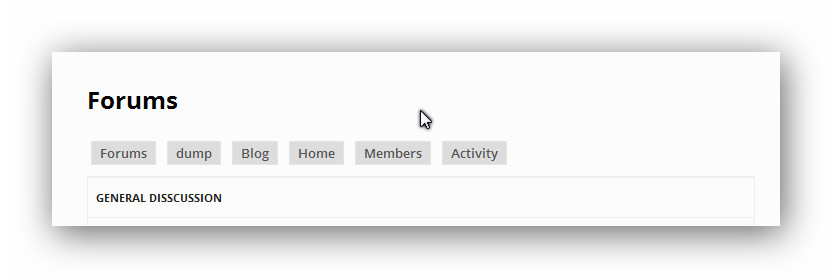
okay what they did was register a menu which is a whole lot easier
so first put this in your functions.php if you have a child theme
function register_menu() {
register_nav_menu('bbmenu', __('bbpress Forum Menu'));
}
add_action('init', 'register_menu');
and now put this above <?php do_action( 'bbp_template_before_forums_loop' ); ?>
which is inside loop-forums.php inside the bbpress default templates
<nav id="subnav" role="navigation">
<?php
if ( has_nav_menu( 'bbmenu' ) ) { /* if menu location 'bbmenu' exists then use custom menu */
wp_nav_menu( array( 'theme_location' => 'bbmenu') );
}
?>
</nav>
now put this in your custom css or plugin
#subnav {
background: none;
clear: both;
display: block;
float: left;
margin: 0 auto 6px;
width: 100%;
}
#subnav ul {
font-size: 13px;
list-style: none;
margin: 0;
}
#subnav li {
list-style-type: none;
display: inline-block;
margin: 6px 4px;
}
#subnav a {
text-decoration: none;
color: #555;
background: #ddd;
padding: 2px 8px;
border: 1px solid #e4e4e4;
}
#subnav li a:hover {
background: #333;
color: #fff;
border-color: transparent;
text-shadow: none;
}
tell me if you come into any problems , so i can see if i hadd a problem copy and pasting
@dottedpixel
could you highlight what you want exactly
cause im not sure what you want , the way the forums itself display?
or the links above the forum that display each forum name? <–thats really easy
you could probably do the other thing with shortcodes
Hi Stephen,
Actually this also happens if only 1 shortcode is used on a page.
Jamie
Ok, thanks and yes we can fix that.
1. the code is missing ‘);’ by mistake, it should read
function mycustom_breadcrumb_options() {
// Home - default = true
$args['include_home'] = false;
// Forum root - default = true
$args['include_root'] = false;
// Current - default = true
$args['include_current'] = true;
return $args;
}
add_filter('bbp_before_get_breadcrumb_parse_args', 'mycustom_breadcrumb_options');
The extra ‘);’ is right at the end
I’ve fixed the documentation
2. as stated in https://codex.bbpress.org/functions-files-and-child-themes-explained/
you should not be adding code to the end of a main theme’s functions, but should be creating child theme. By all means leave it there and test that it works, but then create a child theme and move it there or you risk losing the change on an update. I’ll try and make this even clearer in the documentation – it is a first version !
Hope that helps you, and please come back with any further issues ! ๐
I was told that I could either make the breadcrumbs go away completely or modify them. I chose to modify the appearance of the “crumbs of bread”. The following code was offered to me as a possible solution to my desire to modify my breadcrumbs . . .
Layout and functionality – Examples you can use
function mycustom_breadcrumb_options() {
// Home - default = true
$args['include_home'] = false;
// Forum root - default = true
$args['include_root'] = false;
// Current - default = true
$args['include_current'] = true;
return $args;
}
add_filter('bbp_before_get_breadcrumb_parse_args', 'mycustom_breadcrumb_options'
When inserted at the end of TwentyTen Theme’s functions.php’s code as was instructed in this document . . .
Functions files and child themes – explained !
The result was this message in black against a white screen . . .
Parse error: syntax error, unexpected end of file in /home/sylviannai/public_html/journal/wp-content/themes/twentyten/functions.php on line 568
Is found at the root of my forums . . .
http://hcrd.foundation/journal/forums/
So what I’m asking is there additional code or an error in the code as that last line suggests.
Thank you for reading and please, please help. I’m losing my mind on this project and I didn’t have that many marbles to play with before I started in the first place.
Auriel
Do you know why this fixes the pagination issue when using shortcodes and partnering with a page?
No ๐
I’m not sure what is going on there, I’ll dig around a bit further and see what I can come up with, it should work for any combination of use cases though once you start adding two shortcodes per page it looks like bbPress may have an issue deciding which shortcode to honour the pagination for.
Hi Stephen,
Thanks for the in-depth reply ๐
It looks like I’ve fixed it by selecting “Forum root should show – Topics by freshness”
Do you know why this fixes the pagination issue when using shortcodes and partnering with a page?
Thanks very much for your help!
Jamie
Argh… I can’t reproduce this with either the TWenty Thirteen or Twenty Fourteen theme yet I see the issue on your site!
All of the following combinations work for me
Using a page with the [bbp-topic-index] shortcode
http://example.com/sample-page/ http://example.com/sample-page/page/2/
http://example.com/support/ http://example.com/support/page/2/
http://example.com/forums/ http://example.com/forums/page/2/
Using a page with the [bbp-forum-index] and [bbp-topic-index] shortcode
http://example.com/sample-page/ http://example.com/sample-page/page/2/
http://example.com/support/ http://example.com/support/page/2/
http://example.com/forums/ http://example.com/forums/page/2/
Not using a page (using native bbPress /forums slug with “Forum root should show – Topics by Freshness”)
http://example.com/forums/ http://example.com/forums/page/2/
Any change your using a modified Twenty Thirteen theme?
How about plugin conflicts?
Have you tried resetting/flushing your permalinks?
add_filter( 'bbp_get_single_forum_description', 'ja_return_blank' );
add_filter( 'bbp_get_single_topic_description', 'ja_return_blank' );
function ja_return_blank() {
return '';
}
i have this in my functions php in my child theme