Skip to:
Content
Pages
Categories
Search
Top
Bottom

Search Results for 'code'

Viewing 25 results - 10,726 through 10,750 (of 32,504 total)
  • Author
    Search Results
  • af3
    Participant

    Hate to answer my own post.. anyway, this works okay for me.

    1. add shortcode [bbp-topic-form] in the feedback-no-search.php
    2. use javascript to change the form default value i.e.

    <?php echo do_shortcode('[bbp-topic-form forum_id=4135]'); ?>
    
    <script>
    FormObject = document.forms['new-post'];
    FormObject.elements["bbp_topic_title"].value = '<?php echo bbp_get_search_terms(); ?>';
    </script>
    af3
    Participant

    In template feedback-no-search.php, I would like to add a suggestion to the user to create a new topic instead (since there is no result of the search). How can I make the searched keywords as the default title of the new topic ?

    I think I can put the shortcode [bbp-topic-form] in the feedback-no-search.php file but would like the new topic form to have a default Title == searched text.

    Thanks in advance!

    #151400
    divyesh25
    Participant

    hi Stephen,

    thanks for reply. yes i want this kind of pagination (“Page 1″, “Page 2″ etc). there is no other custom code for pagination or ajax based loading data. This kind of pagination required on my site because lots of data so i am separate out using categorywise. bbpress have great features so i used it on my site. but i am little disappointed just becusee of forum pagination.

    thanks.

    #151398
    mouna84
    Participant

    this code worked to center the forums, but not the bottom of the page:

    #bbpress-forums {
    width: 900px;
    margin-left: 100px
    }

    #151397
    kaminoda
    Participant

    Hi,

    I just activated bbpress and I’d like to add a “return to forum” tab to user profil.

    I understood that i must put a code like this:

    
    <li c lass="">
    <a title="Return forum">Return forums</a>
    </l i> 
    

    But i don’t know where to find the file where i should put this code ?

    Thank you for your help

    #151392

    In reply to: disable pingbacks

    Stephen Edgar
    Keymaster

    Thanks for that, I’ll go make a note to dig into why the tracbacks/pingbacks are enabled, they shouldn’t be.

    I had a quick look at the theme your using, MineWP, if you make a copy of the page.php file and rename it bbpress.php then remove the ‘comments’ section of the template:

    Remove this line of code and save it and you’ll no longer have the pingbacks or trackbacks shown, technically they will still be enabled but will not show until we get this fixed.

    
    <?php comments_template('',true); ?>
    
    
    #151391
    Stephen Edgar
    Keymaster

    Cool, glad it fixed it for you 🙂

    I’ve been using IPv6 heaps lately for testing but my 127.0.0.1 equivalent in IPv6 is ::1, thus it wasn’t an issue locally 😉

    #151384
    Stephen Edgar
    Keymaster

    Sorry for the delay, life has been getting in the way.

    Thanks for listing those tweaks you made, they make sense, we already bump the PHP timeout and up the memory limit to 256M but that is all we can really do safely before we cause grief in shared hosting environments.

    I linked this post from our Import Troubleshooting docs so when I get the time we can expand that section (or a dedicated section) on tweaking ‘all the things’.

    It doesn’t look I have asked this previously, what version of MyBB are you importing from?

    All my tests have been with MyBB v1.6.10

    Some topics are not combined correctly. All replies are separate topics. The ‘Recalculate the parent topic for each post’ does not fix this. I ran all repair queries btw. An option in the Topics interface to combine these, would be ace 😉 Is it possible to correct this with a query? My SQL skills are too limited unfortunately.

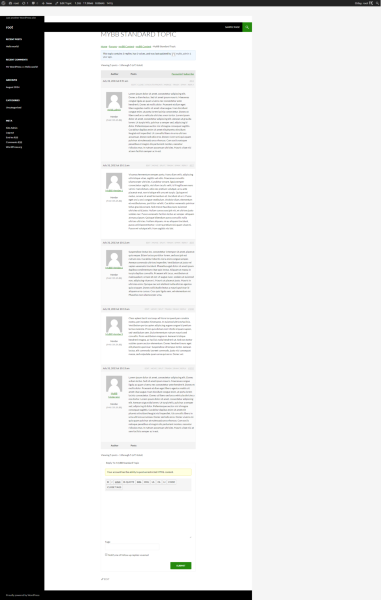
    I just ran an MyBB import of my ‘standard’ MyBB database and without running any repair tools replies are correctly associated with their parent topics.

    Cloudup rdzghv50mtu

    As to the possibility of correcting this with a MySQL query, it could be, it’s hard to say without knowing what data is mismatched.

    Run the following query in phpMyAdmin:
    83 is my topic ID
    97,99,100 and 102 are the reply ID’s I know should be part of the topic ID 83
    – A single topic and a couple of replies should be all I need to see what’s going on

    SELECT * FROM wp_posts WHERE ID IN (83,97,99,100,102)

    Once you’ve executed the query, click ‘Print View’ and the results should open in a new browser tab, select all the text and paste them into a GitHub Gist and select SQL from the language dropdown (You don’t need an account for this)

    https://gist.github.com/

    It should look similar to this (this is based on my above screenshot)
    https://gist.github.com/ntwb/04ed1cf9cf5f67528fcb

    The Repair Forums option ‘Recalculate the position of each reply’ does not work. It creates a white screen. Load problem?

    Yes, sadly, this is because of the size of the forums, kind of a know issue so that is good, sortof. Anyway the best thing is is that you do not need to run this tool. This is for only repairing ‘threaded replies’ which MyBB did not have so you can just skip running this tool. I’ll update the verbiage for this text in the next release and make some improvements when used with ‘large’ sites and some error handling.

    myBB accepts spaces in the login name. Unfortunately WordPress does not. The conversion leaves the spaces in the login name. Is it possible to correct this with an SQL? Is there another workaround? Correcting them one by one is not my preference

    I’ll work out a fix for that shortly, second time I’ve hit this issue today, @Halo-DieHard also did on BuddyPress.org.

    Two forums are created double. The copies do not contain any topics or replies, so it is easy to remove them. Just thought you should know

    That shouldn’t be the case, though as you point out easily fixed, most likely one of two things, either those forums were still there from a previous import OR there is something funky with the forum categories versus the forum forums though checking my import I just did, everything is fine for me 😉

    The original myBB forum contained 1mlj+ messages and 36k+ discussions. The converted forum contains 109k subjects. That can be explained because of the first issue. But it only contains 830k replies. It could be that myBB adds subjects and replies to messages, but the difference is a bit too big. Is it possible to do an SQL checksum to check the expected output?

    It does sound a little off, some forum software combine the total topics and replies to create a total post count.

    On my MyBB I have:

    
    Our members have made a total of 22 posts in 10 threads.
    We currently have 6 members registered.
    

    After importing using the [bbp-stats] shortcode I have
    Topics 10, Replies 12

    So that works out correct in my case, total of 22 posts = 10 topics + 12 replies 🙂

    It’s hard to match up yours because the issue above as you state, ball park 109k + 830k = 93k which is a few short of the 1m, this will be due to those issues above and we can take another look after they’re fixed.

    #151379
    Stephen Edgar
    Keymaster

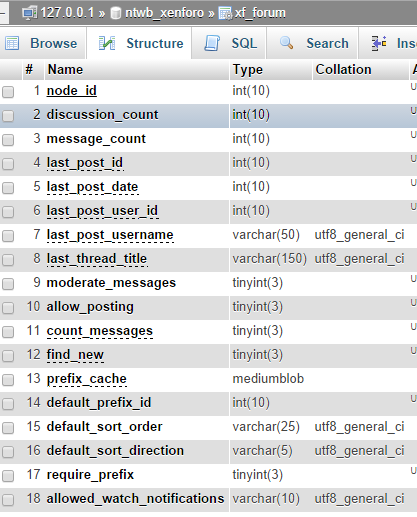
    Can you open up your Xenforum’s database in phpMyAdmin, open the forum table and take a screenshot and post it here please.

    (Your Xenforum’s forum table may include a prefix, in the screenshot below mine is xf_forum)

    It should look similar to mine here, I need to check that the table format matches what I am using.

    https://i.cloudup.com/mnIqTR-W8m.png

    #151378
    Stephen Edgar
    Keymaster

    Add the following to your functions.php file

    
    function custom_bbp_list_forums() {
      $args['separator'] = '<br />';
     
      return $args;
    }
     
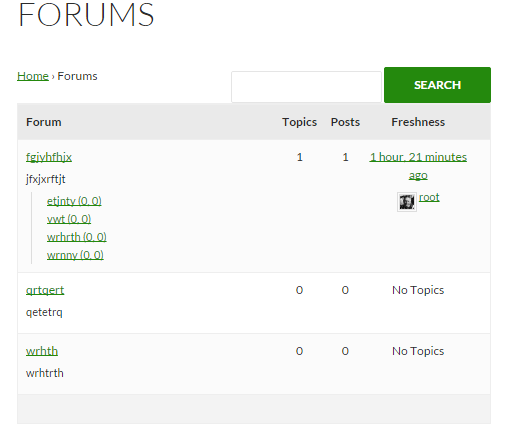
    add_filter('bbp_before_list_forums_parse_args', 'custom_bbp_list_forums' );
    

    That will result in something like this, depending on your themes styles:

    #151377
    Stephen Edgar
    Keymaster

    Add the following CSS to your custom CSS and you should be good to go:

    #bbpress-forums span.bbp-author-ip {
    word-wrap: break-word;
    }
    

    I have added word-wrap: break-word; to bbPress CSS in #2675

    
    span.bbp-author-ip {
    	font-family: 'Helvetica Neue', Arial, Helvetica, 'Nimbus Sans L', sans-serif;
    	font-size: 11px;
    	font-weight: bold;
    	word-wrap: break-word;
    	color: #aaa;
    }
    
    #151373
    cybarmitzvah
    Participant

    Tell me the url you get when you get the 404 on the edit profile link.

    http://www.astronomertalk.com/forums/users/veghar123/edit

    #151370
    Robkk
    Moderator

    Ok, so your code solved moving the edit profile button to the far right, and removed it from the footer, yet all the above problems still remain.

    I probably dont need an account anymore, and im not going to experiment with your site with ftp.

    The other error your getting your going to have to contact your theme developer so they can see whats up with your theme.

    Tell me the url you get when you get the 404 on the edit profile link.

    #151369
    cybarmitzvah
    Participant

    Hi Robkk,

    I tried making an account, but its hard because I cannot log out. Making an account takes like 10 seconds though.

    When I went to the backend to log out, and clicked it, heres what I got:

    Warning: Cannot modify header information - headers already sent by (output started at /home/vaghar123/public_html/wp-content/themes/mesocolumn/functions.php:371) in /home/vaghar123/public_html/wp-login.php on line 414
    
    Warning: Cannot modify header information - headers already sent by (output started at /home/vaghar123/public_html/wp-content/themes/mesocolumn/functions.php:371) in /home/vaghar123/public_html/wp-login.php on line 426
    
    Warning: Cannot modify header information - headers already sent by (output started at /home/vaghar123/public_html/wp-content/themes/mesocolumn/functions.php:371) in /home/vaghar123/public_html/wp-includes/pluggable.php on line 883
    
    Warning: Cannot modify header information - headers already sent by (output started at /home/vaghar123/public_html/wp-content/themes/mesocolumn/functions.php:371) in /home/vaghar123/public_html/wp-includes/pluggable.php on line 884
    
    Warning: Cannot modify header information - headers already sent by (output started at /home/vaghar123/public_html/wp-content/themes/mesocolumn/functions.php:371) in /home/vaghar123/public_html/wp-includes/pluggable.php on line 885
    
    Warning: Cannot modify header information - headers already sent by (output started at /home/vaghar123/public_html/wp-content/themes/mesocolumn/functions.php:371) in /home/vaghar123/public_html/wp-includes/pluggable.php on line 886
    
    Warning: Cannot modify header information - headers already sent by (output started at /home/vaghar123/public_html/wp-content/themes/mesocolumn/functions.php:371) in /home/vaghar123/public_html/wp-includes/pluggable.php on line 887
    
    Warning: Cannot modify header information - headers already sent by (output started at /home/vaghar123/public_html/wp-content/themes/mesocolumn/functions.php:371) in /home/vaghar123/public_html/wp-includes/pluggable.php on line 888
    
    Warning: Cannot modify header information - headers already sent by (output started at /home/vaghar123/public_html/wp-content/themes/mesocolumn/functions.php:371) in /home/vaghar123/public_html/wp-includes/pluggable.php on line 891
    
    Warning: Cannot modify header information - headers already sent by (output started at /home/vaghar123/public_html/wp-content/themes/mesocolumn/functions.php:371) in /home/vaghar123/public_html/wp-includes/pluggable.php on line 892
    
    Warning: Cannot modify header information - headers already sent by (output started at /home/vaghar123/public_html/wp-content/themes/mesocolumn/functions.php:371) in /home/vaghar123/public_html/wp-includes/pluggable.php on line 893
    
    Warning: Cannot modify header information - headers already sent by (output started at /home/vaghar123/public_html/wp-content/themes/mesocolumn/functions.php:371) in /home/vaghar123/public_html/wp-includes/pluggable.php on line 894
    
    Warning: Cannot modify header information - headers already sent by (output started at /home/vaghar123/public_html/wp-content/themes/mesocolumn/functions.php:371) in /home/vaghar123/public_html/wp-includes/pluggable.php on line 897
    
    Warning: Cannot modify header information - headers already sent by (output started at /home/vaghar123/public_html/wp-content/themes/mesocolumn/functions.php:371) in /home/vaghar123/public_html/wp-includes/pluggable.php on line 898
    
    Warning: Cannot modify header information - headers already sent by (output started at /home/vaghar123/public_html/wp-content/themes/mesocolumn/functions.php:371) in /home/vaghar123/public_html/wp-includes/pluggable.php on line 899
    
    Warning: Cannot modify header information - headers already sent by (output started at /home/vaghar123/public_html/wp-content/themes/mesocolumn/functions.php:371) in /home/vaghar123/public_html/wp-includes/pluggable.php on line 900
    
    Warning: Cannot modify header information - headers already sent by (output started at /home/vaghar123/public_html/wp-content/themes/mesocolumn/functions.php:371) in /home/vaghar123/public_html/wp-includes/pluggable.php on line 1121

    Pretty crazy.

    Ok, so your code solved moving the edit profile button to the far right, and removed it from the footer, yet all the above problems still remain.

    If you send me an email at astronomertalk@gmail.com, or make an account on Astronomertalk.com list your email or something, I can probably give u the FTP info and you can experiment with it.

    TY,
    JB

    #151357
    Robkk
    Moderator
    .bbp-login-links a {
    font-size:14px;
    display:block;
    }
    #151356
    godavid33
    Participant

    I just installed the latest version of BP from the WP repo
    WP 3.9.2

    When I go to a buddypress group forum page, it says the forum is empty (which it is) and displays the new topic editor. I can’t fill out any post content for some reason though, the box is grayed out. The html doesn’t say it is disabled. If I click the “code” WYSIWYG button, I can then type but if I remove the tick marks I cannot once again. Title and tags are both completely working, though obviously I can’t create a topic because I cant add content….

    Help please 🙁

    #151355
    Robkk
    Moderator

    try

    .bbpress #content {
    width:100%
    } 

    else try

    .bbpress #content .clearfix {
    width:100%
    }
    #151353
    Robkk
    Moderator

    this should hide the edit profile link in the footer

    .footer-right #bbp-editpro {
    	display: none;
    }
    #151351
    Robkk
    Moderator

    to move the edit profile link right use this.

    replace the original edit profile code with this.

    // Filter wp_nav_menu() to add profile link
    add_filter( 'wp_nav_menu_items', 'my_nav_menu_profile_link' );
    function my_nav_menu_profile_link($menu) {  
        if (!is_user_logged_in())
            return $menu;
        else
            $current_user = wp_get_current_user();
            $user=$current_user->user_login ;
            $profilelink = '<li id="bbp-editpro"><a href="http://www.astronomertalk.com/forums/users/' . $user . '/edit">Edit Profile</a></li>';
            $menu = $menu . $profilelink;
            return $menu;
         
    }

    custom css

    #bbp-editpro {
    	float: right;
    }

    that should move it right.

    #151350
    Robkk
    Moderator

    okay heres how to get full width

    this should be your bbpress.php in your child themes root directory wp-content/awesome/bbpress.php

    you can also remove the css that i gave you from this topic

    Hide author/admin

    since i removed the post author info in the template.

    <?php get_header(); ?>
    
    <?php do_action( 'bp_before_content' ); ?>
    <!-- CONTENT START -->
    <div class="content">
    <div class="content-inner">
    
    <?php do_action( 'bp_before_blog_home' ); ?>
    
    <!-- POST ENTRY END -->
    <div id="post-entry">
    <section class="post-entry-inner">
    
    <?php if (have_posts()) : ?><?php while (have_posts()) : the_post(); ?>
    
    <!-- POST START -->
    <article <?php post_class('post-single page-single'); ?> id="post-<?php the_ID(); ?>">
    
    <h1 class="post-title entry-title"><?php the_title(); ?></h1>
    
    <?php do_action( 'bp_before_page_content' ); ?>
    <div class="post-content">
    <div class="entry-content"><?php the_content( __('...more &raquo;',TEMPLATE_DOMAIN) ); ?></div>
    <?php wp_link_pages('before=<div id="page-links">&after=</div>'); ?>
    </div>
    <?php do_action( 'bp_after_page_content' ); ?>
    
    </article>
    <!-- POST END -->
    
    <?php endwhile; ?>
    
    <?php else : ?>
    
    <?php get_template_part( 'lib/templates/result' ); ?>
    
    <?php endif; ?>
    
    </section>
    </div>
    <!-- POST ENTRY END -->
    
    <?php do_action( 'bp_after_blog_home' ); ?>
    
    </div><!-- CONTENT INNER END -->
    </div><!-- CONTENT END -->
    
    <?php do_action( 'bp_after_content' ); ?>
    
    <?php get_footer(); ?>

    and heres some css

    .bbpress .content {
    	width: 100%;
    }

    this should get you full width

    #151349
    Ismail
    Participant

    bbpress/includes/topics/template.php

    #151343
    mouna84
    Participant

    Hi there,

    I’m using: wordpress version 3.9.2–de_DE
    bbpress version 2.5.4

    The site I need help with is: http://darjinan.com/forum/

    I deleted the sidebar by copying page.php and renaming it to bbpress.php. But I can’t figure out how to center my forum. Here’s the code:

    
    <?php 
    /**
     * Theme Page Section for our theme.
     *
     * @package ThemeGrill
     * @subpackage Accelerate
     * @since Accelerate 1.0
     */
    ?>
    
    <?php get_header(); ?>
    
    	<?php do_action( 'accelerate_before_body_content' ); ?>
    
    	<div id="primary">
    		<div id="content" class="clearfix">
    			<?php while ( have_posts() ) : the_post(); ?>
    
    				<?php get_template_part( 'content', 'page' ); ?>
    
    				<?php
    
    					do_action( 'accelerate_before_comments_template' );
    					// If comments are open or we have at least one comment, load up the comment template
    					if ( comments_open() || '0' != get_comments_number() )
    						comments_template();					
    	      		do_action ( 'accelerate_after_comments_template' );
    				?>
    			<?php endwhile; ?>
    
    		</div><!-- #content -->
    	</div><!-- #primary -->
    	
    	<?php /*accelerate_sidebar_select();*/ ?>
    
    	<?php do_action( 'accelerate_after_body_content' ); ?>
    
    <?php get_footer(); ?>


    Can someone please help me? I’m a complete newbie to html and css.
    Thank you.

    #151333
    Robkk
    Moderator

    will need that code, would appreciate it

    ill try it to find out.

    Darn, tell me any steps if you remember

    i didnt use much php

    #151330
    Robkk
    Moderator

    it didnt work for awhile on localhost , then i editing the href link to make it work.

    use this

    // Filter wp_nav_menu() to add profile link
    add_filter( 'wp_nav_menu_items', 'my_nav_menu_profile_link' );
    function my_nav_menu_profile_link($menu) {  
        if (!is_user_logged_in())
            return $menu;
        else
            $current_user = wp_get_current_user();
            $user=$current_user->user_login ;
            $profilelink = '<li><a href="http://www.astronomertalk.com/forums/users/' . $user . '/edit">Edit Profile</a></li>';
            $menu = $menu . $profilelink;
            return $menu;
         
    }
    #151329
    cybarmitzvah
    Participant

    it works now??

    yes

    ill test out that profile link ,

    if you think its social login , deactivate and see if robins profile link code works.

    still not working

    im sure its just positioning it with css , but hey it doesnt have to be floated right, not a big deal if it is or not.

    will need that code, would appreciate it 🙂

    i just achieved this today. But it required a lot of work with my theme.

    Darn, tell me any steps if you remember

    TY
    JB

Viewing 25 results - 10,726 through 10,750 (of 32,504 total)
Skip to toolbar