Because the site is live, I decided to share one page for both the English and French side for now. But eventually, I would like to have a separate page for each English and French, but I want them both to share the same forum shortcode.
Hello,
I’ve got a simple forum set up using the shortcode. I used the same shortcode on the translated page (French). When bbPress is activated, I have noticed the following issues:
– The top right language switcher re-directs me to the french homepage instead of the community forums page. If bbpress is de-activated, the language switcher works as advertised. All other pages are fine.
– The shortcoded forum on the French page does not carry over custom css styles I input with the Simple Custom CSS plugin. Seems like it has to do with the page template I am using. For some reason, the English side automatically uses my theme’s ‘Upcoming Events’ template. I have the option to choose on the French side, but if I pick that same ‘Upcoming Events’ one, the custom css colours do not carry over.
And lastly, and I believe this is a concern of many. A moderator to the site can not create or modify forums – which I find ridiculous. Any work around to this?
Any help would be appreciated
@dandr69 the weird title look isnt because of bbpress, its how your theme reacts to long titles.
and you can put that code i gave you anywhere where you can put custom css,
a child themes css stylesheet
jetpacks custom css module if you have jetpack
if your theme has a custom css area in the appearance settings
a standalone custom css plugin
Hey, i tested with the code in the theme CSS and it works.
Thank you!
fixing the line height made it look better.
.title {
margin-bottom: 5px;
line-height: normal;
}
you can also just make the line-hieght above 21px or just remove line height from the code.
@robin-w It’s because the new updated version of my theme contains hard coded fields in the submission page that are irrelevant to the purpose of my website. Hence I have to stick with the older version until a newer update is released which makes those fields optional.
What plugins are you running? Sounds like something else (plugin/theme) may be incorrectly filtering the content and or shortcodes and is causing a conflict.
I did everything through wordpress.. I didn’t touch any code
put the original code back to fix your problem
So are you saying that the page works with the shortcode only and with text only, but the two combined fail?
The code I provided doesn’t mess with the bullets. That’s handled by your theme. You could try something like below, but it hides the arrow bullets for those forum listings.
.hentry ul ul.bbp-forums-list li i {
    background: none;
}
To fix the breadcrumb title, use the below instead.
function my_change_forum_root_breadcrumb_title( $args = array() ) {
	$args['root_text'] = 'The EcoPsi Forums';
	return $args;
}
add_filter( 'bbp_before_get_breadcrumb_parse_args', 'my_change_forum_root_breadcrumb_title' );
@robin-w I beg to differ a little, the behaviour seems to suggest it is something else going on.
It is only child forums that seem to be having this issue.
If a forum is is set up as a child of a forum (set as type category) the result is a 404 Error.
if that link is broken (the forum has been set to have no parent) then the forum loads.
The permalink doesn’t change ?forum=general query string is the same for both. This is with all plugins disabled and on different themes.
There must be something that works differently code wise between the two.
Seems very odd.
It has also worked quite happily for the last year on default permalinks with the current plugin setup quite happily.
Something has changed the method in the way that it works, either through a bbpress release or WordPress 4.0 release
John
Dude you are awesome.
Thank you so much.
A couple of things: The counts are gone but now the bullets are layered over the names of the forums. Is there a way to leave the main theme’s bullets alone but in the Forum bbPress reverts to generic bullet points that it’s compatible with?
http://ecopsi.org/forums/
Also I must have made a mistake with the breadcrumb code.
// Custom breadcrumb label for bbPress
function my_change_forum_root_breadcrumb_title( $args = array() ) {
	if ( ! empty( $args ) ) {
		$args['root_text'] = 'The EcoPsi Forums';
	}
	return $args;
}
add_filter( 'bbp_before_get_breadcrumb_parse_args', 'my_change_forum_root_breadcrumb_title' );
thanks but it does in fact kill the page if I add text above the shortcode. My theme is Divi and I’m on the latest WP and all. Pretty generic actually.
You have to trash the forums page where you added the shortcode. Then you have to empty the trash so that the forums page is completely gone. Then forums will display without the shortcode.
It’s both. bbPress is setup to automagically create the /forums page out of thin air. If you’d like to add some other text to this page, you may do that as well. If you do create an actual forums page, as it seems you have, all that’s needed is to add the forums shortcode where ever you’d like the forum index to appear. In this case, just add [bbp-forum-index]. There are a number of other shortcodes that can be used for similar purposes that can be found here https://codex.bbpress.org/shortcodes/.
The numbers represent the topic/post counts of each individual forum. For instance “Cognition (0, 0)” is equivalent to “Cognition (0 topics, 0 posts).”
In your theme’s functions.php file you can add the below to remove the counts:
function my_remove_list_forums_counts( $args = array() ) {
	if ( ! empty( $args ) ) {
		$args['show_topic_count'] = false;
		$args['show_reply_count'] = false;
	}
	return $args;
}
add_filter( 'bbp_after_list_forums_parse_args', 'my_remove_list_forums_counts' );
To change the breadcrumb root add the below code to the same functions.php file as above:
function my_change_forum_root_breadcrumb_title( $args = array() ) {
	if ( ! empty( $args ) ) {
		$args['root_text'] = 'This used to be Forums';
	}
	return $args;
}
add_filter( 'bbp_before_get_breadcrumb_parse_args', 'my_change_forum_root_breadcrumb_title' );
I think you may be inferring the import doesn’t ever actually finish?
If that is the case see the docs here: https://codex.bbpress.org/import-forums/import-troubleshooting/
Thanks for this link Stephen. It is relaoding again from where it stoped. Fingers crossed 😉
– Once the import hangs, click stop, take a note of where it was up to, e.g. Converting 11,299 – 11,300
– Click start again and the import will continue from where it left off
Once the import finishes you will be prompted with a link to the repair tools, you need to run each of these after importing so bbPress, you can’t do this until everything is imported.
Edit: I think you may be inferring the import doesn’t ever actually finish?
If that is the case see the docs here: https://codex.bbpress.org/import-forums/import-troubleshooting/
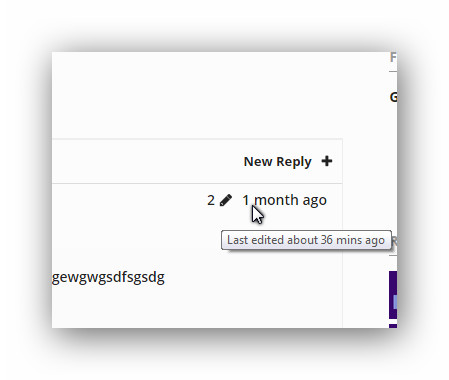
discourse like revision log
shows only when edits occur , shows only number of edits, on hover shows last time ago of edit.
i had two functions of code that could calculate number of edits on the post.
1 is the one i have now which calculates from when i inserted the code i believe.
the other just had a count of previous edit logs, but it had a kind of bug and showed up on all posts with the same number.
might make a tutorial on this, have to consult i guess robin or stephen if the code is good to use or not.
Why, this is fabulous! Thank you so much for your help!!
I tested with your modified code for about an hour, and can’t seem to find any issues. I will post an update in case I do discover any problems…
But this does appear to be the solution to searching single bbpress forums, including private ones in Buddypress. Thanks to you, @tobyhawkins! 🙂
Interesting… WP_query has a tag parameter, lets try resetting that
Try
if ( bbp_has_topics( array( 'author' => 0, 'show_stickies' => false, 'order' => 'DESC', 'post_parent' => 'any', 'paged' => 1, 'posts_per_page' => $number_of_topics,  'tag' => '') ) ) :
		bbp_get_template_part( 'loop', 'mytopics' );
	else :
		bbp_get_template_part( 'feedback', 'no-topics' );
	endif;
I was installing bbPress on my website, using the Tools > Forums > Import forums. It was going okay until it reach converting replies. My forum have 52 600 messages in 18 000 subjects from 1200 users.
– I visited the url mysite.com/forums and I see it well, but at first sights it seems there is no replies at all in every message.
– Here is what I see in the yellow box.
Can you tell me what to do from here ? (as nothing keep going, but the little wheels keeps tuning)
Converting replies (2200 - 2299)
Converting replies (2100 - 2199)
Converting replies (2000 - 2099)
Converting replies (1900 - 1999)
Converting replies (1800 - 1899)Converting replies (1700 - 1799)Converting replies (1600 - 1699)Converting replies (1500 - 1599)Converting replies (1400 - 1499)Converting replies (1300 - 1399)Converting replies (1200 - 1299)Converting replies (1100 - 1199)Converting replies (1000 - 1099)Converting replies (900 - 999)Converting replies (800 - 899)Converting replies (700 - 799)Converting replies (600 - 699)Converting replies (500 - 599)Converting replies (400 - 499)Converting replies (300 - 399)Converting replies (200 - 299)Converting replies (100 - 199)Converting replies (0 - 99)
No tags to convertNo super stickies to stick
No stickies to stick
Converting topics (5000 - 5099)
Converting topics (4900 - 4999)Converting topics (4700 - 4799)Converting topics (4600 - 4699)Converting topics (4500 - 4599)Converting topics (4400 - 4499)Converting topics (4300 - 4399)Converting topics (4200 - 4299)Converting topics (4100 - 4199)Converting topics (4000 - 4099)Converting topics (3900 - 3999)Converting topics (3800 - 3899)Converting topics (3700 - 3799)Converting topics (3600 - 3699)Converting topics (3500 - 3599)Converting topics (3400 - 3499)Converting topics (3300 - 3399)Converting topics (3200 - 3299)Converting topics (3100 - 3199)Converting topics (3000 - 3099)Converting topics (2900 - 2999)Converting topics (2800 - 2899)Converting topics (2700 - 2799)Converting topics (2600 - 2699)Converting topics (2500 - 2599)Converting topics (2400 - 2499)Converting topics (2300 - 2399)Converting topics (2200 - 2299)Converting topics (2100 - 2199)Converting topics (2000 - 2099)Converting topics (1900 - 1999)Converting topics (1800 - 1899)Converting topics (1700 - 1799)Converting topics (1600 - 1699)Converting topics (1500 - 1599)Converting topics (1400 - 1499)Converting topics (1300 - 1399)Converting topics (1200 - 1299)Converting topics (1100 - 1199)Converting topics (1000 - 1099)Converting topics (900 - 999)Converting topics (800 - 899)Converting topics (700 - 799)Converting topics (600 - 699)Converting topics (500 - 599)Converting topics (400 - 499)Converting topics (300 - 399)Converting topics (200 - 299)Converting topics (100 - 199)Converting topics (0 - 99)Calculating forum hierarchy (0 - 99)Converting forums (0 - 99)Delete users WordPress default passwords (1300 - 1399)Delete users WordPress default passwords (1200 - 1299)Delete users WordPress default passwords (1100 - 1199)Delete users WordPress default passwords (1000 - 1099)Delete users WordPress default passwords (900 - 999)Delete users WordPress default passwords (800 - 899)Delete users WordPress default passwords (700 - 799)Delete users WordPress default passwords (600 - 699)Delete users WordPress default passwords (500 - 599)Delete users WordPress default passwords (400 - 499)Delete users WordPress default passwords (300 - 399)Delete users WordPress default passwords (200 - 299)Delete users WordPress default passwords (100 - 199)Delete users WordPress default passwords (0 - 99)Converting users (1300 - 1399)Converting users (1200 - 1299)Converting users (1100 - 1199)Converting users (1000 - 1099)Converting users (900 - 999)Converting users (800 - 899)Converting users (700 - 799)Converting users (600 - 699)Converting users (500 - 599)Converting users (400 - 499)Converting users (300 - 399)Converting users (200 - 299)Converting users (100 - 199)Converting users (0 - 99)No data to cleanStarting Conversion
hi i install bbpress 2.5.4 on wordpress 4.0
i design my theme ,but bbpress forum not show but if i use shortcode my forums will show but i want work without short code , i dont know what to do ?
my site : Siavashg.ir/forum/
how can i fix it ?!
Yes. That’s not ideal. I think the problem is the bbp_pre_get_posts_normalize_forum_visibility function in bbpress > includes > forums > functions.php.
I’m not going to vouch for the security of this (although I think the logic is ok and cursory testing seems to bear this out) but you can get round this by changing your my_bbp_filter_search_results function to the following:
function my_bbp_filter_search_results( $r ){

    //Get the submitted forum ID (added in gethub > bbpress > form-search.php)
    $forum_id = sanitize_title_for_query( $_GET['bbp_search_forum_id'] );

    //If the forum ID exits, filter the query
    if( $forum_id && is_numeric( $forum_id ) ){

        $r['meta_query'] = array(
            array(
                'key' => '_bbp_forum_id',
                'value' => $forum_id,
                'compare' => '=',
            )
        );

        $group_id = bbp_get_forum_group_ids( $forum_id );
        if( groups_is_user_member( bp_loggedin_user_id(), $group_id[0] ) )
        {
            function my_allow_all_forums () { return true; }
            add_filter( 'bbp_include_all_forums', 'my_allow_all_forums' );
        }
    }

    return $r;
}
add_filter( 'bbp_after_has_search_results_parse_args' , 'my_bbp_filter_search_results' );
To negate the danger of plugins forgetting to manage permissions for posts properly the normalize function visibility automatically steps in on any WP_Query activity and shuts it down, but apparently doesn’t account for the possibility of forums being private, but viewable by low level users within the group context. By adding the filter only when searching on a single forum and then only if the logged-in user is a member of the correct group I think I have accounted for the security issues, but I’m not enough of a php expert to be 100% confident that I haven’t missed something.


