Skip to:
Content
Pages
Categories
Search
Top
Bottom

Search Results for 'code'

Viewing 25 results - 10,451 through 10,475 (of 32,504 total)
  • Author
    Search Results
  • #153058
    Robkk
    Moderator

    this is kind of odd…

    i did find a way to see it on IE 11 , i changed the style of the bbp-form fieldset using the inspector tools in IE 11.

    here is some custom css that might help

    put it wherever you can put custom css

    child theme style sheet
    jetpack custom css module
    other custom css plugin

    fieldset.bbp-form {
    display:block;
    min-width:inherit;
    clear:left;
    }

    if that doesnt work add !important like this

    fieldset.bbp-form {
    display:block!important;
    min-width:inherit;
    clear:left;
    }
    Robkk
    Moderator

    if you really want the replies and topics to be on the products page.

    this would require custom development

    http://jobs.wordpress.net/

    #1 outsourcing service for WordPress

    if you want bbpress/woocommerce integration

    i think there is some plugins that would help, cant think of them right at the moment.

    #153052

    In reply to: Hi sorry i'm new here

    Robkk
    Moderator

    buddypress and bbpress are plugins for wordpress, so they need wordpress to work.

    bbpress does have an older standalone version of itself, it can work by itself.
    Using it with newer versions of wordpress might cause issues.

    About

    About bbPress

    bbPress is forum software, made the WordPress way.

    Have you ever been frustrated with forum or bulletin board software that was slow, bloated, and always got your server hacked? bbPress is focused on ease of integration, ease of use, web standards, and speed.

    We’re keeping things as small and light as possible while still allowing for great add-on features through WordPress’s extensive plugin system. What does all that mean? bbPress is lean, mean, and ready to take on any job you throw at it.

    Philosophy

    Now that bbPress is all grown up, we’re certain of a few things:

    Open Source, always and forever
    Less (code) is more
    Code is poetry
    Simplicity is a feature
    Speed & security are paramount to a great user experience
    Every line of code is written with these principles in mind, and if that sounds good to you get involved!

    About

    About buddyPress

    BuddyPress is a powerful plugin that takes your WordPress.org powered site beyond the blog with social-network features like user profiles, activity streams, user groups, and more. Some fantastic uses might be:

    A campus wide social network for your university, school or college.
    An internal communication tool for your company.
    A niche social network for your interest topic.
    A focused social network for your new product.
    If you’re using BuddyPress in a unique or interesting way, be sure to let people know on the forums; we’re always interested!

    BuddyPress is not “all or nothing”

    BuddyPress comes with several components that integrate directly with your site, with each other, and even with other plugins (check out bbPress for support forums.) If you only want to use a few features, BuddyPress will automatically adapt, showing only the menu items, pages and buttons for the features you have enabled.

    BuddyPress.org

    This site is built on WordPress and BuddyPress (we believe in the software we build!). Please consider registering and becoming part of the BuddyPress community. By doing this you’ll be able to contribute to the documentation, ask questions in the forum as well as build your BuddyPress profile so other BuddyPress developers and contributors can keep in touch with you.

    #153051
    Robkk
    Moderator

    its not a shortcode but i think you need one of these

    bbp_reply_content()
    bbp_get_reply_content()
    bbp_reply_excerpt()
    bbp_get_reply_excerpt()

    #153047

    In reply to: Forum Icons?

    Hector
    Participant

    @robin-w LOL X’D

    had understood that was to assign the image by code, almost like vbulletin, apology hahah works perfect the code

    sorry… 😀

    #153042

    In reply to: Forum Icons?

    Robin W
    Moderator

    @zick123 – didn’t quite understand your post.

    you just out the code into your functions file and then use the ‘featured image’ part of the forum to add whatever image you wish ie

    Dashboard>forums>all forums and edit the forum, on the right ahdn side you’ll see ‘featured image’ and just add whichever one there.

    #153041

    In reply to: Forum Icons?

    Hector
    Participant

    I have the same problem, I can not make it work

    put pictures in library forum name I put eg 1525.png

    1525 is the ID of the forum

    I dont know the direction, as images/idforum.png

    do not quite understand where or how do… help 🙁

    #153038
    Hector
    Participant

    hi @giantqtipz, in wp-content/plugins/bbpress/templates/default/css/bbpress.css

    search line 121:

    #bbpress-forums .bbp-forums-list li {
    display: inline ;
    font-size: 11px;
    }

    Changing the display: inline to display: list-item

    regards 😉

    #153032
    solosails
    Participant

    It seems many many people are having this issue with various themes, I have managed to almost get mine working by tampering with the blog template settings..

    However it seems that this issue could be avoided altogether if the user page could be a shortcode in a hardcoded page instead of dynamically being created which is why so many themes are not doing it correctly.

    Surely BBPress could figure out a more stable way of doing this user profile page?

    #153027
    Robin W
    Moderator

    Suggest this is theme related and you need to get bbpress to use the right theme template

    Step by step guide to setting up a bbPress forum – Part 1

    #153014
    Stephen Edgar
    Keymaster

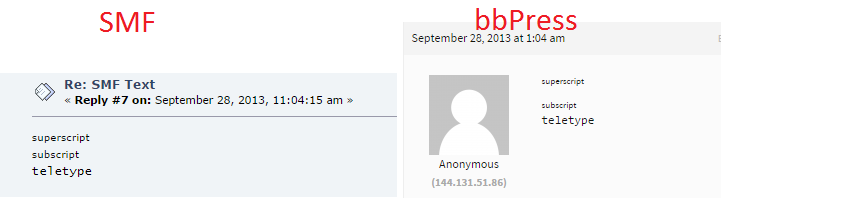
    The code /includes/admin/converters/SMF.php#L717 is replacing [tt] and [/tt] respectively with <tt> and </tt> and a quick lookup of the “teletype” HTML tag shows we should not really be using it all 😉

    http://www.w3.org/wiki/HTML/Elements/tt

    Can you post the HTML raw source of the post from SMF for me, this will allow me to see if it is currently doing it correctly, which I think it is per the details and screenshot below.

    SMF Source: [sup]superscript[/sup]<br />[sub]subscript[/sub]<br />[tt]teletype[/tt]
    bbPress Converted Source: <sup>superscript</sup><br><sub>subscript</sub><br><tt>teletype</tt>

    https://i.cloudup.com/jnMQwRKTXA.png

    We probably should rather than converting them <tt> / </tt> convert them to a span and/or p HTML elements:

    e.g.

    <span style="font-family: monospace;">
    This is a sample.
    </span>
    
    #153013
    Stephen Edgar
    Keymaster

    I had a quick look around to see if I could find if it was a port or fork of another forum project but very little info was around.

    I’d suggest taking a look at either the phpBB or SMF importers, they are pretty much the top two importers that are included with bbPress and have the best “import” feature support for bbPress.

    The ‘Example.php” importer also tries (I know it can/could/should be better) to explain some of the field mappings.

    I made a start on guessing the field mappings for the forum section based on the phpBB importer:

    Using a table prefix deluxebb_ should work fine with the field map 'from_tablename' => 'forums',, as the converter joins these staements together giving you deluxebb_forums 🙂

    https://gist.github.com/ntwb/da6466dc2b057942f0fa

    I’ll let you have a crack at the topics, replies and users and then I’m more than happy to tweak it with some of the newest updates that will be included in the next release of bbPress.

    #153012
    brittonk
    Participant

    I’m moving a social site into BuddyPress and the forums used a now defunct DeluxeBB. It doesn’t seem to be one of the options for the Importer Tools. Do any of you know if the structure of DeluxeBB matches that of one of the options listed?

    Here are the forums, threads, and posts tables which contain most of the information needed for this migration.

    --
    -- Table structure for table <code>deluxebb_forums</code>
    --
    
    CREATE TABLE IF NOT EXISTS <code>deluxebb_forums</code> (
      <code>ordered</code> int(5) DEFAULT '0',
      <code>cid</code> varchar(225) DEFAULT NULL,
      <code>name</code> varchar(225) DEFAULT NULL,
      <code>fid</code> int(6) NOT NULL AUTO_INCREMENT,
      <code>topics</code> varchar(225) DEFAULT NULL,
      <code>replies</code> varchar(225) DEFAULT NULL,
      <code>viewstatus</code> varchar(10) DEFAULT NULL,
      <code>poststatus</code> varchar(10) DEFAULT NULL,
      <code>replystatus</code> varchar(10) DEFAULT NULL,
      <code>lastpost</code> varchar(225) DEFAULT NULL,
      <code>lastpostby</code> int(10) DEFAULT '0',
      <code>description</code> tinytext,
      <code>lastpid</code> int(6) DEFAULT '0',
      <code>lastpidtime</code> varchar(255) DEFAULT NULL,
      <code>password</code> varchar(32) DEFAULT NULL,
      <code>userlist</code> mediumtext NOT NULL,
      <code>moderators</code> mediumtext NOT NULL,
      <code>ficon</code> varchar(25) NOT NULL,
      PRIMARY KEY (<code>fid</code>),
      KEY <code>cid</code> (<code>cid</code>),
      KEY <code>lastpostby</code> (<code>lastpostby</code>),
      KEY <code>lastpid</code> (<code>lastpid</code>)
    ) ENGINE=MyISAM  DEFAULT CHARSET=latin1 AUTO_INCREMENT=22 ;
    
    -- --------------------------------------------------------
    
    --
    -- Table structure for table <code>deluxebb_posts</code>
    --
    
    CREATE TABLE IF NOT EXISTS <code>deluxebb_posts</code> (
      <code>pid</code> bigint(10) NOT NULL AUTO_INCREMENT,
      <code>tid</code> bigint(10) NOT NULL DEFAULT '0',
      <code>author</code> int(10) NOT NULL DEFAULT '0',
      <code>subject</code> varchar(285) CHARACTER SET latin1 NOT NULL,
      <code>message</code> text NOT NULL,
      <code>picon</code> varchar(50) CHARACTER SET latin1 NOT NULL DEFAULT '',
      <code>postdate</code> int(10) NOT NULL DEFAULT '0',
      <code>ip</code> varchar(50) CHARACTER SET latin1 NOT NULL DEFAULT '',
      <code>smiliesoff</code> smallint(1) DEFAULT '0',
      PRIMARY KEY (<code>pid</code>),
      KEY <code>author</code> (<code>author</code>),
      KEY <code>tid</code> (<code>tid</code>,<code>postdate</code>,<code>ip</code>)
    ) ENGINE=MyISAM  DEFAULT CHARSET=utf8 AUTO_INCREMENT=495424 ;
    
    -- --------------------------------------------------------
    
    --
    -- Table structure for table <code>deluxebb_threads</code>
    --
    
    CREATE TABLE IF NOT EXISTS <code>deluxebb_threads</code> (
      <code>tid</code> bigint(10) NOT NULL AUTO_INCREMENT,
      <code>fid</code> int(5) NOT NULL DEFAULT '0',
      <code>author</code> int(10) NOT NULL DEFAULT '0',
      <code>subject</code> varchar(285) NOT NULL,
      <code>picon</code> varchar(50) NOT NULL DEFAULT '',
      <code>views</code> int(3) NOT NULL DEFAULT '0',
      <code>replies</code> int(3) NOT NULL DEFAULT '0',
      <code>closed</code> smallint(1) NOT NULL DEFAULT '0',
      <code>pinned</code> smallint(1) NOT NULL DEFAULT '0',
      <code>moved</code> int(10) unsigned DEFAULT '0',
      <code>flame</code> tinyint(1) NOT NULL DEFAULT '0',
      <code>lastpostby</code> varchar(255) NOT NULL DEFAULT '0',
      <code>lastpostdate</code> int(10) NOT NULL DEFAULT '0',
      <code>hiddenby</code> text NOT NULL,
      <code>likedby</code> text NOT NULL,
      PRIMARY KEY (<code>tid</code>),
      KEY <code>fid</code> (<code>fid</code>),
      KEY <code>pinned</code> (<code>pinned</code>),
      KEY <code>lastpostdate</code> (<code>lastpostdate</code>),
      KEY <code>author</code> (<code>author</code>),
      KEY <code>moved</code> (<code>moved</code>),
      KEY <code>ashouts</code> (<code>fid</code>,<code>tid</code>,<code>author</code>)
    ) ENGINE=MyISAM  DEFAULT CHARSET=latin1 AUTO_INCREMENT=406651 ;
    #153008
    ttmt
    Participant

    Hi all

    I’m using a WP multisite. One of the sites is a bbpress forum.

    On another site I’m pulling through the lastest post using the code below

    The only thing I can’t seem to find is the shortcode to show an extract of the post.

    Is there a shortcode to show an extract of the post.

    
    <?php
        switch_to_blog( 3 );
        $topics_query = array(
          'author'=> 0, 
          'post_type'=> bbp_get_topic_post_type(), 
          'post_parent'=>'any', 
          'posts_per_page'=>3, 
          //'post_status'=>join(',', array(bbp_get_public_status_id(), bbp_get_closed_status_id()), 
          'show_stickes'=> false, 
          'meta_key'=>'_bbp_last_active_time', 
          'orderby'=>'meta_value', 
          'order'=>'DESC', 
          'meta_query'=>array(bbp_exclude_forum_ids('meta_query'))
        );
        
        $widget_query = new WP_Query($topics_query);
    
        if ($widget_query->have_posts()) :
          $widget_output = $before_widget;
          $widget_output .= $before_title . $title . $after_title;
          ob_start();
    
        while ($widget_query->have_posts()):
          $widget_query->the_post();
          $topic_id = bbp_get_topic_id($widget_query->post->ID);
          $author_link = bbp_get_topic_author_link(array('post_id'=>$topic_id, 'type'=>'both', 'size'=>60));
          $forum_id = bbp_get_topic_forum_id($topic_id);   
      ?>
    
      <div class="col-sm-4"> 
        <div class="post">
          <h4><a>"><?php bbp_topic_title($topic_id); ?></a></h4>
          <p class="date"><span><?php bbp_author_link($topic_id); ?></span> <?php bbp_topic_last_active_time($topic_id);?></p>
          <p> <!--show post extract--> </p>
          <a href="">Read more</a>
        </div>
      </div>
    
      <?php 
        endwhile; 
        endif; 
        wp_reset_postdata();
      ?>
    
    #153007
    Robin W
    Moderator

    The problem i’m having is on all other pages

    so you altered code in “content-archive-forum.php”

    how or what are you doing for the other ‘pages’?

    #153002

    In reply to: Forum Icons?

    Robin W
    Moderator

    just tested worked fine on my twentyten test site

    suggest it could be a theme or plugin issue

    Plugins

    Deactivate all but bbpress and see if this fixes. if it does, re-enable one at a time to see which is causing the error.

    Themes

    If plugins don’t pinpoint the problem, as a test switch to a default theme such as twentyten to prove your code works.

    #152996

    In reply to: Picture

    Icaroferreira
    Participant

    My bbPress codes have many other plugins mixed with it, so I can not make these changes.

    I want to modify only these three items photo already do one weeks and I can not. =(

    I give you my username and password, you can get into my wp-admin to do these three changes? Please.

    3 items

    #152985
    arno8
    Participant

    Sorry to come back late to this @robkk , I got this working with

    #bbpress-forums .type-reply.user-id-6 {
        background:url(https://www.primeknights.com/wp-content/uploads/2014/09/Naamloos-2.jpg) repeat;
    }
    #bbpress-forums div.odd.user-id-6 {
            background:url(https://www.primeknights.com/wp-content/uploads/2014/09/Naamloos-2.jpg) repeat;
    }

    Thnx for your help 🙂

    #152984

    In reply to: Picture

    Robkk
    Moderator

    you can also add more padding for the space between the post and avatar

    #bbpress-forums div.bbp-forum-content, #bbpress-forums div.bbp-reply-content, #bbpress-forums div.bbp-topic-content {
        margin-left: 150px;
        padding: 12px 12px 12px 20px !important;
        text-align: left;
    }

    if you say that the reply author details are not as wide as avatar photo and such .

    #bbpress-forums div.bbp-topic-author, #bbpress-forums div.bbp-reply-author {
    width: 150px;
    }

    and yeah if you need more help with styling bbpress id say look at these tutorials

    Step by step guide to setting up a bbPress forum – part 2

    Functions files and child themes – explained !


    https://codex.bbpress.org/creating-a-test-site/

    bbPress Styling Crib

    Step by step guide to setting up a bbPress forum – part 3

    #152982
    Robkk
    Moderator

    try this

    i think this should work now

    #bbpress-forums li.bbp-body .user-id-1,
    #bbpress-forums li.bbp-body .user-id-2 {
    background:yellow;
    }
    #152981
    KostRev
    Participant

    Somewhat related… anyone else have an issue where no anchor is generated for bbp_topic_subscription_link?

    In the loop-replies.php template I have:


    <div class="reply-content">
    <button type="button" class="btn btn-default btn-sm" title="Set as Favorite"><?php bbp_user_favorites_link(); ?></button>
    <button type="button" class="btn btn-default btn-sm subscribe" title="Subscribe to Topic"><?php bbp_topic_subscription_link(); ?></button>
    </div>

    If you view source on the webpage there is no anchor present.
    Subscribing to Forums works as expected.

    Probably related to these:

    Subscribe to topic link is no longer displayed

    BBP: Topic Subscribe Not Working

    I think I found a bug in bbp_topic_subscription_link


    https://bbpress.trac.wordpress.org/ticket/2581
    https://bbpress.trac.wordpress.org/ticket/2480

    Robin W
    Moderator

    If you want forums to be visible but not accessible to non-logged in users then you need my plugin

    https://wordpress.org/plugins/bbp-private-groups/

    which gives you loads of options on how your forums display

    The admin bar (called the toolbar) can be disabled apart from admins

    add

    //disable toolbar for non-admins
    if (!current_user_can('manage_options')) {
    show_admin_bar(false);
    }

    to you functions file

    Functions files and child themes – explained !

    #152976

    In reply to: Picture

    Robkk
    Moderator

    try this the size => auto probably doesnt work or it just defaults to 80px

    in loop-single-reply.php in your bbpress folder in your child theme.

    change

    <?php bbp_reply_author_link( array('show_role' => true, 'type' => 'role' ) ); ?>
    <?php bbp_reply_author_link( array( 'show_role' => false, 'type' => avatar , 'size' => auto ) ); ?>
    <?php bbp_reply_author_link( array( 'show_role' => false,'type' => 'name' ) ); ?>

    to this

    <?php bbp_reply_author_link( array('show_role' => true, 'type' => 'role' ) ); ?>
    <?php bbp_reply_author_link( array( 'show_role' => false, 'type' => avatar , 'size' => 100 ) ); ?>
    <?php bbp_reply_author_link( array( 'show_role' => false,'type' => 'name' ) ); ?>

    now to test it upload an avatar bigger than 100px in width

    #152974

    In reply to: Picture

    Robkk
    Moderator

    you can post a link to the image.
    and if you use something like imgur/flickr it will automatically embed into the post.

    you can click the img button in the toolbar above the reply form and put the url into modal popup and then insert it into the reply form that way too.

    #152971

    In reply to: Picture

    Robkk
    Moderator

    try this css code i forgot about min-width for a second.

    im setting a minimum width of the picture to be at least 100px just like this forum has.

    #bbpress-forums div.bbp-reply-author img.avatar {
    border: medium none;
    min-width:100px!important;
    max-width: 150px!important;
    padding: 0px;
    margin: 12px auto 0px;
    float: none;
    max-height: 150px!important;
    }
Viewing 25 results - 10,451 through 10,475 (of 32,504 total)
Skip to toolbar