Search Results for 'code'
-
Search Results
-
Hi,
The hyperlinks inside my forum content aren’t blue and are only blue when I hover over it. Is there code to change this?
I think we changed the “bbpress-forums a” to black since we wanted the main forum listings links to be black and not blue, but we want to change the links WITHIN forum content to blue so it’s more obvious.
Thanks
Topic: Forums not showing up
I recently had this plugin working properly. But now it is not working properly. I have no idea what I did wrong. I couldn’t figure out why my forums were saying page not found so I unchecked the buddypress group forum, and the forum slug option. And then it stopped working. Now unchecking them or checking them does nothing, and the post page where I paste the shortcode only shows up when I disable the plugin.
My forums page where the forums should be showing up: http://www.minetraverse.com/forums/Topic: Help with Custom View
I *think* I’m going about this the right way — but I may not be, so any advice will be appreciated.
I’ve moved a long-standing forum group onto bbpress. We’re loving it, but members have asked me to make it work more like our old program. I’ve seen a lot of chatter about view-unread elsewhere. I’m using the plugin https://wordpress.org/plugins/bbpress-unread-posts/ — that hasn’t been updated in forever, but works nicely and gives us what we are used to. It creates a meta-key for each topic, each user: bbpress_unread_posts_last_visit_$user-id with the associated value being the unix timestamp.
Combined with the plugin to go to the first unread post, this works. I’ve also created buttons where the user can reset that meta-key to mark forums as read / unread.
Now I want a custom view, “Unread View”, that will look for topics where
_bbp_last_active_time > bbpress_unread_posts_last_visit_$user-idSince $user-id is dynamic, I’m thinking that I can’t just specify the view in the functions.php file and be happy.
What I’ve done:
added:
—–
// adding custom view for unread
function my_custom_views_init() {
$args = array ();
bbp_register_view( ‘unread-view’, __( ‘Unread View’ ), array( $args ), false );
}
add_action( ‘bbp_register_views’, ‘my_custom_views_init’ );
—–
to my functions.php file.created
unread-view.php based on loop-topics.php with the logic to test if
_bbp_last_active_time > bbpress_unread_posts_last_visit_$user-id
and only show the topic if it is… (I’m not sure if I have the logic right yet, or if this is even the right loop to put the test…)Added a page with the short code
[bbp-single-view id="unread-view"]But there’s clearly a link missing. I need something to tell the system that I want to use my unread-view.php instead of loop-topics.php for “unread-view” ONLY.
And I’m not sure how to do that. I’m clearly missing more than a little bit of the logic here. My programming skills are pretty basic, so any help you can give me would be appreciated.
This is my website: http://ecoperate.com, WordPress version is 4.0.1 and bbPress version is 2.5.4.
I have two forum groups running on my website (‘Opportunities’ and ‘Forum’); both of them highlight a different item in the menu when they’re active. Now, what I can’t manage to do is highlighting the respective menu items in the forum topics. At least not in a way they can tell the parent forums apart.
This works perfectly:
.single-topic .genesis-nav-menu .menu-item-71 > aWith the exception that only ONE of the menu-items is highlighted for every single topic (71 refers to menu item ‘Opportunities’). What I want to achieve is differentiation, by somehow linking the single-topics to the right parent forum. How can I do this?
Any help would be greatly appreciated! 🙂
Thanks,
Rosa
<div class="support-topics">[bbp-single-forum id=383269]</div>The above shortcode only works in http mode and not https mode. It stops the entire page content from rendering in SSL mode only.
Nope, this is not an HTML or CSS issue.
Any ideas?
Topic: Import Forums
Maybe I’m blind but …
I’ve just installed bbPress plugin to my WP, with the idea to import Mingle forums but “Getting There” is not getting me anywhere as there is no Import Forums tab.
The only tabs there are All Forums and New Forum
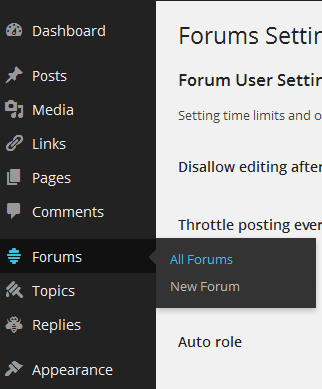
Am I in the wrong place or…?Help please! 🙁


