Search Results for 'code'
-
Search Results
-
I’m building a discussion board site that won’t use the standard bbpress forum interface. Forums will be embedded in individual post/pages with shortcodes. And all forum-type URLs will redirect to the appropriate post/page.
So no one will have access to the normal forum structure/hierarchy. Will I still need to create categories/sub-categories/forums for the individual forums?
This site may eventually have hundreds of forums and I’m looking to provide the best possible performance.
Any help welcome, Thanks.
ChadHello!
I have a forum being diplayed with forum index shortcode on a wp page. I would like to ask if there is a way to display the title of the parent of the sub-forum or the topic on the sub-forum’s or topic’s page, so always the titles of parents that one above the sub-forum or topic in the hierarchy.So the the point of all this would be to let the user know which forum he’s in.
Thanks,
DanielI have a bbPress driven forum on http://ictgiants.com/questions/category/all and I want to create a page that will display the registered users on my website similar to http://stackoverflow.com/users.
Please if there is a plugin or shortcode that does this, that is what I need
Any idea and links will be appreciated.
Thanks in advanceHi there,
I have bbp-register shortcode, but I need to implement next step in the registration. Im using Paid Membership Pro to make membership levels. For now, I have only registration into bbpress, but the user is not redirected on the page where he can choose his membership level…Every new member is registered without any membership.Is it possible to add this feature into registration process?
Thanks!!
Hello everyone,
i am very new to CSS & HTMl, i tried to solve my problem by my own, but i didn’t get it.
Maybe someone has a idea how i can fix my new bbpressforum.Only half of the site is used by BBpress. BBpress should use all the remaining free space.
Thats why i tried yet.
The widget area dissapeard and bbpress should fill out the empty space.
But yeah, how you can see its not working. (http://www.forest-game.de)My Code:
#bbpress-forums .article, div#content_box.sidebar_layout {
	width: 100%;
}
#bbpress-forums .article, .sidebar.c-4-12 {
	display: none;
}
Edit:, oh i did something wrong. The widgets areas on the other sites dissapeared too ^-^
Kindly regards
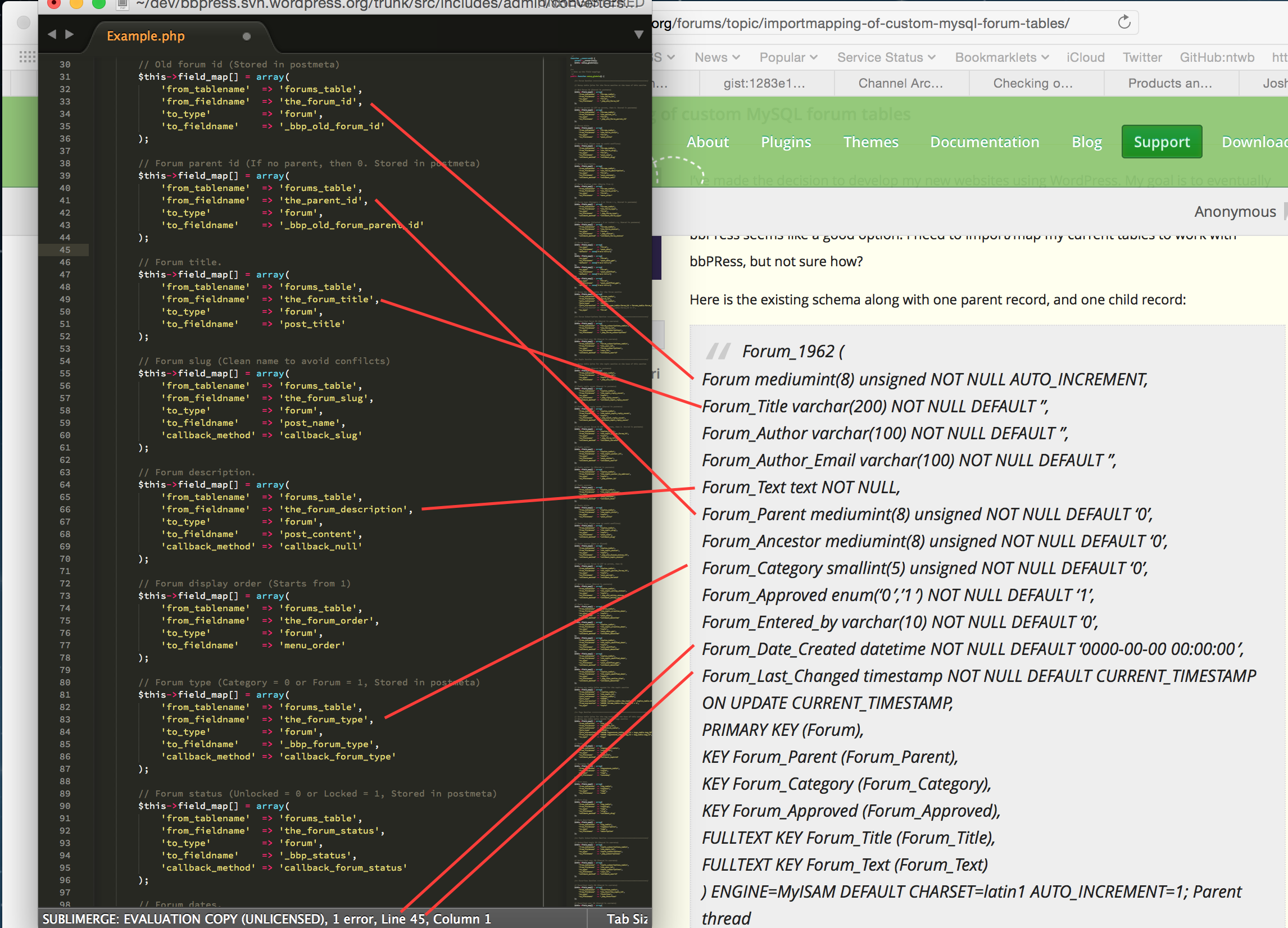
I’ve made the decision to develop my new websites using WordPress. My goal is to eventually re-write my PHP code as a WordPress plugin, but, until then I need to use what’s available, and bbPress seems like a good option. I need to import/map my current tables to work with bbPRess, but not sure how?
Here is the existing schema along with one parent record, and one child record:
Forum_1962 (
Forum mediumint(8) unsigned NOT NULL AUTO_INCREMENT,
Forum_Title varchar(200) NOT NULL DEFAULT ”,
Forum_Author varchar(100) NOT NULL DEFAULT ”,
Forum_Author_Email varchar(100) NOT NULL DEFAULT ”,
Forum_Text text NOT NULL,
Forum_Parent mediumint(8) unsigned NOT NULL DEFAULT ‘0’,
Forum_Ancestor mediumint(8) unsigned NOT NULL DEFAULT ‘0’,
Forum_Category smallint(5) unsigned NOT NULL DEFAULT ‘0’,
Forum_Approved enum(‘0′,’1’) NOT NULL DEFAULT ‘1’,
Forum_Entered_by varchar(10) NOT NULL DEFAULT ‘0’,
Forum_Date_Created datetime NOT NULL DEFAULT ‘0000-00-00 00:00:00’,
Forum_Last_Changed timestamp NOT NULL DEFAULT CURRENT_TIMESTAMP ON UPDATE CURRENT_TIMESTAMP,
PRIMARY KEY (Forum),
KEY Forum_Parent (Forum_Parent),
KEY Forum_Category (Forum_Category),
KEY Forum_Approved (Forum_Approved),
FULLTEXT KEY Forum_Title (Forum_Title),
FULLTEXT KEY Forum_Text (Forum_Text)
) ENGINE=MyISAM DEFAULT CHARSET=latin1 AUTO_INCREMENT=1;Parent thread
=============
(19261, ‘Can I rent an RV?’, ‘BillB’, ‘bill@web-crafter.net’, ‘I\’d like to give RVing a try, but there\’s no way I\’m going to plunk down thousands of $$ to buy an RV. Is it possible to rent an RV like you\’d a car?’, 0, 19261, 1962, ‘1’, ‘rvcn’, ‘2002-12-12 13:52:29’, ‘2002-12-12 13:53:25’);Ancestor thread
===============
(19262, ‘Re: Can I rent an RV?’, ‘Mark’, ‘mark@ittelligent.com’, ‘No problem. Just check your yellow pages for a rental agency in your area. I know there are a few national outfits too. Cruise America and El Monte come to mind off the top of my head.’, 19261, 19261, 1962, ‘1’, ”, ‘2002-12-12 13:59:42’, ‘2002-12-12 13:59:42’);You’ll notice that there are fields for both parent and ancestor, which allows for infinite sub-topic threads (those replies to replies under one parent). Also, I the author name and email are also stored in this table, and not tied to a separate user table (so will need to address that). Each MySQL dump is between 1MB and 3MB.
Need any more information? Please advise.
My goal is one of two options:
- Import/Map existing table dumps in several websites to WordPress and bbPress using above forum schema as source, OR
- Convert my existing PHP forum code to be compatible with WordPress and forget about bbPress altogether if I can’t easily map the table (I don’t know WordPress enough to even think about doing this myself, even though the code is simple and fast, and will ne advice on someone who can)
I am doing this so I can better control the mobile templates and have a more robust way of controlling my websites. I need to do this for about 6 websites, and would like the method to do this myself after the first time.
Thanks in advance,
Lisa
Hi!
PLease, help me to fix this!I don’t understand: bbpress in my site uses template page.php. In this template we have:
<?php get_template_part('inc/page-title'); ?>.
In /inc/page-title.php we have:
<?php elseif ( is_page() ): ?><h2><?php echo alx_page_title(); ?></h2>But in http://muzl.it/forums/ we have title
<div class="page-title pad group"><h2>Темы</h2></div>
and in http://muzl.it/forums/topic/lorem-ipsum/ we haven’t title:
<div class="page-title pad group"><ul class="meta-single group"><li class="category"></div>How to fix it?
I’m building what while be a discussion board style website. I will embed a single forum through a shortcode in each/every post.
This will allow standard WordPress navigation and give each forum its own post/page.
I will not allow users access to any part of the natural bbpress forum hierarchy (categories/forums/subforums/etc.) and will use redirects to ensure that all requests for specific forums end up on the appropriate post/page that uses the embedded shortcode.
My question: Without the need to query numerous (potentially hundreds) of individual forums through traditional forum navigation, do I still need to spread the forums out among multiple categories/sub-categories when building the forums on the backend.
Remember, no user will ever need, nor get, access to the forum hierarchy/structure. ALL forums links will redirect to the appropriate post.
Having to create a needlessly complex hierarchy/structure is daunting and would make a mess for moderators to dig through.
Just curious. Appreciate any guidance in this matter.
Thanks,
Chad Schulz