Search Results for 'bbpress'
-
AuthorSearch Results
-
July 22, 2014 at 3:32 am #149460
Leonyipa
Participantnow I added the code in functions.php
but the error message still appear:Parse error: syntax error, unexpected T_STRING, expecting ‘(‘ in /home/u639474582/public_html/wp-content/plugins/bbpress/includes/core/functions.php on line 168
My Full Code:
http://pastebin.com/75iu9ijHJuly 21, 2014 at 7:15 pm #149448Halo Diehard
ParticipantHmm… not sure what’s going on here. Have you tested it on a default theme?
My avatars were not doing that the last I checked. I’m pretty sure they were auto-resizing smaller, and fitting in quite nice. But, I stopped using this bbPress theme before the last couple WordPress updates because it’s not responsive, and the default bbPress is. It’s possible something changed in the WordPress code to make it act different.
If you can make a child theme, you could try this to change the avatars’ size on the page where they’re squished with css:
bbp-topic-meta .avatar {
     width: 30px;
     height: 30px;
}
July 21, 2014 at 6:49 pm #149447In reply to: Reply to topics on WordPress backend
Robkk
ModeratorTo make everything more organized, I decided to switch to forum instead of wordpress comments.
so you are you using bbpress topics for posts plugin??
https://wordpress.org/plugins/bbpress-post-topics/
well this functionality will be implemented on bbpress in the future
so you could add a suggestion for a feature in the trac topic
July 21, 2014 at 5:49 pm #149442In reply to: Import forums from localhost
Stephen Edgar
KeymasterAre you sure you selected “PunBB” from the select platform list?
Do any of the forums and categories get imported? What about users?
I also haven’t tested punBB 1.4, I have done all my testing using 1.4.2
These are the settings I just used testing this:
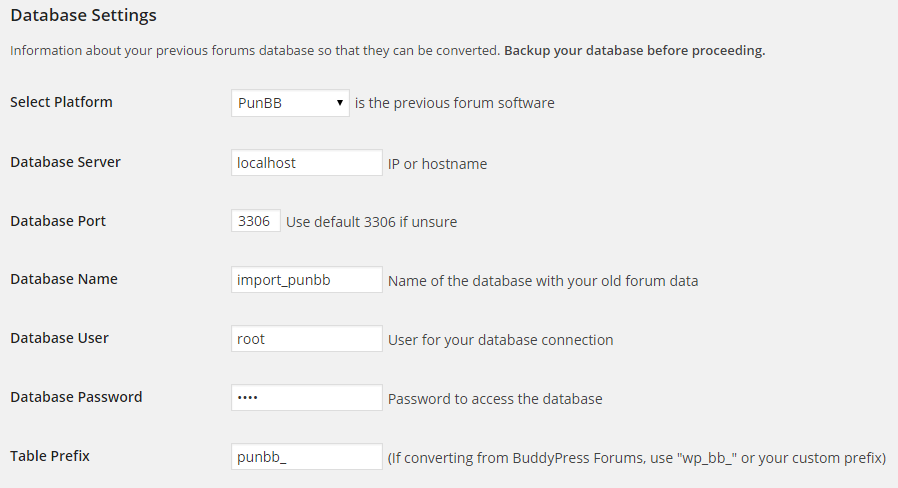
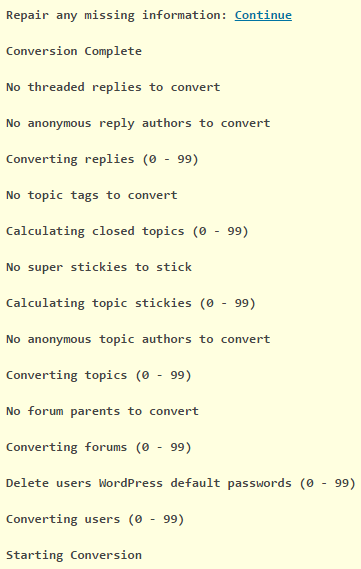
And the results are working as expected for me (This screenshot includes a few enhancements coming in the next release of bbPress)
 July 21, 2014 at 5:32 pm #149437
Robin W
ModeratorDon’t know ay plugin that restricts wordpress based on bbpress roles.
I use the plugin ‘restrict content’ to limit wordpress pages and then my plugin ‘bbp private groups’ to limit forum access.
On one site I then use manual registration to give users wordpress ‘subscriber’ and bbpress ‘participant’ roles, and on another automatic registration that does the same
July 21, 2014 at 5:24 pm #149433In reply to: Forum Page does not have link to Login
Moderatorok, so now we are back to my first response which gave you two ways to do it.
If you want it within the screen, then add this to your functions file
//add login to top of index
function index_login () {
if (!is_user_logged_in() ) {
echo do_shortcode('[bbp-login]');
}
}
add_action ('bbp_template_before_forums_index', 'index_login' ) ;
see
for how to do this
July 21, 2014 at 5:04 pm #149432Arturo Ramirez
ParticipantJuly 21, 2014 at 3:30 pm #149430NewSha
ParticipantIs there a way to create simple WordPress pages with limited access to users based on their bbPress roles?
For instance, only Participants can access forums and see topics. Similarly, I want to create a normal WP page which would be accessible only to Participants (and admins of course).
July 21, 2014 at 2:28 pm #149427In reply to: wrong display when logged in as non-admin
Moderatorhave to say I am struggling from the screenshots to see what your issue is, the ‘correct’ one is all squashed up and impossible to read !
What plugin are using for the ‘paid’ bit? suspect that this works at wordpress user levels (subscriber, author, admin etc. ) not bbpress (participant, keymaster etc.)
July 21, 2014 at 2:17 pm #149426In reply to: Sidebar reappear in topic and topic/
Moderatorok, this theme has annoyed me so much that I have down loaded it.
I then saw that it claims to be a bbpress friendly theme, aghh!!! why not include a fullwidth forum????
so had a little play
on my test site the following works
bbpress.php looks like
<?php get_header(); // Loads the header.php template. ?>

<main>

	<?php if ( have_posts() ) : // Checks if any posts were found. ?>


		<?php while ( have_posts() ) : // Begins the loop through found posts. ?>

			<?php the_post(); // Loads the post data. ?>

			<article <?php hybrid_attr( 'post' ); ?>>

				<?php if ( is_singular( get_post_type() ) ) : // If viewing a single page. ?>

					<header class="entry-header">
						<h1 <?php hybrid_attr( 'entry-title' ); ?>><?php single_post_title(); ?></h1>
					</header><!-- .entry-header -->

					<div <?php hybrid_attr( 'entry-content' ); ?>>
						<?php the_content(); ?>
						<?php wp_link_pages(); ?>
					</div><!-- .entry-content -->

				<?php else : // If not viewing a single page. ?>

					<header class="entry-header">
						<?php the_title( '<h2 ' . hybrid_get_attr( 'entry-title' ) . '><a href="' . get_permalink() . '" rel="bookmark" itemprop="url">', '</a></h2>' ); ?>
					</header><!-- .entry-header -->

					<div <?php hybrid_attr( 'entry-content' ); ?>>
						<?php the_content(); ?>
						<?php wp_link_pages(); ?>
					</div><!-- .entry-content -->

				<?php endif; // End single page check. ?>

			</article><!-- .entry -->

		<?php endwhile; // End found posts loop. ?>

	<?php else : // If no posts were found. ?>

		<?php locate_template( array( 'content/error.php' ), true ); // Loads the content/error.php template. ?>

	<?php endif; // End check for posts. ?>

</main><!-- #content -->


		<footer <?php hybrid_attr( 'footer' ); ?>>

			<div class="wrap">

				<?php hybrid_get_menu( 'social' ); // Loads the menu/social.php template. ?>

				<p class="credit">
					<?php printf(
						/* Translators: 1 is current year, 2 is site name/link, 3 is WordPress name/link, and 4 is theme name/link. */
						__( 'Copyright © %1$s %2$s. Powered by %3$s and %4$s.', 'stargazer' ),
						date_i18n( 'Y' ), hybrid_get_site_link(), hybrid_get_wp_link(), hybrid_get_theme_link()
					); ?>
				</p><!-- .credit -->

			</div><!-- .wrap -->

		</footer><!-- #footer -->

	</div><!-- #container -->

	<?php wp_footer(); // WordPress hook for loading JavaScript, toolbar, and other things in the footer. ?>

</body>
</html>
July 21, 2014 at 10:34 am #149422Topic: Where do i find a BBPress Theme Developer
in forum Themesrafferjr
ParticipantIm looking to have someone built a theme for my Forums, and ensure compatibility with my site, i have a staging area set up, if someone can reach out to me that would be great its time Sensitive.
July 21, 2014 at 7:58 am #149417In reply to: Sidebar reappear in topic and topic/
gogitossj34
ParticipantIt looks like my footer and bbpress.php files was corrupted some where so I downloaded the theme and bbpress plugin and extracted the files and tried your method again.
This time, it worked, though not perfectly, the sidebar is gone but it’s still not full width.And again, only content in http://www./forum which is bbpress root is not full width, everything else is ok.
Any suggestions ?
July 21, 2014 at 6:27 am #149414Topic: how to change install address?
in forum Installationwpdb
ParticipantHi
I want to install bbpress in a subdomain like —> forums.site.com
what I must to do?July 21, 2014 at 5:52 am #149412In reply to: Sidebar reappear in topic and topic/
Participantgetting this, code checker said it’s mssing ); ?> on line 52 or 50
Parse error: syntax error, unexpected ‘;’ in /home/a7203024/public_html/wp-content/themes/stargazer/bbpress.php on line 52
Just have this weird idea. What if we make a copy of footer.php, name it footer1.php then delete the getsidebar line in it. Afterthat, modified bbpress.php for it to call the footer1.php nstead of footer.php ?
July 21, 2014 at 5:33 am #149411In reply to: Sidebar reappear in topic and topic/
ParticipantOk, now I’m noticing this.
If the forum content is at
http://www./forums which is where my forums page is at ( the page content bbp-index )
It wont show sidebar as the page is using the full width layout.If the content is at http://www./forum which is where bbpress root is at, it will have the sidebar.
Maybe you’ll figure something out from that
And I’m just curious why is it hybrid_get_sidebar and not get_sidebar ?
Remove the hybrid caused problem with line 21 which is the
Copyright © 2014 The young marketers community . Powered by WordPress and Stargazer sentence.July 21, 2014 at 5:25 am #149410In reply to: Sidebar reappear in topic and topic/
ModeratorThe fact that your theme has coded the sidebar in the footer is really annoying !
No idea why that isn’t working, but plan b
change footer.php back to how it was, that way all the other pages will work.
now go back into bbpress.php and instead of the
<?php get_footer(); // Loads the footer.php template. ?>paste the footer.php code, but without the two sidebar lines
</div><!– #main –>
</div><!– .wrap –>
<footer <?php hybrid_attr( ‘footer’ ); ?>>
<div class=”wrap”>
<?php hybrid_get_menu( ‘social’ ); // Loads the menu/social.php template. ?>
<p class=”credit”>
<?php printf(
/* Translators: 1 is current year, 2 is site name/link, 3 is WordPress name/link, and 4 is theme name/link. */
__( ‘Copyright © %1$s %2$s. Powered by %3$s and %4$s.’, ‘stargazer’ ),
date_i18n( ‘Y’ ), hybrid_get_site_link(), hybrid_get_wp_link(), hybrid_get_theme_link()
); ?>
</p><!– .credit –>
</div><!– .wrap –>
</footer><!– #footer –>
</div><!– #container –>
<?php wp_footer(); // WordPress hook for loading JavaScript, toolbar, and other things in the footer. ?>
and see what that does ! Sorry without having your theme, I’m guessing at some of the code, and am as before likely to miss some grammer so you may need to play a bit with it.
July 21, 2014 at 3:04 am #149406ModeratorApologies was trying to answer many threads with guests due for dinner, so prevouis answer was a bit short !
I followed it and copy-and-pasted the code into my capabilities.php
ahhh, now I understand, as per original thread you need to add that code to your functions.php, not to capabilities.php, and that would explain the error.
Whilst you could amend the participant role, I haven’t documented that, so easiest is just for you to create a new role and give it the participant capabilities plus the ‘delete topics’ and ‘delete replies’. This article explains how
add this code to your functions file – see
https://codex.bbpress.org/functions-files-and-child-themes-explained/
July 21, 2014 at 2:50 am #149405In reply to: Sidebar reappear in topic and topic/
Moderatorlate night brain fade
try
<?php if (!bbpress()) {hybrid_get_sidebar( ‘primary’ ); } // Loads the sidebar/primary.php template.?>

</div><!– #main –>

<?php if (!bbpress()) {hybrid_get_sidebar( ‘subsidiary’ ); }// Loads the sidebar/subsidiary
July 21, 2014 at 2:44 am #149402Participantyes, I followed your instructions, and when I saw:
I followed it and copy-and-pasted the code into my capabilities.php
however, it still show me the error message.
sorry but pastebin adds millions of blank lines, so without re-editing the file I can’t see what you are doing.
Does it work if using RAW Paste Data?
July 20, 2014 at 5:01 pm #149394In reply to: Forum Page does not have link to Login
arminius
ParticipantBBDT Forum will bring you to enter username/password, but no link to new user registration. That page is using: [bbp-forum-index] and is one I setup in wordpress, no link. Does that answer your question? Also, do I need to have a page called Forum Registration using: [bbp-login] that seems redundant. When I initally started I used this link as a guide if that helps: https://codex.bbpress.org/step-by-step-guide-to-setting-up-a-bbpress-forum/
July 20, 2014 at 4:36 pm #149392In reply to: What could make bbPress better? I have ideas…
Moderator3. My main beef with bbPress is the way categories and forums are shown. Forums are placed under categories like sub-forums which looks un-forum like to me.
bbpress has worked on this , https://bbpress.trac.wordpress.org/ticket/1958
since you commented on my layout topic too, ill tell you which one i used , which is
https://bbpress.trac.wordpress.org/timeline?from=2014-03-04T09%3A51%3A07Z&precision=second
i copied all of his files from pastebin and used it as my own. then i style with css
But another way to the have the layout lets say like phpbb , is download Lynqs starter theme.
https://github.com/EpicWebs/bbPress-starter-theme-epicwebs
3. can you give an example of how you would like it to look? doesn’t need to be a bbpress site
heres an example of what he is talkingn about robin
July 20, 2014 at 3:55 pm #149389In reply to: Sidebar reappear in topic and topic/
Moderatorok no problem
Normally you would have a bbpress.php that would contain
header stuff
while have posts loop stuff
do_sidebar stuff
do_footer stuffYour theme has decided that the sidebar stuff will be in the footer stuff.
Now all this will work for non bbpress pages, so all we need to do is stop sidebars for bbpress pages.
so put back the footer line in bbpress.php
and then edit footer.php to make the first lines that were
<?php hybrid_get_sidebar( ‘primary’ ); // Loads the sidebar/primary.php template. ?>

</div><!– #main –>

<?php hybrid_get_sidebar( ‘subsidiary’ ); // Loads the sidebar/subsidiary.php template. ?>
change to
<?php if !bbpress() {hybrid_get_sidebar( ‘primary’ ); } // Loads the sidebar/primary.php template.?>

</div><!– #main –>

<?php if !bbpress() {hybrid_get_sidebar( ‘subsidiary’ ); }// Loads the sidebar/subsidiary.php template. ?>
essentially that code says ‘if the page is not a bbpress page ‘ the do the sidebar stuff the ‘!’ is a not statement and bbpress() checks if we are dispaying a bbprtess page
Give it a try, and come back and let me know if it works.
July 20, 2014 at 3:47 pm #149388Moderatorwhy changing directly doesn’t work?
because on every software update you will lose your changes!
My Full Code
sorry but pastebin adds millions of blank lines, so without re-editing the file I can’t see what you are doing.
If you go back to my original instructions and follow these and get an error, then come back and I’ll try and help you further
or if you go back to your
2) making custom role, but it says:
“ Parse error: syntax error, unexpected ‘roles’ (T_STRING), expecting ‘(‘ in /home/gleam/public_html/wp-content/plugins/bbpress/includes/core/capabilities.php on line 216
216: function add_new roles( $bbp_roles )
217: {and let me have lines 210 to 220 I’ll try and sort the error
July 20, 2014 at 3:32 pm #149387In reply to: Forum Search not working
Moderatoroffhand I can’t say.
It could be a theme or plugin issue
Plugins
Deactivate all but bbpress and see if this fixes. if it does, re-enable one at a time to see which is causing the error.
Themes
If plugins don’t pinpoint the problem, switch to a default theme such as twentytwelve, and see if this fixes.
.
July 20, 2014 at 3:19 pm #149386In reply to: What could make bbPress better? I have ideas…
ModeratorThe ethos behind bbpress is keep it light and let other add plugins for the functionality you require, so you don’t get tons of code for functions that you don’t need.
1. You can create menu logins such as
or
or add this code to your functions file
//add login to top of index
function index_login () {
if (!is_user_logged_in() ) {
echo do_shortcode('[bbp-login]');
}
}
add_action ('bbp_template_before_forums_index', 'index_login' ) ;
see
2. Easily added as a plugin
https://wordpress.org/plugins/bbp-signature/
3. can you give an example of how you would like it to look? doesn’t need to be a bbpress site
-
AuthorSearch Results

