I don’t have BuddyBoss installed. bbPress provides integration code that injects the “Forum” tab inside the group creation process. Normally:
add_filter( 'groups_create_group_steps', function ( $steps ) {
    unset( $steps['forum'] );
    return $steps;
} );
or something of that sort would have solved the issue. I was wondering of bbPress injects the tab in a different way.
I would appreciate if you could forward that to one of the devs, since you are a Mod, Robin, otherwise, thanks for the help.
But the integration code resides inside bbPress– not sure what you mean – the filters you quote are all buddypress or possibly buddyboss
But the integration code resides inside bbPress. If it was core BuddyPress filters, it would be much simpler, don’t you think?
bbpress uses custom post types, and database entries for linking replies to topics.
It is unlikely that the plugin will take account of these.
I do not know how that plugin works, but if you are importing to a clean site (ie one with no posts/pages/or other entries, then running the following repair may just fix.
dashboard>tools>forums>repair forums and run on at a time
ok, so that tells you that the error is in your theme ‘enterprise pro’ – in essence they are using a function that only exists if bbpress is active, so first of all see if there is a setting you need to change if you are NOT using bbpress.
Otherwise contact the theme authors for help.
PHP Fatal error: Uncaught Error: Call to undefined function is_bbpress() in /home2/mbotcom/public_html/juegosrobotica.es/wp-content/themes/enterprise-pro/functions.php:45
Hi!
I’m trying to desactivate and delete bbpress because I don’t need at the moment.
But I can’t do it! If I try my website is down.
I remove all the bbdd information: tools – forum – reset forums.
Anybody know what it’s happening?
Thanks
UPDATE
Hello, thank you very much Robin. I used the diagnosis mode and could find that the plugin Polylang was conflincting with bbpress. I just had to configure it well and now everything works fine.
Learndash I think hides some stuff, maybe try disabling and see if that is the issue, you can then look at what you need to do there.
If not, then it could be a theme or plugin issue
Themes
As a test switch to a default theme such as twentytwenty, and see if this fixes.
Plugins
If that doesn’t work, also deactivate all plugins apart from bbpress and see if this fixes. if it does, re-enable one at a time to see which is causing the error.
If you cannot do this to your site (say because it is live) then use the ‘troubleshooting’ features of this plugin to let you test without affecting other users
Health Check & Troubleshooting
Then come back
Hi!
I am using bbpress with learndash. I’m having a problem, and it’s that when I create a new topic, the message appears in the forum, but all the replies to that message don’t show up in the forum. The notification that there’s a new reply appears, and the reply count is shown, but I can’t see any of the replies. However, in on the WordPress side, they do appear. I’ve tried uninstalling plugins and even changing the theme, but it’s still not working. I don’t now but else to do
1.Screenshot: there is no visible replies.
https://app-eco-one.com/wp-content/uploads/2024/09/no-replies-shown-1.png
2.Screenshot: Replies created and shown in the wordpress panel
https://app-eco-one.com/wp-content/uploads/2024/09/replies-created-in-the-backend.png
BBpress Version: 2.6.11
Wordpress version: 6.6.2
Website link: app-eco-one.com
Theme: Kadence
I have used bbpress for 10 years but now, as I needed more/different functionalities as I am growing my site, I had to migrate to IPBoard/Invision. I did that almost 2 years ago, but I kept the bbpress forum as-is for reference purposes.
Occasionally, I get people posting there by mistake or spammers posting there. Is there a way to lock all the threads while keeping them available for reading only?
Thanks for reply but, sorry…
Installed and keymaster issue (so, nothing work, I need to fix via your plugin): this is an important issue (cannot work without the fix by your plugin).
Also, not work in FSE and also with your plugin I have bad result.
FSE is out and default theme in wp from about 4 yrs and still not supported from bbpress.
This really looks like an abandoned project.
Other minor project (like asgaros
And similar) work out of the box (install, shortcode, all work as expected).
Best regards and I really hope bbpress team can work to fix asap this issue.
I am just a moderator here, and not a bbpress author.
The authors tend to release updates every few years, rather than more frequently.
My personal view is that you should consider bbpress to be a ‘mature’ product, ie any releases will be to fix issues rather than add functionality.
bbpress is written really well, and has loads of hooks. In essence it is a WordPress product, written by the founder of Wordress, and taken into a plugin by sponsorship from WordPress.
There are no show stopper bugs in it, it may throw a few deprecation notices (and these are very few at the moment), but WordPress recommends that you should not show error messages in live sites.
I currently have my test site running WordPress 6.6.x and php 8.2 with no issues.
The only major issue with bbpress at the moment is that it does not work well with FSE themes.
However my bbp style pack plugin has fixes for this
bbp style pack
as well as block versions of the widgets and a ton of styling and functionality add-ons.
All plugins are subject to the authors commitment, and bbpress is no different.
The main WordPress support forums use bbpress, and it would be mega work to move those over to some other product.
But with open software you make your choices….
I tried to reinstall bbPress after a long time, but encountered several issues.
First, there was no keymaster role after installation, which made the plugin unusable. I had to fix it via the BBP Style Pack plugin using the keymaster fix. It seems strange that I need one plugin just to make another work.
After that, I faced a blank page issue. Even though the BBP Style Pack plugin helped fix this as well, I still encountered problems—such as the shortcode in the footer not being parsed and some graphical glitches.
It seems impossible now to simply install bbPress, add a shortcode to a page, and use it like I did years ago.
I’m really disappointed with the current state of the plugin. It feels like it has been abandoned.
My webpage already use /%post_id% , but it not work for the topic page created by bbPress, how to fix it?
ok, that’s like sending your auto mechanic a picture of your Ford and asking him to say what is wrong 🙂
The best I can say is it could be a theme or plugin issue
Themes
As a test switch to a default theme such as twentytwenty, and see if this fixes.
Plugins
If that doesn’t work, also deactivate all plugins apart from bbpress and see if this fixes. if it does, re-enable one at a time to see which is causing the error.
If you cannot do this to your site (say because it is live) then use the ‘troubleshooting’ features of this plugin to let you test without affecting other users
Health Check & Troubleshooting
Then come back
trying to add replies content of bbpress plugin but not able to create as when click on add new section it redirects to error page
I’ve just taken a look, yes it is most probably a setting within Cirkle, or a bbpress template that has been changed by that theme.
ok, since I cannot see the site, troubleshooting is near impossible.
it could be a theme or plugin issue
Themes
As a test switch to a default theme such as twentytwenty, and see if this fixes.
Plugins
If that doesn’t work, also deactivate all plugins apart from bbpress and see if this fixes. if it does, re-enable one at a time to see which is causing the error.
If you cannot do this to your site (say because it is live) then use the ‘troubleshooting’ features of this plugin to let you test without affecting other users
Health Check & Troubleshooting
Then come back
Hi, I am using bbpress first time. WordPress Ver : 6.6.1 , BBpress Ver : 2.6.11 , theme : buddyx 4.5.8
I couldn’t find a solution to this issue.
the issue is : when i post new topic and edit again and URL generate : http://buddypress.local/index.php/questions/topic-3/edit/ [404 error]
any other way how to edit topic from frontend not wordpress backend ?
i have test in my localhost system.
Thanks
Disabling Dynamic CSS in Divi (as advised by @robin-w here) worked for me too.
When using the Divi Theme Builder you can not create a template for the user profile page. That is unexpected.
Is it because the user profile page is not created as a custom post type like Topic, Reply etc.?
It looks like that when I inspect the plugin code (especially the template.php-files in the includes folder).
If the user profile page (and search page) was created as a custom post type, would it fix these situations (?):
– that you have to disable Dynamic CSS in Divi to get the stylesheets to load
– that you can’t create a template for profiles with the Divi Theme Builder
– the similar issue with the other themes
Best regards and thanks for a great plugin!
/Mads
many plugins that do advertising have code you can use, and bbpress has many hooks you can use to insert.
If you want to say what and where, I may be able to give you further help.
Hi all. I am on a shared server with a limit of 200 emails per hour. I only have just over a 100 members but if two people post within the same hour the cpanel suspends the account and I have to unsuspend it from WHM.(I have a reseller plan that I use for my own projects.)
Can anyone recommend a plugin that will throttle bbpress emails to say 199 per hour and then queue the rest for the following hour?
Thanks for any suggestions.
I am trying to use wp to buffer to send my topics and replies to X etc, but it does not send a featured image is there a way to set a default featured image.
wp to buffer give 3 options
1 No Image
2 Use open Graph settings
3 Use Feat..Image not linked to post.
wp to buffer said “No such option for bbPress topics and replies”
but on the setup page it has settings for posts, forums, topics and replies.
Hope that makes sense.
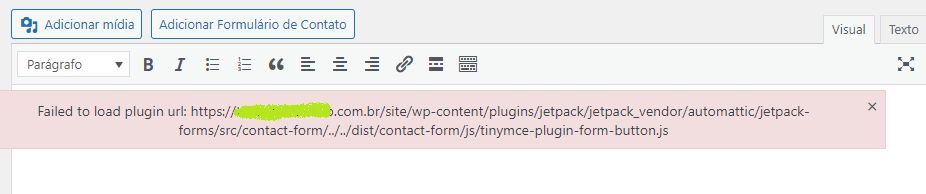
When Jetpack is active, when trying to edit a Topic, Forum or Reply, through the WordPress administrative panel with Jetpack active.
An error is displayed below the text editing toolbar.
Failed to load plugin url: https://mydomain.com.br/site/wp-
content/plugins/jetpack/jetpack_vendor/automattic/jetpack-forms/src/contact-form/../../dist/contact-form/js/tinymce-plugin-form-button.js