At least can I have it verified whether it is a bug in the script or not?
Hi John,
I want to send you a demo account on my site. But I can not find out how to send you a PM on bbpress.org. So could you send me a ping to the email address that I use in my profile on this forum? I will reply you with the account info.
I was able to get this to work using a custom page.php file, some sql to pull the data and a truncate function to minimize the number of characters replied. You can view the result of my work at: dev [dot] silverdoctors [dot] com/topic/testing-topic/.
The final thing that would be really cool is to have the ability to have a jquery loader that when a button is clicked, would load, lets say, 10 more recent site-wide forum replies. Or even better yet, a jquery function designed to automatically load new content at the bottom of the screen (by appending to a DOM element) when the user scrolls beyond the element, much like Facebook does with their status updates.
Do you know if anyone has ever done something like this with bbPress? Would you be able to guide me as I go through with this next step of adding the jquery?
Thanks a bunch for sharing this snippet. It works perfectly when not conditioned. It’s not behaving nicely with the is_bbpress() conditional logic, so I’ll have to delve a bit deeper into the set of is_ functions you mentioned above, but I should be able to work something out. Thanks again for the help, and for the great forum software.
For those of you familiar with phpbb forums, a very liked feature is the ability to show your unread posts, and also to skip to the last unread reply in that thread.
I have spoken to Pippin, from http://pippinsplugins.com, who estimates that to create a plugin to include these features on bbpress will cost between $350 and $600.
Now my website, which will have a forum migrated to it soon, will require these features, however it is only a hobby website 🙁
So I’m asking bbpress forum owners out there, do you want this plugin? And if yes, would you be willing to contribute to the cost?
Tanya 🙂
I just had a quick question about removing the sidebar.
I changed my forum theme to 2010 (bbpress). The forum now fill up almost the full width of the page. I am using custom community theme mind you.
The problem I have know is the sidebar on the forum pages
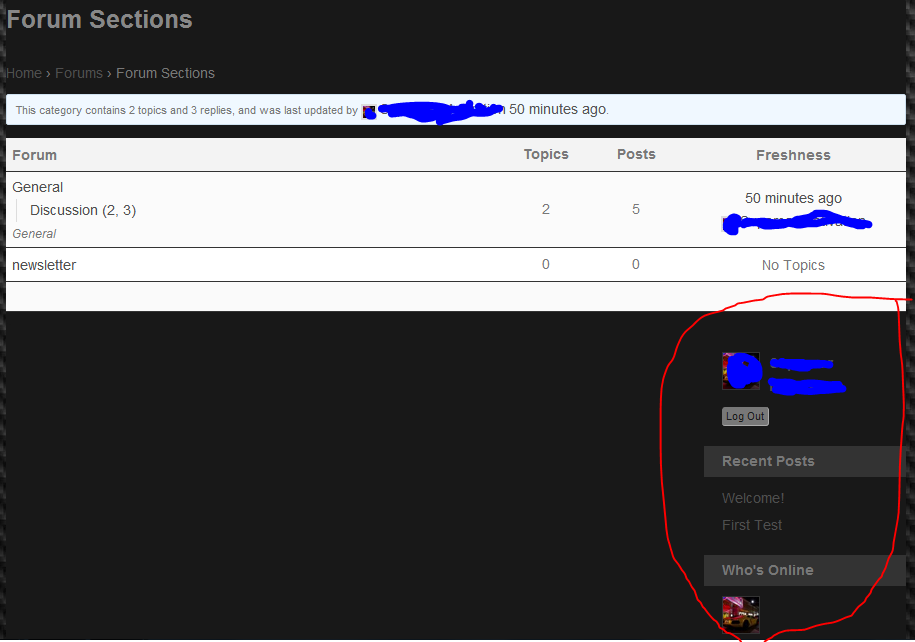
The sidebar is now underneath the forum and I was wondering if there was a quick method to removing the sidebar on forum pages.
If there is no easy way, what is the only other way?
Thank you so much for your time!
-
This topic was modified 14 years, 3 months ago by
 Janus12.
-
I activated bbPress (Twenty Ten) theme
-
Enabled Group Forums within bbpress settings (buddypress default bbpress wasnt installed)
-
Checked “Allow BuddyPress Groups to have their own forums”
-
Group Forums Parent is “group-forums” and its a category (I also tried a forum for that but it didnt work either)
http://fantastic7.x10.mx/forums/forum/group-forums/
- A group forum that doesnt work
http://fantastic7.x10.mx/groups/morb/forums/morb/
- A thread, topic within the same group forum that didnt work and still is
http://fantastic7.x10.mx/groups/morb/forums/topic/actu-tutoc/
-
No plugins activated other than bbpress and buddypress
-
I made the above group forum sit at the forum root. But it was also fruitless
-
selected Forum Root as group forums Parent (the thing that isnt recommended) but it was futile too
-
“Works fine if I navigate to it directly”, I seriously doubt that anyone would do that
Sorry, I should have included this info in my initial post.
I’m using the bbPress plugin version 2.1.1
My theme is custom built using Justin Tadlock’s Hybrid Core version 1.4.0.
I don’t believe there should be any pre-existing theme conflict with the /users/username permalink structure, but obviously there is something that I have overlooked. If I switch to TwentyEleven, I’m not getting a 404 on user pages, so it has to be something related to the Hybrid framework. Hopefully I can track it down.
Sorry, I guess I’m not being very clear. The is_bbpress() function already seems to deliver the conditional logic I need. That (I don’t think) isn’t my problem. My problem is getting the proper syntax for removing the actions that add styles and scripts to the head area.
remove_action ( 'bbp_enqueue_scripts' , 'enqueue_styles' );
remove_action ( 'bbp_enqueue_scripts' , 'enqueue_scripts' );
This doesn’t work, nor do some variants that I have tried. Could you suggest the proper syntax for removing the relevant actions, regardless of the conditioning logic employed?
This is not for bbPress 2.1 and above. You can use normal WordPress pages for this.
There are a few tags you could use, but the normal bbPress CSS isn’t written to be broken up and conditionally loaded; you’ll need to do that yourself. They are conveniently called is functions:
https://bbpress.trac.wordpress.org/browser/branches/plugin/bbp-includes/bbp-common-template.php#L91
Hi. I’m new to bbpress and I’m trying to install the front page text plugin but I can’t get it to work. Can someone give me some more detailed guidance than what’s on the page here, http://www.fldtrace.com/wordpress/bbpress-front-page-text-plugin.
I have the plugin installed and I can activate it from the admin account, but when I click on the “front page text” button, I get an error message that says, “There is no administration page at the requested address. Please check the address you entered and try again.”
Any ideas?
What version of bbPress and what theme you’re using are always helpful. bbPress takes measures to prevent incorrect 404 notices, so it’s likely a theme is resetting those flags afterwards, or it’s a bug.
Hi I am new to bbPress and BuddyPress 🙂
I have just installed: WordPress: 3.4.1 Theme: Salutation Version 1.4.3.1 bbPress: 2.1.1 BuddyPress: 1.5.7 + some more plugins
- how to create a parent bbpress group forum in buddypress?
I am a Administrator and have created a new Group and wants to create a forum but cant – get this ERROR: Your forum must have a parent?
But where do I create this parent forum? I have tried to create a Category but it didn help 🙁
I am a newbie i know 🙂 regards Tonny
NB! BuddyPress forum is not enabled
-
This topic was modified 14 years, 3 months ago by
 groubee.
-
This topic was modified 14 years, 3 months ago by groubee.
Hey everyone,
Unfortunately I’m having another minor hiccup in my bbPress 2.1 implementation. I’ve done some fairly heavy modifying of bbpress user profile pages, and somewhere along the line I have induced wordpress to flag profiles as error-404.
My site homepage is http://tamrielfoundry.com, which can be accessed using username=test and password=test.
My own user profile page http://tamrielfoundry.com/users/atropos/ works just fine, no 404.
A different user (who has not made any posts, which could be the cause) gets error-404 as a class in the body declaration. http://tamrielfoundry.com/users/blade/
Regardless, the fact that this content is getting flagged as 404 doesn’t seem to affect the page actually displaying the relevant content, however obviously it would be preferable if I can get the site to recognize user pages for existing users as non-404.
Let me know if I can provide any relevant info, any help would be greatly appreciated.
Andrew
I am still having this issue, unfortunately. Although I worked out enough of the technical details of bbPress 2.1 to port the plugin/templates/css over to the live (development) site.
If it would be helpful to see what I’m talking about you can access http://tamrielfoundry.com with username: test, password: test.
The bbpress CSS + some other scripts are being loaded in the head site-wide, and I can’t figure out the correct conditional syntax to remove them unless is_bbpress() is true.
Does anyone have any idea how I can have members become “Supporting Members” and add a supporting member badge to a single user’s bbpress posts under their username? I dont want to run a full subscription plugin, just a badge to show members that are in an elite group of donating members?
Got another question. How does bbPress weigh the different templates? For example, if I put a bbpress.php in my child theme root, with the sidebar removed, all pages in the forum misses the sidebar.
However, if I put archive-forum.php in the child theme root, with a removed sidebar, that sidebar pops up on all the other pages.
In what order does bbPress look for templates in version 2.1?
Hi all, it looks like the bbpress is – for some reason – not interpreting the HTML tags in first posts. The HTML tags are visible in the posts themselves and the content is not formated. Replies are OK – HTML formated, tags not visible.
Example here: http://poradci-sobe.cz/diskuse/topic/nef%C3%A9rov%C3%A9-jedn%C3%A1n%C3%AD-poji%C5%A1%C5%A5ovny/
Any idea what is the issue
One small remark – all the forum content was imported from bbpress 1.02 via bbconverter
Now I finally got it to work. You just copy the bbpress.css file to /my-child-theme/css/ and voilá, it works. When I found out that I looked in bbpress-functions.php and stumbled over this line:
// Check child theme

if ( file_exists( trailingslashit( get_stylesheet_directory() ) . $file ) )
Which states the obvious, it looks for bbpress.css in the /css/ folder in your child theme. If found, it will replace it with the default css.
If any admin reads this, can you please elaborate a bit more on the subject. It is very diffuse how all this works.
-
This reply was modified 14 years, 3 months ago by
 DramaticBaby.
Hi, I’m trying to create a custom theme for the bbPress forum. I already got a child theme based on Twenty Eleven, and I’m trying to style bbPress with my style.css in the child theme folder.
The problem is that bbpress.css is imported in the html code after my style.css, overwriting the latter’s styling. How do I force bbPress to use style.css instead, even though bbpress.css is imported after?
I have been struggling with this for hours and hours.
-
This topic was modified 14 years, 3 months ago by DramaticBaby.
Not sure I understand the problem. Spaces aren’t valid in URLs unless they are encoded.
You have enough conflicting slugs where I suspect only you can configure your way out of them.
http://fantastic7.x10.mx/forums/forum/group/ – Broken
http://fantastic7.x10.mx/forums/forum/group-forums/ – Broken
http://fantastic7.x10.mx/groups/morb/forums/topic/actu-tutoc/ – Works
http://fantastic7.x10.mx/groups/morb/forums/topic/actu-tutoc/page/2/ – Works fine if I navigate to it directly
Could be something with your theme, could be other plugins, or it could be a bug. You’re a bit on your own to narrow things down. I’d start with checking error logs and looking into why the page output stops on the broken links above.
bbPress 1.1 called those users Bozo’s, though it was often used for spammers, which gave them free-reign on entering content in the database, which was a pretty poor approach.
oops – that should read bbPress 2.1.1….my bad


