Search Results for '\"wordpress\"'
-
Search Results
-
I have tried to upgrade my install of bbpress from 1.0.2 to 1.2 (so I can migrate to the plugin version) several times now and I only get a white page. I verified my versions…
Wordpress 3.5.1
PHP – 5.3.3
MySQL – 5.1.61I disabled all my bbpress plugins, copied over all the files, made sure my template files (custom theme) and my bb-config.php file were still there. I only get a white page after the upgrade. Page source says there is zero code in the page. I have seen other posts with this problem, but have not seen a resolution to the issue.
Am I missing something?
Topic: Template Tags
bb press 2.2.4
Wordpress 3.5.1Hi Guys,
wondering if someone can help me out with the following bbpress query. The tag below when used directs website users to the profile page for wordpress.
My Profile | %admin_url%/profile.php
Does anyone know the tag required to take bbpress forum members to the bbpress profile page where mambers can also see the topics they have started?
Thanks for your assistance in advance.
Sam
Users can create new topics perfectly fine, but when a user replies to that topic after they click the reply link to submit the reply, they are redirected to my 404.php page, yet the reply is submitted perfectly fine.
Is there a setting im not seeing where you specify where users are redirected after reply submission?
Wordpress Version: 3.5.1
bbPress Version: bbPress 2.2.4Other info: Currently developing my own theme. Running wordpress on my localhost.
Topic: Forum Layout is messed up
Hello,
I’m using the latest version of wordpress and bbPress. Here is my site. BestFishingSite.com. And here is a link to the forums. http://bestfishingsite.com/forums/forum/forum-2/
The format of the forum is all messed up. Can you help me clean it up?
I created a user-profile.php file in my theme so I could customize its appearance. I want to add a link to the author’s blog posts, but am getting stuck on the loop part. When I tried the standard default wordpress loop – it looped the entire profile itself.
Here is the code I am working with:
http://pastebin.com/LAnd9hRnWith the current code, I get a 404 not found error.
Thanks in advance for any suggestions or ideas you might have to try!
Hello. I’m about to launch my customized WordPress/bbPress/BuddyPress platform; it’s a quite large undertaking and eventually we decided for this, even though bbPress is a bit lacking in some aspects when compared with similar forum software, but we went for it since it granted more compatibility with WP/BP.
Anyway, I noticed an image today with Forum Statistics and Online Users List, something that I thought was not possible with bbPress. Here it is:
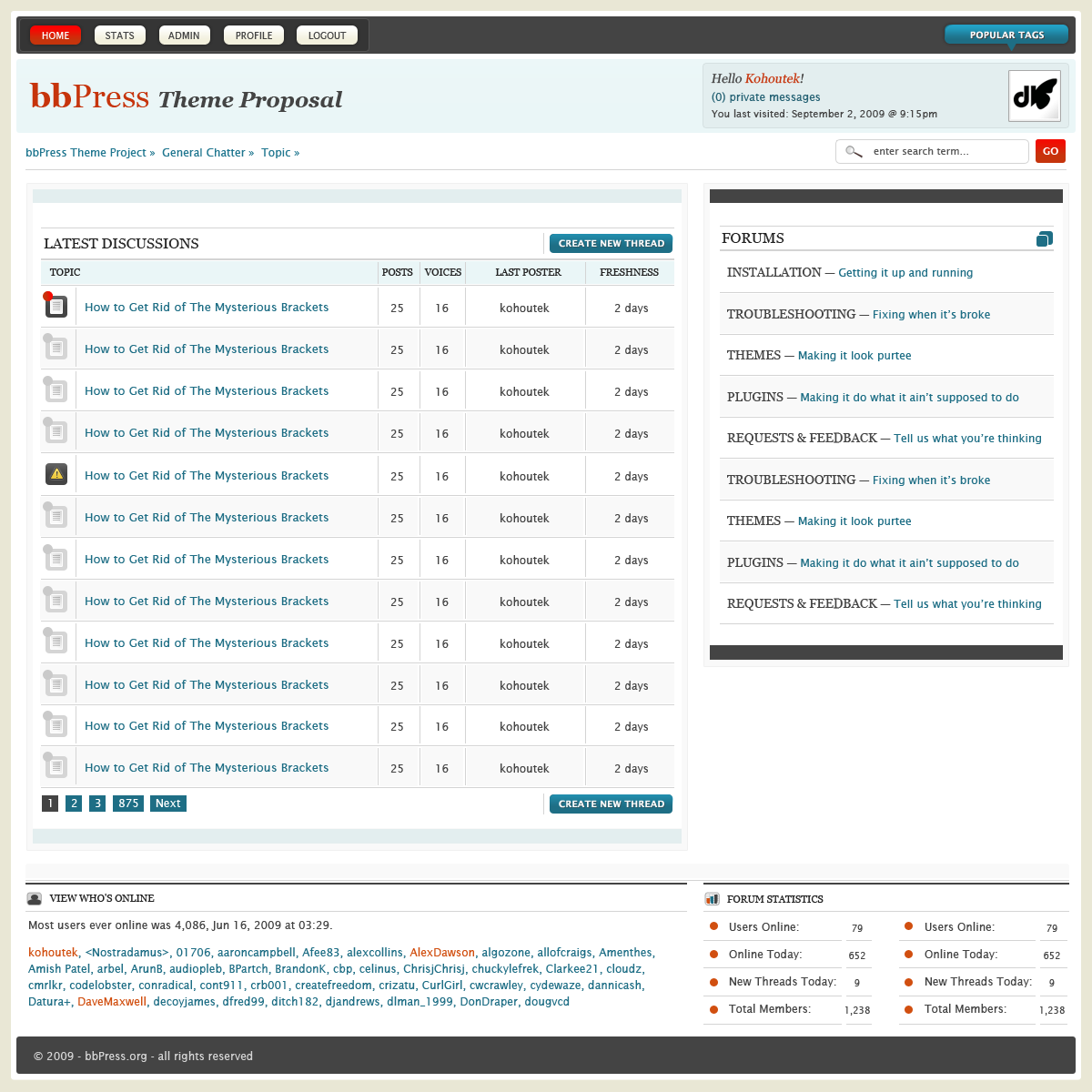
Can anyone of you tell me how can we do the same? Thanks in advance!
Hi I’m having a problem with my buddypress forums.
I’m able to create forum topics and view the topics I’ve created. But no one else who’s on the site can view the topics.
How do I make my topics visible?
We are using BP version 1.6.4
BbPress is version 2.2.4
Wordpress is version 3.5.1Forum settings are allowed for groups and standalone. This issue is happening on all topics as far as I can tell.
See screenshots below to see what I’m talking about.
Here you can see the topics.

Here’s what shows up once I click on one of the topics.
Topic View

The post is hidden and all it shows is the option to reply.Any thoughts on what’s causing this?
Topic: space after last topic
Wordpress Version 3.5.1
BB press Version 2.2.4
Website – http://www.ghanalandlords.com/Hi Guys,
Can someone tell me how i can get rid of the large white space under the last topic please. i have restricted the number of topics to 10 so there should not be anymore space after the last topic.
its on the homepage here – http://www.ghanalandlords.com/
thanks in advance
Hi all,
Running WordPress version 3.5.1 and bbPress version 2.2.4 My them is Everest by Elegant Themes.
All works well with the whole site, and wanted to add Forum functionality with bbPress. The CSS doesn’t appear to be showing at all for the forum. It really is horribly dull and small fonts.Although this is on a staging / testing server, you will see what I mean:
http://letstrav.cpanel1prelive.ireckonhosting.com/interaction/forum/
Can someone help please? I have copied the original bbPress css file into the /themes/everest/css/ folder but still get the same issue.
Thnks in advance.
ChrisTopic: Changing Strings
Wordpress Version 3.5.1
BB press Version 2.2.4
Website – http://www.ghanalandlords.com/Hi Guys,
I need to change some texts on my forum. Examples of the texts i need to change are listed below.
Topic
Freshness
Voices
Post
Create New Topic
Topic Title
There are a few more but I would run out of space trying to list all of them. (LOL)
Now to my question, How can i change these texts without using a plugin preferably.
I have tried the – BB Press String Swap Plugin – but i am not keen on it as it does not offer the opportunity to change all the texts i would like to change and also because i feel it slows my site down.Has anyone got any other suggestions to help me out. If there is no plugin out there that can do all the text changes i need to do, is there a tutorial out there to which i can refer? If it is possible to achieve this by editing files would it have to be in a child theme (Risk of losing after update)
Finally, if all fails, is there any expert out there who can make these changes for me for a fee?
Thanks in Advance
Topic: Default roles not working
My dev site is http://fishwire.rudtek.com. I’m running wordpress 3.5 and have buddypress 1.7 b2 and bbpress 2.3-rc1.
New users can’t seem to signup to the forums. The site lets them register, and sends them the activation email. When it’s clicked it says they are activated, but they can’t login.
The users are being created on the back end but they are not being assigned a default forum role. I have the box checked that says that it should be doing so, but it’s not working.
I have tried with all plugins but bbpress and buddypress disabled and I have tried with and without the default buddypress theme.
Any suggestions? THANKS!


