You’ll likely see a plugin popup in the WordPress.org repo soon that will prevent the need to deal with any code directly.
la79 has it right. I too started having this issue when I installed the following seo plugin. I figured out a work around for my issues but hopefully it helps others.
http://yoast.com/wordpress/seo/#utm_source=wpadmin&utm_medium=plugin&utm_campaign=wpseoplugin
The info below does not address the OPs question for performance, but rather is an answer to the questions regarding emails being sent out all together.
This does happen unfortuantly and it’s usually do to the server setup. We see this a lot with shared hosting.
The WordPress function that handles email, wp_mail() (more info here), uses the PHP mail function to send it’s emails (bbPress uses this as well). Many hosting environments have a throttle on how many emails can be sent using their SMTP servers, which are used by default.
The solution is to use a different SMTP server/service to send out the emails and not rely on the default one hosting provider’s server uses.
The first thing you will want to do is install one of the many SMTP plugins that are available on the WordPress.org plugin repository. I’ve used WP SMTP before without any issues.
After that’s installed you’ll want to configure that plugin to use your new SMTP service.
Sometimes you can ask your host for this information and by just using their SMTP service through the plugin will fix the issue. Other times it doesn’t, which means you’ll need a new SMTP service all together.
There are a ton of great paid SMTP services available, most should be suitable. SendGrid seems to be a popular one, which gives you 40,000 emails/month for $10.
It’s not ideal that emails don’t always “just work” out of the box, however it almost always boils down to the web host. Especially when some emails send out fine but others don’t go through.
 Anonymous User 5853594
Inactive
This is the short story:
WordPress.com is a hosting platform that makes it easy for anyone to publish online. You don’t have to download software, pay for hosting, or manage a web server. WordPress.com has hundreds of themes, and includes the functionality of many plugins, but you can’t upload your own plugins or themes.
WordPress.org offers free software that you can install on a web server. You can upload and install themes and plugins, run ads, and edit the database.
But you should read http://en.support.wordpress.com/com-vs-org/ too.
Hey guys –
I’m using the Pinboard theme as a base in a WordPress Multi-site. This has been complicated but I’m getting it together.
The BBPress plugin loads and works perfectly except for one issue: it is breaking in four-column layout on the top level (i.e. the “Forum” page). Within the sub-forums and within the topics themselves it lays out fine.
Here’s the messed up layout:
http://www.itinerantangler.com/blog/podcasts/boards/
But then if you navigate down a level, to a forum, it lays out fine:
http://www.itinerantangler.com/blog/podcasts/boards/board/fly-fishing/
So it’s obviously just a settings issue with the top-level forum. Is there a place I can go swap over to like a four-colun-layout.php or something like that for that top level? I’m comfortable using the editor to customize the site.
Thanks!
Zach Matthews
OK I think I’m ready to move forward……
I now have a (temporary) database set up into which I’ve imported ONLY the bbPress tables:
bb_forums
bb_meta
bb_posts
bb_tagged
bb_tags
bb_term_relationships
bb_term_taxonomy
bb_terms
bb_topicmeta
bb_topics
AND I have another (temporary) database into which I imported ONLY the WordPress tables:
wp_commentmeta
wp_comments
wp_links
wp_options
wp_postmeta
wp_posts
wp_term_relationships
wp_term_taxonomy
wp_terms
wp_usermeta
wp_users
In theory I could change out the database called in my wp-config.php file to this second database and my site would be just the same as it is now, minus the Forum which isn’t working anyway.
I did NOT export the wp_bbp_converter_translator to anywhere since it sounds like that’s part of the problem….
SO what’s next? Do I try the Tools>Forums>Import Forum again? OR should I switch to the newer, no-bbPress database and then import the forum from the existing (or backup) database? Although it seems straightforward my prior experience has me cautious and I’d rather have some expert guidance before I try anything else yet….
OK, suspect i’m just being thick here.
I am running bbpress 2.2.4 as a plugion on wordpress 3.5.1
http://www.gospbc.co.uk
When I click a users avataor or username I get a profile page like this :
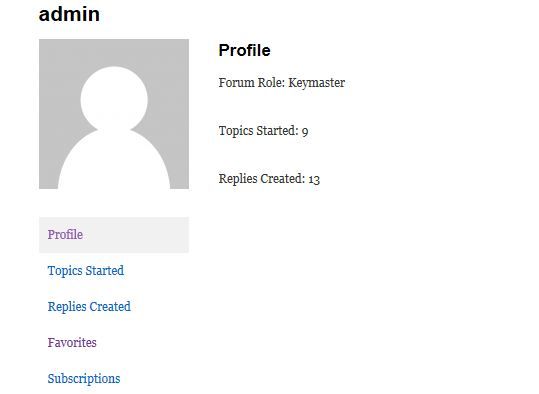
How do I tweak this to display other info that the user has entered, such as location, name, etc.?
There’s lots of talk on the fourm about adding extra fields to registration or removing things such as URLS, but this seems to assume that people are seeing much more than I am on the profle page !
Help with what files to edit, or just what i need to do would be much appreciated !
I’m having this problem as well. I want to use the BBPress breadcrumb on Forum pages, and Yoast everywhere else, but I can’t get the bbpress crums to work unless i disable it completely.
I like bbPress it’s awesome. Like most open source software I like to get stuck in and break stuff then fix it, you learn a loads from doing that.
I agree phpbb and some others are easier options in certain areas, but the integration with wordpress is amazing.
Good luck with your forums 🙂
– bbPress 2.3.1 – WP 3.5.1 – Buddypress 1.7 –
When you change the FORUM ROLE any user via forum, then in the WordPress administration is forum rule unchanged, even though the user already has rights moderator or administrator. Can you change the forum role of the user via WordPress administration or not?
I tried to change the user role of the participant to moderator in the WordPress administration and nothing happened. I tried to change the role through the forum and role has changed, but the administration remained WordPress original role. Is this normal?
Same problem. After installation i have login widged in plugins, but i haven’t “forum” button and i have no permissions to enter plugin settings. WordPress 3.5.1 mantra theme.
Anonymous User 5853594Inactive
@johnjamesjacoby
I think he meant the changelog at the WP Plugin Directory because that hasn’t been updated yet.
Fixed my forum (but not solved).
— ALERT MAY DAMAGE YOUR FORUMS —
What I did:
1) deactivate plugin + delete plugin
2) manually installed older version from SVN (https://bbpress.svn.wordpress.org/branches/2.2/)
3) export forum data (from Tools)
4) reset forum plugin
5) update plugin through standard plugin process
6) installed wordpress import plugin
7) imported forum data
There is no changelog. What’s changed?
There is a changelog, you just need to read the blog post this topic is connected to. 🙂
Or, even better, keep an eye on Trac if you’re concerned about the exact changes.
I have WordPress 3.4.2 and BBpress 2.3
The problem, I see the meta/header of reply’s just I dont see the message-reply text??
http://www.brommert.nl/garage/gesprek/franss
Thanx in advance!
Unfortunately my bbPress does not allow admin to access settings anymore.
Forum is still publicly visible and it’s possible to post, but settings are “gone”.
I tried to figure out for 2 hours before writing here.
Wordpress debug says: PHP Notice: bbp_setup_current_user was called incorrectly. The current user is being initialized without using $wp->init().
.. is it possible to add features to the Post Editor? I can add custom meta boxes to regular and custom post types in WordPress but is it possible to add them to the bbPress editor
As @tbermudas I have also lost the tinyMCE editor on front-end.
I try to go back to version 2.3, but the zip file in WordPress repo for version 2.3 actually contains version 2.3.1. Where can I download version 2.3?
Thanks.
Jetpack developers are tracking this issue at https://wordpress.org/support/topic/foreach-error-in-223-update and there is a changeset posted there if you feel comfortable editing the core code before a stable update gets released.
I have installed the update in my tester site and I have lost the visual editor, also the “Ckeditor for wordpress plugin” seems to be not compatible.
There seems to be a conflict or something if used with Jetpack. Others users as well I have been having some problems.
Daniel,
I was able to solve the problem by creating a new wordpress administrator. When logging in as that user I could then access the Forum settings and assign the messed up users to forum keymaster role. See if that works for you.
Hi,
This is my main forum page where all forums are listed: http://vladimircuk.com/carolalt/forums/
Where is this page located and how do I edit it? I can’t find it anywhere in WordPress Pages admin.
Any advice appreciated.
Drop feedback about bbPress 2.3.1 here!
See the 2.3.1 milestone on Trac for changes.
From the blog post:
Also in bbPress 2.3.1, we’ve disabled the use of WordPress’s visual editor (aka TinyMCE.) The HTML editor is still available, and works extremely well. If you want to enable the visual editor again, we’ve added a code snippet to the codex that will turn it back on for you.


