bbpress should have no problems with any database prefix that wordpress accepts, it just rides on this
bbpress largely picks up on your wordpress theme, use any of thevdefault ones and you’ll get a great look.
I use twentyten very successfully.
and look at the set up guides
Codex
Same thing happening to me. Running WordPress 3.9. I activated bbPress – first time i got a weird access denied error, so I removed and reinstalled. Now when I activate, i get nothing, no welcome page, nothing on the left menu. I do get a widget on the dashboard telling me I have no forums…
Any more thoughts on this?
WordPress 3.9
bbPress 2.5.3
On website, links to topics work – eg:
http://domain/forums/topic/topic_name
The forums link produces a list of forums – eg:
http://domain/forums
However, the links to forums do not work – eg:
http://domain/forums/forum/forum_name
I get page not found
In addition, the dashboard menu for ‘Forums’ only has the ‘Attachments’ link. ‘All Forums’ and ‘New Forum’ have vanished.
I have tried:
* repairing forums
* re-saving settings
* resaving existing permalinks
* running debug mode (no errors)
The updates were from:
WP: 3.2.1 to 3.9
bbPress: 2.0 to 2.5.3
Any ideas what to look for?
Thanks
Hi.
I am getting this error.
Notice: bbp_setup_current_user was called incorrectly. The current user is being initialized without using $wp->init(). Please see Debugging in WordPress for more information. (This message was added in version 2.3.) in /home/xxx/public_html/xxx/wp-includes/functions.php on line 3245
I saw some of people asked about this question for previous versions. Its supposed to be fixed.
I am using
Debug : True
Wordpress : 3.9
bbPress Version 2.5.3
I’m trying to mark a topic as private via the wordpress visibility options so that only the topic author and admins can read it. After marking it as private the topic text (post content) is only visible to the author (not even admin / keymaster can see it).
I found this post which seems to be semi-related.
https://bbpress.trac.wordpress.org/ticket/2088
Hello – I have no coding experience whatsoever but I have worked with WordPress before. I would love to do a discussion forum, but the whole process has to be idiot proof for me. Can anyone recommend a theme that looks good and is beyond easy to use with the discussion forum?
Thanks so much!
Just spotted you post on the wordpress forum :
‘My theme (MH Magazine) has no bbPress template by default, so I copied my full-page-width template and renamed it plugin-bbpress.php. I’ve got the forums page set to this template’
If this is how you have it currently, then it is a sidebar template from your theme that you need, not a full width page one. With a siderbar theme, then wp-tweaks will pick this up and add the forum one to the page.
Ok, I’ve just finished a new plugin called
bbp Private Groups
This plugin adds private groups to the forums, allocating users to up to 8 groups, and combinations of forums to those groups, creating multiple closed forums.
download from
bbp Private Groups
Let me know what you think.
I’ll add this to the wordpress plugin repository in the next few days
Ok, I’ve just finished a new plugin called
bbp Private Groups
This plugin adds private groups to the forums, allocating users to up to 8 groups, and combinations of forums to those groups, creating multiple closed forums.
download from
bbp Private Groups
Let me know what you think.
I’ll add this to the wordpress plugin repository in the next few days
Ok, I’ve just finished a plugin called ‘bbp Private Groups’
This plugin adds private groups to the forums, allocating users to up to 8 groups, and combinations of forums to those groups, creating multiple closed forums.
download from
bbp Private Groups
Let me know what you think.
I’ll add this to the wordpress plugin repository in the next few days
Theme: modified portfolio press:
/*
Theme Name: Portfolio Press
Description: Portfolio Press is a responsive theme for showcasing your photography, art, web sites, or other projects. It also works nicely as a regular blog site. An options panel is included for uploading logos and and changing the layout. There’s also support for the image, gallery and quote post formats. Visit the demo site or watch the video screencast for set up instructions.
Author: Devin Price
Author URI: http://wptheming.com/
Theme URI: http://wptheming.com/portfolio-theme/
Version: 1.7
License: GNU General Public License
License URI: license.txt
Tags: white, black, gray, two-columns, left-sidebar, right-sidebar, flexible-width, custom-menu, full-width-template, microformats, post-formats, rtl-language-support, theme-options, translation-ready
Credits:
Portfolio was built on the solid foundation of Toolbox:
https://wordpress.org/extend/themes/toolbox
Reset default browser CSS.
Based on work by Eric Meyer: http://meyerweb.com/eric/tools/css/reset/
MODERATOR EDIT: I removed the ~1200 lines of code here, use pastebin or a gist on GitHub for big code dumps.
I have done a fresh installation of wordpress & bbpress and created new topics under forum but my users are unable to create a new topic. Please let me know if anybody knows.
Hello,
I’m looking for a way to show which topics have some new replies. Also I want a button ‘Mark all as read’. I’ve downloaded some plugins but none of them worksfine.
The plugins i’ve tried:
BBpress pencil unread — http://wordpress.org/plugins/bbpress-pencil-unread/ (shows the mark all as read but don’t do anything when pressed)
BBpress unread posts — http://wordpress.org/plugins/bbpress-unread-posts/ (shows a notice of new replies but all the topics are now ‘NEW’ and there is no ‘Mark all as read’ button)
BBpress Mark as read — http://wordpress.org/plugins/bbpress-mark-as-read/ (doesn’t work at all)
Please help me,
My website is: http://www.friendsofgaming.nl
Thanks!
I am also curious as there should be some fine tuning here otherwise I agree that updating the activity stream with forum posts and replies will result in too much duplication of updates
I am trying this old plugin to see if it will help:
https://wordpress.org/plugins/buddypress-block-activity-stream-types/
I am not sure how Register Plus Redux registers the new profile fields though an alternate way would be to use user_contactmethods
https://codex.wordpress.org/Plugin_API/Filter_Reference/user_contactmethods
So here is an alternate method using that method as a single standalone plugin:
I’m not saying there is anything wrong with the method you used, just an alternate method.
You could add as many or few extra fields as you want 😉
Source: https://gist.github.com/ntwb/11241301
<?php
/*
Plugin Name: bbPress - CLB Add user school to reply author details
Plugin URI: https://gist.github.com/ntwb/11241301
Description: bbPress - CLB Add user school to reply author details
Version: 0.1
Author: Stephen Edgar - Netweb
Author URI: http://netweb.com.au
*/

function clb_user_contact_methods( $user_contact ){

	/* Add user contact methods */
	$user_contact['school'] = __('School Name');

	return $user_contact;
}
add_filter('user_contactmethods', 'clb_user_contact_methods');

function clb_school_replies_author() {

	echo get_user_meta(bbp_get_reply_author_id(), 'school', true);

}
add_action( 'bbp_theme_after_reply_author_details', 'clb_school_replies_author' );
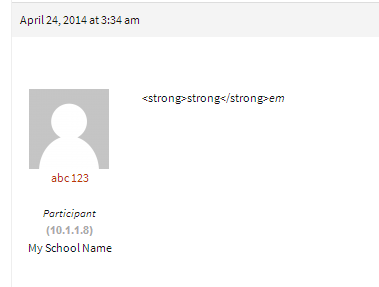
As it displays in each reply under the author details
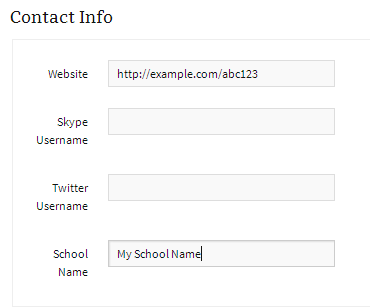
As it displays on a users profile page
Thanks Stephen,
I have raised the same issue in other post so We will have some updates there
https://wordpress.org/support/topic/handling-session-load-capacity?replies=3#post-5494586
or it is depending on the wordpress site?
This, basically dependant upon what WordPress can handle.
There appears to be quite a few though I have not used any take a look at the WordPress plugins:
https://wordpress.org/plugins/search.php?q=facebook+login+bbpress
Maybe use some other bbPress/BuddyPress conditional tags
bbPress Conditional Tags
Template Tag Reference
Note: The BuddyPress codex page is undergoing some updates. There are a few that are now depreciated, you can find an accurate list here.
I also wrote a plugin that makes it super easy to see what conditional tags are being used on a page 🙂
https://wordpress.org/plugins/query-monitor-bbpress-buddypress-conditionals/
(You first need to install https://wordpress.org/plugins/query-monitor/)
You could write some custom code to do it in a child theme though it would probably be quicker to fork an existing plugin that will do it for you with bbPress.
@imath’s BuddyPress plugin comes close to what you want I think and would be a good starting point to convert it from BuddyPress to bbPress.
https://wordpress.org/plugins/bp-avatar-suggestions/
Hi All,
I just wanted to know How many sessions can be handled in BBpress. I am just concern about the load it can handle. or it is depending on the wordpress site?
Iam just confused. Any help would be appreciated.
Thanks,
Kailash
I don’t know if any of the avatar plugins will do what you need it to do though with ~350 + avatar plugins via https://wordpress.org/plugins/search.php?q=avatar and/or 26 listed also with ‘bbPress’ at https://wordpress.org/plugins/search.php?q=avatar+bbpress maybe take a look at some of these other plugins and see if one of those will do what you want.


