Search Results for '+.+default+.+'
-
AuthorSearch Results
-
March 31, 2016 at 3:43 pm #173704
In reply to: Forum Width / Sidebar Issue?
semperaye
ParticipantI was given something like this:
body.responsive.page-template-default #page-wrapper .full-container {
    max-width: 1080px !important;
}
March 31, 2016 at 12:05 pm #173701In reply to: Forum Width / Sidebar Issue?
Pascal Casier
ModeratorHi,
First of all, the /forums is indeed the default that comes out. Handy, no ? 🙂
For the width, this is fully WordPress and the theme you have chosen, so bbPress just adapts to it.
I would propose that you ask on the global WordPress support forum for that.Pascal.
March 30, 2016 at 9:08 pm #173671In reply to: Performance after conversion
talhawp
ParticipantI tried the following steps without any success:
1- Upgraded to bbPress 2.6
2- Removed sub-forums
3- Emptied Trash/Spam Topics and Replies through admin panel. This took me 3 days! Around 25% of 0.5 million posts were removed
4- Repaired Forums by going through every single option
5- Optimized WordPress Database through wp-optimize plugin
6- Changed theme to WordPress default Twenty Sixteen theme
7- Deactivated all the plugins except bbPress
The site works for few minutes then crashes. My WordPress itself has around 30K posts and 400K comments, not sure if this is causing the issue.
The whole bbPress 1.x worked perfectly for 7 years, then only issue was that the cookies and single sign between WP and bbPress had become incompatible due to newer WP versions.
Can anyone suggest anything else that I can try?
March 30, 2016 at 6:28 pm #173667tech55541
ParticipantHello,
It was hard, but I and another member on a private dev forum were able to figure it out. What tripped us up was this.
https://bbpress.trac.wordpress.org/ticket/2685
Can’t believe this has not been fixed in core yet.Anyway, here is my full solution. All you have to do is add this code to functions.php.
/*Customize the BBPress roles to allow Participants to trash topics*/
add_filter( 'bbp_get_caps_for_role', 'ST_add_role_caps_filter', 999, 2 );

function ST_add_role_caps_filter( $caps, $role ){
if( $role == bbp_get_participant_role() || $role == "default" ) {

	$new_caps = array(
                // Primary caps
                'spectate'              => true,
                'participate'           => true,
                'moderate'              => false,
                'throttle'              => false,
                'view_trash'            => false,

                // Forum caps
                'publish_forums'        => false,
                'edit_forums'           => false,
                'edit_others_forums'    => false,
                'delete_forums'         => false,
                'delete_others_forums'  => false,
                'read_private_forums'   => false,
                'read_hidden_forums'    => false,

                // Topic caps
                'publish_topics'        => true,
                'edit_topics'           => true,
                'edit_others_topics'    => false,
                'delete_topics'         => true,
                'delete_others_topics'  => false,
                'read_private_topics'   => false,

                // Reply caps
                'publish_replies'       => true,
                'edit_replies'          => true,
                'edit_others_replies'   => false,
                'delete_replies'        => true,
                'delete_others_replies' => false,
                'read_private_replies'  => false,

                // Topic tag caps
                'manage_topic_tags'     => false,
                'edit_topic_tags'       => false,
                'delete_topic_tags'     => false,
                'assign_topic_tags'     => true,
            );

	}

    return $new_caps;
}
/*Fixes an issue that only allows mods to trash topics.
https://bbpress.trac.wordpress.org/changeset/5852
https://bbpress.trac.wordpress.org/ticket/2685*/

add_filter( 'bbp_map_reply_meta_caps', 'ST_tweak_trash_meta_caps', 11, 4 );
add_filter( 'bbp_map_topic_meta_caps', 'ST_tweak_trash_meta_caps', 11, 4 );

// tweak for replies
function ST_tweak_trash_meta_caps( $caps, $cap, $user_id, $args ){

	// apply only to delete_reply and delete_topic
	if ( $cap == "delete_reply" || $cap == "delete_topic" ){
		// Get the post
		$_post = get_post( $args[0] );
		if ( !empty( $_post ) ) {

			// Get caps for post type object
			$post_type = get_post_type_object( $_post->post_type );
			$caps      = array();

			// Add 'do_not_allow' cap if user is spam or deleted
			if ( bbp_is_user_inactive( $user_id ) ) {
				$caps[] = 'do_not_allow';

			// Moderators can always edit forum content
			} elseif ( user_can( $user_id, 'moderate' ) ) {
				$caps[] = 'moderate';

			// User is author so allow edit if not in admin
            } elseif ( ! is_admin() && ( (int) $user_id === (int) $_post->post_author ) ) {
                $caps[] = $post_type->cap->delete_posts;

			// Unknown so map to delete_others_posts
			} else {
				$caps[] = $post_type->cap->delete_others_posts;
			}
		}

	}
	// return the capabilities
	return $caps;
}
I suppose this was the correct way to do it @casiepa?
Thanks.
March 30, 2016 at 5:36 pm #173665In reply to: Cannot see option to subscribe to a forum
uschesch
ParticipantHi Pascal,
Thanks for the quick reply. There is no Subscribe next to the breadcrumbs.
I did customize the breadcrumbs though so that it displays my wordpress forum home page instead of the default forum home page. This is what I added to the template.php file in this folder: wp-content/plugins/bbpress/includes/common
// Add the breadcrumb
// $crumbs[] = ‘‘ . $r[‘root_text’] . ‘‘;
$crumbs[] = ‘Dynaman Community Forum‘;instead of the standard code, which is:
// Add the breadcrumb
// $crumbs[] = ‘‘ . $r[‘root_text’] . ‘‘;March 30, 2016 at 4:32 pm #173660In reply to: Cannot see option to subscribe to a forum
ParticipantHi Pascal,
Thanks for the quick reply. There is no Subscribe next to the breadcrumbs.
I did customize the breadcrumbs though so that it displays my wordpress forum home page instead of the default forum home page. This is what I added to the template.php file in this folder: wp-content/plugins/bbpress/includes/common
// Add the breadcrumb
			// $crumbs[] = '<a href="' . esc_url( $root_url ) . '">' . $r['root_text'] . '</a>';
			$crumbs[] = '<a href="/wordpress/dynaman-community-forum/">Dynaman Community Forum</a>';
instead of the standard code, which is:
// Add the breadcrumb
// $crumbs[] = '<a href="' . esc_url( $root_url ) . '">' . $r['root_text'] . '</a>';
March 30, 2016 at 4:26 pm #173659In reply to: Import from PhpBB Issues – WordPress database error
aaachiaki
ParticipantI only had about 10 plugins running. I closed down everything but BBPress, your toolkit, and a simple “under construction” page. No white/blacklisting that I know of…
Re-ran, gave the same issue:
WordPress database error: [Specified key was too long; max key length is 1000 bytes]
CREATE TABLE wp_bbp_converter_translator ( meta_id mediumint(8) unsigned not null auto_increment, value_type varchar(25) null, value_id bigint(20) unsigned not null default ‘0’, meta_key varchar(255) null, meta_value varchar(255) null, PRIMARY KEY (meta_id), KEY value_id (value_id), KEY meta_join (meta_key, meta_value) ) DEFAULT CHARACTER SET utf8mb4 COLLATE utf8mb4_unicode_ciMarch 30, 2016 at 12:34 pm #173640In reply to: Import from PhpBB Issues – WordPress database error
ParticipantPascal, thank you for responding! Downloaded 2.6 and uploaded it without problem.
Went to import, and got a new error–>
WordPress database error: [Specified key was too long; max key length is 1000 bytes]
CREATE TABLE wp_bbp_converter_translator ( meta_id mediumint(8) unsigned not null auto_increment, value_type varchar(25) null, value_id bigint(20) unsigned not null default ‘0’, meta_key varchar(255) null, meta_value varchar(255) null, PRIMARY KEY (meta_id), KEY value_id (value_id), KEY meta_join (meta_key, meta_value) ) DEFAULT CHARACTER SET utf8mb4 COLLATE utf8mb4_unicode_ciMarch 29, 2016 at 6:45 am #173575In reply to: Documented import from snitz access database
Sziban
ParticipantThanks!
In the original Exmple.php the ‘default’ => ‘Example’, but the phpbb sample the ‘default’ => ‘phpBB’ and the SMF sample the ‘default’ => ‘SMF’ was. This is why I thought I can change to any text.
Anyway I am going to change the value and see what happens.March 29, 2016 at 4:39 am #173567In reply to: Reverse Title Order
ModeratorHi,
Copy this code into your functions.php:function casiepa_bbp_has_topics() { $args['order'] = 'ASC'; // 'ASC' (Ascending), 'DESC' (Descending, Default) return $args; } add_filter('bbp_before_has_topics_parse_args', 'casiepa_bbp_has_topics' );Pascal.
March 28, 2016 at 7:51 pm #173556In reply to: Documented import from snitz access database
Stephen Edgar
KeymasterI changed the default value to “special” in this part below.
I don’t think this would cause that error, the fact that I’ve no idea what is causing that error “could” be in fact the cause of the error.
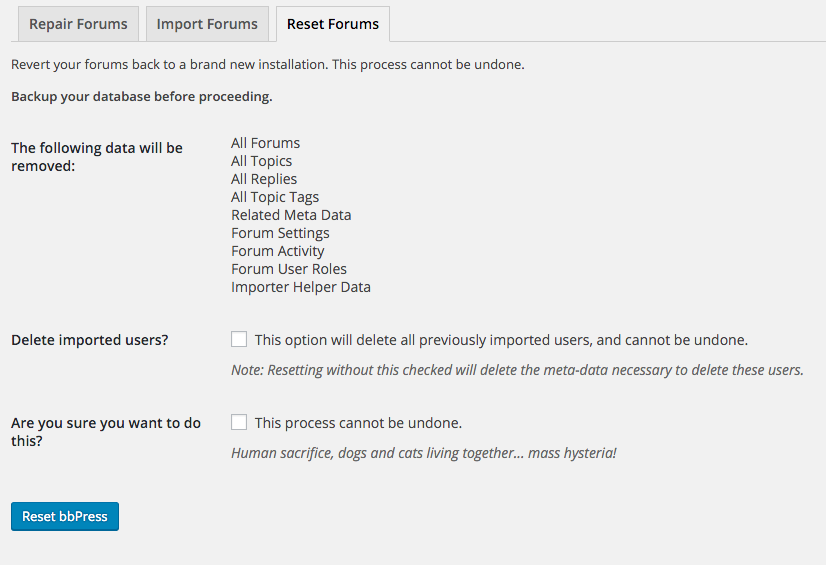
The “Reset Forums” tool includes the ability to delete all bbPress forum content and imported users, run this and that should get rid of your ~30k imported users.
After that, try changing that “special” back to “Snitz” (I think thats what it was) and se what happens.
March 28, 2016 at 5:03 pm #173552In reply to: Create similar topics to several forums at once
ModeratorAdd this in your functions.php or in a plugin:
add_filter( 'manage_edit-forum_columns', 'casiepa_edit_forum_column' ) ;
function casiepa_edit_forum_column( $columns ) {
	$columns['id'] = __('ID');
	return $columns;
}

add_action('manage_forum_posts_custom_column', 'casiepa_manage_forum_columns', 10, 2);
function casiepa_manage_forum_columns($column_name, $id) {
    global $wpdb;
    switch ($column_name) {
    case 'id':
        echo $id;
            break;
    default:
        break;
    } // end switch
}
It will add the ID column when you go in your Dashboard to ‘Forums’.
Pascal.March 28, 2016 at 2:47 pm #173550In reply to: Importing Large Xenforo Forum
Wendell
ParticipantI reset the forum, then upgraded to bbpress 2.6 alpha, checked the “purge previous import” checkbox (just to be sure), then started the import process again and got this lovely error message:
“WordPress database error: [Specified key was too long; max key length is 1000 bytes]
CREATE TABLE blp_bbp_converter_translator ( meta_id mediumint(8) unsigned not null auto_increment, value_type varchar(25) null, value_id bigint(20) unsigned not null default ‘0’, meta_key varchar(255) null, meta_value varchar(255) null, PRIMARY KEY (meta_id), KEY value_id (value_id), KEY meta_join (meta_key, meta_value) ) DEFAULT CHARACTER SET utf8mb4 COLLATE utf8mb4_unicode_ci”So I unchecked the purge option and tried again. It’s currently importing the users.
March 28, 2016 at 11:31 am #173541In reply to: Documented import from snitz access database
ParticipantAs I checked the converter again, I found that during the test period I changed the default value to “special” in this part below.
// User password verify class (Stored in usermeta for verifying password)
$this->field_map[] = array(
‘to_type’ => ‘user’,
‘to_fieldname’ => ‘_bbp_class’,
‘default’ => ‘special’
);
Is this could cause the error?March 28, 2016 at 6:56 am #173528In reply to: Vertical alignment of text
Robkk
ModeratorI see you are using bbPress new UI, see if that plugins styles are affecting the layout by temporarily deactivating it, and see how the default theme looks in comparison.
March 27, 2016 at 2:20 pm #173498In reply to: How to change/create fourm roles
olliewe88
Participanthi again @robin-w
Ok so I have put the code below in the functions.php
function add_new_roles( $bbp_roles )
{
/* role the new role*/
$bbp_roles[‘bbp_Facepainter’] = array(
‘name’ => ‘Facepainter’,
‘capabilities’ => custom_capabilities( ‘bbp_Facepainter’ )
);return $bbp_roles;
}add_filter( ‘bbp_get_dynamic_roles’, ‘add_new_roles’, 1 );
function add_role_caps_filter( $caps, $role )
{
/* Only filter for roles we are interested in! */
if( $role == ‘bbp_Facepainter’ )
$caps = custom_capabilities( $role );return $caps;
}add_filter( ‘bbp_get_caps_for_role’, ‘add_role_caps_filter’, 10, 2 );
function custom_capabilities( $role )
{
switch ( $role )
{/* Capabilities for ‘Facepainter’ role */
case ‘bbp_Facepainter’:
return array(
// Primary caps
‘spectate’ => true,
‘participate’ => true,
‘moderate’ => false,
‘throttle’ => false,
‘view_trash’ => false,// Forum caps
‘publish_forums’ => false,
‘edit_forums’ => false,
‘edit_others_forums’ => false,
‘delete_forums’ => false,
‘delete_others_forums’ => false,
‘read_private_forums’ => true,
‘read_hidden_forums’ => false,// Topic caps
‘publish_topics’ => true,
‘edit_topics’ => true,
‘edit_others_topics’ => false,
‘delete_topics’ => false,
‘delete_others_topics’ => false,
‘read_private_topics’ => true,// Reply caps
‘publish_replies’ => true,
‘edit_replies’ => true,
‘edit_others_replies’ => false,
‘delete_replies’ => false,
‘delete_others_replies’ => false,
‘read_private_replies’ => true,// Topic tag caps
‘manage_topic_tags’ => false,
‘edit_topic_tags’ => false,
‘delete_topic_tags’ => false,
‘assign_topic_tags’ => true,
);break;
default :
return $role;
}
}}However, it is still not working. It shows when I go to Users,user,Forum Role and set it to facepainter but when I save it, it still doesn’t set their fourm role to face painter?!
Thanks for you help
March 27, 2016 at 5:36 am #173479In reply to: How to put the post box on top?
ModeratorDo what @casiepa said and just put the bbPress template
content-single-forum.phpin a folder called bbpress in your child theme, and edit the file.A guide like this would help you figure out how you can customize the bbPress default theme in a child theme.
https://codex.bbpress.org/themes/theme-compatibility/
Just make your file look similar to this gist.
https://gist.github.com/robkk/059c1f87b3d21cf75dd9
@tech55541 thanks for helping out in a few topics in the support forums, but your code shows undefined messages in the user profile subscriptions section if you are subscribed to a forum.
March 26, 2016 at 10:35 am #173428Topic: WordPress /author/ page and bbPress /user/ page
in forum Troubleshootingdalemiles
ParticipantHey guys.
I’ve tried searching about this but not really been able to find a definitive answer, especially for my own situation.
I currently have a live site, where users NEED to use WordPress default domain.com/author/username
Currently when you go to the profile of a poster in the bbPress forum it takes you to a different user page domain.com/user/username
I need this to direct to domain.com/author/username as the default WordPress profile contains information about the user (feedback ratings, post details + more – its a classified site).
Now I’m not 100% fussed on whether the domain.com/author/username page displays post details, as the ‘forum’ I’ve having is a single forum and more like a general chat area of the site. I’m not looking to setup a fully fledged forum.
However the most important thing is having their profiles direct to their author page instead of their bbPress user page.
If there is code I can place in the author.php file (WordPress one) that will check their bbPress details regarding their posts, that would be great. I’ve tried copying the code from bbPress user-profile.php but that didn’t work.
Can any one offer any assistance? I’d deeply appreciate it.
Thanks
bbPress: Version 2.5.8
WordPress: Version 4.4.2
Website: http://www.airsofttrader.co.nz (You can see the example of author pages, however bbPress is not installed on the live site – its installed locally.)March 26, 2016 at 9:11 am #173411Topic: Changing BBPress Templates
in forum Themesmigno
ParticipantSup guys,
im currently working on a WordPress based Gaming-Theme and want to change a few of BBpress Templates.
Unfortunatly bbpress dont like the take the changes and always falls back to the default ones.My Theme folder looks like this:
%mythemename%/bbpress/%template_files_here%but everything i change here wont update…
So, im a doing something wrong with the bbpress folder there or is it just my dumbness ?March 25, 2016 at 10:24 pm #173390In reply to: Cannot login with chrome, says “blocked”
ModeratorI did get a blocked message at first from a user agent blocker on gronboekoby site, now it leads to the default WordPress login.
March 25, 2016 at 2:02 am #173300In reply to: Remove left indentation when viewing topic?
ModeratorThis issue is theme related, because bbPress is just inheriting the CSS styles from the themes stylesheet. Same thing with the other themes, there are just some styles that could affect some classes in the code that can make the layout look different.
In the theme compat code in bbPress, has it where you can use default WordPress conditionals like
is_single()which should show up for each single forum and topic, andis_archive()for the forum archive (forum root page) and topic archive (usually at yoursite.com/topics or forum root).So while you did create a single forum page using shortcodes as an easy to do workaround, as the code for the “indentation” is created by your themes CSS and only for single pages using ,while you created a simple page. When you enter the normal forum url in 2016 you will see the same “indentation” you see on topics.
You are on the money on what CSS to use to fix the issue, there is just some media queries that you need to add is all. There will be a slight margin to the right around 700px width when the sidebar goes under the content, but a page has that same margin in your theme and for consistency I just say leave it in.
This CSS should help your help solve your issue.
@media screen and (min-width: 61.5625em) {
.bbpress .entry-content {
  float: none;
  width: auto;
}
}
March 24, 2016 at 6:29 pm #173284In reply to: Remove left indentation when viewing topic?
Valery Kondakoff
ParticipantThank you for adding a ticket. Hopefully this will be fixed.
Maybe it is a good idea to add another ticket as well: the bbPress does not follow switching color scheme in the default WP theme (Twenty Sixteen). Here are the details and a screenshot: https://bbpress.org/forums/topic/bbpress-does-not-support-the-default-wp-theme-when-switching-to-dark-scheme/
March 24, 2016 at 5:57 pm #173281In reply to: Remove left indentation when viewing topic?
ParticipantJust tested several default WP themes with bbPress (from 2010 to 2016). Here they are: http://vkondakoff.synology.me/photo/share/8erFChRr
2010, 2012, 2013 and 2015 are looking good. 2011 is cropped by it’s right side even without anything in WP sidebar. 2014 is just to small is size (don’t know why). 2016 is just cropped on the left side…
March 24, 2016 at 4:59 pm #173278In reply to: Remove left indentation when viewing topic?
ParticipantPascal, thank you for help!
The theme used is the default (for the WP 4.4.2) Twenty Sixteen. This is a fresh install, no theme modification or other plugins are used. Can we think of this issue as of a bug?
March 24, 2016 at 4:35 pm #173275TKServer
ParticipantI had the readme text setup right but all I’ve read on the screenshot locations said to put them inside of the assets folder. I’ll update and see if I can get the screen shots fixed.
How about getting a default image then?
-
AuthorSearch Results

