ahh..if you are saving in ‘text’ view, try changing to ‘visual’ or if you are in visual view try going to text. Sometimes the editor does funny things to stuff it sees as code. Once you have fixed it, try and not edit anything on the page, or if you do check whether it has changed the code, and change the code back as last thing.
It’s an annoying bug in the wordpress editor where it get’s over-keen to ensure that code doesn’t screw up how it stores, but I’d prefer it to do that than muck up the database !
Yea I forgot to mention I had tried that fix Robin, sorry.. I did some more searching and found
that one person fixed it using a multisite install and another
https://wordpress.org/support/topic/bbpress-forum-homepage-displaying-oddly
Pinboard with BBPress
I’m in the process now of trying Defkon1’s solution from the first url
I can definitely foresee a mobile theme would be required, as I can’t seem to get 2.5.3 to work properly on mobile, and I have no idea how to modify the default theme to work best on mobile. I have a custom theme installed on my WordPress site, so definitely a mobile “modification” at least would be applauded in my mind.
I am using WordPress MS (version 3.8.1) with bbpress and buddypress.
I have the wp-admin folder on the host server password protected as a security measure.
There are two things occurring that I cannot figure out:
1) When a logged-in user tries to go to any forum, or a topic, the web browser is asking for a password to access wp-admin. Entering the password or clicking cancel does not appear to change anything. This does not happen when someone is not logged in.
2) When logging out from the “edit profile” screen, the user again gets the password request, and after clicking cancel is taken to a registration/lost password default screen.
These things occur on both Firefox and IE. Thanks in advance for any help I can get to solve this annoying issue. 🙂
Hi,
I started a bbPress to test and i have a huge problem.
My theme have a few page templates, including full width pages and pages with sidebars. bbPress, in my case, uses full width for the index and a sidebar page template for the topics.
I want bbPress to use the full width template everytime, but i don’t know if the modification needs to be made to bbPress or my template.
Maybe someone can help me with that ?
Regards.
You want to use the /dev branch of both projects:
https://translate.wordpress.org/projects/bbpress/dev/sv/default
https://translate.wordpress.org/projects/buddypress/dev/sv/default
On each of the above pages select ‘.mo’ from the dropdown at the bottom of the page and click export.
Rename each file to buddypress-sv.mo & bbpress-sv.mo
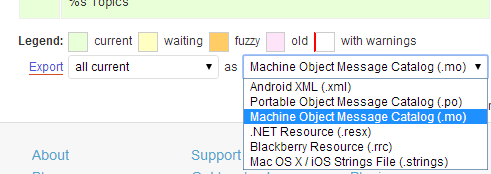
The extra instructions on the BuddyPress site might also help, I’ll try to get the bbPress updated soon also.
https://codex.buddypress.org/developer/translations/
Suspect that there are values in a “forum” post that you need to populate.
I suspect (but don’t know) that the forum will be a category, and the topics will be posts. Therefore you need to link your topic to it’s forum so need to link the post to it’s category.
Try searching round phrases such as “wordpress post category in database” which got me a bunch of articles eg
http://stackoverflow.com/questions/2848505/how-does-wordpress-link-posts-to-categories-in-its-database.
‘I guess the developers don’t visit their own forum anymore?’ – sounds critical, the developers are busy developing – remember this is all free stuff, and no-one pays their, or indeed my time to do this. They do regularly visit, but I would not expect to get a load of development advice for free to do something that is not in significant demand. Even writing this took ten minutes !
I hope you find a solution, and in the spirit of free open source, post the solution when you get it. I’ll add it to the codex, so that others can benefit.
Regards
Robin
@netweb Thank you! But I have found this https://translate.wordpress.org/projects/bbpress/2.3.x/sv/default but how do I get it in my .mo file? Sorry, but Im a newbie to this! =(
hi there – new to bbPress
followed you instructions on getting started; created my forums page and added a few forums & topics, yet the forums page layout is one continuous string of text.
any advice on how to address this?
WordPress 3.8.1
bbPress Version 2.5.3
http://cynergycrossfit.com/cynergisticlife/forums/
appreciate your help!
not in the core, but I believe this plugin does what you want
https://wordpress.org/plugins/bbpress-direct-quotes/
Think this is beyond the scope of a help forum ! It would take me much research and many hours to document.
Suggest you post to
http://jobs.wordpress.net/
and see if someone will create it for you.
@mordauk: In the trac you posted a screenshot which shows a link to subscribe to forums. This links is at the top of the forums, in the header row. Can you tell me if this is where the link was positioned in the final release as I can’t find it in my installation?
bbPress 2.5.3
WordPress 3.8.1
twentyeleven theme.
Many thanks
Glyn
Can’t explain,
The back office “replies” just not work ! see :
wordpress 3.8.1
bbpress 2.5.3
hueman theme
dev version, localhost.
Hi Guys.
Looking at the trac I can see that forum subscriptions has been implemented in bbpress 2.5:
https://bbpress.trac.wordpress.org/ticket/2299
…but I can’t see how to subscribe to a forum.
I have “Allow users to subscribe to forums and topics” enabled in the dashboard and am using bbpress 2.5.3
Hello!
I have installed both Buddy Press and BB-Press to my wordpress installation working as a intranet for our company.
I have found some file to change the Buddy Press area to swedish but can´t find anything to the BB-Press area. The only thing I found was from early 2006-2009, I guess it have happen very much since then.
Can anyone help me, I have scanned the internet for some .mo files but didn´t found anything. =(
/ Rebecca
Hello @jamestranm , can you share how you did it please?
Want to do the same thing for the reply section and the topics section ^^
(I would like topics in bbpress with the same template as my wordpress theme comments)
thank you!
@netweb
I don’t need their role or title. For some reason the avatars will just not come up in the loop outside of the mychild/bbpress/loop-single-forum.php files and mychild/bbpress/loop-single-topic.php. So it works fine on index pages.
I’ve tried all of the but nothing
Here’s what the code looks like right now:
<?php $args = array( 'post_type' => 'topic', 'posts_per_page' => 10 );
			$the_query = new WP_Query( $args );?>

<?php if ( $the_query->have_posts() ) : ?>

  <!-- pagination here -->

  <!-- the loop -->
  <?php while ( $the_query->have_posts() ) : $the_query->the_post(); ?>
   <?php bbp_author_link( array( 'post_id' => bbp_get_forum_last_active_id(), 'size' => 32 ) ); ?>

	<a class="bbp-topic-permalink" href="<?php bbp_topic_permalink(); ?>" title="<?php bbp_topic_title(); ?>"><?php bbp_topic_title(); ?></a>
  <?php endwhile; ?>
  <!-- end of the loop -->

  <!-- pagination here -->

  <?php wp_reset_postdata(); ?>

<?php else:  ?>
  <p><?php _e( 'Sorry, no posts matched your criteria.' ); ?></p>
<?php endif; ?>
This worked for getting the original post author, but I need the latest active poster to appear<?php echo get_avatar( get_the_author_meta( 'ID' ), 32 ); ?>
Is there a wordpress function equivalent for this function: bbp_get_forum_last_active_id() that I can use with get_avatar() ?
What file do these functions reside in? Maybe I could copy the functions out and make new ones in mychild/functions.php or see if something wrong and replace the file?
Thank you for the help!
Hi,
I’ve hit an issue that is critical for my site to function, and can’t figure out where to go to fix this. If you are a service professional, please let me know, I’d be happy to pay for a fix.
We launched our site, and have found a weird bug where users who have the Site Role – Subscriber [through Contributor] and Forum Role – Participant [through Keymaster] which is most everyone CANNOT view any original topic posts, only replies if any. Even if you are user who is creating the topic, once you hit submit, you’re brought to your topic, and you cannot see the topic content any longer. Here’s a snapshot of what you do see: http://bit.ly/1ctPQv7 [replies are shown, but the actual topic content which goes above the replies is missing]
Here’s the same post as viewed from a User set as an Administrator: http://bit.ly/NzMu4K [notice the original topic content and controls that are visible]
The only user type who can see the topic post content is Administrators, which certainly isn’t workable for a forum!
Please help, and contact me if you are a support professional with this forum software. Where do I look for what could be causing this?
This makes no sense, and I can’t figure out how to fix this. I am willing to provide username and password to any individuals that can help troubleshoot. The site is protected with wishlist so you won’t be able to view the forums without access, it can be located at http://mbicoachspot.marthabeck.com
Wordpress 3.8
BBpress 2.5.3
BuddyPress 1.9.1
suggest you try :
http://jobs.wordpress.net/
you can get help for anything, no matter how small !
unfortunately you are right. The widgets that bbpress comes with can only be changed by filters, and that may be your solution.
Alternately you can cut the widget code into a plugin. I do this to alter the wordpress login plugin, and once you get into it it’s quite easy, just google creating a plugin for lots fo resources.
You’ll need some plugin code, and then to copy the widget into the plugin. You’ll then need to change the widget name so it doesn’t conflict.
If having themes and plugins in wp-content was a security issue, then WordPress all over the world would be hacked daily, and if wp-content is insecure then all wordpress folders would be and the locations of the wordpress core are all standard.
I’d just put bbpress into a wp-content folder
If you really want to stick with your route, then search the whole bbpress plugin for “wp-content” and just do a copy/paste. it may be one occurance, it could be hundreds.
Of course you’ll need to repeat on any upgrade
use the bbpress logon widget in a sidebar on your forum page, and it’ll stay on the forums.
edit : sorry just read your entry again, and that’s exactly what you are doing !
I disable dashboard for all my users – untick “show toolbar when visiting site”
If they logout using the widget (which is their only option if they don’t have toolbar), then they don’t get the WordPress login page.
You can customose the generic login form if you want to keep it see
https://codex.wordpress.org/Customizing_the_Login_Form
How long have you had the forum?, and how long have you had the problem?
Have you done any additional plugins, wordpress, bbpress or other plugin upgrades, or changed css or functions recently?
What versions of wordpress and bbpress are you on?


