Skip to:
Content
Pages
Categories
Search
Top
Bottom

Search Results for '"wordpress'

Viewing 25 results - 7,676 through 7,700 (of 26,877 total)
  • Author
    Search Results
  • #160467
    Robin W
    Moderator

    Donlt worry we all had to start at some stage !!

    1.

    Now, because I did that, anyone that registers registers for a WordPress account. I’m not sure if that’s correct.

    yes that is how bbpress works it uses a worpress account. As long as you set Dashbiard>settings>general default to subscriber, your user won’t be able to do anything in wordpress

    2. set the admins to hidden as per docs

    Forum visibility:

    Public – Anyone can see these forums
    Private – Only logged in registered users with a forum role can see these forums
    Hidden: Only Moderators/keymasters can see these forums

    If you want more granular access, then use

    https://wordpress.org/plugins/bbp-private-groups/

    3. no sorry not a ‘diary’ way- wordpress not bbpress so try their forum, but

    4.

    I am pretty sure I can do it via the forum, I just don’t know how to do it. I know it’s a permissions thing and I can make certain posts hidden.

    https://wordpress.org/plugins/bbp-private-groups/

    and set a forum per user, but you’ll need to do this manually as part of user set-up, so if only say one as day signing up that would be fine, but if hundreds !!

    4.

    ‘I was just told we need to also make it so that the posters are anonymous’

    No idea why, it is entirely up to you how you set you site up
    – if you want no-one to comment then set comments off in settings>discussion>default article settings.
    – if you want just registered – then also set ‘users must be registerd…’ in other comment settings

    Come back if you need further help 🙂

    #160463
    Robin W
    Moderator
    Robkk
    Moderator

    Is this the same code that bbpress is using on this forum?

    i dont think so, i think its something else, maybe just BuddyPress but i think they took out the notifications for each @mention.

    if you use what i am talking about you type @ then after that a bunch of users names show up that are in the topic for you to put their name in.

    You are also talking about a plugin functionality

    i mean a plugin that you can paste code snippets llke the one i put above into ,

    https://wordpress.org/plugins/functionality/

    Is there also a plugin who can do this?

    For @mention notifications , BuddyPress. For placing code snippets you can use the plugin i mentioned above.

    #160453
    Robkk
    Moderator

    would this plugin help out with what you are trying to do.

    https://wordpress.org/plugins/bbpress-post-topics/

    instead of embedding a forum each post , it is a topic.

    then you could use wordpress categories for each type like TV or Movies then

    their is a some settings added to the comments metabox to specify what forum you want this specific topic would be in , then it would create the topic automatically based off the current post you are creating.

    Im not sure if it does what you want to do , id say check it out and see if you can.

    you dont have to create categories for all the forums just create a couple forums like say TV and MOVIES for example then create topics for each post.

    #160450

    In reply to: Request: Voting

    Chad R. Schulz
    Participant

    I’m trying Thumbs Rating. It doesn’t tie into any user meta, so you can’t restrict the voting to only registered/logged-in users. However, it works very well and very fast. It only adds post meta so it shouldn’t noticeably slow-down your site even with thousands of topics/replies.

    After activation, per the plugin developers instructions I put the following code into my loop-single-relay.php:
    <?=function_exists('thumbs_rating_getlink') ? thumbs_rating_getlink() : ''?>
    goes somewhere between <div class="bbp-reply-content"> and </div>
    –this is theme specific and has to be modified based on your needs. I found that placing the vote before or after and not inside the content works best as the “quote” function in the forum(s) gets screwed up with the added voting content.

    That means before/after the <?php do_action( 'bbp_theme_before/after_reply_content' ); ?>

    Of course, as a lightweight plugin some serious css work is required. And it would be best to place this modified .php file into a bbpress child theme folder to ensure it continues to work after updates.

    Good luck, Chad

    #160447
    Chad R. Schulz
    Participant

    I know of no simple way to create multiple forums with topics/replies for a site without using a pre-structured environment. I’m simply removing the “forum” look and putting each forum on it’s own WordPress styled post/page.

    Think something like what IMDB does with movies/talent–where every film/show/person gets its own discussion board.

    This way I can use bbpress’s built-in widgets and hooks to direct people to topics/replies while using WordPress menus/templates/tags to direct people to specific discussions.

    bbpress is basically a well-designed, feature-rich custom post type plugin that creates post types for topics/replies inside a forum structure. So, I’m using those custom post type functions while not using the structure.

    Oh, and sorry about the duplicate topics. I realized this question belongs more appropriately on this forum and had no way to delete the previous post that I put over on “Troubleshooting”.

    Thanks, Chad

    #160444
    leeleepompom
    Participant

    Hi everyone,

    I wasn’t sure where to post my question. I apologize if there are others like mine out there.

    Extreme WP noobie here, I’ve been given the task of making a forum.

    I downloaded bbPress, everything seems to have been set up. When I try to register, I received an error stating “User registration is not opened”.
    I followed the directions from http://tinyurl.com/ofaf5qn. Then, I went back and turned on anyone can register. Now, because I did that, anyone that registers registers for a WordPress account. I’m not sure if that’s correct.

    Second: I need to have a public forum, which I created. Member-only forum, also created (but having that registration issue). Also, we want to have an admin forum, obviously just for admins. How do I do that last part? Only give access to certain people?

    Third: Not sure if you’re the People to talk to about this, but, we also want to have a section in our website, preferably in the forum, for our clients to have a journal/diary. They will log their food for the day. It will be private and just for them. Any advice on that? I tried using the DiaryPress plug in, but i can’t seem to figure out how it works and there isn’t any documentation online.

    I am pretty sure I can do it via the forum, I just don’t know how to do it. I know it’s a permissions thing and I can make certain posts hidden.

    How easy is it to create a login just for them? We don’t want to use something like Penzu, because we want it tied to us.

    I was just told we need to also make it so that the posters are anonymous. I don’t want to have people to post anonymously, I want them to sign up.

    Is there a way to do that?

    I’m sorry for the novel. But as you can see. I am way way way over my head and need a lot of help.

    #160442
    Robkk
    Moderator

    dont make duplicate topics

    you probably dont have to make categories/sub-categories for each forum you are making if you are going to end up putting the forum in a post/page.

    But i have no idea why you would need to do this type of thing, why not just use bbPress or just WordPress by itself instead of redirecting one to another.

    #160425
    Robkk
    Moderator

    ok i got the information from my contact form , and i will log into your site in a minute.

    I dont know whats the issue with you not sending to my normal email though??

    i just tested in this topic

    http://gptxffa.com/wordpress/?topic=test-test-test-test&lang=en_US/

    it did not pull the reply form under the reply i was replying to , it did lead to the bottom but the reply threading did work.

    you said that it wasnt working well in a sticky topic?? it should work.

    was this the sticky topic you were talking about??

    http://gptxffa.com/wordpress/?topic=site-commentssuggestions&lang=en_US

    that had the issues??

    #160420
    Robkk
    Moderator

    if you use BuddyPress and bbPress together the profiles will most likely merge together, but you could force to just use the bbPress profile i think.

    And i think the members page from BuddyPress should link to the users forum profile if you forced it.

    i never tried it before but this might help you.

    it looks like you create a custom page template, so create a members page then choose that template and i should show up.

    http://www.hongkiat.com/blog/wordpress-display-authors-pagination/

    #160418

    In reply to: Login fails for Chrome

    Ronosho
    Participant

    Hi Robin W
    As I stated, the problem occurs when using Chrome now also affected by safari.

    I have not tried Firefox, but it is working in good oll IE.

    After searching the net for a couple of hours I managed to find a solution.
    The owner of the website didn’t have the same WordPress Address (URL) and site Address (URL)
    I only needed to remove www. and the problem was solved.

    I was actaully just about to post this, thanks anyways guys

    #160413
    Robkk
    Moderator
    #160408
    Robkk
    Moderator

    @gptxffa

    you can also create me a subscriber/participant account and send me the login details through email so that i can see the problem first hand.

    Contact

    also off topic , but upgrade your web browser to something like google chrome.

    IE 8 is just horrible.

    #160407
    tummybos
    Participant

    Thanks very much @robkk. The link on wp user query is a great tool to solve my problem.
    Concerning the use of BuddyPress, i think the link will be a problem in the sense that the links to the profiles that will be displayed will not link to the users forum profile. I want the links to go to user’s bbPress profile page, not the default wordpress user page nor the buddypress profile.
    So I have decided to go by the Wp user query way, but please how am I going to create the php code. Am i supposed to wrote it in a page? or where should I put the code and how will i create the page?
    Thanks.

    #160406
    Robkk
    Moderator

    @gptxffa

    Showing the comment your are replying to next to the reply to: text bbPress does not do that. That sounds like some custom development go to http://jobs.wordpress.net/ and post a job.

    as for reply threading , i guess not threading??

    see if its a theme or plugin issue

    Plugins

    Deactivate all but bbpress and see if this fixes. if it does, re-enable one at a time to see which is causing the error.

    Themes

    If plugins don’t pinpoint the problem, as a test switch to a default theme such as twentytwelve, and see if this fixes.

    Then come back

    #160403
    gptxffa
    Participant
    #160401
    gptxffa
    Participant

    Here is a screen shot which may help

    http://gptxffa.com/wordpress/wp-content/uploads/2015/03/reply-issue.jpg

    #160397
    Robkk
    Moderator

    what version of bbPress / BuddyPress / WordPress are you using?

    #160390
    Robkk
    Moderator

    This sounds like some custom development.

    I suggest you hire a developer , go post a job at http://jobs.wordpress.net/

    #160389
    Robkk
    Moderator

    There is a way using the wp user query

    https://codex.wordpress.org/Class_Reference/WP_User_Query

    plugins like BuddyPress have this type of feature too.

    bbPress does not have a feature/shortcode like this, but if you use BuddyPress , bbPress is compatible with it.

    #160362
    Stephen Edgar
    Keymaster

    You may need to extract the users out to a separate table, or you may be able to treat these users as “anonymous users”, I’d suggest first though I’d look at mapping some of the fields for the content only as that should not take much time to get up and running.

    First you want to do this with bbPress 2.6 ‘alpha’ rather than the current 2.5.6 release as there are significant improvements to the importers in the upcoming version.

    You can get your hands on 2.6 alpha via https://wordpress.org/plugins/bbpress/developers/ and it is listed under “Other Versions” as “Development Version”
    Or the direct download link https://downloads.wordpress.org/plugin/bbpress.zip

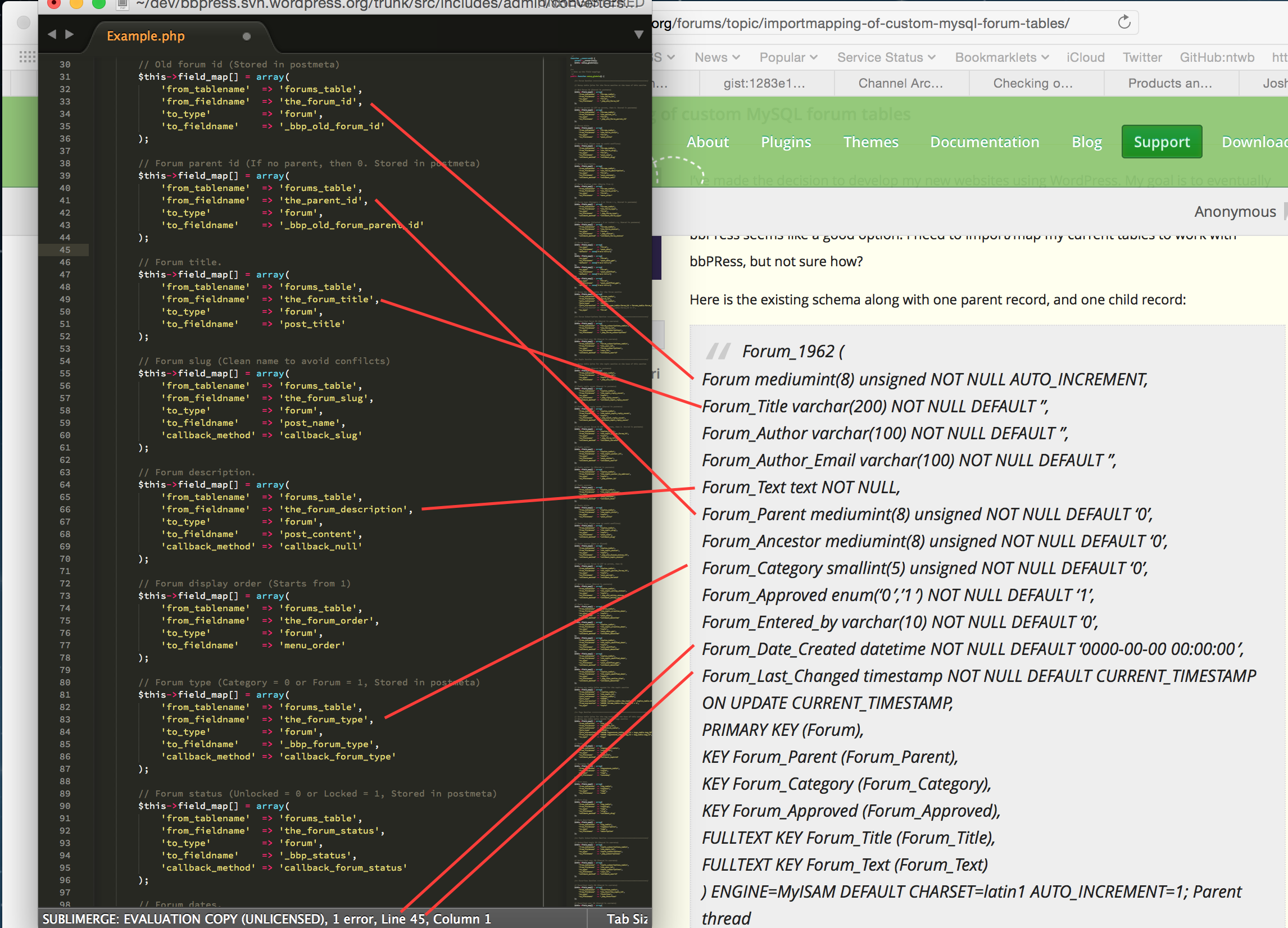
    Next you want to make a copy of Example.php from the includes/admin/converters folder of the plugin to MyConverter.php and in that file replace any instance of Example with MyConverter (this is case sensitive to be mindful of that)

    Next up start mapping the fields from your schema to the fields in MyConverter.php

    In the following screenshot I’ve mapped drawn lines to the easily concluded fields, any field mappings that you do not use you can simply delete, ideally using as many as you can will ensure the best bbPress experience for your data though.

    Take a stab at doing the above for the rest of your database, topics, replies etc and get back to us.

    If you need a place to host code snippets, use GitHub Gists: http://gist.github.com

    #160352
    impressor
    Participant

    Notice: bbp_setup_current_user was called incorrectly. The current user is being initialized without using $wp->init(). Please see Debugging in WordPress for more information. (This message was added in version 2.3.)

    #160348
    impressor
    Participant

    Notice: bp_setup_current_user was called incorrectly. The current user is being initialized without using $wp->init(). Please see Debugging in WordPress for more information. (This message was added in version 1.7.)

    Why? and How to fix?

    Buddypress also had this error, but they fixed it almost 2 years ago. Something to do with calling is_user_logged_in()

    See here: https://buddypress.org/support/topic/debug-error-bp_setup_current_user-was-called-incorrectly/

    #160347
    phil_b
    Participant

    Hi all,

    I hope you guys can offer some advice suggestions here.

    This is the situation:

    – I have a wordpress multi-site setup (4 blogs in total)
    – There are currently 4 xenforo forums I need to import. These need to be imported in to my 4 multi-site blogs. One xenforo forum to each of the 4 blogs.
    – all users from all xenforo forums, imported in to each of the 4 blogs should be able to visit each of those 4 blogs and post in any they choose

    The goal is to ultimately have a single user base within my wordpress multi-site, but with 4 different forums running (one under each blog), where users can access and post data in all of them (as well as submit regular post comments etc)

    The main issue I can see me having is that each xenforo forum will have users who’s IDs start at 1, and go up to about 15,000 (lots of users!!). If I import one forum in to the first multisite blog, then what happens when I import the next forum in the second multisite blog? Will users get overwritten? Will forum topics/replies get attributed to the wrong user?

    Note: I am also running buddypress.

    A solution I have considered is to import all users from xenforo forum 1. Then loop through all users in xenforo forum 2 to update their ID’s to +15,000 (i.e user with ID 1 becomes user with ID 15001 etc). Then import that forum in to bbpress. Then do the same with xenforo forums 3 and 4 (+30000, +45000).

    That is a hefty task though.

    Any advice/help would be really appreciated!

    #160344
    Robin W
    Moderator

    writing an entire forum code for wordpress as a solo project seems to be a significant challenge, so using bbpress and amending that would seem to be a good strategy.

    ok, since you seem to be very php savvy, suggest you go to

    https://codex.bbpress.org/import-forums/

    and simply amend one of the templates there for your forum.

Viewing 25 results - 7,676 through 7,700 (of 26,877 total)
Skip to toolbar