First and foremost, let me go ahead and apologize if this isn’t the right place for this.
With the latest major WP update, it seems that my forums have become broken. When viewing a topic or thread, the entire site’s theme isn’t loaded, resulting in a white screen with very minimal content on it. I’ve switched out themes to see if maybe it was just a theme issue, and the results were the same.
Some information about my site:
Forum URL: http://cosplay-central.com/forum/
Wordpress Version: 4.6.1
bbPress Version: 2.5.10
Current Theme: Esteem
Hello,
there is a problem with bbpress, that prevents SEO Plugins to do there job.
The problem exists only for the forum index page. Also if you use a standard page an paste the [bbp-forum-index] shortcode.
* That page is not handled anymore as a page, so it gets a noindex tag by the SEO plugins.
* It’s also not possible to add a custom title, description or other meta tags.
The bbpress forum index is completely ignoring all of that settings.
The result is a noindex forum index without a reasonable title and description.
Example:
Forum index
Screenshot of the ignored settings:

I talked with the codes a the German WPseo plugin.
They told me, that bbpress is using so crude things for that index and doesn’t use wordpress standards.
I also found here in the forum and on Google, that Yoast and All in one SEO Pack have the same problems with bbpress.
Is there a way to get that fixed?
A forum index with nofollow makes no sense at all.
thanks
Jochen
RESOLVED: before we had time to try the wireshark tools we ran a script on the database looking for broken relationships. Found that a post that had been removed using correct tools somehow had broken a relationship and the replies page would not load. Here is what happened:
1. A member joined our forum and spammed the crud out of it.
2. Akismet caught the spam and blocked it all, marking all topics and posts as “spam”.
3. One of our keymasters marked the user as a “spammer” according to the moderation tools provided by bbPress.
4. One of our admin staff moved the spam topics and posts to the trash, using the tools on the WordPress admin.
5. The same admin staff emptied the trash using the tools on the WordPress admin.
After this, they did not notice the replies page was not working or that people could no longer post. Later when people reported they could no longer post, our admin went to the WordPress admin and got a 503 error on the “replies” page. We fought this 503 error issue for nearly 1 week. After finding one broken relationship between a topic and the replies in that topic, we fixed the relationships and the 503 error went away. Now, all the forum is working perfectly.
So, somehow, using all the tools provided by bbPress, a user was marked as a spammer, their spam was blocked, trashed and emptied. And then the entire forum was broken due to a broken relationship. Fixed now, but really strange it could happen in the first place.
Hello. I’m getting this error when attempting to update the bbPress plugin on my site:

As suggested here on Stack Overflow, I made sure my file permissions are set properly:

I even tried renaming the bbpress directory to bbpress.old without success. Does anyone know how to fix this? I’m not necessarily opposed to reinstalling the plugin, but I want to make sure it’s not going to wipe out any related database records.
You’re welcome all. Happy to be able to help 🙂
@wasanajones You can use get_the_excerpt( $se_post ) or just post_excerpt property of the WP_Post object:
Edit the last callback from previous code to go as this:
add_filter('bbp_get_form_topic_content', function( $body ) {
	global $se_post;
	if( $se_post ) {
		return $se_post->post_excerpt;
	}
	return $body;
});
I did not test this but I am sure it should work.
Best,
Samuel
I want to join WordPress forum. Recently i joined bbpress.org forum. Tell me another best forum plugins for wordpress? Help me.
OK, so I have now purchased the Pro version and it still doesn’t work! EVERYTHING ON MY SITE WORKS GREAT EXCEPT THIS MESSAGES? So I don’t see why it should be a problem with Wamp;
Have produced new WP site on Wamp 2.5 on my PC. I have installed bbp-messages 0.2.3.1 and already have bbpress 2.5.8 forum. WordPress 4.6.1 Sport Theme by Theme Canon Win10
THE WHOLE SITE and forum IS WORKING FINE, but When I try to use bbp-messages Lite, it returns the following:
FORBIDDEN: you don’t have permission to access wordpress/members1/http:/localhost/wordpress/members1/ on this server. Apache/2.4.9 (Win64) PHP/5.5.12 Server at localhost Port 80.
Would be very grateful for any advice as I am ready to publish this web – this my first WP site!
Update. Today we did the following:
1. Deactivated all BuddyPress and bbPress plugins. Uninstalled all BuddyPress and bbPress plugins. Removed all BuddyPress and bbPress data from the database, but kept a backup copy of the data and tables.
2. Installed fresh WordPress on fresh server. Installed new, fresh plugins.
3. Site worked.
4. Replaced data from backup.
5. Entire site works, EXCEPT there is a 503 error when people try to post a reply on a forum, and a 503 error when we try to go to the “replies” page from the wp-admin.
So, maybe something in the data? Could someone have posted a reply that has some content that is breaking the php code when trying to see the Admin panel “replies” page or when people try to post a reply?
We have learned another thing. When people post a reply, the reply DOES go into the db and it is visible to other members on the forum. HOWEVER, the person posting the reply gets a 503 error during the process and has to come back to the site fresh to see the forum, including their post.
Something is causing a 503 error ONLY when replying OR when we try to access the Admin “Replies” page as admin. It is very very strange.
I wanted to introduce myself to the forum. I just registered and I have been using bbpress for about a week now! I am running WordPress 4.6.1 and bbpress 2.5.11…. I created a website and forum page @ http://www.theintrovertspeaksblog.com I would like some honest input as to the integration of bbpress into the website. I also have a question, On the lost password page it displays a blank screen with simple text box only as well as the reset password button. I temp fixed it by adding text above the box to direct the user to insert username or password. Is there a better way to do this?
It is the shortcode, but I think that you probably need to pay someone to do this – different theme work in different ways and clearly this is not within your current skillset
http://jobs.wordpress.net/
Have produced new WP site on Wamp 2.5 on my PC. I have installed bbp-messages 0.2.3.1 and already have bbpress 2.5.8 forum. WordPress 4.6.1 Sport Theme by Theme Canon Win10
THE WHOLE SITE and forum IS WORKING FINE, but When I try to use bbp-messages Lite, it returns the following:
FORBIDDEN: you don’t have permission to access wordpress/members1/http:/localhost/wordpress/members1/ on this server. Apache/2.4.9 (Win64) PHP/5.5.12 Server at localhost Port 80.
Would be very grateful for any advice as I am ready to publish this web – this my first WP site!
would need bespoke code.
You can get close by having forums per team and using
https://wordpress.org/support/plugin/bbp-private-groups
but without further code it wouldn’t restrict them to their own topics
no idea why it is not in core, but this I think adds that functionality
https://wordpress.org/plugins/gd-bbpress-attachments/
Maybe to help out a bit:
We run
PHP7.0-fpm (latest stable)
Nginx 1.10 (latest stable)
Ubuntu 16.04 (latest stable)
WordPress 4.6.1
bbPress 2.5.11
bbPress Advanced Statistics 1.4.02
bbPress NewTopics 1.0.1
bbPress No CAPTCHA reCAPTCHA 1.0
BuddyPress Version 2.7.2
BuddyPress Activity Plus 1.6.4
Buddypress Messages Spam Blocker 2.5
BuddyPress Profile Tabs 1.6.1
bbPress is tested with wordpress default themes. It maybe a conflict – you need to check plugins and themes
It could be a theme or plugin issue
Plugins
Deactivate all but bbpress and see if this fixes. if it does, re-enable one at a time to see which is causing the error.
Themes
If plugins don’t pinpoint the problem, as a test switch to a default theme such as twentyfifteen, and see if this fixes.
Then come back
ok, so try
https://wordpress.org/plugins/bbp-style-pack/
and go to
dashboars>settings>bbp style pack>forum templates to get one that is closer to what you want
and use
https://wordpress.org/plugins/bbp-private-groups/
to have private groups
I also have this problem and am running the current versions of WordPress and bbPress. Is there a fix for this yet? Thank you!
I’m currently working on a project for a client who wants to have the latest reply from any topic in a forum show up on the main bbpress page under the forum name. Is there a way to get this reply from the database using either built in functions or a wp_query. I also need to show the persons avatar, name, and when it was posted. Any help would be greatly appreciated. Dev site is at http://realestateinvesting.how/topics/. I can’t tell you exactly what version of bbpress they are using as the client hired a developer before me who hid the plugins unless your at a user level higher than admin. WordPress version is 4.5
Hello, I Installed wordpress correctly with an mySQL, installed a theme, then installed bbPress. When I click on Forums, I see they exist in the control panel, but when I visit the pages, they just don’t exist. My theme comes with a Basket because it comes with a market, and even the URL/Basket is missing. I’m not sure what is going on as I am new to WordPress. This site is keeping me afloat so any help i really appreciate.
Hi,
New to bbPress and finding it great to work with.
I have an issue though – on forum listings all topics get the wp-sticky class regardless of whether or not they’re sticky. This is the same whether or not there are any sticky topics in a forum.
Is this is a bug or am I missing something?
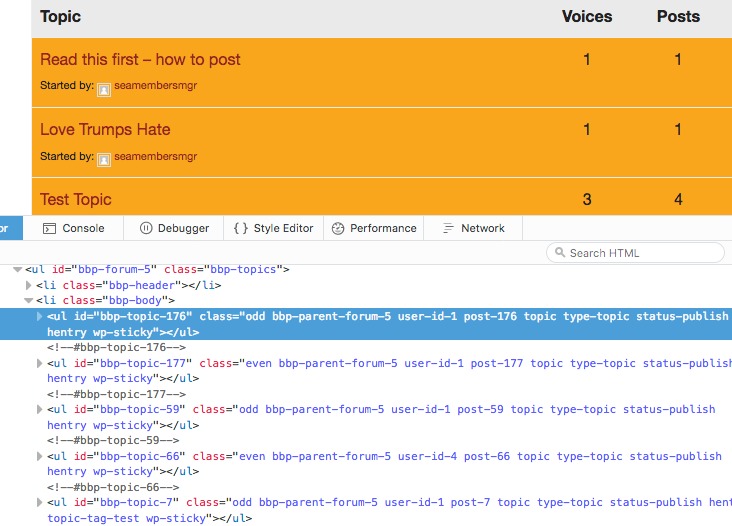
WordPress 4.6.1 / bbPress 2.5.11
Something has gone wonky and suddenly none of the original posts in my topics are visible. You can see all of the replies and make a reply.
bbPress 2.5.10-6063
I’m running the latest version of WordPress and Buddypress.


