HI,
My my name is E.J. and I’m enjoying your product!
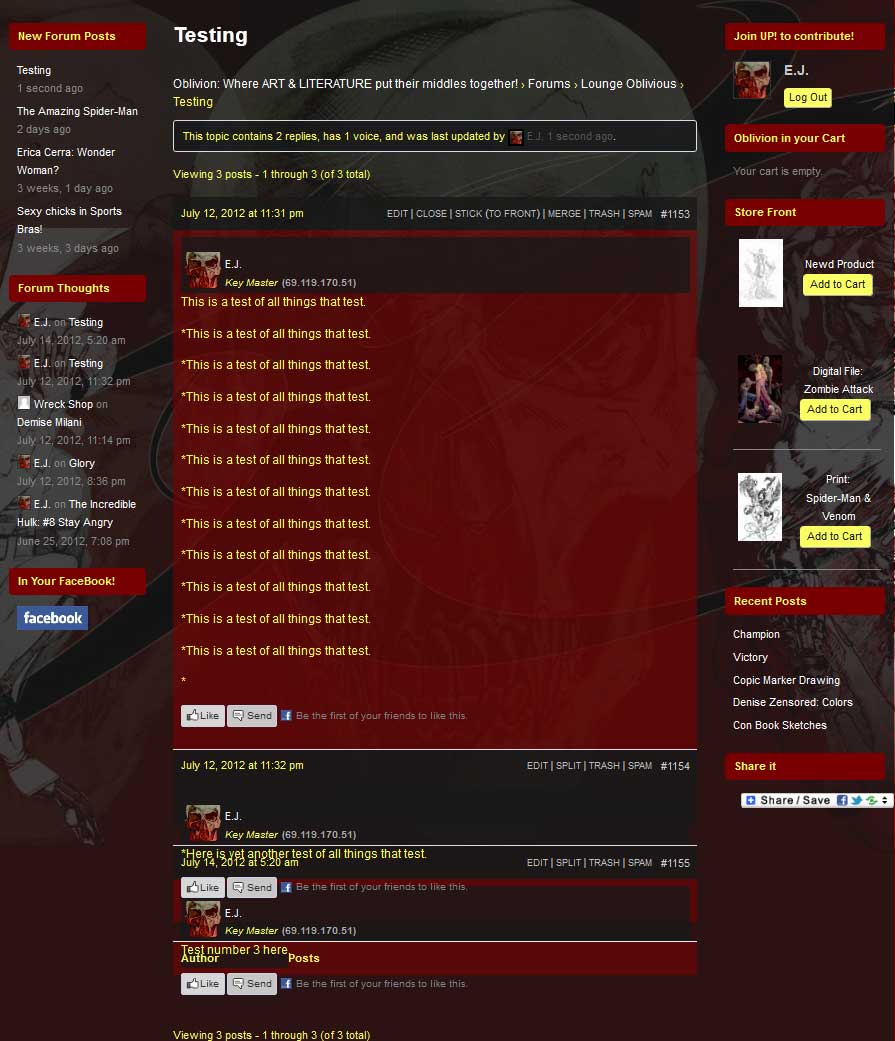
After updating to that latest version of WordPress and bbPress, I began to experience truncations in of replies to the topic threads in my forums. Everything was working well before the upgrades but now it appears that it’s not calling the proper CSS styles to the reply areas after the initial post, perhaps there’s a conflict with the theme styles. . . I’m not sure.
If there’s any advice you can offer I would greatly appreciate it.
…………………………….
Here are the stats to my site::
WordPress: 3.4.1
bbPress: 2.1 – bbPres Default -/plugins/bbpress/bbp-theme-compat
(Theme) Custom Community: 1.819.1 by Themekraft
…………………………….
You can see an example here:
http://www.pressoblivion.com/Boards/thread/testing/#post-1155
http://www.pressoblivion.com/wp-content/uploads/2012/07/Reply_Truncation.jpg
Thank you for your time!
Because bbPress is just a plugin you should be able to put filters into your functions.php file of your wordpress theme.
A GPL page would still be nice to have. I’m comfortable linking to WordPress.org for now in places where there is direct content overlap like that.
I just finished a draft of my proposal for bbpress.org’s license page. I don’t think a dedicated GPL license page is necessary when there’s a nice public page for it and plenty other trustworthy “mirrors” in case of downtime.
I basically copied the WordPress License page, updated it with mentions of bbPress and alternatively licensed forums, and merged it with a summarized version of the domains warning.
Your thoughts please.
Yesterday I offered to help write some copy for bbPress.org, so this is the first of many such posts in a series of sorts as I work my way through the pages and contents in question.
Today I’ve been looking at the examples page. This page is not linked to yet, but we’ll sort that out once we’re happy with the page itself.
Also, down the line bbPress should simply have its own “flavor” on the WordPress Showcase site, coupled with a custom page on bbpress.org that pulls information from there, much like how the BuddyPress showcase probably already works. But since that might take a while (all I know is it’s beyond my capabilities) I figured a static page would serve as a good substitute in the meantime.
Styling
I realized that a common question that’s going to be popping up as I work on these pages is “Changes to bbpress.org vs Changes to my article formatting“. So when I give this feedback, know that I probably have a reasonable workaround for it in mind already if you don’t agree with the proposed changes.
- Page headers – Either make them take charge of the page (more prominent than h1) or don’t show them at all. One of my favorite examples of a beautifully dominant page title is WooThemes’ Optimize.
- On my test site (also where my images are currently loaded from because I don’t have that privilege here yet) I used captions to achieve some simple compartmentalization. It seems the bbpress.org theme doesn’t have any styling for captions yet. Furthermore, on hover they expand slightly instead of highlighting in some other way (e.g. a shadow overlay), making the content below shift downwards slightly, which looks weird.
- The showcase codex page should be retired.
Your input is most welcome, including my choice of “featured” items.
-
This reply was modified 13 years, 8 months ago by
 Erlend.
-
This reply was modified 13 years, 8 months ago by Erlend.
-
This reply was modified 13 years, 8 months ago by Erlend.
Looks good to me. You’re free to shift things around at this point. WordPress’s canonical redirect will take care of the rest. 🙂
Re: Markdown
Feedback should be directed towards the WP-Markdown support forum.
Re: Search
wpmudev.org has got a very elegant forum search set up on their site, including an alternative Google search. Maybe they’ll share the code. I’ll refer them to this thread and try get a conversation going.
Re: Breadcrumbs & Tags
Agreed, I’ll do some mockups.
Wow thanks! I can’t wait to apply this on my wordpress site.
Thank you for this information, I too have issues in my wordpress account. This really helped me a lot.
There are some plugins that should be able to do what you are looking for. Neither of the two below specifically list being bbPress compatible, so contact the developers to see if they will do what you want them to.
User Registration
https://wordpress.org/extend/plugins/welcome-email-editor/
It would also be an idea to upgrade to bbPress 2.1 🙂
I have not used Semisecure Login, but a quick look around found this:-
https://wordpress.org/support/topic/simple-modal-login-and-semisecure-login-reimagined
> “I didn’t used with SimpleModal Login. But maybe “Theme My Login” is a good alternative for you?! That works with Semisecure Login Reimagined.”
> “This plugin themes the WordPress login, registration and forgot password pages according to your current theme. It creates a page to use in place of wp-login.php, using a page template from your theme. Also includes a widget for sidebar login.” https://wordpress.org/extend/plugins/theme-my-login/
You may be able to create a new login page/template and get around the issue that way.
Have a good read at a few other sites with other alternatives as the Semisecure Login Reimagined plugin is no longer being developed and there may be other solutions that are actively supported to meet your needs.
> When activated bbPress will use bbpress.css in your theme directory instead of the one included in bbPress core. https://wordpress.org/extend/plugins/bbpress-custom-css-file/
I hope this doesn’t confuse things further, if it does help sorry I think of it earlier. 😉
I assume that copying the contents of bbp-twentyten would allow you to create a theme from scratch using the twentyten theme as a base.
If you are using a theme with wordpress then it looks like using the bbp-theme-compat would be the way to go.
Good to hear you got it sorted.
Markdown Plugin
I like Markdown, though cutting & pasting the above text/reply crashed Safari on the iPad twice.
Reproduce Steps: start a reply, I’m using this post itself for an idea on size, it is now so slow and I can’t type or delete text faster than one character a second.
Forum Wide Search
See Trac Ticket #1575 https://bbpress.trac.wordpress.org/ticket/1575
The code in #1575 is a WP plugin ‘Search bbPress’ though it needs an update for bbPress 2.1 (remove old widget typo bug code and whatever else may need updating)
Ideally getting #1575 closed and built into bbPress would be the ideal scenario 🙂
Breadcrumbs & Tags
These are features available in the bbPress software, as such I think they should be used here at bbPress.org/forums to help showcase the features of bbPress. As for the actual user experience/implementation of said features, ideas on how you use them and how they could be best used here would be great.
(~typing at only one character per second here, there is some performance issue with Markdown going on here or at least on iPad Safari)
> @ziadmasry: Great work!! Is there a recent translation for Arabic version WP?
Ziadmasry,
You can see the current status of bbPress translations here:
https://translate.wordpress.org/projects/bbpress/plugin
(Arabic has 132 of 842 translations, though all additional contributions would be welcome :))
Please see this post How do I change the language? (We will add this to the docs in the near future.)
That post has instructions for Spanish, its the same process except you substitute ES (Spanish) for AR (Arabic) where applicable, it’s an identical process for bbPress as it is for WordPress itself.
1: https://bbpress.org/forums/topic/how-do-i-change-the-language/#post-113281
Hello,
I’d like to use bbPress so I’m looking at setting it up on my blog…
I use the plugin Semisecure Login Reimagined to encrypt login details before they’re sent off to the server…
When I use the bbPress shortcode for the login or use the login widget I get the message:
> Semisecure Login is not enabled! Please enable JavaScript and use a
> modern browser to ensure that your password is encrypted.
Does anyone know if it is possible to get around that?
Thanks!
The index page for bbPress translations is here:-
https://translate.wordpress.org/projects/bbpress/plugin
If you can contribute translations that would be great 🙂
I love the look of the styled Register/Lost password/Login pages featured here.
Much better user experience than the WordPress backend look…
How can I do this on my site?
Thanks!
Hello,
Thanks for helping me logging in to bbPress.org – had to ask via twitter…
You might want to:
- change the Register page to tell people to use their WordPress.org credentials and register there if needed.
- remove the Lost Password page
- fix the contact us link in your footer as it doesn’t work 🙂
Thanks!
Hello,
I tried to use the bbpress rate post plugin on WordPress 3.4.1, bbpress 2.0.3, BuddyPress 1.5.6 and the plugin v. 1.6.6. In the group forums it works very well, but in the site-wide forums there is nothing, so I thought I will modify and make it to work in bbpress…
I opened the files (bb-rate-forum-posts.php – the main file) looked at the hooks and tried to find the similar hooks for bbpress, but unsuccessfully for now. I tried few changes but always get blank screen errors.
Can anyone help me, with code, or just hints? Or some other plugin recommendation?
Thanks in advance.
I just checked on my site and in Firebugs net panel it does not show that it is loading bbpress from the plugin folder?
It shows that it is being loaded from my theme directory.
These steps may be incorrect but this is what I did.
1) I copied across bbp-theme-compat to my wordpress theme folder.
2) I deleted the bbp-theme-compat from the bbpress plugin (this was probably not the thing to do!).
Everything is working fine for me though?
I copied across bbp-theme-compat to my wordpress theme folder and then bbpress automatically picked up my files.
Is your bbpress-functions.php file located inside your theme directory aswell?
Bumping this to the top. Blake from DriveNet Consulting took on the project and produced absolutely nothing after over a month and a lot of apparent bluffing.
Who here has experience creating or modifying/adapting bbpress themes for the PLUGIN version of bbpress for WordPress?
Thanks
I did the following today:
-
Install a fresh version of wordpress and bbpress plugin.
-
Copy all files (except style.css) from …/wp-content/plugins/bbpress/bbp-themes/bbp-twentyten to my child theme folder
-
Modify bbpress-functions.php to include add_theme_support( 'bbpress' );
bbpress is still using the bbpress.css file from wp-content/plugins/bbpress/bbp-themes/bbp-twentyten/css
I’ve been tinkering with it for hours and I cannot get it to start using my child theme’s css files by default. They properties always are overwritten by the bbpress.css file in the plugins folder.
Ideas?
-
This topic was modified 13 years, 8 months ago by
 Clay.
Clay.
Hi John James Jacoby
I tried your suggestion with no luck. I experience this issue on a second website as well. Could it be any database configuration settings that is causing this?
Thank You