Hello,
how can I do when I write a message in the forum (bbPress) appearing in the wordpress homepage?
Thanks.
- The ‘Recent Replies’ widget shows recent replies.
- The ‘Recent Topics’ widget has the option to show ‘New Topics’, ‘Popular Topics’ or ‘Topics with recent replies’
You can therefore use a combination of the two widgets to achieve what you are after…
This was by design… This can change…
A couple of the widgets have just been updated (see #1903) by @jaredatch and I suppose what you are asking is like how the ‘Recent Topics’ widget has the new/pop/recent options, could the ‘Recent Replies’ widget also include a checkbox to also include ‘Recent Topics with No Replies’?
If that is what you are asking then jump on over and create a new ticket explaining what ‘enhancment’ you would like in the widget/s and we will see how we go for a future release. https://bbpress.trac.wordpress.org/newticket
No it wasn’t an auto reply to your post.
I presumed what you were looking for is in point 4 of ‘Creating your first forum’ where you can define if a forum is a parent category or straight forum. In the case you were asking you simply create the forum as a forum and not a category.
https://codex.bbpress.org/getting-started-with-bbpress/#creating-your-first-forum
> Adjust your Forum attributes. These are:
> Types: choose whether you are creating a Forum or category.
> Forum – can contain topics and be the parent of other forums.
> Category – can only contain forums (no topics). Use for organizing your forums.
> You may, for example, have a Category “Open Source Software” with the > Forums “bbPress” and “WordPress”.
And yes forum wide search is planned for a future release
-
This reply was modified 13 years, 8 months ago by
 Stephen Edgar.
-
This reply was modified 13 years, 8 months ago by Stephen Edgar. Reason: quote formatting
There are plans to improve bbPress’s moderation features.
You can see whats planned thus far, contribute more ideas or even code here:
https://bbpress.trac.wordpress.org/ticket/1721
Hello,
I’m have a little bit of an issue with both TinyMCE & the Password Strength Indicator in user profile editor. Both of which seem to be invisible – space for them in the CSS has been provided but nothing displays. Are they supposed to be installed separately?
I’m running the latest version of WordPress & bbPress
-
This topic was modified 13 years, 8 months ago by
 Robert Roy. Reason: Forgot to enable 'Notify me of follow-up replies via email'
-
This topic was modified 13 years, 8 months ago by Robert Roy.
 Anonymous User 5853594
Inactive
You could create a page and use the shortcodes to display the forum there. You can then set the page as home, instead of the blog (under Settings > Reading).
From there you’ve got the forum index on the frontpage. You could create other pages to handle registration and other account related things.
You’ll want to read through https://codex.bbpress.org/shortcodes/ for the shortcodes.
I found the culprit: it’s bbpress-antispam:
bbpress-antispam 0.7 not compatible to bbpress 2.1
https://wordpress.org/support/plugin/bbpress-antispam
When I deactivate it, it’ll work fine.
Hi,
I seem to have successfully migrated my bbpress database (1.1) into the latest (2.11) wordpress plugin version. The problem is I dont want the wordpress “site” at all – just the forum (as it used to be in its standalone version – accessed via a link from my main site menu).
In addition I can only access the forum at present via the dashboard and ‘view’. It does not appear as a menu command on the wordpress “site” or anywhere else on that page. How does one find the forums at all on that “home” page?
What I am trying to do is recreate what I had before (with custom template too) under this new setup. I would not have moved to Wpress but was forced to as the bbpress 1 forum is getting chinese spammers every day and the registration approval plugin doesnt work at all.
I hope this is clear enough for some good help/advice! I cannot find any good simple steps to convert the one into the other. Do I have to base my entire site on WordPress now (will have to junk wpress if I am forced to do that!) or can I recreate what I had before when bbpress was a standalone forum?
Thanks
Patrick
I tweaked the widget code for what will be 2.1.2. If you can report back if it fixes your issues would be great.
Dear all, thanks a lot for all your effort and great piece of work!
I am stuck in trouble… I am still trying hard to create my own custom template and I am observing strange bbpress behaviour. In order to customize my bbpress template I have copied all “extras” files from bbpress plugin to my custom template. When edited, the public outcome is as expected… I am able to modify the copied “extras” files and all the changes are visible. So everything seems to be OK.
BUT… The “page-front-forums.php” index file is ignored by my wordpress site. When edited, no changes are visible on the front end. I have tried to call the index file page-front-forums.php using shortcode. It is working fine, all changes in page-front-forums.php working as expected. Strange, isnt is?:-) Why?
All other “extras” files/pages seem to be sent to front end visible with customizations and working as expected.
Thanks for your advice!
Awesome! It’d be great to have a push on getting a complete bbPress Codex.
Some general thoughts:
-
Planning the architecture is really important. I get brought on board with a lot of doc projects at a late stage. When no planning has gone into it the docs end up getting unwieldy and difficult to navigate. People just randomly add docs until there is a mountain of information and no user-friendly way of navigating through it. If there is a sound structure from the start it makes sure the complete documentation holds together as it grows.
-
We should create some sort of task list of doc we would like to see and things to work on. We could use a P2 or a wordpress.com blog, or we could try using bbPress itself for management. If we had a bbPress docs forum then we could add doc suggestions as topics. When a person decides to do it, it becomes a sticky (so that no one else works on it). We could tag posts as idea, in progress, and complete – people would be able to discuss individual posts in the threads. It might be fun to try using bbPress in this way.
Okay – those are just some ideas. Feel free to disregard – just thought it would be good to get a discussion going.
There are shortcodes for sign-up, login, and lost-password forms. Since there’s no UI for shortcodes in WordPress, you’ll need to check the bbPress codex to find them.
You’ll want to research ‘WordPress multisite” and bbPress will take care of the rest. Most of the issues you’ll run into aren’t up to the software, but rather the user’s experience of visiting two forums, and how you choose to handle that strict divide.
This has now been fixed and will be in the next update v2.12
As a workaround you can download the updated phpBB.php file here.
Seeing as you wiped bbPress and tried the import from phpBB again, if you do the same again with this update users no longer need to reset their password 😉
Hi
I have a wordpress based site with buddypress and BBpress. I use S2member for user management.
I have been unable to find a way to make a user a forum moderator.
Any help please?
Registration and login are build in. It’s using the WordPress functions for that.
Hello,
I’m using bbPress plugin with WordPress. But the problem is whenever I post a new topic or reply on forum, it shows up on recent post widget on my blog sidebar. I would like to know if there’s a way to stop this.
http://tjosm.com/
Thanks!
Sounds like cookies or caching, both of which are up to you to tune and troubleshoot, since bbPress’s stock settings play nicely with WordPress core in those regards.
You could use a subdirectory multisite installation of WordPress, and then activate bbPress on each site.
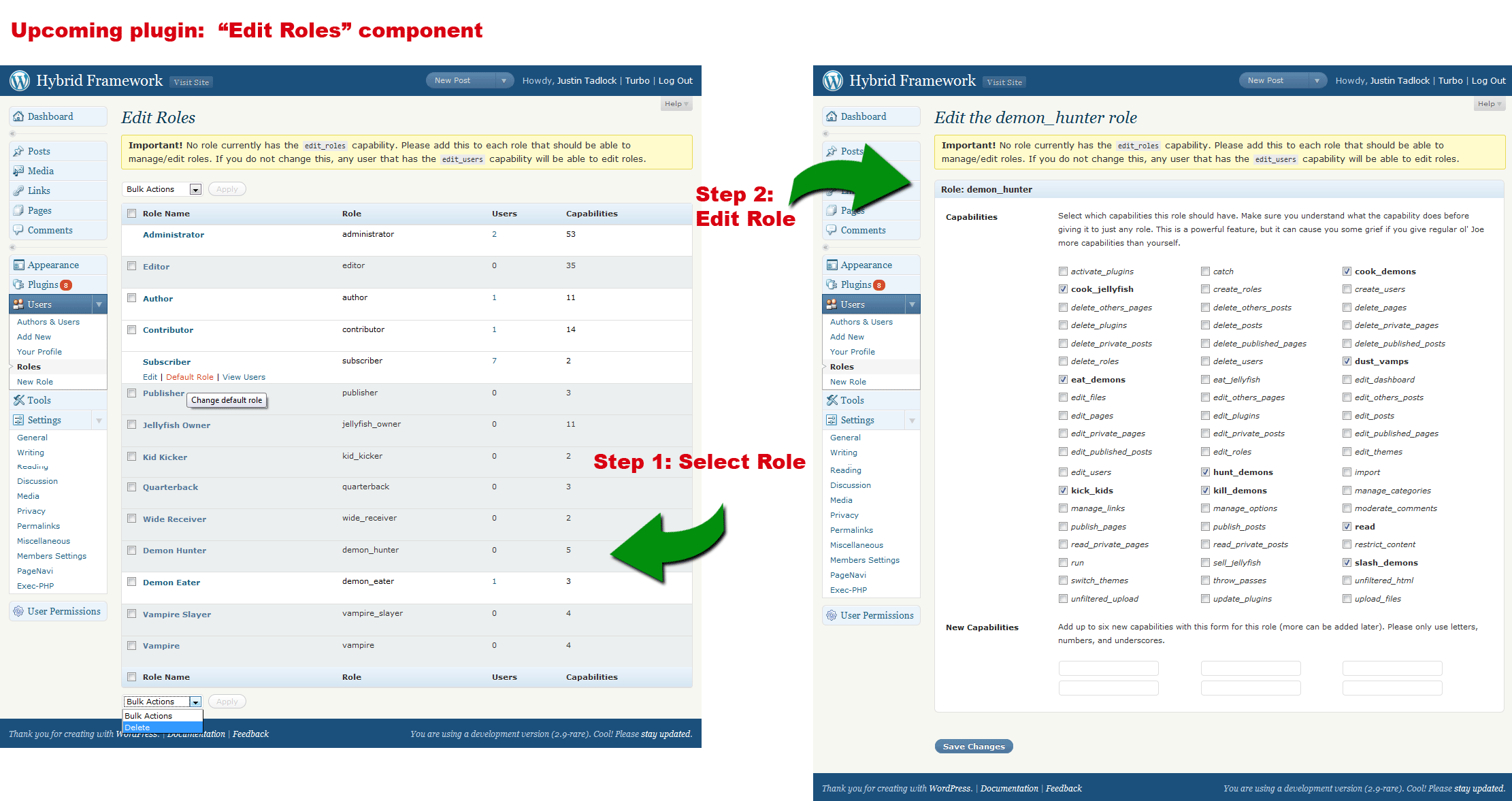
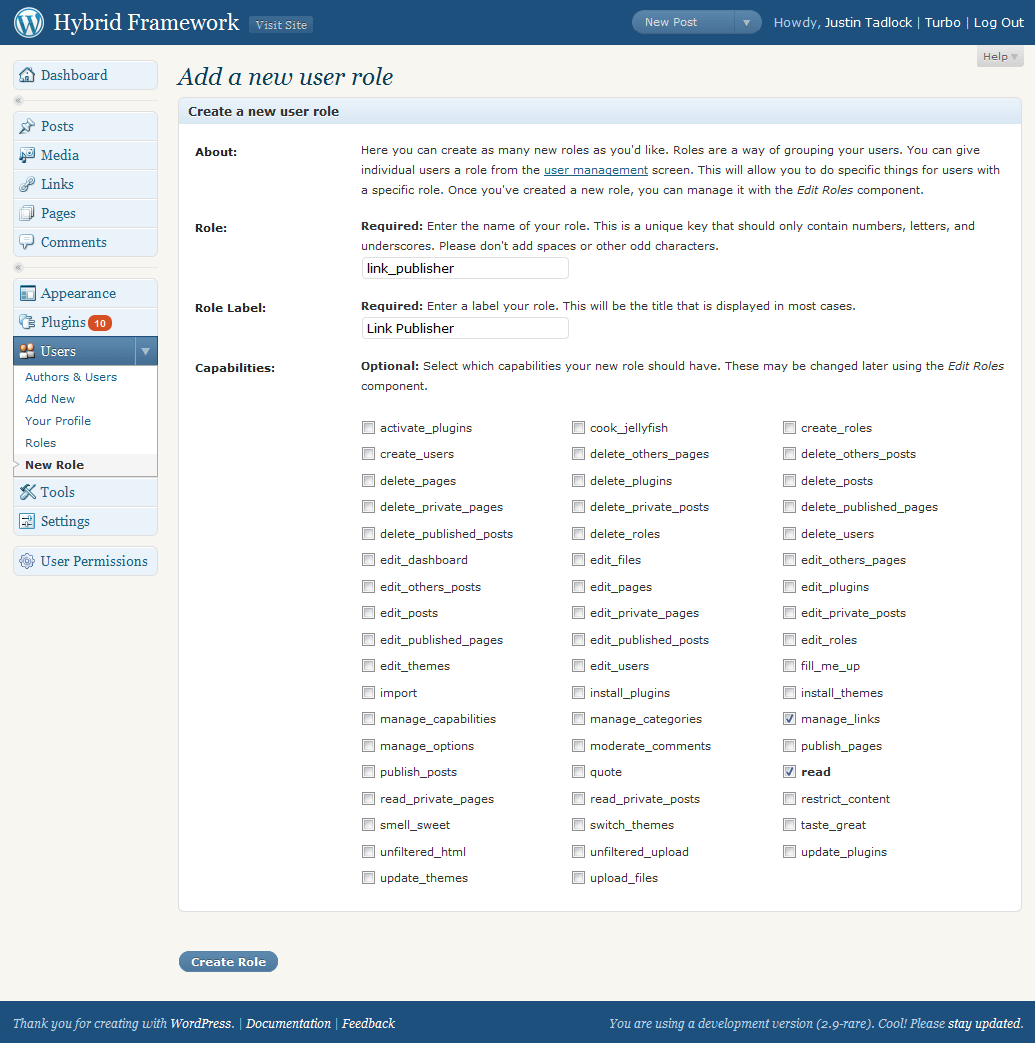
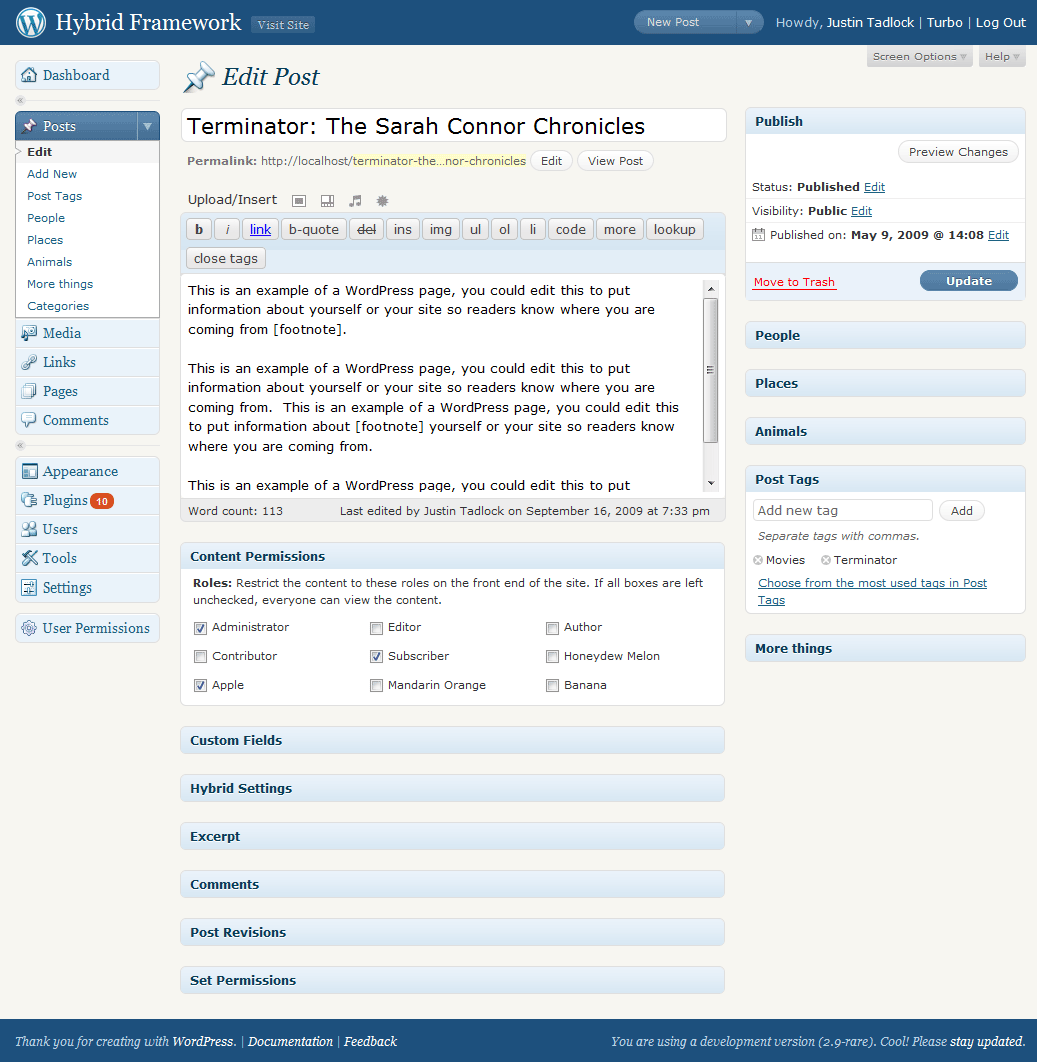
Try this plugin https://wordpress.org/extend/plugins/members . By using this plugin you can easily create new and existing users rules. You can see some screenshot here.
Select Components Screen
Edit Roles Component
New Roles Component
Content Permission
-
This reply was modified 13 years, 8 months ago by
 Asif Mushtaq.
> The other issue is that subscribers cannot embedd pictures into posts but editors/administrators can. I have auto-embedd links ticked. It looks like it could be a permissision thing but I wanted to check if there is anything in bbpress that prevents subscribers from doing this?
Confirmed: Admin & Editor can embed images using <img src=hxxp://example.com/test.jpg />
Forum Participant, Forum Moderator, Subscriber, Contributor and Author roles cannot. https://bbpress.trac.wordpress.org/ticket/1916
You can only run a single instance of the bbPress plugin per WordPress install.
I think I solved. The reply edit from the “edit panel wordpress” does not lose the relationship with the topic parent if i remove to check on option “Use the fancy WordPress editor to create and edit topics and replies”.
I thought the fancy wordpress editor could be used only to create topics and replies.
Thank you.
Thanks… Though this should have already been patched 😉
https://bbpress.trac.wordpress.org/changeset/4092