Published on September 1st, 2015 by AilyRoot
Hello
When we run invision importer for our invision 3.4.7, importer seems not working and showing
Conversion Complete
No reply_to parents to convert
No replies to convert
No tags to convert
No super stickies to stick
No stickies to stick
No topics to convert
No forum parents to convert
No forums to convert
No passwords to clear
No users to convert
No data to clean
we have also restore sql backup into same hosting account under wordpress and tried again, still not working
setup is like below, simple and nothing wrong(?)
[img]https://i.imgur.com/lwwMq48.jpg[/img]
could anyone help on this?
thanks!
Hi there,
I have created a companion website for an ebook, and each chapter has a corresponding page on the website. I have added additional resources (interactions) to the site, and made them show at the bottom of the chapter pages (displaying them by their tags, ie. chapter number and media type).
What I also need to do, is display the corresponding forum on the post pages. Ie. Every post is tagged with a media type and chapter number, so I need the associated chapter forum to show – so chapter 1 forum on all posts tagged with chapter 1 etc.
Any help appreciated 🙂
Thank you
Hello, I have a new forum, and the page is.. well, in need of sprucing up. How do I add an image to the top of this page?
Things seem to be a bit messed up anyway. I have a page called “forums”, which has the permalink: http://www.eyeondemand.com/forum/
I can edit this to add text, but no image appears when I add a “featured image”.
My actual formums though are at http://www.eyeondemand.com/forums/ (see the plural) and I have no idea why. That said, would it kill the forums if I changed the permalink from the first one above to add the plural?
Or is there a way to edit the http://www.eyeondemand.com/forums/ page
What file would I edit to add my sitename to the page title (browser tab) on the forums page. I am using SmartCrawl SEO plugin and it has a section in the Titles and Meta tab for the forums I added %%sitename%% but this don’t work for the forum index page. It just worked for individual forums and topics and replies not the forum index. See screenshots
This is a rather huge branch off of the forum that was offered by Sceko in this topic:
bbPress like Flarum
The default view shows all topics, color coded with a unique font awesome icon assigned to each category.
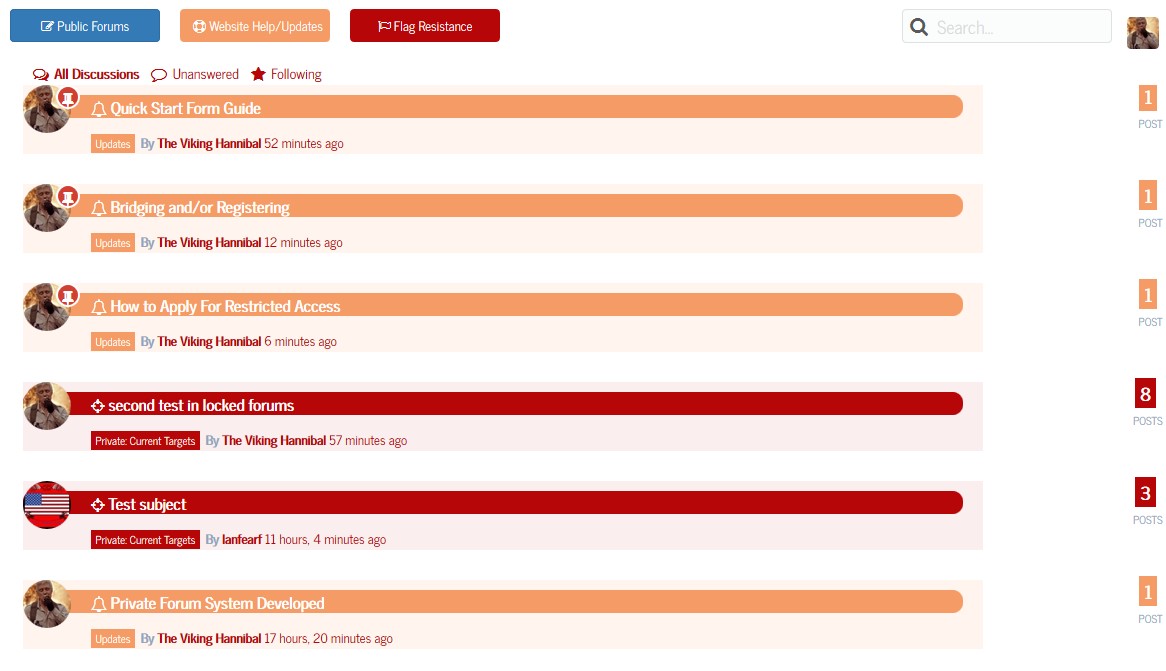
If you click on one of the main categories, whether it be public, support, or the restricted area, it will now show all topics including children forums of that particular category in this view. It also shows all children forums of that category as well:

Last but not least the reply look for viewing a topic shows not only the badges from mycred, but the picture rank as well.

Problem/Scenario – On my website (http://dcjtech.info/) using the latest version of WordPress, BBPress, and BuddyPress, I closed a topic in my forum. Now, the tags belonging to the closed topic are listed as “empty topic tags”. This issue is always reproducible.
Specific Example – For instance, I closed a topic (http://dcjtech.info/topic/lindows/) and then I see under “Dashboard > Topic > Topic Tags” that “linspire” has a count of zero. Also, in the BBPress statistics widget, it says there are twenty “empty topic tags”. However, http://dcjtech.info/tag/linspire/ lists the Lindows topic as a topic with the “linspire” tag.
Question – Why do these “empty topic tags” appear/form when closing a topic and how can it be fixed and prevented?
Similar Thread on BBPress.org – https://bbpress.org/forums/topic/empty-topic-tags/
In my forum the users achievements are showing below the word moderator/participant. How do i remove this or prevent it from showing any badges at all? The badges come from a plugin call WPAchievements.
site name is Spanishscholars.com
BBpress: 2.5.8
WP : 4.3
These two bbpres shortcodes I added to my Main Menu are not working. They were working fine yesterday but not it says ‘That page can’t be found’.
My website: http://mysite.com/recent-replies/
http://mysite.com/view/latest-topics/
Hi there – I’ve googled; searched plugins and read a fair bit here. My question is about changing the way search results for BBPress display.
I’m using the Avada theme 3.8.3
Wordpress 4.2.4
BBPress 2.5.8
There are a couple of issues – only in the visual appearance of BBPress search results, and I need some tips as to how to fix it!
- Search results are not well distinguished (compared to our previous ExpressionEngine forum, where admittedly, the forum post content was not shown, but it easy to see the list of topics and results). A mix of “Topics” and “Replies To” are shown
- Search results may include several posts from the one topic, but these are not collated (they are displayed in order of recency, and usually appear in between the other search results)
- Search results with long forum posts take up too much page realestate
Please see these two screenshots that illustrate the difference:
https://www.dropbox.com/s/04ndkdsjlpa5k8j/avada-forum-search.jpg?dl=0

Clearly the search results are very thorough, and I’m looking for help to represent them more efficiently.
- What template would I look for?
- How can I change the loop so that the results are more like our old forum?
Thanks in advance – feel free to point me to any plugins I may have missed.
Robert
Hi all I know this question has been asked many a time but nothing I try seems to work
I have a client who has an existing site that is hugely based around a bbPress forum
I have moved the forum and all users over using these plugins
Cimy User Manager
https://wordpress.org/plugins/cimy-user-manager/
First used Cimy so that when I imported the forums the correct users would be present to prevent author issues.
bbPress Import / Export
https://github.com/pippinsplugins/bbPress-Export-and-Import
Next used this import export plugin only allows you to do one forum at a time and was hard to find the initial export spot (you have to go forum>”forum name”>On the right hand side under update it will be there). To import you must create the forum first and then in the same spot where you found the export button is the import button
Found these fixes for the plugin on this forum post
bbpress wp4 fix2
bbpress wp4 fix
Integrating bbPress with the Warp7 framework
Next I installed my theme
http://yootheme.com/demo/wordpress/frequency
Then I did this:
“copy the /wp-content/plugins/bbpress/templates/default/bbpress folder into the /wp-content/themes/my-theme/ folder and then copying the files from /wp-content/plugins/bbpress/templates/default/bbpress/extras/ into the /wp-content/themes/my-theme/ folder”
So this fixed most of my major issues except a couple
First off every user profile page looks like this
http://screencast.com/t/26t9FgsH0maC
and doesnt populate with the correct information that can be seen on the current site
Every user you click comes to a profile page where there name is just profile
The other problem I have is how can I now style this page the transparent background isnt really a possibility with this theme
If anyone can help me out that would be great
Thanks
Worpress version: 4.3
bbPress version: 2.5.8


