Any time you click into the breadcrumb navigation, it logs users out. However, if you click back into a forum, it logs you back in like it never happened. It seems like an odd bug. Has anyone encountered this and how to solve it?
Navigation Breadcrumbs Log User Out
Published on January 3rd, 2020 by danielsgirlImport of data
Published on January 2nd, 2020 by dsallansonWe have exported our forum data using the wordpress menu – Tools – Export We have exported the Forums, Topics and Replies and then imported them to our new site. When looking at the WordPress menu it shows the 4 forums we have imported with the number of topics and replies but when you click on to view the forum we receive the following message
This forum has 963 topics, 2,570 replies
Oh, bother! No topics were found here.
If I click on the Topics menu in the wordpress i can see all the topics and read them but does not show the replies but it has the replies cunt and voice replies
and if i click on the replies menu in WordPress i can see the replies
But not working all together – has any one got any suggestions
I have tried creating a new forum and this works fine so i know my theme etc works ok with forums we are using wordpress 5.3.2 and PHP 7
Thanks
David
Help request: Change page/topic date to coincide with last post
Published on January 2nd, 2020 by devsamHi all,
I am migrating one old website forum to a new WP site and one of the things I need to do is to take all the archive people’s comments to the newer so it’s a matter of creating topics one by one. All good until this point. The thing is most of topics have just clients’ comments with no replies so I would like to make the creation date with the last post date which is currently the one I have created the new topic on the new site.
Any suggestions/thoughts/ideas?
Thanks beforehand!
bbPress consultant needed
Published on January 2nd, 2020 by neilkutzenHello: My web consultant set up a forum for me with bbPress. It’s good and doesn’t need fixing. But I now need someone with good teaching skills to show me how to work it well. I get stuck in places. Hourly fee is negotiable. Five hours a week for several weeks should do it.
Reply to neil@memorizebest.com
Inserted link – post doesn’t go through
Published on January 2nd, 2020 by ChrisMembers can’t post if they use an insert/edit link (Ctrl+K) icon. If we paste a link directly in the text everything is ok, but if we use that icon to paste an active link the post doesn’t go through. Sometimes a message shows up “You cannot reply to this topic”, other times nothing’s happening.
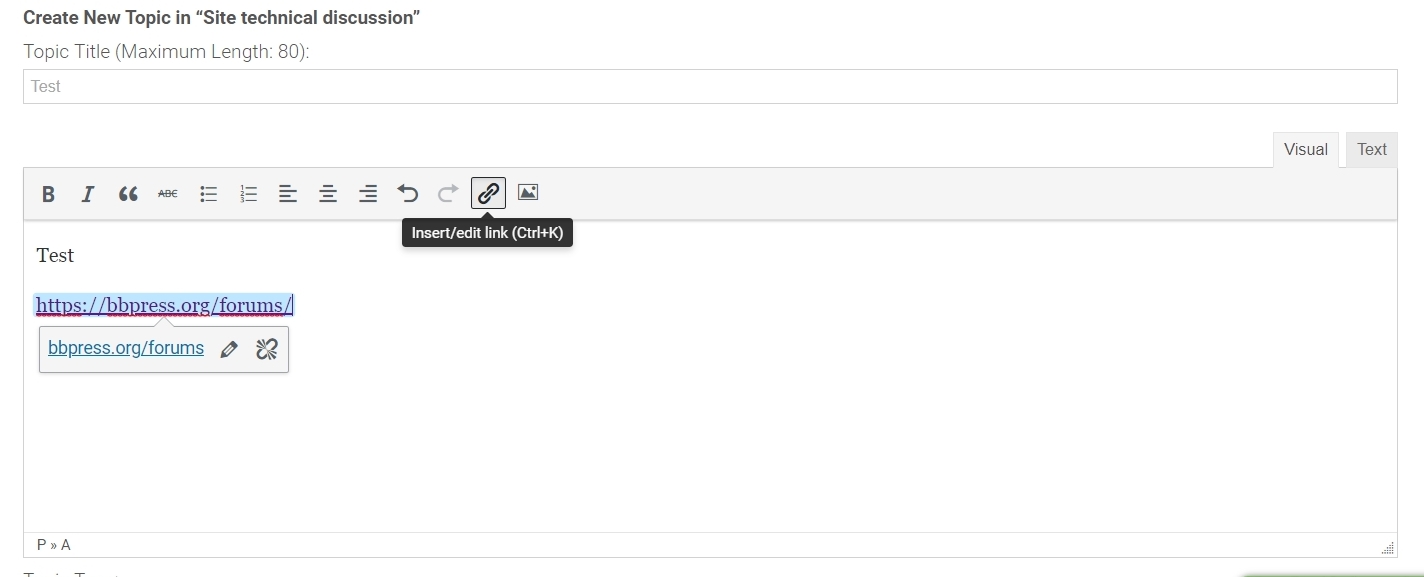
My theme is Avada, WP version 5.3.2, bbPress 2.6.3, bbp style pack 4.3.7, Image Upload for BBPress 1.1.16.
Chris
Main Forum page not working
Published on January 2nd, 2020 by sdeboHi. First of all thanks for bbPress.
I run it on a small non profit website and although it is early days, it is a cool feature which I hope will gain popularity.
My problem is that the main forum page is not working. Topics and subtopics appear to work fine. Instead of listing the fora topics the main forum landing page reads as follows
Archives: Forums
bbPress Forums
Published 02/01/2020
TopicsSearch for: Home › Forums Viewing 6 topics – 1 through 6 (of 6 total) Topic Voices Posts Last Post Intellectual Impairment Started by: ….
It can be views at https://fitamalta.eu/forums/
Any help is greatly appreciated.
Thanks
Stanley
bbp_new_reply not fired when bbp_insert_reply from api
Published on January 2nd, 2020 by Mickeymarko0
I have developed an app for my website www.miil.co.il and part of the application is the website bbpress forum.
now I’m adding push notification using FCM to the forum (the web site already have it) so use can get notification on mobile when a new replay is posted.
I have been manage to send notification when replay is posted from web interface but not from the API, it seems that the bbp_new_reply is not firing when posting is done via the API.
here is the API command.
function bbp_api_replytotopic_post( $data ) {
$return = array();
//required fields in POST data
$topic_id = bbp_get_topic_id( $data[‘id’] );
if ( !bbp_is_topic( $topic_id ) ) {
return new WP_Error( ‘error’, ‘Parameter value ‘ . $data[‘id’] . ‘ is not an ID of a topic’, array( ‘status’ => 404 ) );
}
$forum_id = bbp_get_topic_forum_id( $topic_id );
$title = ‘RE: ‘ . bbp_get_topic_title( $topic_id );
$content = $data[‘content’];
$email = $data[’email’];
$myuser = get_user_by( “email”, $email );
$author_id = $myuser->ID;
$new_reply_id = bbp_insert_reply(
array(
‘post_parent’ => $topic_id,
‘post_title’ => $title,
‘post_content’ => $content,
‘post_author’ => $author_id,
),
array(
‘forum_id’ => $forum_id,
‘topic_id’ => $topic_id,
)
);
$return[‘id’] = $new_reply_id;
$return[‘topic_id’] = $topic_id;
$return[‘forum_id’] = $forum_id;
$return[‘author_id’] = $author_id;
return $return;
I wonder why I do not get the same outcome from the API as the web interface, as far as I can see they are using the same function.
Participant can move topics
Published on January 1st, 2020 by audrey2112Hi,
for some reason, the participant role on my website can move a topic on another forum. I don’t want them to have this ability. This apply only on the first post in the topic. I search everywhere for a solution, but nothing work for me, and the problem just appear a couple of days ago. Just disactivated that fonction in the front-end would be just fine since I can move topics in the backend.
Also, I would like that the participant can delete their own post.
Thanks.
All of my plugins are update. I am using Elementor, Youzer and buddypress.
bbPress display latest topics frontpage?
Published on January 1st, 2020 by angrywarriorPretty much as the subject headlines says… 😉
Is there a way to display the latest topics/threads on the frontpage?
In some kind of widget or something?
The website is https://planetary-alliance.com
The idea is to have a little section on frontpage displaying the above mentioned.
Any suggestion that would lead in the right direction would be very appreciated. 🙂
Can’t Read Toolbar after Update
Published on January 1st, 2020 by Editor MikeWordPress 5.3.2 running Corvus theme.
BBPress Version 2.6.3
I have just updated BBPress and now my forum toolbar buttons are really hard to read.
How do I change the button text colour from white to black?
(On the text tab, the visual tab is fine)
Here is a link to a topic:

