I am facing an issue. Some Replies are sent to trash automatically. Why this is happening?
Please help
Replies are sent to Trash automatically
Published on July 27th, 2020 by nayanboost“bbp Style pack”: Larger font creates line breaks in the forum headings.
Published on July 27th, 2020 by Tobias ClarenHello.
Larger font (from 16 and more) creates a line break of the forum headings.
E.g. “Theme”, and then “n” on the next line.
Unfortunately the font in BBPress is too small (much smaller than the rest of WP) and I wanted to enlarge it with the plugin “bbp Style pack”.
But 16 size forum headings are not big enough either.
List of all BBPress plugins with recommendations or ranking?
Published on July 26th, 2020 by Tobias ClarenHello.
I have installed WordPress.
For testing, also MyBB in /forum.
I ask myself the question, is BBpress an alternative to extra forum scripts now?
A few years ago, BBPress was quite rudimentary, wasn’t it? Did this change?
Can BBpress keep up with all available plugins in the range of functions with forum scripts such as SMF, MyBB, phpBB etc.
Is there a good clear list of all plugins for BBPress?
Possibly with usage ranking. There will be a reason if certain plugins are used very often.
But also curated recommendations.
The plugin list here is very “simple”.
21 pages with 10 plugins each, not sortable, no recommendations or rating based on usage (not quality rating) …
I saw user avatars. But there may be different plugins for the purpose.
Or a map with the members.
I don’t know where to start.
And doesn’t want to try out hundreds of plugins.
E.g. such an insignificant little thing as using homemade forum icons.
Tagging/mentioning another user
Published on July 25th, 2020 by casselI am not sure if I am not doing it right, but I am not sure how to get to tag someone with @someone correctly.
I might have more than one user with the same display name (currently, I have two Susan in one thread) and I would like to identify which one I am responding to. However, if I put @Susan, I have no clue which one will be tagged.
I am also using BuddyPress, so I am not sure if it is controlled by bbPress or BuddyPress (or even by WordPress for all I know).
Can someone point me to a way to tag/mention someone correctly when I respond?
404 error on css and js files
Published on July 24th, 2020 by lonelydimeHello,
I’m running a fresh install of WordPress from the bitnami helm chart using persistent storage on an NFS share. The path used by the containers is /bitnami/wordpress/wp-content/ to pull in plugins/etc. When I install bbPress, all of the css files and js files use the wrong path to include the assets.
Here’s an example:
<link rel='stylesheet' id='bbp-default-css' href='https://example.com/bitnami/wordpress/wp-content/plugins/bbpress/templates/default/css/bbpress.min.css'>

<script type='text/javascript' src='https://example.com/bitnami/wordpress/wp-content/plugins/bbpress/templates/default/js/editor.min.js?ver=2.6.5'>
I haven’t had any issues with other plugins thus far, but for some reason bbPress is wanting to use the full installation path instead of the web root. Is there a way of fixing this with some WP constant that I’m not setting? The installation of wordpress is in /opt/bitnami/wordpress and wp-content/ and wp-config.php are symlink’d to /bitnami/wordpress/wp-content and /bitnami/wordpress/wp-config.php.
I have a temporary fix right now which will be wiped out when bbPress updates.
File: wp-content/plugins/bbpress/includes/core/template-functions.php
function bbp_enqueue_style( $handle = '', $file = '', $deps = array(), $ver = false, $media = 'all' ) {
        // Attempt to locate an enqueueable
        $located = bbp_locate_enqueueable( $file );
        //Ghetto fix
        $located = str_replace('/bitnami/wordpress', '', $located);
function bbp_enqueue_script( $handle = '', $file = '', $deps = array(), $ver = false, $in_footer = false ) {
// Attempt to locate an enqueueable
$located = bbp_locate_enqueueable( $file );
//Ghetto fix
$located = str_replace('/bitnami/wordpress', '', $located);Topics Not Showing on bbpress forum
Published on July 23rd, 2020 by sillyninjaHello,
I have installed bbpress on my WordPress website. I have created 4 categories in the main forum, but when I click on the categories, topics do not show on the category. Each category has more than 4 threads.
I saved permalinks too, but it did not work.
Topics and Replies not showing after import
Published on July 23rd, 2020 by malinkyHi all,
I’ve seen this issue in the forum but I haven’t found a solution that works yet.
I have exported and imported my forum, topics, replies, and users using the WP import / export functionality. Everything appears in the admin but only the forums appear on the site…not the topics and replies.
If I manually update a topic in the admin, it appears on the site.
All of the replies say “mismatch” under the Forum column…even the ones that have a Forum listed in the same column.
I have tried switching to the TwentyTwenty theme but this didn’t fix it. I also tried the repairs in the forum tools but that didn’t work either. And also tried the permalink refresh that someone suggested. No luck.
WP version 5.4.2
bbPress version 2.6.5
Theme Beaver Builder
Site link https://dev.karebou.com/forums
Move “New Topic” element to the top of the page.
Published on July 22nd, 2020 by dylandebruijnHi, I would like to move the “New Topic” element to the top of the page. See image:
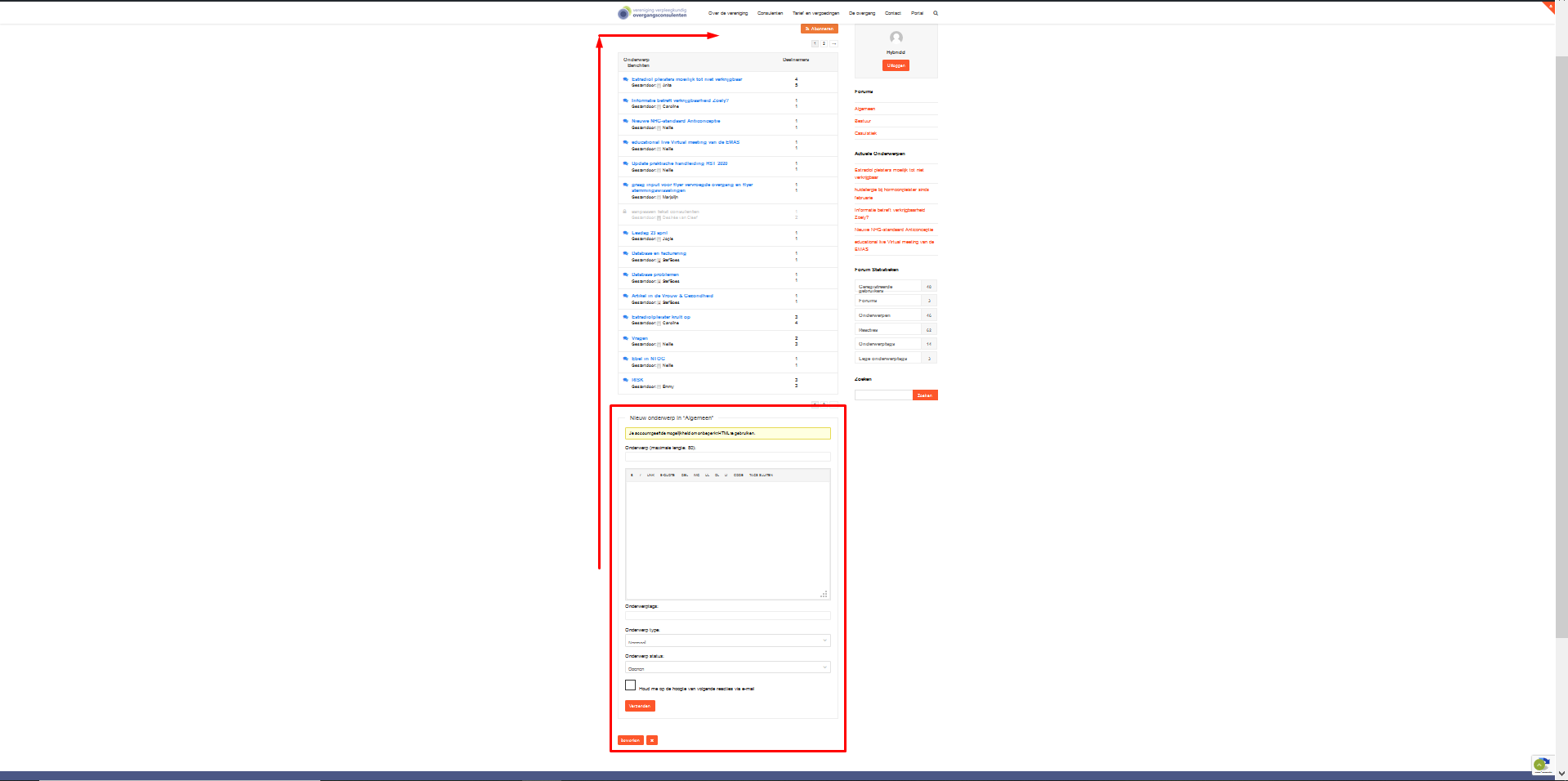
How can I achieve this?
Kind regards,
Dylan
How to find if um on a topic page
Published on July 22nd, 2020 by nayanboostI want to know how can I check if I am on a Bbpress topic page?
Login Leads Users To URL For Admin Login
Published on July 22nd, 2020 by chaosfranklinHello everyone,
I am having a bit of trouble with the login for my forums with bbpress. Users cannot log into the forums. I think the source of the problem is my security. I am changed the url for my administration login to hide from hackers. However, bbpress is using this url for members to login. This presents two problems. First, users cannot login. Second, users see the hidden url that they should not see.
Is there anyway to change the login url for users(subscribers) under bbpress’s settings?

