Published on February 19th, 2014 by jslom
I have a form, with multiple inputs that I am trying to get posted to the wordpress “post_content”. I am able to get the title field and only one other field to post successfully, only when making a field name “description” instead of “description[]”, but have no idea how I can get the rest to submit into the post_content. I would like the inputs posted like the image I have created below.
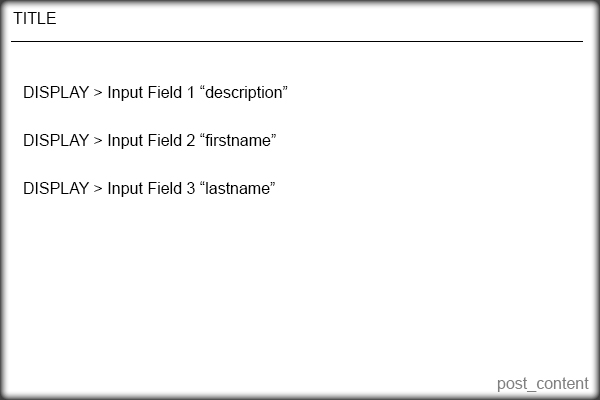
Here is the code I currently have that works for the title only.
    <?php /* Template Name: Question Form */ ?>


    <?php
    if( 'POST' == $_SERVER['REQUEST_METHOD'] && !empty( $_POST['action'] ) &&  $_POST['action'] == "new_post") {
    if (isset ($_POST['title'])) {
    	$title =  $_POST['title'];
    } else {
    	echo 'Please enter a title';
    }
    if (isset ($_POST['description'])) {
    	$description = $_POST['description'];
    } else {
    	echo 'Please enter the content';
    }
    $tags = $_POST['post_tags'];
    $new_post = array(
    	'post_title'    => $title,
    	'post_content'  => $_POST['description'],
    	'post_parent' => 599,
    	'post_status'   => 'publish',
    	'post_type' => 'topic'
    );
    $topic_meta = array(
    'forum_id'       => $new_post['post_parent']
    );
    $topic_id = bbp_insert_topic($new_post, $topic_meta);
    wp_redirect(get_permalink($topic_id)); exit;
    }
    ?>


    <form id="new_post" name="new_post" method="post" action="">

    <p class="question"><label>Title</label><input name="title" type="text">


    <p class="question"><label>Description</label><input name="description[]" type="text">


    <p class="question"><label>Your First Name</label><input name="description[]" type="text">


    <p class="question"><label>Your Last Name</label><input name="description[]" type="text">


    <p align="right"><input type="submit" value="Publish" tabindex="6" id="submit" name="submit" />


    <input type="hidden" name="action" value="new_post" />

    <?php wp_nonce_field( 'new-post' ); ?>

    </form>
I don’t know how to add the other fields to be a part of post_content.
I have tried a few other things, but have been unsuccessful. I would appreciate any help very much!
I set up WordPress on Microsoft Azure cloud and installed bbPress. Users can add topics and type in posts/replies and the correct number of posts/replies are displayed but the actual post/reply text does not display when users click on the topic title. Take a look: http://testgene2.azurewebsites.net/?topic=which-16s-rrna-primers-to-use
Any help or ideas are appreciated. I pretty much went with the defaults on installation and settings.
Hi – I’m trying to do something really simple: I just want to export bbpress from one WP installation and import it to another. I see instructions for just about everything else, but not for this. Now, you may say “just use the WP export/import tool”. Problem is, I don’t want the entire site, only the forum, exported from one site and imported to another site (each of which has its own unique content).
Using the WP export tool I have to create separate exports for each piece: forums, topics, replies. Unfortunately when these are imported in the target site, they don’t connect. So the forums are there and the topics are there, but the forums don’t think they have any topics.
Does anyone have experience with this? Kind of weird that I can import from every conceivable forum except BBpress.
Thanks!
Hello,
I need create forum where i will be speak with my client.
In one topic can see only 1 person(who is registed in wordpress) and me. How can i create topic and add rules and authorization only 1 users and me(admin).
Please i need help!
Thx
Hi guys,
I’m trying to tinker with my bbPress forum and the font sizes of the parent forums and sub forums. I found this code (#bbpress-forums li a) and entered it into my custom CSS field, but it affects both parent and sub forum titles. How do I target the parent forum titles and sub forum titles separately.
Thanks!
Hello.
How to change user’s permalinks (profile page urls), from nicename to ID’s:
mysite.com/forums/user/Mike-jovanr
to
mysite.com/forums/user/99
???
We just downloaded bbpress plugin, but somehow forum page and topic that we created is not showing up.
can you please check: http://forbixindia.com/fbx/forums/topic/forum-home-automation
http://forbixindia.com/fbx/forums/forum/forum-for-electronics/
Are the versions compatible?
If not what can I do? I cannot migrate to any higher version of wordpress for sure.
A quick reply would be really helpful.
– JB –
I have a WP installation with bbPress installed. I am setting up moderators and would like them to receive emails from posted forum topics and replies so they can keep up with the forum when they are not logged in. I set up forwarders in the server for the email account for the forum domain email address (example team@ourblog.com).
But then I realized that I get these topics and replies sent to me via the generic email account for the hosting account (myuserlogin@box###.bluehost.com) on the server. I also get then to my primary email account and I am not sure how that happens, but thought this was because I checked “Notify me of follow-up replies via email.”
How does “Notify me of follow-up replies via email” actually work? I can’t find anything in documentation that explains this. Does it harvest the topics and replies and send it to the email of the poster who has checked this feature? Why am I getting this mail sent to the my isp default box number for my account?
If I could figure out how bbPress is determining email addresses, then I could solve my own problem.
Thank you, Matoca
WordPress 3.8.1
bbPress 2.5.3-5249
www.secondchanceaihadogs.com
Hey everybody!
Me and a friend have been looking for this for several hours now without look. I’ve found some outdated posts about it but since they’re outdated any eventual fix doesn’t work.
What we want to do is remove the topic and reply count from the Forum titles (marked red in the image). I’ve personally checked probably all .php-files in bbpress\templates\default and few in the includes folder looking for anything related to topic, reply count. Either I’m looking in the wrong place or I’ve missed them.

As you can see I marked something with green as well, this isn’t as important but I would like to either remove that one or rename to Star or something similar since pressing it sends you back to the start page.
Appreciate all kinds of help, cheers!
This is an odd problem.
Whenever anyone posts to the bbpress forums, the relevant activity notification shows up in the buddypress activity stream (frontend) as “44 Years, 1 month ago” and in the back end activity stream as “January 1, 1970 at 1:00 am” regardless of when it is posted (although obviously not 44 years ago!)
All the other activity posts (friend requests etc) show the correct times.
I have the timezone in WordPress dashboard set to UTC+1 (I am in Europe). WordPress, buddypress and bbpress are all current and up to date. We have the site running on a Windows IIS server.
Anyone help on this would be greatly appreciated!
(crossposted to buddypress.org as I have no idea if bbpress or buddypress is the problem, or neither!)

