Published on December 4th, 2014 by Pixstrad
Hello fellow bbPressers,
I recently installed bbPress for my site, http://mitosisguild.com/ (WP version 4.0.1, bbPress version 2.5.4) and have found a rather annoying issue with bbPress and my current theme.
Basically, as you can see on the site, some text starts a new line when it really shouldn’t, such as this:

Any help or advice on how to rectify this would be greatly appreciated! Thank you!
Hiya !
I’ve look everywhere and was unable to find any answer. (Even Firebug refuse to show me the thing a need to change)
I’m not a Noob in CSS / Html, but almost 😛
I need to remove those white lines. (or change the color of it)
I’ve made some screenshot, if anyone could help!
(Sorry if my english is bad 🙁 )
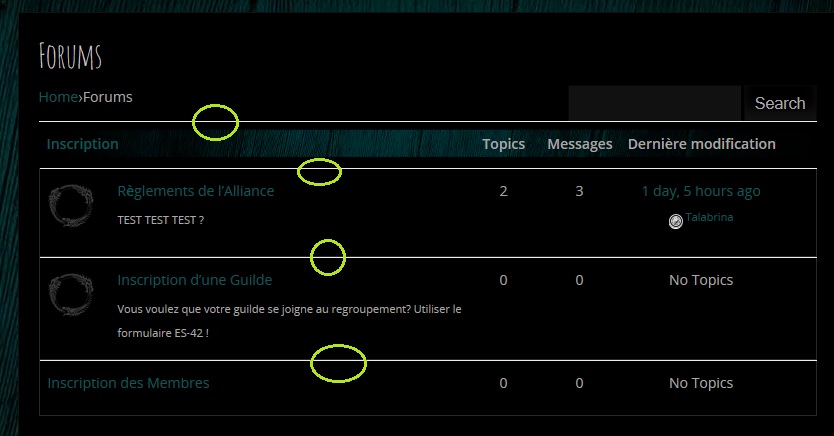

and my website : http://troubadours.olympe.in/forums
Hi I just updated to WordPress 4.0.1. and now I can’t see any of the posts in my forum. Here is the main forum page:
http://www.chmaonline.com/bulletin-board/
Then when you click on the forum, you see nothing, there are supposed to b3 39 posts there.:
http://www.chmaonline.com/forums/forum/chma-members-bulletin-board/
I am using version 2.3.1.
Thanks!
Hello, i have set up some categories and forums, but I see that something is going wrong, everything is one forum next to the other one on the listing on the index and category index.
I have checked bbPress forum files to see I i can manage to edit some html out but I can’t figure this out, heres a screenshot.


WordPress version: 4.0.1
bbPress version: 2.5.4
Link to site
Hi,
I run http://baconcape.com and we have an issue with the bbpress plugin, the full post in a topic or replies don’t show up. I think it is an issue with our match ticker plugin and bbpress.
Here is the link to our bbpress forums http://www.baconcape.com/forums/ the match ticker is just below the breadcrumbs.
Topics don’t show up unless they are stickied as you can see here: http://www.baconcape.com/forums/forum/counter-strike-global-offensive/
And topic content or replies don’t show up which you can see here: http://www.baconcape.com/forums/topic/post-your-team-name-and-lineup-here/
Does anyone know how we can fix this? I think the match ticker is telling bbpress to not show certain things but I don’t know where I should look or how to fix this?
If you need admin or something I can provide that, our email is bacon.cape@gmail.com
Thanks for trying to help,
Adam
Hi,
Topics and Replies that have been edited are showing duplicate entries for each actual revision. Example (see the 3rd post): http://cancergrace.org/topic/webmaster-tests
See the 3rd post – it should only be showing 3 revisions, but they are listed twice for some reason. Nothing has changed on my end and I don’t believe I added any hacks to this part of the code, other than some CSS.
I’m not exactly sure when this started, but I believe it may have been when my WPMS was updated to 4.0.1, while running bbP 2.5.4-5380.
Thanks for any tips on how I might resolve this.
-Mark
Hello!
Paragraphs in posts have stopped working.
The paragraphs or new lines I create in the editor don’t show up when I submit the post. Instead, all the text is merged together, making it much harder to read.
Does anyone clever have some sort of magical solution to this very frustrating problem?
Thank you my friends!
———————————————————–
I wonder if it has anything to do with a recent fix I used for the forum search….
I added “bbpress.php” into my child theme. This file can be downloaded here: https://gist.github.com/mattyza/1b01583441b11c8d04d0
Add the following code into my “functions.php” file: https://gist.github.com/mattyza/f210cadb7f70188d513d
Hello,
On my test forum I’m having a hard time understanding how Freshness works. On the theme I purchased Freshness is called “Last Post” but I’m assuming it works the same.
What confuses me is on Forum List view, the Freshness (Last Post) seems to be pulling the last time a “Topic” was created….not the last time someone “replied”.
Is this normal behavior and is there a way to modify it?
I would like Freshness to reference the most recent reply….not the most recent topic.
Forum View is showing last Topic date

I’d like the Forum view to show the last Reply date like the Topic View page shows
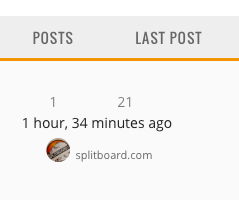
As a side question, how can I edit the size/color/boldness of the Freshness time given? I’d like to make it smaller.
Thanks
Hello,
I’m loving wordpress and trying to love bbpress, I think I’m very close to getting there. I have a large phobia community I’m working to convert to bbpress.
On my Forum list view the alignment of the Topics and Posts (also called Voices and Replies in the stock install?) looks good.
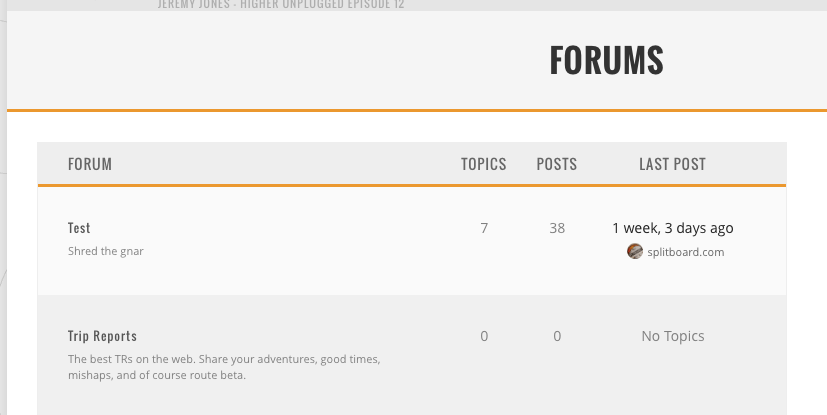
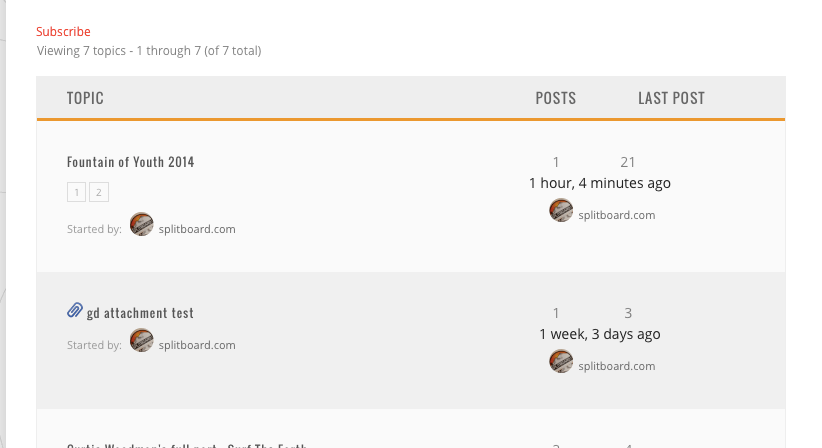
But on the Topic view, the alignment is off and pushed over to the right. Is there any way to fix or control this alignment issue?
Hello,
It has been 2 years since I couldn’t resolve this issue.
I have a bbpress forum installed on my wordpress site. http://www.outdoorhaber.com/forum
The site is in Turkish.
Some information for you to eliminate errors
I added define(‘WPLANG’, ‘tr_TR’); to wp-config
I exported https://translate.wordpress.org/projects/bbpress/2.5.x/tr/default po and mo files
I renamed the exported files to bbpress-tr_TR.po and bbpress-tr_TR.mo
I put those 2 files both in wp-content/plugins/bbpress/languages and wp-content/languages/bbpress (I tried to put files only in 1 of the folders and vice versa, but did no good)
I am about to have a complete brain meltdown, just because of bbpress language issue.
The weird thing is; I download bbpress turkish files from various sources. 1st the official project page (by exporting), then some people translated the files.. I want to translate “Last comment” but there is no match (nothing to translate) in po file. (The one exported from here https://translate.wordpress.org/projects/bbpress/2.5.x/tr/default)
Come one please export a po file from the link above, and ctrl+f “Last comment” in poedit. You will see, there is nothing to translate..
Here is a screenshot for what I mean

Here are my po and mo files
http://www.outdoorhaber.com/wp-content/languages/bbpress/bbpress-tr_TR.po
http://www.outdoorhaber.com/wp-content/languages/bbpress/bbpress-tr_TR.mo
The reason why I gave so much detail is to eliminate unnecessary “did you do this, that” replies.
Please someone help me.


