The image (png format) of the menu does not appear on any of the pages where bbpress is being used.
Example of the problem: https://anaimo.com/forum-list/
Example of how it is: https://anaimo.com/sdk/
Also, if you insert any image, either png or jpg, it doesn’t display.
Image from menu does not appears
Published on November 23rd, 2022 by marketinganaimoClick on Forum name sends view to Page of my Posts
Published on November 22nd, 2022 by Sean MasseyHi
I’ve just installed bbForums on my WP.ORG site, www.positivepython.co.uk.
WP Version 6.1.1, using Xolo Theme. Confirm the issue also happens on theme 2022
bbPress version 2.6.9
My site is set up so the Forums are the home page foe the site. I have set up some forums, but when I click on one of the forum titles, the link doesn’t take you to the forum, but it does go to a page of the (two currently) posts I have put on my site.
I am sure its something obvious, but I haven’t seen anything in forums or docs to help me.
Thanks in advance.
How do I make a donation to bbPress?
Published on November 21st, 2022 by veganishdotworldI thought I saw a link for making a donation to support bbPress, but I can’t find it now.
Would someone point me in the right direction?
How do I remove “All Discussions” section from [bbp-forum-index]
Published on November 20th, 2022 by integratedcourseHello. I am hoping there is a method, maybe CSS, to remove the “All Discussions” portion of the BBpress forum grid display. I just want to present the grid of the forums. I do not want it to have the 2nd part that shows the latest activity. Thank you!
How do I set up new registered users in a private forum?
Published on November 20th, 2022 by veganishdotworldSo frustrated!
I installed BBPress yesterday. I’m trying to set up a private forum for about a dozen authors on our site, so we can ask questions and learn from each other regarding using wordpress or the type of content we want to create.
First Question. I used the bbpress shortcode to add the forum to a page, just as a test. www.veganish.world/forums That went well (there is a public forum there, just as a test), but the thing is, how do I add the registered users for the private forum? The 12 people who will have access? I’ve looked in Settings, and I’ve looked under Forums, in the left-hand side bar in WordPress, and I can’t find anything.
I installed Robin’s Private Groups plugin today, thinking that would help … still not finding anything there either, regarding how to MANUALLY add registered users who are pre-approved to view the content in the forums. ARGH.
Such a simple and crucial thing, I don’t know why I can’t find it.
Second Question. Once I figure out how to register a new user, I have a question … can I make it so that if this persons is already logged in at wordpress.com (as they would need to be, to upload new blog posts), they instantly have access to the FAQ author forums, without having to log into anything else?
My web site is www.veganish.world, but I don’t see how that would be helpful as I just have two (2) general questions, noted above.
If you go to www.veganish.world/forums, you might see a public forum that I posted as a test yesterday, before I realized I need private forums, etc.
Thank you!
Raquelita Dee
Buddypress + BBpress BUG FIX request
Published on November 19th, 2022 by WordCamp Bilbao 2024Until now I had a problem every time a participant wanted to unsubscribe from forum or topic notifications using buddypress profile (forums/subscriptions).
Since the unsusbscribe buttons on his buddypress profile did not work.
And he had to go to the forum/topic in question to perform the operation.
I modified the plugin code to fix the problem and it works. You can review my code and include it in your plugin for future updates.
Thanks:
/wp-content/plugins/bbpress/includes/users/engagements.php
line 840~ (depends version)
// Bail if actions aren’t meant for this function
if ( ! in_array( $_GET[‘action’], $possible_actions, true ) ) {
line 870~ (depends version)
/** No errors *************************************************************/
if ( ‘bbp_unsubscribe’ === $_GET[‘action’] ) {
/wp-content/plugins/bbpress/includes/users/template.php
line 1375~
$html = sprintf( ‘%s<span id=”subscribe-%d” %s>%s</span>%s’, $r[‘before’], $object_id, $sub, $url, $object_id, $object_type, wp_create_nonce( ‘toggle-subscription_’ . $object_id ), $text, $r[‘after’] );
Theme Support said change forum slug to fix template?
Published on November 19th, 2022 by sc00tHi everyone,
I have had no end of trouble with PopularFX support on this issue!
I managed to get the forums to display within the theme using a shortcode here:
But as you look at an individual forum (i.e. Feedback) the forum is no longer incorporated within the theme. If you then click a thread, neither is that.
PopularFX changed a margin, somehow thinking that would fix the issue, but instead made containers for all the text on my website 10 pixels wide!
They then reverted that back and replied a few days ago saying “change your page slugs.” – so ended their support, and replies to my support ticket!
So are they right in saying changing my page slugs will somehow incorporate the forums into the theme? And if so, how do I go about doing so?
I’m using Popular FX, Scoops.
Thanks in advance!
sc00t
Filter Forum Widget to show a parent and child forum
Published on November 18th, 2022 by DavidHi
I have a parent forum with 3 child forums. On a specific page, I want the forum topic widget to display only new topics from any of the 3 child forums. Here are the forums. The parent is ‘English’ and has 3 child forums.
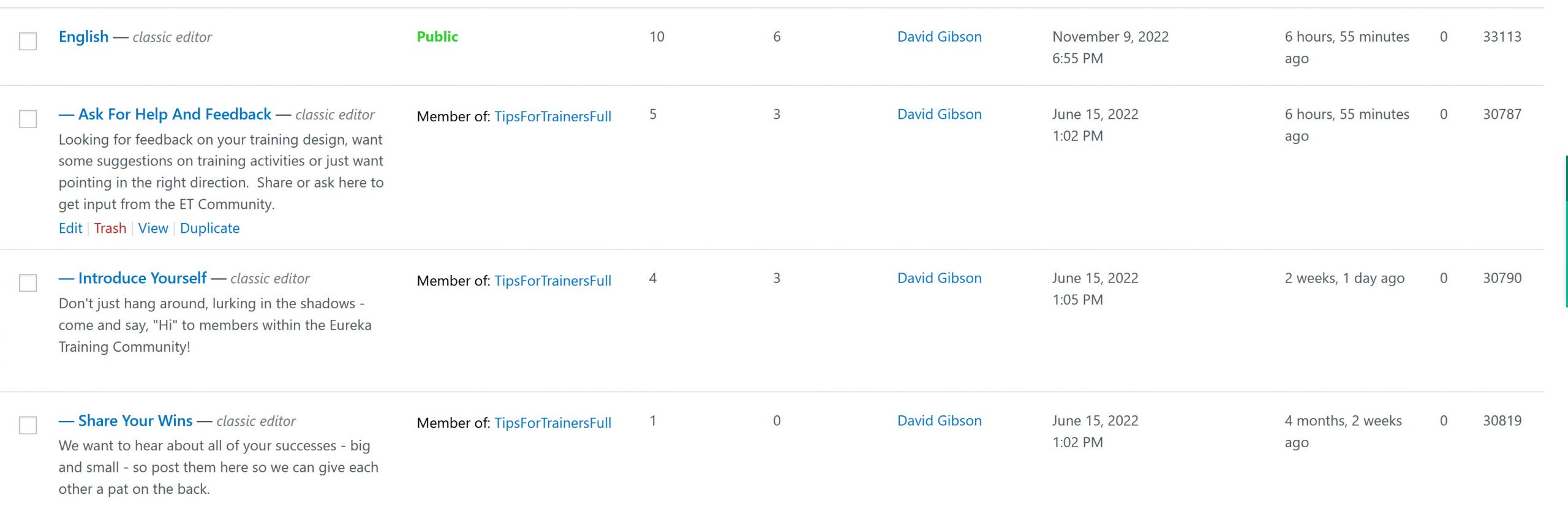
Here are the settings I’m trying to use from the Forum Topic Widget (when I use the settings shown in the image below, the widget shows as blank)
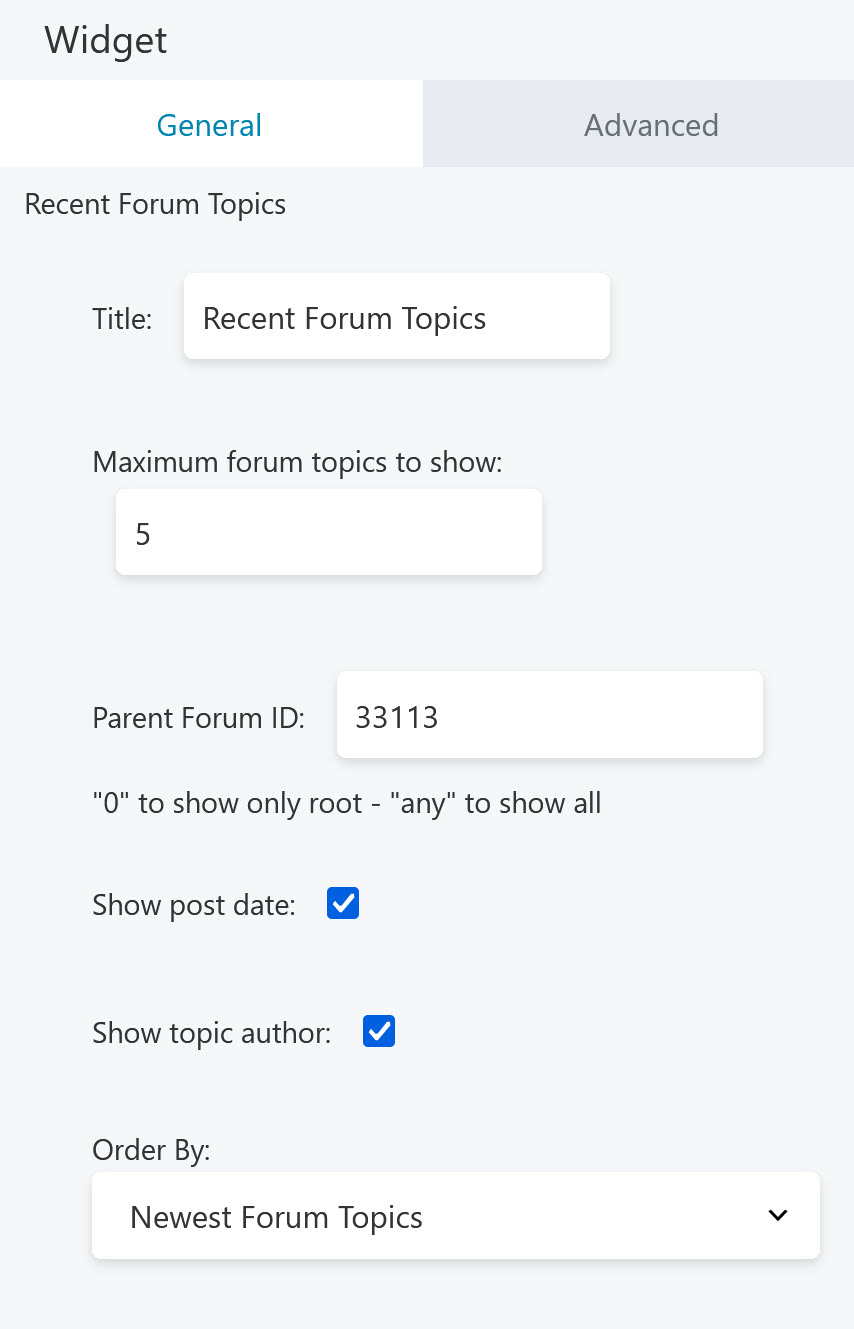
Am I missing something or more likely, what am I doing wrong.
Thanks in advance for any help you can offer – David
Multisite doesn’t show forum
Published on November 17th, 2022 by eichenauI want to use bbpress in sub-site network.
I was able to install it, create a forum and display it on
-
- Forum
-
- Installation
- 28,552
- Troubleshooting
- 62,901
- Themes
- 10,445
- Plugins
- 15,399
- Requests & Feedback
- 14,995
- Showcase
- 3,259
this is the code what I can show the forum page
<html>
<head></head>
<body></body>
</html>
Embed links for internal links
Published on November 17th, 2022 by andreiandronachi95Hello! In settings – forums, auto embed links(yt, twitter etc) is checked. But, I have a little problem in a topic/reply, when I copy a link on a new row and without any text. That link is transformed in an iframe, but I don’t want that for internal links? Is any chance that I can let that setting check but to have an exception for internal links?

