Published on February 27th, 2023 by
Hi – the quicktags toolbar is not displaying above the edit box for a topic so a person can’t link any text (or bold, or italic etc). “Add toolbar & buttons to textareas to help with HTML formatting” was switched to On by default, I tried switching it to off / save / then back to on again / save — but that did not work.
See https://greensmoothie.com/members/forum/plantstrong
Be grateful for help – thanks!
I’ve looked thru previous posts on this topic without success; hopefully you can help.
I have created a forum that several users of my site have subscribed to. When anyone creates a new topic or post to the forum, neither I nor other subscribers are notified. I do see an email sent to noreply@(MyDomain) notifying me of a post sent by me, but copies are not received by others who are subscribed (which I believe should be bcc’d). I am certain I’m overlooking something; can you help?
Do users need to be logged into the website to receive an email?
bbPress ver. 2.6.9
Astra Theme ver. 4.02
I am customizing my bbPress installation and I have encountered an issue where there are two rectangles to the left and under-neath a user’s avatar on a post that appear to be misaligned. When I inspect element they appear to be bbp-reply-author or bbp-author-link, I can’t find where to edit this in css or in the bbpress functions. Does anyone know where I can look to fix this?
My theme is a modified version of Seedlet and I am using the latest bbPress and WordPress versions.
Here is a screen grab highlighting the issue:
View post on imgur.com
Hi, new to BBpress.
I’ve noticed that there aren’t a lot of options regrading the customization of the forum, at least on the front end and you need to install additional plugins if you want to get more functionality or make things simpler to customize.
My question is, are there any plugins that allow me to have features that are commonplace in other forum software, like who is online at the bottom, different icons for new/unread forums/posts.
Essentially, I want to know what plugins are pretty much must haves for BBpress, I already have the BB style pack plugin which has helped immensely, but it’s still not enough. If there’s a tutorial out there to get all of the customization I’m after than I’d highly appreciate the help as well.
I am using the latest version of wordpress and BBpress.
The forum in question: https://sonic-city.net/forum/
Thanks in advance
Many, many forum replies were accidentally put in trash. I want to get them back to where they belong.
- I have tried to use bulk action to Restore them but then they show up as Draft
- once they appear as Draft there is no bulk action to Approve them
- when I bulk Edit them to change Status to Published they appear in the Forums as recent activity even though they could be several years old.
Can I use MySQL in the database to change the forum replies to where they were before being trashed? If so, in which database table and which fields are these values set?
WP version: 6.1.1
bbPress version: 2.6.9
using child theme based on Enfold 5.4.1
Forums are at https://canadianvintageradio.com/cvrs-forums/
Re-posting this. For some reason my original post got marked as spam. So, this time I took out the screenshot link.
I wanted to share some code I cooked up for one of my sites. I want to disclaimer that I’m not a professional coder but through lots of trail, error, and zero hair left I’ve found this code works very well for my website.
There are two functions. The first one creates a “New Topic” button and uses a template hook to display it above the forum list. The second function does the same thing, but just uses a hook to display the button over the single topic display to create a “New Reply” button. The second function is basically the first function but renamed and uses a different template hook.
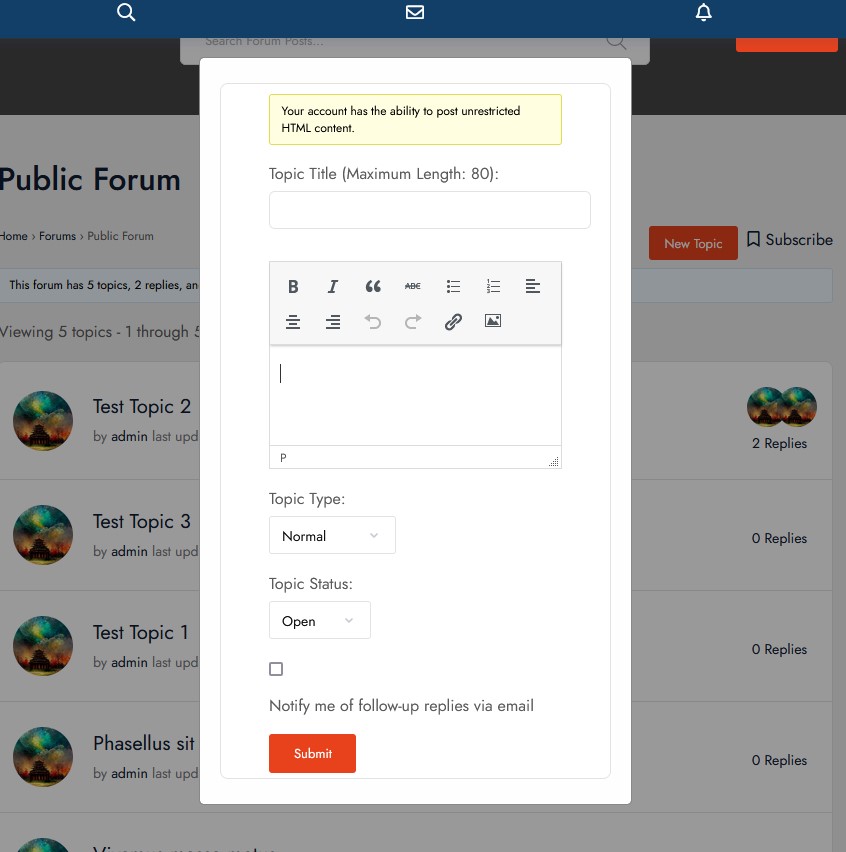
These buttons, when clicked, open a modal that has the shortcode for a new topic/new reply. The code also passes the current forum id into the shortcode, so there is no need for the user to select a forum from the drop down menu. In my screenshot, I’ve enabled the WYSWYG TinyMCE editor and all buttons on it work properly. In addition, I’ve fixed it so that the user can’t accidentally close the modal. They have to physically click on the “Close” button in order to close it. I decided to do this for simplicity sake and so my users won’t accidentally click off the screen and close the modal.
I made it because I was tired of users getting confused about the new topic/new reply topic area of bbpress. So, in order to bring it more in line with other forum software I made this code (through many trial and errors). I hope that it can help anyone in the community who’s using bbpress for their forums. Oh, I also made sure it displays nicely in mobile size screens. I added a screenshot to show people what it looks like.
/*
This function adds the New Topic button to bbpress above the forum list template
*/

function add_new_topic_button() {
    $forum_id = bbp_get_forum_id();
    ?>
    <button id="new-topic-button">New Topic</button>
    <div id="new-topic-modal">
        <button id="close-modal-button">Close</button>
        <div class="modal-content">
            <?php echo do_shortcode(''); ?>
        </div>
    </div>
    <script>
    jQuery(document).ready(function($) {
        var newTopicButton = $('#new-topic-button');
        var modal = $('#new-topic-modal');
        var close = $('#close-modal-button');
        newTopicButton.click(function() {
            modal.show();
            setTimeout(function() {
                if (typeof bp !== 'undefined' && typeof bp.mentions !== 'undefined') {
                    bp.mentions.tinyMCEinit();
                }
            }, 1000);
        });
        close.click(function() {
            modal.hide();
        });
        $('textarea#bbp_topic_content').addClass('bbp_topic_content');
    });
    </script>
    <style>
    #new-topic-modal {
        display: none;
        position: fixed;
        z-index: 999;
        left: 0;
        top: 0;
        width: 100%;
        height: 100%;
        overflow: auto;
        background-color: rgba(0,0,0,0.6);
    }
    .modal-content {
        background-color: #fefefe;
        margin: auto;
        padding: 20px;
        border: 1px solid #888;
        width: 50%;
        max-width: 600px;
        border-radius: 5px;
        position: absolute;
        top: 50%;
        left: 50%;
        transform: translate(-50%, -50%);
    }
    #close-modal-button {
        color: #aaaaaa;
        float: right;
        font-size: 28px;
        font-weight: bold;
        margin-right: 10px;
        margin-top: 40px;
    }
    #close-modal-button:hover,
    #close-modal-button:focus {
        color: #000;
        text-decoration: none;
        cursor: pointer;
    }
    @media only screen and (max-width: 600px) {
        .modal-content {
            width: 90%;
            max-width: 90%;
        }
    }
    </style>
    <?php
}
add_action('bbp_template_before_single_forum', 'add_new_topic_button');
/*
This function adds the New Reply button to bbpress above the single topic template
*/
function add_new_reply_button() {
$forum_id = bbp_get_forum_id();
?>
<button id="new-topic-button">New Topic</button>
<div id="new-topic-modal">
<button id="close-modal-button">Close</button>
<div class="modal-content">
<?php echo do_shortcode('
- You must be logged in to reply to this topic.
'); ?>
</div>
</div>
<script>
jQuery(document).ready(function($) {
var newTopicButton = $('#new-topic-button');
var modal = $('#new-topic-modal');
var close = $('#close-modal-button');
newTopicButton.click(function() {
modal.show();
setTimeout(function() {
if (typeof bp !== 'undefined' && typeof bp.mentions !== 'undefined') {
bp.mentions.tinyMCEinit();
}
}, 1000);
});
close.click(function() {
modal.hide();
});
$('textarea#bbp_topic_content').addClass('bbp_topic_content');
});
</script>
<style>
#new-topic-modal {
display: none;
position: fixed;
z-index: 999;
left: 0;
top: 0;
width: 100%;
height: 100%;
overflow: auto;
background-color: rgba(0,0,0,0.6);
}
.modal-content {
background-color: #fefefe;
margin: auto;
padding: 20px;
border: 1px solid #888;
width: 50%;
max-width: 600px;
border-radius: 5px;
position: absolute;
top: 50%;
left: 50%;
transform: translate(-50%, -50%);
}
#close-modal-button {
color: #aaaaaa;
float: right;
font-size: 28px;
font-weight: bold;
margin-right: 10px;
margin-top: 40px;
}
#close-modal-button:hover,
#close-modal-button:focus {
color: #000;
text-decoration: none;
cursor: pointer;
}
@media only screen and (max-width: 600px) {
.modal-content {
width: 90%;
max-width: 90%;
}
}
</style>
<?php
}
add_action('bbp_template_before_single_topic', 'add_new_reply_button');
/*
This function calls the Buddypress js file to bbpress pages only so that @mentions can work in the modal
*/

function enqueue_buddypress_js() {
    if ( function_exists( 'bp_is_active' ) && bp_is_active( 'mentions' ) ) {
        wp_enqueue_script( 'bp-mentions-js' );
    }
}
add_action( 'wp_enqueue_scripts', 'enqueue_buddypress_js' );
/* Additional Custom Forum Modal CSS This will hide the default new topic/reply form boxes but shouldn't hide the ones inside of the modal */

.modal-content .bbp-topic-form, .modal-content .bbp-reply-form {
	padding-top: 5px;
	padding-bottom: 5px;
	margin-top: 5px;
	margin-bottom: 5px;
}

.bbpress-wrapper > .bbp-topic-form {
  display: none;
}

.modal-content .bbp-topic-form legend {
	display: none;
}

#new-topic-button {
  float: right;
  margin-right: 10px;
}

#bbpress-forums > .bbp-reply-form {
	display: none;
}
I wanted to share some code I cooked up for one of my sites. I want to disclaimer that I’m not a professional coder but through lots of trail, error, and zero hair left I’ve found this code works very well for my website.
There are two functions. The first one creates a “New Topic” button and uses a template hook to display it above the forum list. The second function does the same thing, but just uses a hook to display the button over the single topic display to create a “New Reply” button. The second function is basically the first function but renamed and uses a different template hook.
These buttons, when clicked, open a modal that has the shortcode for a new topic/new reply. The code also passes the current forum id into the shortcode, so there is no need for the user to select a forum from the drop down menu. In my screenshot, I’ve enabled the WYSWYG TinyMCE editor and all buttons on it work properly. In addition, I’ve fixed it so that the user can’t accidentally close the modal. They have to physically click on the “Close” button in order to close it. I decided to do this for simplicity sake and so my users won’t accidentally click off the screen and close the modal.
I made it because I was tired of users getting confused about the new topic/new reply topic area of bbpress. So, in order to bring it more in line with other forum software I made this code (through many trial and errors). I hope that it can help anyone in the community who’s using bbpress for their forums. Oh, I also made sure it displays nicely in mobile size screens. I added a screenshot to show people what it looks like.
https://img.iwebnow.net/screenshots/popup.jpg
/*
This function adds the New Topic button to bbpress above the forum list template
*/

function add_new_topic_button() {
    $forum_id = bbp_get_forum_id();
    ?>
    <button id="new-topic-button">New Topic</button>
    <div id="new-topic-modal">
        <button id="close-modal-button">Close</button>
        <div class="modal-content">
            <?php echo do_shortcode(''); ?>
        </div>
    </div>
    <script>
    jQuery(document).ready(function($) {
        var newTopicButton = $('#new-topic-button');
        var modal = $('#new-topic-modal');
        var close = $('#close-modal-button');
        newTopicButton.click(function() {
            modal.show();
            setTimeout(function() {
                if (typeof bp !== 'undefined' && typeof bp.mentions !== 'undefined') {
                    bp.mentions.tinyMCEinit();
                }
            }, 1000);
        });
        close.click(function() {
            modal.hide();
        });
        $('textarea#bbp_topic_content').addClass('bbp_topic_content');
    });
    </script>
    <style>
    #new-topic-modal {
        display: none;
        position: fixed;
        z-index: 999;
        left: 0;
        top: 0;
        width: 100%;
        height: 100%;
        overflow: auto;
        background-color: rgba(0,0,0,0.6);
    }
    .modal-content {
        background-color: #fefefe;
        margin: auto;
        padding: 20px;
        border: 1px solid #888;
        width: 50%;
        max-width: 600px;
        border-radius: 5px;
        position: absolute;
        top: 50%;
        left: 50%;
        transform: translate(-50%, -50%);
    }
    #close-modal-button {
        color: #aaaaaa;
        float: right;
        font-size: 28px;
        font-weight: bold;
        margin-right: 10px;
        margin-top: 40px;
    }
    #close-modal-button:hover,
    #close-modal-button:focus {
        color: #000;
        text-decoration: none;
        cursor: pointer;
    }
    @media only screen and (max-width: 600px) {
        .modal-content {
            width: 90%;
            max-width: 90%;
        }
    }
    </style>
    <?php
}
add_action('bbp_template_before_single_forum', 'add_new_topic_button');
/*
This function adds the New Reply button to bbpress above the single topic template
*/
function add_new_reply_button() {
$forum_id = bbp_get_forum_id();
?>
<button id="new-topic-button">New Topic</button>
<div id="new-topic-modal">
<button id="close-modal-button">Close</button>
<div class="modal-content">
<?php echo do_shortcode('
- You must be logged in to reply to this topic.
'); ?>
</div>
</div>
<script>
jQuery(document).ready(function($) {
var newTopicButton = $('#new-topic-button');
var modal = $('#new-topic-modal');
var close = $('#close-modal-button');
newTopicButton.click(function() {
modal.show();
setTimeout(function() {
if (typeof bp !== 'undefined' && typeof bp.mentions !== 'undefined') {
bp.mentions.tinyMCEinit();
}
}, 1000);
});
close.click(function() {
modal.hide();
});
$('textarea#bbp_topic_content').addClass('bbp_topic_content');
});
</script>
<style>
#new-topic-modal {
display: none;
position: fixed;
z-index: 999;
left: 0;
top: 0;
width: 100%;
height: 100%;
overflow: auto;
background-color: rgba(0,0,0,0.6);
}
.modal-content {
background-color: #fefefe;
margin: auto;
padding: 20px;
border: 1px solid #888;
width: 50%;
max-width: 600px;
border-radius: 5px;
position: absolute;
top: 50%;
left: 50%;
transform: translate(-50%, -50%);
}
#close-modal-button {
color: #aaaaaa;
float: right;
font-size: 28px;
font-weight: bold;
margin-right: 10px;
margin-top: 40px;
}
#close-modal-button:hover,
#close-modal-button:focus {
color: #000;
text-decoration: none;
cursor: pointer;
}
@media only screen and (max-width: 600px) {
.modal-content {
width: 90%;
max-width: 90%;
}
}
</style>
<?php
}
add_action('bbp_template_before_single_topic', 'add_new_reply_button');
/*
This function calls the Buddypress js file to bbpress pages only so that @mentions can work in the modal
*/

function enqueue_buddypress_js() {
    if ( function_exists( 'bp_is_active' ) && bp_is_active( 'mentions' ) ) {
        wp_enqueue_script( 'bp-mentions-js' );
    }
}
add_action( 'wp_enqueue_scripts', 'enqueue_buddypress_js' );
/* Additional Custom Forum Modal CSS This will hide the default new topic/reply form boxes but shouldn't hide the ones inside of the modal */

.modal-content .bbp-topic-form, .modal-content .bbp-reply-form {
	padding-top: 5px;
	padding-bottom: 5px;
	margin-top: 5px;
	margin-bottom: 5px;
}

.bbpress-wrapper > .bbp-topic-form {
  display: none;
}

.modal-content .bbp-topic-form legend {
	display: none;
}

#new-topic-button {
  float: right;
  margin-right: 10px;
}

#bbpress-forums > .bbp-reply-form {
	display: none;
}
If You are searching Exhibition stand design Company in Amsterdam, US. You may get several option. But Here I suggest you best exhibition stand design companies and contractors in Amsterdam. Fountainheadint, It is one of the best Exhibition Stand Builder in Amsterdam that you may consider working with. Here are a few options: Why Fountainheadint.
This is a global company with a strong presence in Amsterdam. They specialize in designing and constructing temporary structures for exhibitions and events, including exhibition stands.
This is a creative agency that specializes in brand experiences, including exhibition stand design and construction. They have a team of designers, project managers, and builders who work together to create memorable brand experiences.
Fountainheadint Exhibition Stand Design is a design agency that specializes in creating unique and impactful exhibition stands. They offer a range of services, from initial design concepts to final installation and dismantling.
This is a full-service exhibition stand contractor that offers a wide range of services, including design, construction, logistics, and storage. They have a team of experienced professionals who can help you create an effective and engaging exhibition stand.
This is a design and construction company that specializes in creating custom exhibition stands. They have worked with clients in a variety of industries and have a strong reputation for quality and creativity.
These are many Exhibition Stand Design Companies and contractors in Amsterdam. It’s important to do your research and choose a company that has experience in your industry and can deliver the results you’re looking for.
Hello,
On my forum pages (for users who aren’t logged in) it shows a username + password box, but there is nothing that says “create an account here if you’re a new user” in order to direct users to the registration page.
Is there a way to add this in?
I’m sure this question has been posted before but most of the ones regarding this topic that I found were rather old…
I am trying to remove the sidebar and make my forums full width. Any ideas?
The website I am trying to accomplish this on is: https://goldcountrymarket.com/forums/

