Published on February 24th, 2021 by purityboy83
Hi
If add a link to “topic and reply”, the embed function does not work.
ref img
https://ibb.co/qxXG125
site.com is an example for screenshots.
I entered the actual URL
error error embed
Oops! That embed can’t be found
ref img
https://ibb.co/grXr9dV
It was a site that has been without problems for months.
I just discovered it by accident.
The same is happening at the internal test site.
I installed the “Health Check & Troubleshooting” plug-in from the test site
and activated the Troubleshooting mode.
and only 2 plugin activate
– bbPress
– bbPress Permalinks with ID
The problem still occurs.
It’s a well-used feature, site, but suddenly a problem arises and I’m confused.
I must need to help
wordpress 5.5.3
PHP-7.4
Thanks
Best Regards,
Hyunho
Hi All,
Iam totally new to bbpress and i tried the search functionality and when i click search it brings me to Archives and the formatting is totally off and below is what I see. Is that how the search results looks like in ALL TEXT? I have replaced the IP and email address with X.
Thanks
Archives
Search Results for ‘test’
Home › Forums › Search › Search Results for ‘test’ Viewing 6 results – 1 through 6 (of 6 total) Author Search Results February 23, 2021 at 12:45 pm #231 In reply to: test TW XXXXXXX@gmail.comKeymaster (XXX.XX.XX.XX) test February 23, 2021 at 12:45 pm #230 Topic: test in forum Private: Forum 1 XXXXX@gmail.comKeymaster (XXX.XX.XX.XX) test […]
Hi all, thanks in advance for any help. I have set up a members only page on my website – http://scaleupgroup.co/members/. This page is restricted using Memberpress. I have also set up bbpress and set the root forum index to http://scaleupgroup.co/members/forums. However, this forums page is not protected by Memberpress as it is an archive page built by bbpress.
Can anyone help me set the forums archive page (in this case – http://scaleupgroup.co/members/forums) parent page to be http://scaleupgroup.co/members?
Thank you
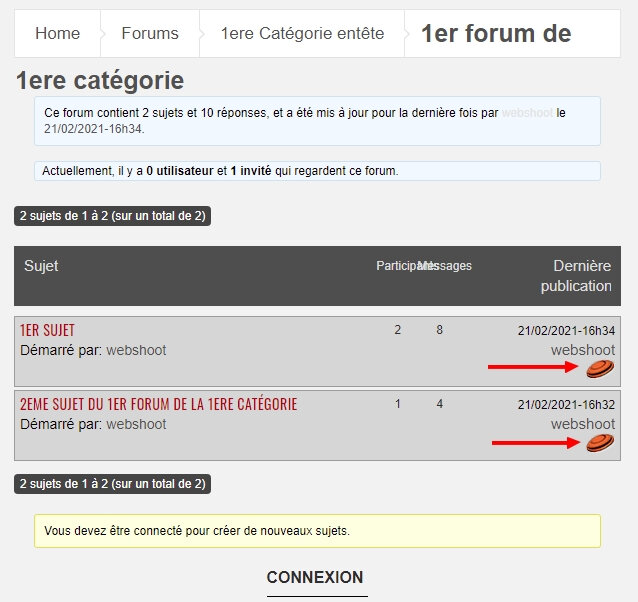
Hello,
In my page where the list of subjects appears, I would like the image of the board on the right to be linked to the last message posted in the subject.
I have made various attempts but each time I am referred to the last post of the forum and not of the subject.
Do you have a solution for me?
Thank you and good day.
Hi,
I want to create private forums in bbpress. if a user wants to get access in this private forum he should request it from the admin. I want this private forum to be visible from all users but not accesssable until the user get the access permission. I am using ultimate member plugin with bbpress.
Thanks in advance.
Hi
I want the thumbnail to appear on the topic
Search results found a plugin similar to the function I’m hoping for
bbpress-topic-thumbnails
https://wordpress.org/plugins/bbpress-topic-thumbnails/
I want to add one more feature in this plugin.
With this plugin, thumbnails of all forum topics are displayed
I only want to use this feature for 1 specific forum
reason for write topic is because the plugin has not been updated for a long time.
So I ask for help here
code is
/*Hooks into the loop-topic.php output to print image*/
add_action( 'bbp_theme_before_topic_title', 'bee_insert_thumbnail' );
function bee_insert_thumbnail() {

        if((!bee_catch_image() == '')){
        echo('<a href="');
    echo(bbp_topic_permalink() . '"><img class="bbp-topic-thumbnail"  width="100%" style="max-width: ' . get_option('thumbnail_size_w') . 'px; max-height: ' . get_option('thumbnail_size_h'). 'px; vertical-align:middle;" src="' . bee_catch_image() . '"/>' .'</a>');
        }
}

/*Function that retrieves the first image associated with the topic*/
function bee_catch_image() {
  global $post, $posts;
  $first_img = '';
  ob_start();
  ob_end_clean();
  $output = preg_match_all('/<img.+src=[\'"]([^\'"]+)[\'"].*>/i', $post->post_content, $matches);
  $first_img = $matches [1] [0];
  return $first_img;
}
Anyone can help?
Thanks
Hello,
I want participants to be able to post their topics without admin or moderator approval.
Do you have the solution.
Thanks for your help.
I am trying to create a custom role that can only reply to existing topics.
I followed this to create new role. At first, the role did appear in dropdown list in admin edit user screen, but after saving, it went back to “— No role for these forums —”.
I found this thread, so.. I created custom WordPress role in the same name. This made the bbPress role to be “saved” but it doesn’t seem to add capabilities. The user with this role can’t see forum or topics.
How can I get this custom bbPress user role to have custom capability?
WordPress 5.5, bbPress 2.6.6
Hello,
I would like to add a class in “bbp_forum_class” which only concerns when it comes to the categories of the first index page that I want different from the forums pages.
Thanks for your help and have a good weekend.
Bernard
WordPress version 5.6
bbpress Version 2.6.6
website: jackkornfield.com
I recently moved a reply to topic and now from the WPAdmin when I click on Replies I get a 502 error, So I am unable to view/edit replies from WordPress Admin. Please help.

