Published on November 18th, 2012 by archer09
Hi, I’m trying to create a bbpress Registration page so that users can register and start posting on my website’s forum. I’ve read through the tutorials on how to do this but there’s a problem. After adding a new Page, under Page Attributes we are supposed to select “bbPress – User Register” as the template. But I don’t see this as an option on the dropdown menu at all.
In fact, the dropdown menu has nothing related to bbPress at all. I’m starting to wonder if the plugin wasn’t installed properly, but the rest of it seems to work fine (eg. I can create forums/threads etc and these are showing up).
Any help on this would be much appreciated! Thanks.
FYI, I’m using bbPress 2.1.3, BuddyPress 1.6.1 and WP 3.4.2
Hi Guys …
Please, in wich file can I find the ” You must be logged in to create new topics. ” ??
I would like to add a link to the login page …
Thank You.
Pietro
Is bbPress language defined by WPLANG in wp-config?
I would like my bbPress language to different from my WP language.
I use WPML and have a multilingual site. For several reasons, I have set my WP Default language as English.
I wish to deploy bbPress as a Hungarian language forum. I will not have forums in other languages.
What do I do?
Hey All,
I’ve recently installed bbpress on a fresh Qordpress site. I’ve created forums and categories fine. My issue is now when i make a new topic, either via wp-admin or the website, i am unable to post in some of the forums/categories even as an admin.
If i make a topic through the wp-admin menu the categories are greyed out and through the site i dont have the option to post at all. All the categories and forums are set to public and open and have all been ordered.
The site is . One of the forums that currently are unavailable is the Work in Progress forum.
I’ve noticed if i delete the category and re-add it i can use it again. But some will re-lock.
Any advice would be greatly appreciated. I have looked around the forums already so if I have missed a thread already please link me to it.
Many Thanks, John
I installed bbPress 2.1.3 on my WordPress 3.4.2 installation and I am having the problem that user profiles do not work. Whenever I hover over the name profile I can see that the URL points to domain.com/forums/user/admin but when I click on it I am returned straight to my blog’s homepage, but with domain.com/forums/user/admin in my browser’s URL line.
Others had related problems too, as I found in this forum, but they were slightly different, and none of the fixes suggested in these other threads helped.
Does anyone know what might be going on here?
Thank you for any ideas or leads,
Guido
Hello
I’d like to translate bbPress into Arabic for both the front and back end.
Where can I started?
Please someone to guide me to the place of the language file so I can get stated and any other recommendations.
I do not mean that someone do the translation for me but I will do the whole thing myself then share it here for all.
In my forums, when I go to a user profile page, the title of that page is being shown as “Page not Found”, even though there clearly was a page found since I can see the user’s profile. I’m setting the page title using wp_title(). Any idea what might be going on? How can I make the title the user’s name or at least something that isn’t “Page not Found”?
Hi! I have installed the bbpress forum plugin here: http://buyclassifiedscript.com/forums/ but the forum is aligned to the left and its full width. I managed to change the css to 1000px but its still to the left. Any suggestions how I can center it?
bbpress: 2.1.3 (TwentyTen package)
WP: 3.4.2
Hi! My layout is like this:
[Category 1]
[Forum 1]
[Forum 2]
[Category 2]
[Forum 3]
.
.
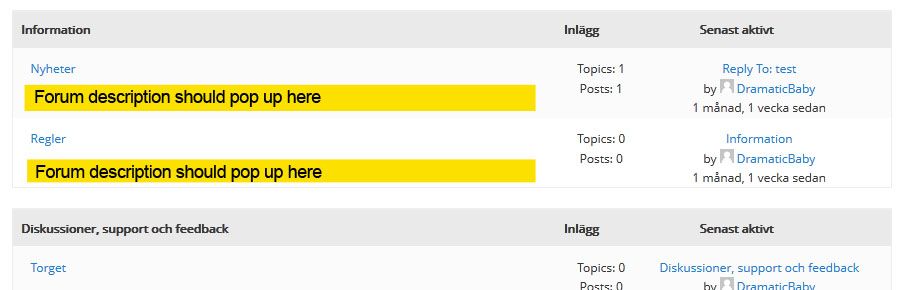
As you know, bbPress’ default layout is to fetch the Category description, not the Forum descriptions. I’ve tweaked the bbp_list_forums function, so now I want to show the forum descriptions instead. But when I add the_content() to my loop-single-forum.php it fetches the category description.
I think I must add the_content() in my_bbp_list_forums, but don’t know where or how.
The code can be found here (Kudos to Lynq): http://pastebin.com/GLhCHYze
And what I’m after graphically: http://i649.photobucket.com/albums/uu216/DramaticBaby/forum_description.jpg
How can I make the_content() fetch the forum descriptions? Or is there a bbp_get_sub_forum_description() function somewhere? 🙂
Hi,
I’ve installed bbpress and set up a test forum.
When viewing the forum it show me a nice full-width page without sidebar, but when I click on a topic, bbpress redirects me to a full-width forum page with the sidebar under the forum (while it shouldn’t show up).
Has anyone an idea how I can fix this?
How it should be: http://www.gebetendoorhonden.be/forum/
sidebar showing (wrong): http://www.gebetendoorhonden.be/forums/forum/te-koop-aangeboden
btw: this also happens with standard wordpress-themes (twenty-ten). I select full-width page and when clicking on topics I get redirected to page with sidebar!?
Dear regards,
Bart