Published on November 21st, 2014 by galiulinr
I added the following code in your theme function:
function get_related_author_posts() {
    global $authordata, $post;
    $authors_posts = get_posts( array( 'author' => $authordata->ID, 'post__not_in' => array( $post->ID ), 'posts_per_page' => 5 ) );
    foreach ( $authors_posts as $authors_post ) {
        $output .= '<l i>< a>ID ) . '">' . apply_filters( 'the_title', $authors_post->post_title, $authors_post->ID ) . '</ a></l i>';
    }
    return $output;
}
On page user-profile.php, I put the following code:
<?php echo get_related_author_posts(); ?>
It shows 5 posts, but I want to show only the for profile author of this posts. Now it shows all the user profiles.Each author should have a list of posts in the profile. Tell me how to do it.
Hello,
I would like to remove or reduce the size the Topic starter’s avatar from the forum topic view index pages.
I’ve tried to add screenshots but every time I do this thread disappears?
I’m using the Easy Adsense plugin and I would like to prevent it from showing an ad on my forum pages. The plugin does have a custom field to disable ads on specific pages, but the problem is that it only disables ads that are outside the forum area (the header and the sidebar), NOT the ad that is showing inside of the forum content area.
Does anyone know where I could insert/delete some code to stop it from showing up?
Hello,
I would like to remove or modify the Topic starter’s avatar from the forum topic view index pages.
this screenshot shows how it currently looks
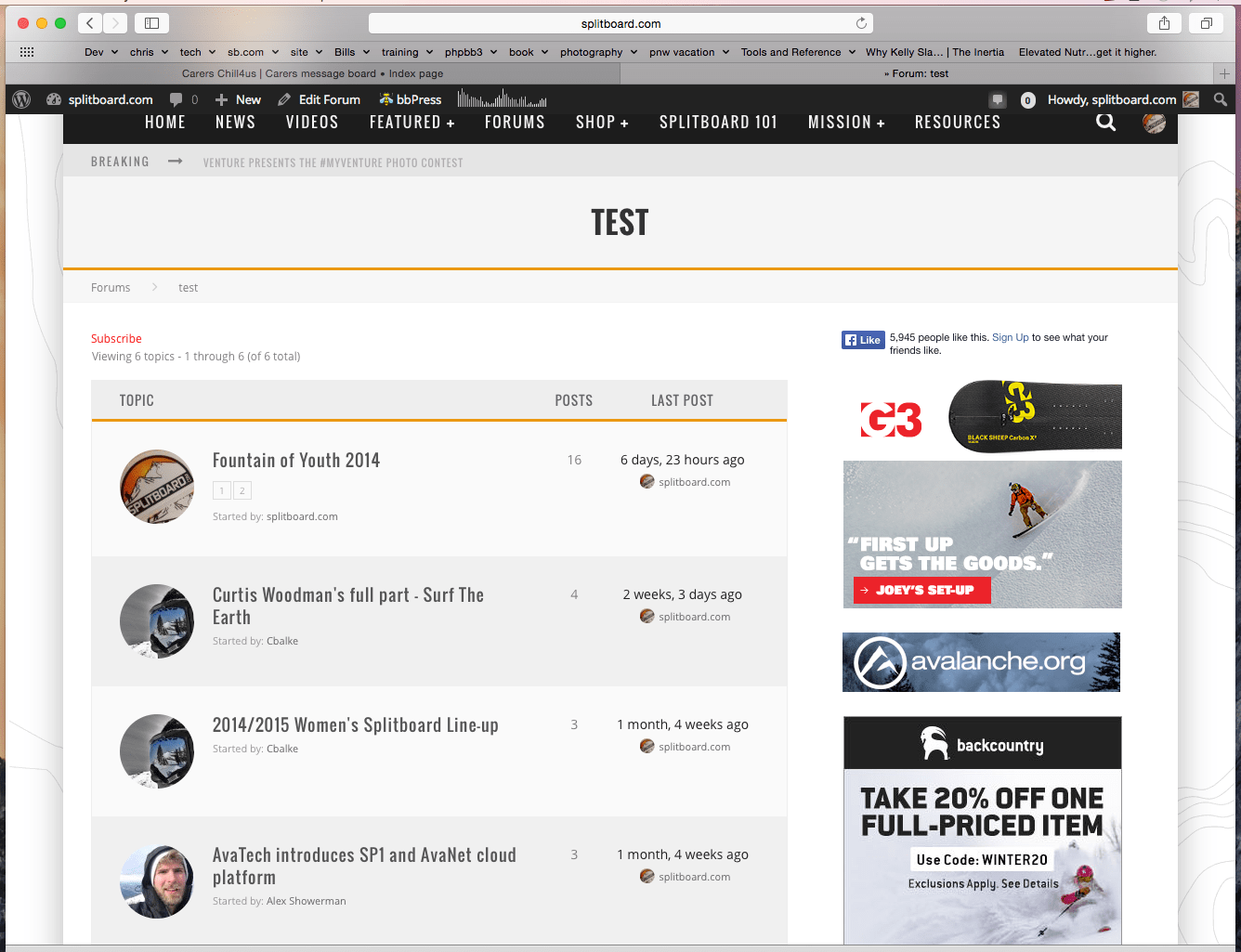
and this is how I would like it to look, notice how it just says “started by” and does not show the avatar.
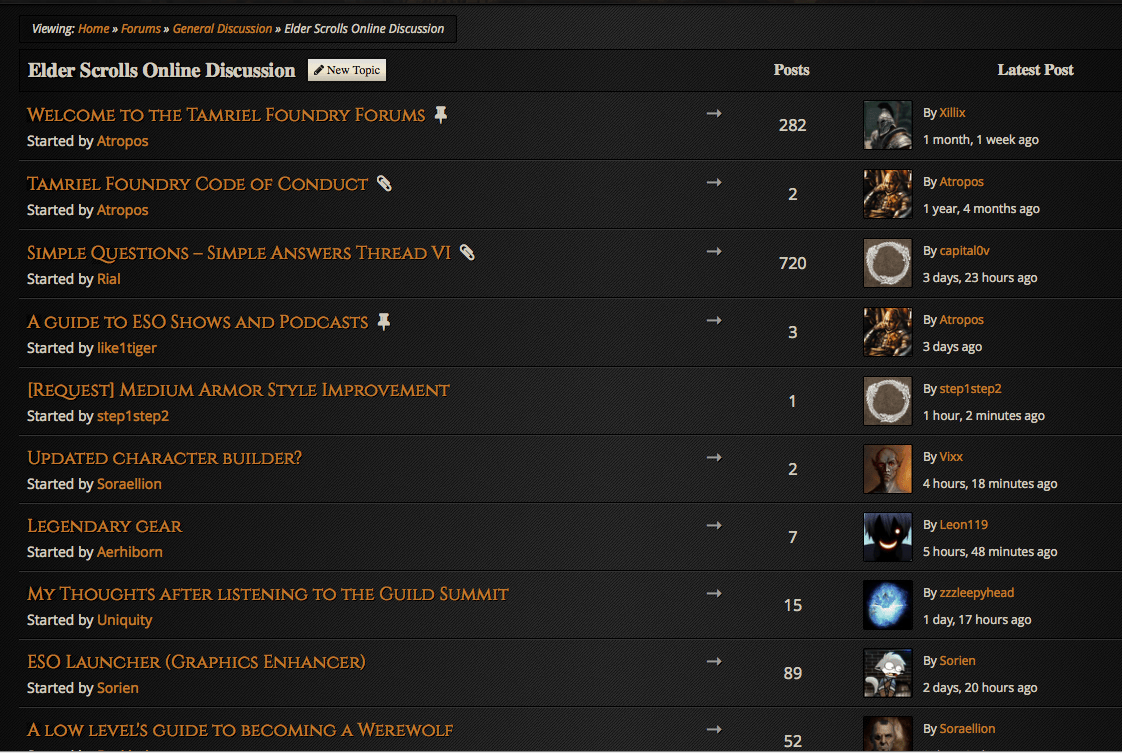
I’d also like to know how to make the avatar smaller like on the pages here
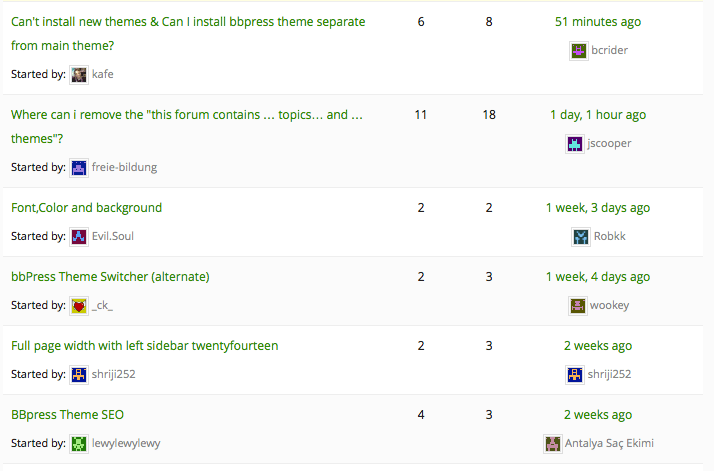
Thanks!
Dear bbPress,
I am contacting you all on behalf of my client who is currently having problems with their website. One of her staff members sent me an email saying they were unable to edit, delete or remove posts on my site’s forum. Not even their own. Their also experiencing problems with posting and/or responding to post. It sometimes allows them to write the post and press the post button but when they check to see if their post has loaded, it is nowhere to be found. I reached out to the organization that powers the forum but I don’t think they will be able to assist me. I’m not sure if WordPress or Buddypress controls the forums on various websites or if the organization that powers the forum can help with forum issues.
My client is using WordPress 3.7.4. and bbPress 2.4.
www.motherswithsonsinprison.com
Hi
Sorry for posting this here, I have been searching around for an answer but cannot find it. I am fairly new to word press and have not used bbpress before.
I am trying to build a website that will have a forum on for people to sign up to, comment, receive notifications, follow certain threads, that type of thing. A fairly normal forum, so I have installed bbpress on my new wordpress website, it is very basic at present but can be seen here if needed, www.multimums.com the problem I have at the moment is that if I go to the website as a normal user, ie not logged into wordpress, then I can see a box for login with user name and password but nothing for registering as a new user. I have the option selected in general settings for anyone to register, but there is no option on the site. Do I need to install a plugin for this to work?
Normally in a forum when you look at a thread there is a line saying something like ‘you are not logged in, to post please login or register.’ How and where do i get this statement to appear, and how do i get people to to be able to register, to be able to post.
Will they then receive an email with their login details and a link to confirm their email address?
Where will these email addresses be stored for my reference, do i need to create a database to store users details in?
I can’t seem to find a guide to setting up the forum other than creating topics and threads, which I have been able to do successfully.
Once users are registered I assume that they will then be able to create new threads?
Thanks very much in advance for your help, sorry if I am asking questions which seem to basic.
Hello,
I updated to WordPress 4.0.1 and updated my bbPress to 2.5.4. The Forum page is a complete mess, it is just a bunch of unformatted text taken from headers and links that were on the page:
Search for: Welcome! Logout › Forums Forum Topics Posts Freshness General Member Posts Feel free to post what you like here! 1 1 2 years, 4 months ago Member News Use this to let us all know your news! 1 1 1 year, 10 months ago
Please let me know what I need to do to get the Forum back!
Link to the site (no spaces) http:// 4 t h s t r e e t c l u b .org/
Hi everyone!
I’m using a members plugin called UserPro. I’m trying to integrate bbPress forums with the user profiles created through UserPro.
All I’m trying to do is replace the user’s photo and username links to instead link to the UserPro profiles.
Here’s a visual.
The plugin’s developer gave users his own CSS changes to the “Loop-single-topic”, “Loop-single-reply” and the “loop-single-forum” .php files.
Though his supplied CSS works in terms of replacing the links, it also breaks the look of the entire forum and removes all of the info below the user’s pic and name.
Here’s the default “loop-Single-reply”:
<?php

/**
 * Replies Loop - Single Reply
 *
 * @package bbPress
 * @subpackage Theme
 */

?>

<div <?php bbp_reply_class(); ?>>

	<div class="bbp-reply-author">

		<?php do_action( 'bbp_theme_before_reply_author_details' ); ?>

		<?php bbp_reply_author_link( array( 'sep' => '', 'show_role' => true ) ); ?>

		<div class="bbp-reply-post-date"><?php bbp_reply_post_date(); ?></div>

		<div class="bbps-post-count"><?php printf( __( 'Post count: %s', 'Avada' ), bbp_get_user_reply_count_raw(bbp_get_reply_author_id()) ); ?></div>

		<?php if ( bbp_is_user_keymaster() ) : ?>

			<?php do_action( 'bbp_theme_before_reply_author_admin_details' ); ?>

			<div class="bbp-reply-ip"><?php bbp_author_ip( bbp_get_reply_id() ); ?></div>

			<?php do_action( 'bbp_theme_after_reply_author_admin_details' ); ?>

		<?php endif; ?>

		<?php do_action( 'bbp_theme_after_reply_author_details' ); ?>

	</div><!-- .bbp-reply-author -->

	<div class="bbp-reply-content">

		<div id="post-<?php bbp_reply_id(); ?>" class="bbp-reply-header clearfix">

			<div class="bbp-meta">

				<?php if ( bbp_is_single_user_replies() ) : ?>

					<span class="bbp-header">
						<?php _e( 'in reply to: ', 'bbpress' ); ?>
						<a class="bbp-topic-permalink" href="<?php bbp_topic_permalink( bbp_get_reply_topic_id() ); ?>"><?php bbp_topic_title( bbp_get_reply_topic_id() ); ?></a>
					</span>

				<?php endif; ?>

				<a href="<?php bbp_reply_url(); ?>" class="bbp-reply-permalink">#<?php bbp_reply_id(); ?></a>

				<?php do_action( 'bbp_theme_before_reply_admin_links' ); ?>

				<?php bbp_reply_admin_links( array ( 'after' => '<span class="admin_links_sep"> | </span></span>') ); ?>

				<?php do_action( 'bbp_theme_after_reply_admin_links' ); ?>

			</div><!-- .bbp-meta -->

		</div><!-- #post-<?php bbp_reply_id(); ?> -->

		<div class="bbp-reply-entry">
			<?php do_action( 'bbp_theme_before_reply_content' ); ?>

			<?php bbp_reply_content(); ?>

			<?php do_action( 'bbp_theme_after_reply_content' ); ?>
			<div class="bbp-arrow"></div>
		</div>

	</div><!-- .bbp-reply-content -->

</div><!-- .reply -->
Here’s his supplied CSS:
<?php

/**
 * Replies Loop - Single Reply
 *
 * @package bbPress
 * @subpackage Theme
 */

?>

<div <?php bbp_reply_class(); ?>>

	<div class="bbp-reply-author">

		<?php do_action( 'bbp_theme_before_reply_author_details' ); ?>

		<?php

/* Integrating UserPro */
		global $userpro;
		$link = preg_replace("/(?<=href=(\"|'))[^\"']+(?=(\"|'))/", $userpro->permalink( bbp_get_reply_author_id() ),
		bbp_get_reply_author_link( array( 'sep' => '<br />', 'show_role' => false ) ) );
		echo $link . userpro_show_badges( bbp_get_reply_author_id() );
		?>

		<?php if ( bbp_is_user_keymaster() ) : ?>

			<?php do_action( 'bbp_theme_before_reply_author_admin_details' ); ?>

			<div class="bbp-reply-ip"><?php bbp_author_ip( bbp_get_reply_id() ); ?></div>

			<?php do_action( 'bbp_theme_after_reply_author_admin_details' ); ?>

		<?php endif; ?>

		<?php do_action( 'bbp_theme_after_reply_author_details' ); ?>

	</div><!-- .bbp-reply-author -->

	<div class="bbp-reply-content">

		<?php do_action( 'bbp_theme_before_reply_content' ); ?>

		<?php bbp_reply_content(); ?>

		<?php do_action( 'bbp_theme_after_reply_content' ); ?>

	</div><!-- .bbp-reply-content -->

</div><!-- .reply -->
I would be grateful to get any assistance on how I might change the links alone without modifying or breaking everything else. Thanks so much in advance.
I’m using the Avada theme.
Hey there,
I have a forum on my website but the BBcode buttons have white text which makes them practically invisible. Is there custom CSS I can apply to make the font color of these buttons black? I’ve attached an image.

Hi
We are using this plug in for one of our clients. Their site just went live after being designed, built, and tested on our beta server. Everything worked great, so we moved it to the live server this week.
However, now that they’re on the live site, new forum users are not receiving their email notifications containing their password. In Beta, there was no email “link” as far as I could tell between the Beta site and our hosting. When a new user would register, they would receive an email from wordpress@clientname.org. Within our hosting back end, I can see that emails were actually sent from ourusername@ourbetaserver.com.
Within the Dashbaord/Settings/General, I’ve made certain that the email account listed on that screen matches what was set up with their hosting provider. I’ve dug through the files until I can see code with my eyes close and cannot figure out how to make this work again.
I’ve just now learning development, so please help (at a 101 level). I appreciate any insight!!

