Hi, we have installed the follow:
WordPress Network version 3.6.1
bbPress version 2.4
I do not have found some way to prevent the instant publish of topics and replies loaded by Participants.
There is a way, to do the approval for the publish of the topics and replies by the Blog Administrator or by Blog Editor ?
This has been a long standing issue.
The problem here is that, in the user profile favorites page, only topics that are created by the user and marked as favorite shows up. Any topic that is not created by the user and marked as favorite will not show up in user profile page.
Is this by design or is this a bug?
I am using WordPress default theme with only bbPress plugin.
i’ve been looking for this simple answer for 4 hours straight. google, bing, wordpress, plug in INSTALLATION NOTES… no place is it found. THANK YOU!
I am using WordPress 3.6.1 with plugins Buddypress 1.8.1 and bbpress 2.3. I am trying to import the latest topics and replies from specific bbpress forums into specific wordpress pages.
I started with a Mysql query:
$query=”SELECT * FROM wp_posts WHERE post_type = ‘topic’ OR post_type = ‘reply’ ORDER BY post_date DESC”;
Then (in pseudo code) I planned to do the following:
// since forum is a parent of topic which is a parent of reply
// if post is topic get forum id
// if post is reply get forum id from the parent of the topic
//create an array of latest topics and replies associated with their forums
//print latest topics and replies for each forum to different wordpress pages.
The problem I cannot seem to solve is – where to get the name of the forum from? Without getting the name of the forum from somewhere in the database, my only option would seem to be to hardcode the forum id’s of each forum with their respective names. Which means every time a new forum is created this needs to be added in manually in the code. None of the tables I see in the wp database seems to contain the names of the different forums. Even if one of the other tables did contain it I am still not sure how I would then associate the forum id’s from the wp_posts table with the forum names from another table – presumably I would have to do some kind of join? Or maybe I am going about it completely the wrong way – is anyone able to help an inexperienced developer out of his depth navigate his way through this problem?
Just by chance found a mailchimp plugin, no idea if it will help you, but :
https://wordpress.org/plugins/mailchimp/
probably worth a look !
Guys, we are proud to announce that the new Rating-Widget plugin release supports BuddyPress & bbPress ratings. And the Premium version even support aggregated user ratings which is calculated based on all user’s activities.
Read about the announcement:
http://rating-widget.com/blog/bbpress-buddypress-star-rating-plugin/
Indeed, it looks like the new parent is not caught. It’s strange because in the code, the ID of the parent forum is correctly read as we can see in the <ul id="forums-list-17150" class="bbp-forums"> and is seen as a category. It seems like the post_parent argument is not used.
Have you (or your theme creator) applied a filter to bbp_has_forums ?
Can you check with an other theme ? (use https://wordpress.org/plugins/theme-test-drive/ if you don’t want to disturb your visitors)
Well, here are some ideas.
[glow=red,2,300]Glow[/glow] – What do we want to translate this to?
This is obviously a CSS Text-shadow without offset and with a little blur so the only thing that comes to my mind would be to convert this to a SHORTCODE and add in the documentation of the converter how to add it manually to the user’s wordpress install and to the theme CSS, since I can’t think of another way for this to work.
[shadow=red,left]shadow[/shadow] – What do we want to translate this to?
Same as the above but with a little offset to the 4 sides being able to pick a side in the shortcode and without blur.
[move]marquee[/move] – What do we want to translate this to?
JUST REMOVE IT, it’s ugly and old
[tt] – teletype? should this be a monospaced font?
YEP
And as for the smileys (extra space added so these render in code block)
;D 😉 ; - )
>:( 😡 : x
8) 😎 8 - ) unless a glasses smiley is added to WP
??? ❓ : ? :
::) 🙂 : ) I didn’t find what this smiley is supposed to be
:-[ 🙁 : - (
-X 😡 : - x
:-\ 😕 : - ? unless a skeptical smiley is added to WP
:-* 😉 ; - ) unless a kiss smiley is added to WP
:';( 😥 : cry :
The new WordPress 3.6.1 doesn’t have this option anymore. I know there are a few code hacks out there for changing the embed size, but those affect all the embeds on the site (including embeds on regular posts).
I was wondering: Is there a way to change the embed size for bbpress posts only?
You guys are AWESOME, I can’t believe that after years I’m finally this close to having a full integration of my forum with my wordpress, thank you for the hard work…
Looks like the last thing needed now for SMF v2.x is converting any custom HTML/BBCodes for topic/reply content.
From my tests the following BBCodes are converting fine:
[url][img][email][b] – bold[i] – italic[u] – underline[s] – strikethrough[left]– left aligned[center] – centre aligned[right] – right align[font=fontname] – fonts[color=colorname] – color name[color=#FFFFFF] – color hex value[sup] – superscript[sub] – subscript[quote] – quote
The following need to be converted by regex strings during import:
[quote author=SMF Admin link=topic=9.msg30#msg30 date=1380330453] – Quoting a post, username, post id & date support needs to be added.[pre] – pre formatted text[code] – partially working[size=x] – font size[glow=red,2,300]Glow[/glow] – What do we want to translate this to?[shadow=red,left]shadow[/shadow] – What do we want to translate this to?[move]marquee[/move] – What do we want to translate this to?[tt] – teletype? should this be a monospaced font?[table], [tr] & [td] – tables and closing tags[list] – unordered list[list=decimal] – ordered list[li] – list item[hr] – horizonal rule
SMF Smilies Working (extra space added so these render in code block)
- 🙂
: )
- 😉
; )
- 😀
: D
- 🙁
: (
- 😮
: o
- 😛
: P
SMF Smilies not working
- ;D
;D
- >:(
>:(
- 8)
8)
- ???
???
- ::)
::)
- :-[
:-[
- -X
:-X
- :-\
:-\
- :-*
:-*
- :’;(
:'(
What should the above be converted to with the smilies included with WordPress?
https://codex.wordpress.org/Using_Smilies
Have I missed any BBCode and/or other ‘stuff’ that isn’t getting converted correctly during the SMF import?
There are a couple of plugins that help with this and ‘Forum Topic notifications’ are coming to bbPress 2.5 https://bbpress.trac.wordpress.org/ticket/2299
Details of this are here https://bbpress.trac.wordpress.org/ticket/2443
Anyone else have some thoughts on this? Add to the discussion on Trac 🙂
I’ve been at this for a while. I have a wordpress multisite installation. I want to provide bbpress as an option to all the users of blogs on the network. The problem is, if the plugin is not network activated users of the sub-blog cannot activate it. They get a permissions error. The only way I’ve found to get around this is to network activate it, which I do not want. Many of my users will not need forums and by network activating it they all get the widgets, dashboard notifications, and pages created.
How do I fix this bug? It does this with bbpress 2.3.X and 2.4.
I have added password support to this importer 🙂 .
You can find it at Trac Ticket #2380.
Forgot:
BBpress: 2.4
Wordpress: 3.6.1
I have a theme-specific issue affecting the Skeleton WordPress theme. Basically, the front-end topic/reply editor loads the entire source code of the page.
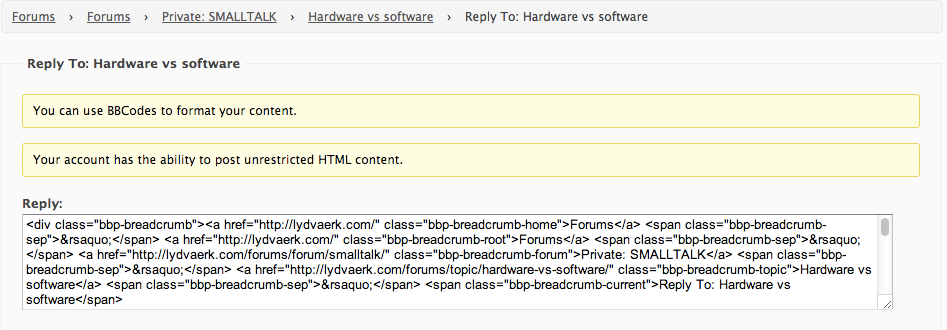
Any ideas?
Found out –
you can simply use Widgets inside your template.
I also installed the tehnik-bbpress-permissions plugin to not show the hidden forums topics and put this into my template:
<?php the_widget( 'Tehnik_BBP_Replies_Widget', $instance, $args ); ?>
This should work with the default BBP Replies Widget, too (just need to find out the name of it)
Will try a bit more customization today with an eye on https://codex.wordpress.org/Function_Reference/the_widget
Another possibility is manually:
	<?php do_action( 'bbp_template_before_topics_index' ); ?>

        <?php if ( bbp_has_topics( array( 'author' => 0, 'show_stickies' => false, 'order' => 'DESC', 'post_parent' => 'any', 'posts_per_page' => 5 ) ) ) : ?>
                <?php bbp_get_template_part( 'bbpress/loop', 'recent-topics' ); ?>
        <?php else : ?>
                <?php bbp_get_template_part( 'bbpress/feedback', 'no-topics' ); ?>
        <?php endif; ?>

	<?php do_action( 'bbp_template_after_topics_index' ); ?>
Sage words? Nope 😉
I had a quick look around https://wordpress.org/plugins/search.php?q=bulk+users and nothing really stood out.
The most users I have played around with is ~4,000 and that was too many also for the WordPress admin dashboard. I ended up doing everything I needed directly in phpMyAdmin with SQL queries.
A way to delete users an reattribute their posts/topics/replies to another user (mainly for a handful of folks who already had accounts on the WordPress side before migrating vBulletin over)
With only a handful of these use WordPress’ built in user delete tool, when you select to delete a user you have the option to delete all posts (including topics & replies) or keep them an attribute them to another user.
A way to “nuke” users who have spammed the forums. This would delete the user as well as all of their topics and replies.
First you are going to have to find the spam and record each user id associated and this is painful indeed! I am not to sure on the specifics but there probably is a way to get Akismet to check all of this for you.
A way to purge all users with no forum topics or replies (or posts, for that matter).
I think the quickest way for this would be in phpMyAdmin directly using an SQL query.
The query (Good to verify this stuff before you delete them)
SELECT ID FROM wp_users
WHERE ID NOT IN (SELECT DISTINCT post_author FROM wp_posts);
The delete queries (Any user without a post gets deleted)
DELETE FROM wp_usermeta WHERE user_id NOT IN (SELECT DISTINCT post_author FROM wp_posts);
DELETE FROM wp_users WHERE ID NOT IN (SELECT DISTINCT post_author FROM wp_posts);
Okay, so I am working on a migration from vBulletin to bbPress. Everything moved over fine, but now I have over 60k users. This causes a real problem when I want to delete a user, because the Delete User screen creates a pick list with all 60k names!
Here’s what I’m looking for…
- A way to purge all users with no forum topics or replies (or posts, for that matter).
- A way to “nuke” users who have spammed the forums. This would delete the user as well as all of their topics and replies.
- A way to delete users an reattribute their posts/topics/replies to another user (mainly for a handful of folks who already had accounts on the WordPress side before migrating vBulletin over)
Any sage words of advice?
it uses the wordpress user database to store email addresses, and will mail to the email address of the wordpress user as you set them up.
Whilst a bit clunky, you could use
https://wordpress.org/plugins/export-users-to-csv/
to export the email addresses to a csv, and import them from there to mailchimp maybe via a macro.
depends on how many users you have and how often you’re emailing.
Hi! I found out that this “who is online function” is in progress. This the link I’ve read about this, hope it helped you: https://bbpress.trac.wordpress.org/ticket/1792
I don’t have any issues with search widget.
I can’t see your forums
Bandwidth Limit Exceeded
The server is temporarily unable to service your request due to the site owner reaching his/her bandwidth limit. Please try again later.
Possibly try resaving your permalinks:
To fix this try resetting your permalinks. In your WordPress Administration Screens navigate to Settings > Permalinks, select a different permalink structure and save. Then select your preferred permalink structure and save again
I followed the instructions for installing the WordPress plugin of bbPress.
However, doing this invariably puts the live bbPress forum in the following directory:
/mysite.com/blog/forums
Clicking the /blog breadcrumb will drop my users into the weblog. Ideally, I’d prefer to have the nesting as follows:
/mysite.com/classrooms/forums
But if that’s not possible, having it exist as /mysite.com/forums would also work.
The most recent thread I could find on this issue was four years ago, and suggested using freestanding bbPress, which won’t work with my membership software (MemberMouse).
Thanks for any help you can offer on changing my setup.
Current site is password-secured DEV: WordPress Version 3.6.1, bbPress v.2.4
Site URL available privately if necessary.


