Skip to:
Content
Pages
Categories
Search
Top
Bottom

Search Results for '"wordpress"'

Viewing 25 results - 6,076 through 6,100 (of 26,866 total)
  • Author
    Search Results
  • Pascal Casier
    Moderator

    Do you have any posts or forums already on the new subsite of the multisite installation ? If not, you could probably just export your whole single site with the wordpress export and then import it on the multi-side one.

    Pascal.

    mauryg
    Participant

    @membershipsite101
    Using the index shortcode on the ‘forum’ page is perfectly normal. If you leave the /forum page blank then you can choose whether to show the forums index or the topics index on the bbpress settings page.
    As I noted before the URL of the Welcome page says it is a subpage of the ‘Help’ page (http://membershipsite101.com/help/welcome). So I would expect it to use the template of the /help page, not the one of the /forum page. Do you perhaps have a page titled ‘Welcome’? Try hovering over the forum title on the /forum page and see what the link says. If the forum root is ‘discussion’ then the /welcome page should be either /discussion/welcome or /forum/discussion/welcome.
    I think you need to review your bbpress settings again. Look at my page http://spaug.net/forums.
    I use the bbpress default settings as follows:
    Forum root slug: forums
    Forum slug: forum
    Topic slug: topic
    And I check the ‘Forum Prefix’ box as recommended.
    Then my URLs are as follows:
    Root page: sitename/forums
    Individual forum page: sitename/forums/forum/forum-name
    Individual topic page: sitename/forums/topic/topic-title
    I suggest that you try changing the forum root slug to ‘forum’ or ‘forums’
    Finally, unless you are very adept at CSS modifications, I recommend the ‘bbp style pack’ plugin. It allows you to modify colors, fonts, font size, etc easily.
    Remember, whatever optimizepress theme template.php you want to use for the forums page (right sidebar, no sidebar, etc) make a second copy of it IN THE SAME FOLDER and rename it bbpress.php. That way bbpress will always use that template. I also make a copy of the bbpress.css file from plugin folder (\wp-content\plugins\bbpress\templates\default\css\bbpress.css) and put it in the theme folder. That way you can use the WordPress Editor (Appearance>Editor) to make changes.
    I just did a quick Google search on ‘Optimizepress and bbPress’ and it looks like there is a lot of incompatibility. I also noted that Optimizepress was discontinuing their support forum in favor of their ‘customer happiness team’. My condolences
    Having fun yet?

    Maury
    Maury

    #171193
    phraisohn
    Participant

    I have the same problem. I just download WordPress 4.4.1 and Fresh install. Then install bbPress latest version.

    When I visit Forum category I can’t see the link or button that I can create new topic. It’s show only “This forum is empty.”. I try with basic theme Twentyfourteen which came with WordPress.

    Any Idea to solve this please?

    #171188
    hooohn
    Participant

    *EDIT*

    I just tried it out with a totally clean install of wordpress 4.4.1 and bbpress 2.5.8SAME RESULT – there are no other plugins installed !, only two users, etc.

    can there a be an issue with the local MAMP installation?

    thx for any suggestions!

    #171175
    Pascal Casier
    Moderator

    Hi,
    I think you better ask this on a WordPress forum. Seems no error from bbPress.
    Pascal.

    #171170
    Pascal Casier
    Moderator

    Hi,

    Just to be sure, you tried the permalink thing like netweb indicated ?

    It could be an issue with your rewrite rules. To fix this try resetting your permalinks. In your WordPress Administration Screens navigate to Settings > Permalinks, select a different permalink structure and save. Then select your preferred permalink structure and save again.

    Pascal.

    #171164

    In reply to: User ranking system?

    Robin W
    Moderator

    I have just released a plugin for user ranking

    https://wordpress.org/plugins/bbp-user-ranking/

    #171161
    TechBae
    Participant

    I want to extend forum support on my website to get my users more engage. I have a Tech Website – Can anyone here give me a detailed tutorial to setup bbpress on WordPress? It will be a great help.

    Manuel Fritsch
    Participant

    WP Version 4.4.1, bbpress 2.5.8, http://de.movemeta.org/foren/

    Hi,

    just like in WordPress.org and bbpress.org forums, I would like to enable users to insert blank lines to be visible after posting. Please tell me how to accomplish this – I know that the limitation is there to prevent users posting 1000 lines in a row, but clearly, to have at least one blank line was considered preferable around here, too.

    Thank you,
    Manuel

    #171151
    Stephen Edgar
    Keymaster

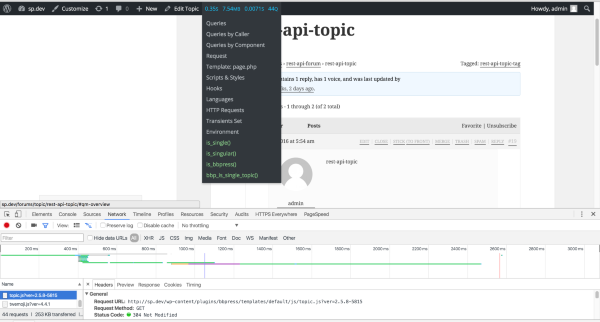
    @andrewgtibbetts can you install the following two plugins and take another look?

    https://wordpress.org/plugins/query-monitor/
    https://wordpress.org/plugins/query-monitor-bbpress-buddypress-conditionals/

    Here’s what I see, is_single(), is_singular() and bbp_is_single_topic() all return true

    BbPress Topic JS

    #171150
    Stephen Edgar
    Keymaster

    @ dots Nice size forum, heres a few things that I hope will help:

    Firstly, can you try by using bbPress 2.6-alpha, you can find it here https://bbpress.org/download/

    1) Sometimes scripts are automatically stopped and script not start automatically.

    Sometimes things timeout, a workaround for this is to open another tab in your browser to example.com/wp-admin and refresh it occasionally

    2) Currently, lots of data is still pending to import in BBPress but the script is not running and in tools bottom section I can see only “Starting Conversion” and loader.

    This is similar to 1), by refreshing you should in another browser tab this should keep that issue at bay, this particular issue is usually when PHP drops the MySQL connection and needs refreshing to update the connection between WordPress and the database.

    3) I have noticed in the tool having the duplication issue you can see above in Xenforo only 83,813 topics but BBPress tool imported 83,867 records. So 54 records are duplicates. so this issue resolved using BBPress repair forum tabs?

    It could be duplicates, though I’ve only ever tested 3 or 4 Xenforo forums with bbPress, potentially using the repair tools might fix this though without some more information here it will be hard to take a guess. If you can supply a copy of a couple of duplicates I can take a closer look as to the reason why.

    4) BBPress import tool taking random data from the Xenforo database. I have noticed when I have started the script first the users come from the Xenforo. But unfortunately, the users are skipped and the tool has started to import the topic. So, I am a bit confused here BBpress import tool can complete import all the users, topic, forums, and replies successfully? you can see above my total Xenforo user is 1,59,679 and BBPress tool has imported only 94,600. and the now script has started to import replies.

    Again, it should do all of this correctly, though testing with bbPress 2.6-alpha per above will hopefully fix many, or most of the issues you are having, can you try using 2.6-alpha and let me know how that goes for you please 🙂

    Also a couple more tips in our docs:

    Import Troubleshooting

    #171144

    Topic: Catagories

    in forum Showcase
    ilink
    Participant

    this is a site for a new guild in World of Warcraft I wiped up with wordpress,
    I want the forums to look like another site I made.

    Wordpress Site: http://thornbladeguild.com/forums/

    Website I want forums to look like: http://sanctusgaming.com/Community/index.php?/

    [not including the shout box]

    #171140
    Rhinooo
    Participant

    Whenever someone tries to register an account when they hit the register button it just takes them to a “401 Authorization Required” page that says “This server could not verify that you are authorized to access the document requested. Either you supplied the wrong credentials (e.g., bad password), or your browser doesn’t understand how to supply the credentials required.” I’ve gone over the basic troubleshooting but cant seem to figure it out…

    Running WordPress 4.4.1
    Running Theme: Hamza LiteVersion: 1.1.8 By 8Degree Themes
    @ http://duramaxin.com/

    #171113
    Manuel Fritsch
    Participant

    Hi,
    thanks, I did just that! https://bbpress.trac.wordpress.org/ticket/2909#ticket
    ~Manuel

    Pascal Casier
    Moderator

    Hi,
    I you use bbPress on WordPress (so no BuddyPress), then any WordPress plugin would do. Users are managed by WordPress.
    Pascal.

    #171085
    Pascal Casier
    Moderator

    Hi Bryan,
    ‘Registering’ would be a WordPress issue (if you just use bbPress) or a BuddyPress issue.
    If you want a response, you might have more luck on those forums.
    Pascal.

    incibes
    Participant

    Thank you for the tips provided, Stephen! However, isn’t there any user-friendly plugin for this? I am a total MySQL noob. We are currently choosing from responsive WP themes at http://www.templatemonster.com/wordpress-themes.php for our Alumni Association website redesign, but we already have an existing board based on vBulletin, so smooth migration seems to be very challenging.

    Pascal Casier
    Moderator

    Hi,
    There is a check every 6 hours for plugins, if they are at 100% for a locale, they should become available at that moment.
    Just make sure you do not have any pending local mo/po files anymore. And that your WordPress is set to de_DE (and not to formal or e.g. Swiss).
    Pascal.

    _az_
    Participant

    Hi,

    i was doing some performance analysis with the Xdebug and Xhprof profiling tools and noticed that many of my DB queries/per request are something similar to:

    SELECT option_value FROM wp_options WHERE option_name = '_bbp_enable_subscriptions' LIMIT 1

    In Trac Ticket 1550 it is mentioned, that the WordPress Object Cache is used, but this “error_log” (in wp-db.php Version 4.4.1 line 1809) tells me a different story:

    
    	private function _do_query( $query ) {
    		if ( defined( 'SAVEQUERIES' ) && SAVEQUERIES ) {
    			$this->timer_start();
    		}
    
    		if ( $this->use_mysqli ) {
    			error_log($query . "\n", 3, '/tmp/wpdb.log');
    			$this->result = @mysqli_query( $this->dbh, $query );
    		} else {
    			$this->result = @mysql_query( $query, $this->dbh );
    		}
    		$this->num_queries++;
    
    		if ( defined( 'SAVEQUERIES' ) && SAVEQUERIES ) {
    			$this->queries[] = array( $query, $this->timer_stop(), $this->get_caller() );
    		}
    	}

    Am i missing some Cache Settings here?

    I am using WordPress 4.4.1 with bbPress 2.5.8

    #171057
    Gunilla
    Participant

    I have had the problem since I installed bbPress six weeks ago and I think I have had WordPress 4.4.1 since then.
    I have now found a work around solution, inactivated the 404-plugin, created a 404.php-file and uploaded it in the theme folder. After that the bbPress topic pages are available.

    #171051
    Pascal Casier
    Moderator

    Hi,
    I had a similar issue already when running e.g. “Recalculate last activity in each topic and forum” and if post IDs and post dates are not really aligned. It’s a known issue that should be fixed in the upcoming v2.6.
    After the next reply, everything should be then correctly refreshed.

    Are you seeing the same behaviour ?

    Pascal.

    #171049
    Gunilla
    Participant

    The theme was not the problem. I now know that it is the 404 plugin where I can use a wordpress page as 404-page. I have tested two different 404 plugins but it is the same problem with both of them.

    Is there any way to work around this problem so I can use a 404 plugin and still have a well functioning bbPress forum?

    WalkerDesign1
    Participant

    Thanks for the feedback Robkk.

    I am experiencing this issue within BuddyPress. It is only when I attempt to upload a profile image for the member in the Change Profile Photo.

    I have a php.ini file in the main directory that has the following settings –

    memory_limit = 256M;
    max_execution_time = 180;
    upload_max_filesize = 20M;
    post_max_size = 20M;
    max_input_vars = 3000;

    I have also set the wp-config file with this setting –

    define( ‘WP_MEMORY_LIMIT’, ‘256M’ );

    Updating these files with these memory increases has not solved the BuddyPress Upload Failed! issue.

    Is there a configuration file in BuddyPress that needs to be updated or changed?

    Uploading images within WordPress’s media directory works great.

    Buddypress is the only place where I am experiencing the upload fail error

    #171036
    elis85
    Participant

    i have a site with buddypress and bbpress installed.
    latest version of wordpress, buddypress and bbpress
    every group has a forum. i’m having a strange issue, regular users can post only one post.
    when trying to post again, the page reloads but nothing happens. the post is not saved, and wont show up anywhere, and no error massage is shown.
    searched for info about this problem but couldn’t find anything.
    any ideas what could be the problem.

    thank’s,
    eli.

    #171032
    Robin W
    Moderator

    ok, this is now a wordpress problem, so suggest you post a new topic there

    Support Forums

Viewing 25 results - 6,076 through 6,100 (of 26,866 total)
Skip to toolbar