i cant customise the forum , like color , size of headings etc i change it from bb style pack but it doesn’t appear in actual
Cant Customise BB Press using BBp style pack
Published on February 12th, 2021 by Mylo curtisuser’s topic list occur 404 error
Published on February 12th, 2021 by purityboy83Hi
When I searched another user’s “forums” menu(user’s topic list), a 404 error occurs from page 2.
There are many attached images, so I’ll give you a google presentation link
(because : Posts with 3 or more links will be manually approved by our forum moderators
my link 3 more )
Please see the link below
Best Regards,
Hyunho
non privilege user can make Forums ? and control
Published on February 11th, 2021 by kenusysHi ,
I would like to make non privilege user can make forums and also this fourms members be controlled
by who make forums.( I don’t want use buddypress)
Is there any plugins for this feature?
How to publish every posts as bbpress topic in specific forum
Published on February 11th, 2021 by mc9625I would like to automatically create a topic on bbpress for every post I publish. I use different categories, so far I’ve created one forum for each category.
I’m using bbpress topics for posts plugin, but it doesn’t fit. Since it creates a post only when there’s actually a comment.
Is there any other solution to achieve that?
move moderation
Published on February 11th, 2021 by frenchlemansHello,
I would like to have the moderation block under the reply as I show on the screenshot.
Is it possible ?
Thank you very mutch.
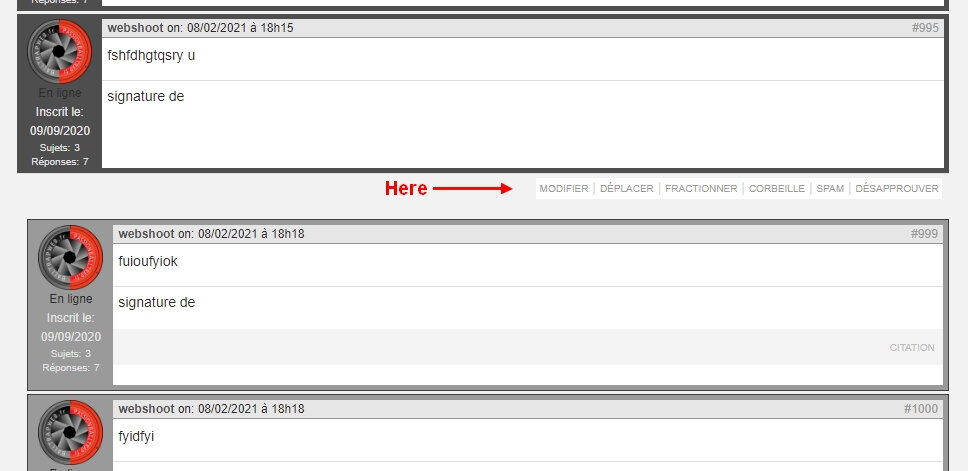
404 error
Published on February 10th, 2021 by kealarafana2020HI I am using bbpress with memberpress to control forum access with members.
we have two membership levels. and a different forum for each membership.
The first one set up without a hitch.
The second one was set up the same way but the access is not correct. It should say a particular member group. instead it says public. and when people are logged into memberpress and should have access the page says 404 error not found
I think my memberpress rules are set up correctly as they are identical to the settings for the forum that is working. WHat coould I be missing here?
cant see forum tab , cant see keymaster role
Published on February 10th, 2021 by Mylo curtisi have installed bbpress , i am an administrator , i assigned the role to user moderator (the highest show role) i can only see topic and replies tab only on my WordPress dashboard
i saw other support queries tried every thing but cant fix it
i set permanlinks also
cant assign keymaster as its not visible in option
https://www.theislamicquotes.com/ is the site
BBPress set-up problem
Published on February 10th, 2021 by kwager01Hi,
My current WP configuration
– WordPress version: 5.4
– BBPress version : 2.6.6
– Website Link : https://kam-webagentur.fr
Problems encountered :
I installed WordPress but I am having a problem installing “bbpress” which I want to integrate with WordPress.
I arrive at the “Welcome to bbPress installer” installation interface
and this is the error message I get once I run the installation.
Fatal error: Call to undefined function: wp_check_invalid_utf8 () in /www/forum/bb-includes/functions.wp-core.php on line 60
What is the procedure to stop getting this error message ???
Thank you in advance…
Compatibilty with weglot plugin
Published on February 10th, 2021 by chussmanHi there,
Im using Weglot to translate my website. I have 12 forums. A forum for each language.
I have a serious problem, if I am viewing, for example, my website in Spanish, and I publish a new topic or respond to an open topic, my website loses the current language when I hit the send button.
I have spoken to Weglot technical support and they tell me this:
It seems that I’m not able to reach the form action that redirects to the URL with /forums/topic/title_id
There’s always a 302 redirection to the next URL and I’m not able to counter that.
I think this setup is made her > https://desa.laprairievirtualbaevent.com/wp-admin/options-general.php?page=bbpress
However, I’m not able to add a condition regarding the current language.
Can you maybe contact BBPress support asking them how can we add a condition regarding the current language or the current URL?
How can i fix this? Is very urgent!
Next link on bottom of forum/topic pages
Published on February 10th, 2021 by ikspemOn the bottom of the Forum Page, I see a link “Next forum”, which leads me to the 1 forum I have :). Pretty useless ;).
On the bottom of the topic Page, I see a link “Next topic”, which always leads me to 1 specific topic. No other topic is presented.
I’ve tried repairing freshness of forum (Backend > Tools > Forum), no luck
My question:
– Can I easily switch those links off?
– If not easy; how can I fix it so that it becomes useful?

