hello,
where i can find a good guide to make a bbpress theme …
thx
hello,
where i can find a good guide to make a bbpress theme …
thx
I am using BBPress and in the header I have created an login/logout section for when a guest or user is logged in. I’m currently trying to create a “My Profile” link when a user is logged in but I’m unsure of the functions to achieve this (or if I am using the right functions currently). My code for this currently is:
 if(is_user_logged_in()) {

     global $current_user;

     get_currentuserinfo(); $text .= 'Hi '.$current_user->display_name.'!';

     echo $text;

     echo "#"'>My Profile | Logout"; }

else{echo "You are currently not logged in!";

     echo "Register |

      Log in"; }
I am currently trying to customize the default BBPress profile page. For each forum user’s profile I would like to display the user’s description (which for a WordPress user account is called “Biographical Info”. What functions or how can I display this?
Just curious, i’ve worked with bbPress before but it looks like the WordPress Hierarchy is broken by bbPress.
https://codex.wordpress.org/images/1/18/Template_Hierarchy.png
Normally i could make a page template and call it page-forums.php to make sure WP would use this page template for a new page created by the slug forums
But for some strange reason this doesn’t work anymore with bbPress 2.2.1 and WP 3.5 Beta and Twenty Twelve.
How can i make sure WP or bbPress uses a different page template then page.php for showing the forums and category -index on the forums slug?
I’ve tried everything, Copy/Paste the page-front-forums.php from the Extra’s folder to my Theme’s Root -> Created a new page inside my Dashboard and called it Forums… Nope doesn’t work.. Even when i use the Shortcode
Anybody who can help ?
Because this it totally not very cool 🙂
Hi,
Great forum plugin!
I am however experiencing some annoying theme compatibility issues…
My forum page (with
Resulting in an unusable forum layout.
I have applied the theme compatibility actions by copying the necessary bbp-theme-compat directory/files to my theme root.
By setting the correct bbpress page template via its page attributes, the main forum page (now without shortcode) seems to pick up the bbpress css. But shortcodes are still picking up the wrong css via the default theme page template..
Any suggestions to make shortcodes work with the bbpress css instead of the theme’s css?
Are there any additional css styles available that work with the bbpress theme-compat templates?
I am using wp 3.4.2, bbpress 2.1.2 and my theme is generated with Artisteer 4.
Regard,Tom
I haven’t been able to find a simple solution for building a topic/reply excerpt. I’ve checked for plugins and widgets, but can’t seem to find anything out there. I’m also using Advanced Post List plugin (https://wordpress.org/extend/plugins/advanced-post-list/) for building excerpts for other (non-bbpress) post types, and it does not seem to know how to to query the database correctly for the forum, topic and reply post types.
What I’m trying to do is build a list of the most recent N posts to the forums (any/all), and list the member name, ideally their avatar, the topic name, and a ~100-200 word excerpt of the post.
Certainly someone has done this before, and I’m just looking in all the wrong places. 🙂
Any ideas on how to do this? Many thanks in advance.
Michael
My forum works fine but when users create their topics they cant close them or say to others that this is a solved topic!! how can i have a “Solved ” option for my forum?
So recently my website has switched from just being a forum to becoming an actual website. We chose wordpress as a CMS because it seemed to fit all of our needs.
I’m no PHP programmer, at most I can do HTML/CSS so I need a little help. There’s a comma in my forums sub-forum list. You can visit this page: http://ludosnet.com/bbpress and see there’s an unneeded comma after every subforum. I’d like to know how to remove that. I’m using the 2010 theme with a few of my own customizations.
We’re in the process of importing all of our forums over to bbpress from xenforo, but it’s a rather complicated task. So any help would be appreciated.
Also concerning bbpress what plugins would you recommend to make the software have a few more features?
How does one install bbPress as a SUB-domain of an existing WordPress installation? If I install it in the plugin folder, how do I get it to work as a subdomain?
Hello,
Please look at picture.
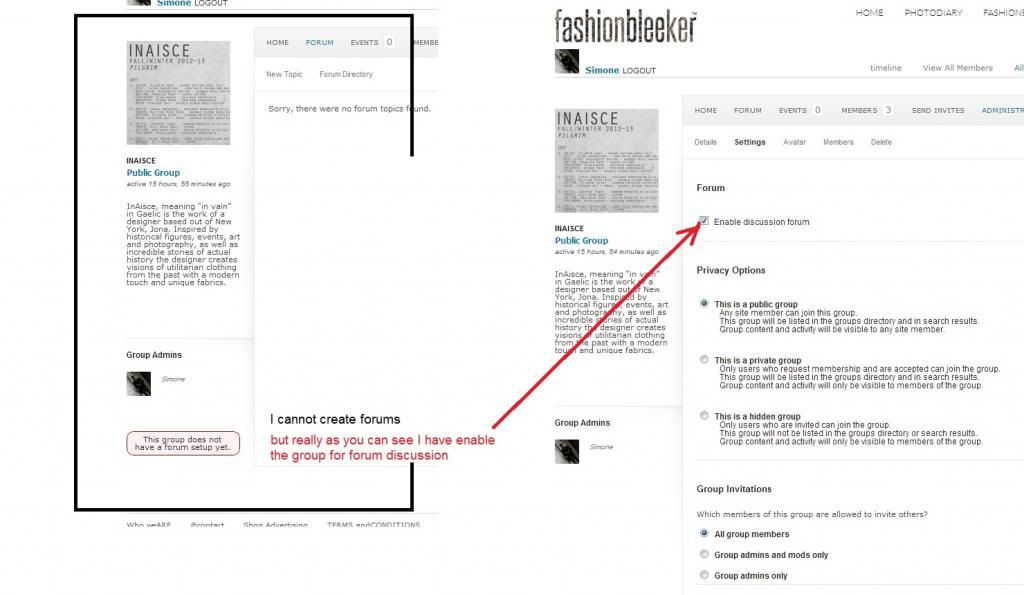
Anyone know a solution?
Thank you guys.
Simone

