Published on May 4th, 2022 by
A few months ago I played around with popular SEO plugins. Unbeknownst to me, one of them created a sitemap that included over 50,000(!) individual topic reply pages, and Googlebot indexed over 20,000 of them…making my site run out of crawler quota.
I didn’t notice the problem until Google went from instantly indexing my articles to ignoring them until manually submitted.
Blocking the community/reply/* URL in robots.txt has little effect because it only blocks googlebot from visiting the URL format again – it doesn’t drop the existing indexed pages.
So I added this to a custom plugin:
add_action("wp_head", function ()
{
	if (substr($_SERVER['REQUEST_URI'], 0, 17) == "/community/reply/")
	{
		echo '<meta name="robots" content="noindex">';
	}
} );
Self-explanatory – adds the noindex to the header of reply pages. If you’ve named the slugs differently, obviously edit them and the substr length count.
Let me know if you’ve experienced the same issue and how you went about fixing it. And.. what’s the point of the reply page any way? It’s just duplicate content because the reply is already listed in the thread.
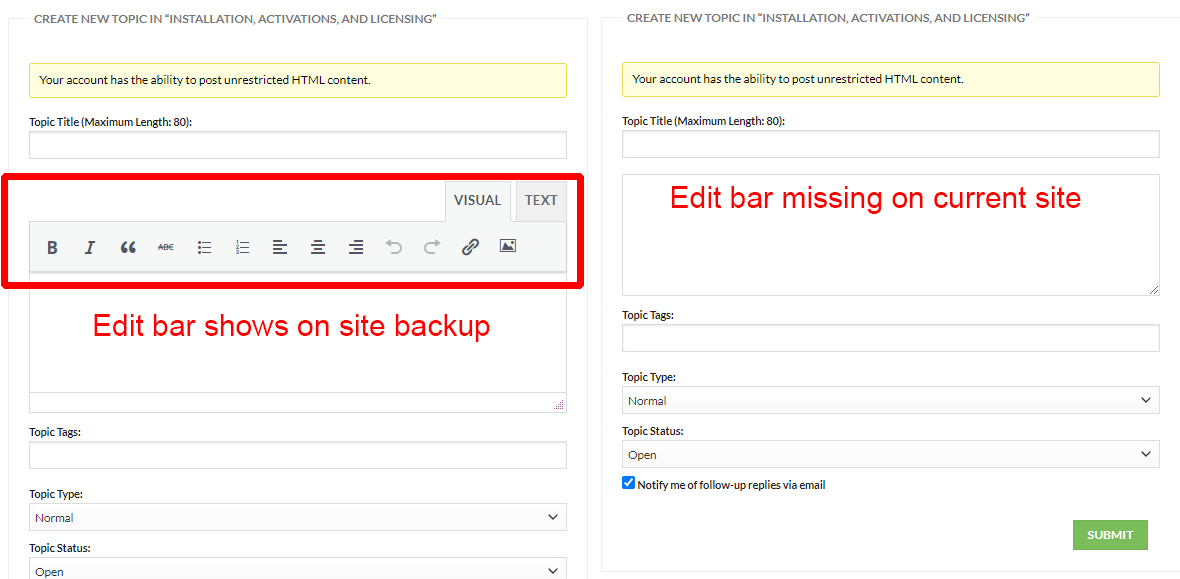
The Text Edit Bar and buttons for the text area is missing on my Keymaster account. It shows up in regular user accounts. It was working in my Keymaster until recently. My bbPress install is 100% default. There is no custom styling at all. I haven’t made any changes to the settings.
I loaded a site backup on a different URL and the Edit Bar shows up for the same Keymaster account in the backup. However, I don’t want to reload the backup on the main site because I have have Woocommerce orders since the last update.
I already tried clear the browser cache and tried multiple browsers but that didn’t fix it.
Is there any setting to control this?
With a fairly large board, I m finding that deleting old topics to be painfully slow. When topics have 500 replies, it is not TOO bad. Sending to the trash takes about 3 minutes and emptying the trash take about another 5 minutes. Not great, but not too bad.
But when topics have 1000-2000 replies, it often times out. So it moves some of it to the trash. I select it again and the big topics eventually get to the trash. Then comes the empty trash part. It just takes forever. Usually times out. I have to empty the trash several times to get those large topics finally gone. The process for those large threads takes 30 minutes or so.
Am I doing something wrong here? Should I be using some other type of process to get rid of old topics?
How are the rest of you handling this?
Hello.
I am a beginner in making websites.
The topic size of one of the forums on this page is “926px X 59px”
But the topic size of one of the forms on my site is “866px X 189px”
How can I change this size?
I’m only studying CSS, so if possible I would like to solve it with CSS only, without using php.
I’ve tried a lot of CSS so far, but I still can’t resize it.
I have multiple roles on my website, I have observed that some of my user roles have no access to forums in the backend. They can access all other pages/modules on the website. Can you please provide me with any quick fixes for this? It’s good if I can override these settings to my child theme via any hooks. Thanks in a advance
I’m getting an error when I’m testing a “new account”. I’ve tracked it down to bbpress & woocommerce memberships.
Immediately on purchase I only get this:
Fatal error: Uncaught Error: Call to a member function get_users_for_object() on null in /home/customer/www/midwestpermaculture.com/public_html/wp-content/plugins/bbpress/includes/users/engagements.php:125 Stack trace: #0 /home/customer/www/midwestpermaculture.com/public_html/wp-content/plugins/bbpress/includes/users/engagements.php(146): bbp_get_users_for_object(47093, ‘_bbp_moderator_…’, ‘post’) #1 /home/customer/www/midwestpermaculture.com/public_html/wp-content/plugins/bbpress/includes/users/capabilities.php(107): bbp_is_object_of_user(47093, 366, ‘_bbp_moderator_…’) #2 /home/customer/www/midwestpermaculture.com/public_html/wp-includes/class-wp-hook.php(307): bbp_map_primary_meta_caps(Array, ‘moderate’, 366, Array) #3 /home/customer/www/midwestpermaculture.com/public_html/wp-includes/plugin.php(189): WP_Hook->apply_filters(Array, Array) #4 /home/customer/www/midwestpermaculture.com/public_html/wp-content/plugins/bbpress/includes/core/sub-actions.php(523): apply_filters(‘bbp_map_meta_ca…’, Array, ‘moderate’, 366, in /home/customer/www/midwestpermaculture.com/public_html/wp-content/plugins/bbpress/includes/users/engagements.php on line 125
Any ideas?
It would be really nice to have forums in our membership site.
Thanks!
Hello all,
I’m working in PHP in WordPress. I’m comfortable modifying and editing code.
I have a collection of Musical Artists and their releases. I’ve created a topic for each artist (post type) and release (post type) using bbPress Topics For Posts.
The user then replies to the topic. I want them to be forced to choose a tag when they reply: “Buy”, “Sell”, or “Info”.
Then I want them to be able to click a button that only shows replies tagged “Buy”, “Sell”, or “Info”.
How do I create a button to filter replies in PHP? Thanks!
Here’s an example of an artist page with a discussion forum below
I’m uploading images @ 1920px on long side. They end up small in the forum, not even filling the post field. I got rid of the sidebar for logged in users and the forum got wider but the images stayed the same small size. Uploading a new image didn’t work either. I would post a screenshot but I don’t see that images can posted here. the images are 473px wide.
On the profile page for a user, the user-profile.php file is being used, and I’m in the process of customising this a bit to show what I would like.
At the very top of the page, is an h1 tag with the username – I would like to know how I can change this, so that I can use something else, e.g. “User Profile” or “Account” ….
<h1 class=”entry-title”>username</h1>
I’m not sure where the username is being populated from so a bit lost at the moment.
Hello!
I’d like to install bbpress on a non wordpress website and am not shure,
if bbpress is compatible.
Will it work and if so, how does the installation process look like?

