Search Results for 'code'
-
Search Results
-
Hello,
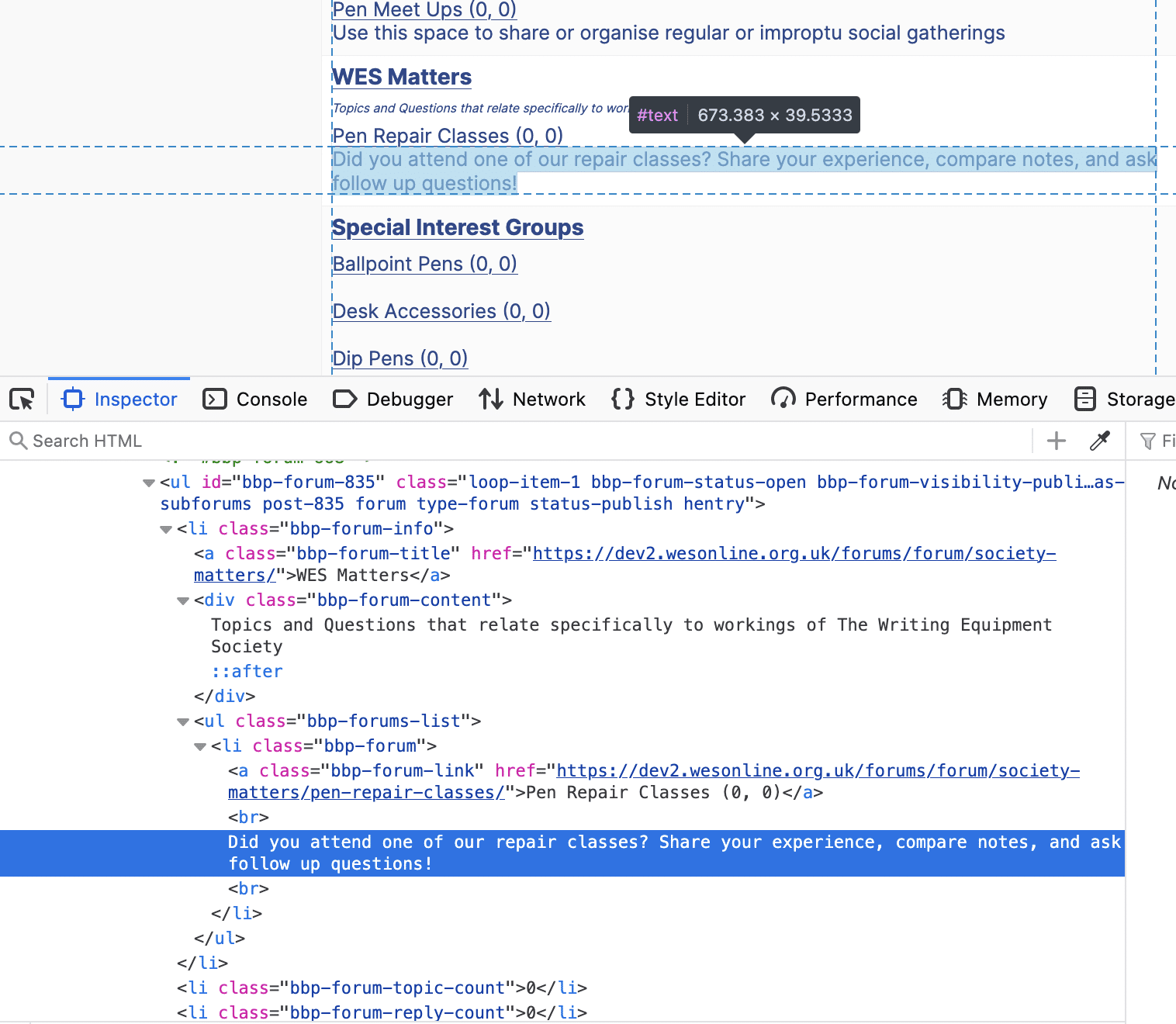
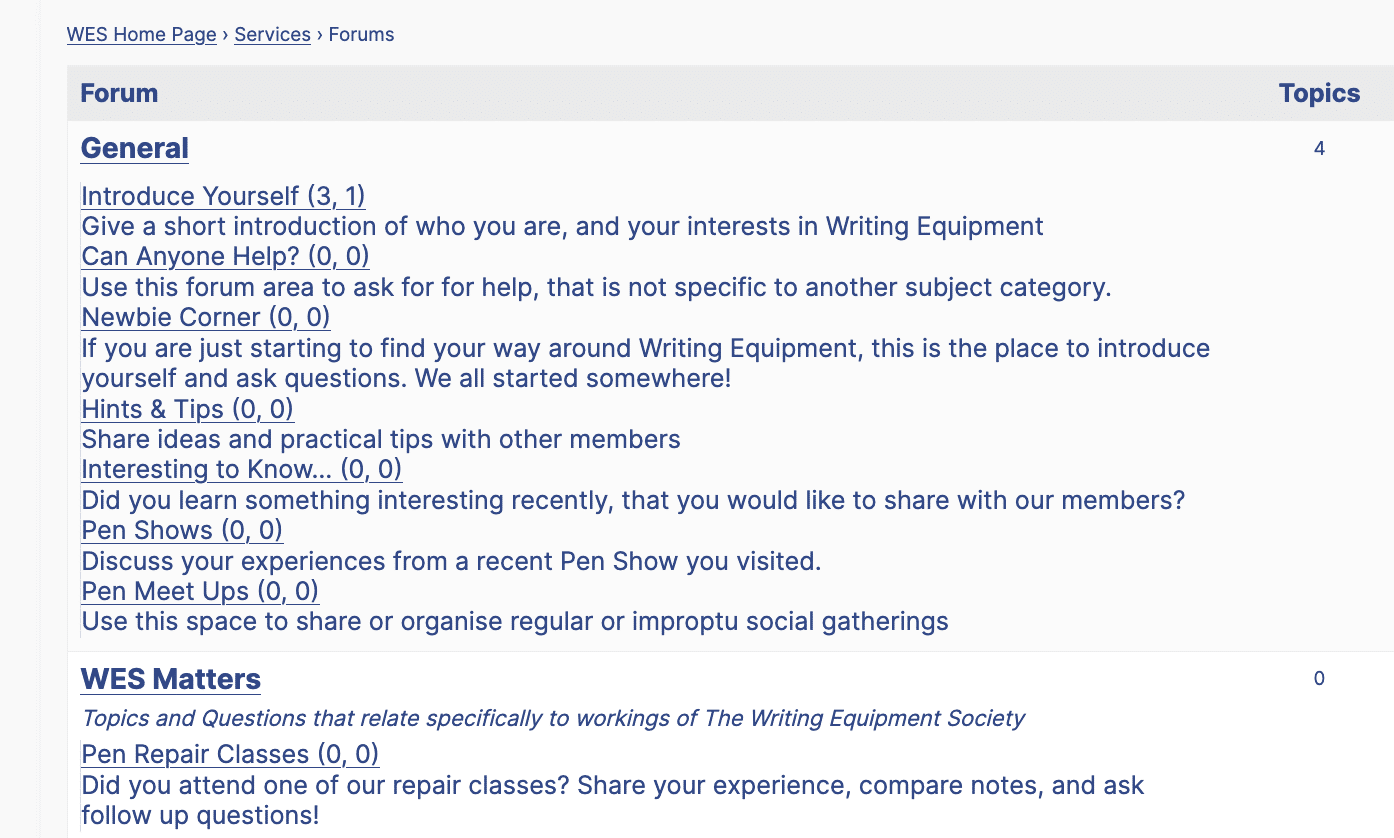
As you can see from the attached example and output code, there does not seem to be a style code applied to the sub-forum descriptions. As a result, they all appear bunched up and unformatted. Unlike the Title Forum (i.e. Category) description, which follows bbp-forum-content.
Is there a way to apply bbp-forum-content or a different Style to the sub-forum decription??
Please message me directly, if you need a link to the page.
Many thanks,
GeorgeInspect Code:
Output:
When the delete_user action is called I want to delete all the bbPress forum topics and replies for a specified user.
I think the problem is the posts are having their user id set to 1 as part of the deletion process and by the time the delete_user action is called, it is too late.
The code I have so far is given below. I’m not quite sure what the current state of this code is, but I think it deletes topics but not replies.
// Get remaining replies by user (not already removed with topics)
$replies = get_posts(array(
‘author’ => $user_id,
‘post_type’ => bbp_get_reply_post_type(),
‘post_status’ => array(‘publish’, ‘closed’, ‘spam’, ‘pending’, ‘trash’, ‘inherit’),
‘numberposts’ => -1,
‘fields’ => ‘ids’));// Delete replies
if (!empty($replies))
{
foreach($replies as $reply_id)
{
bbp_delete_reply($reply_id, true);
}
}// Get all topics by user
$topics = get_posts(array(
‘author’ => $user_id,
‘post_type’ => bbp_get_topic_post_type(),
‘post_status’ => ‘any’,
‘numberposts’ => -1,
‘fields’ => ‘ids’));// Delete topics (this also deletes their replies)
if (!empty($topics))
{
foreach ($topics as $topic_id)
{
bbp_delete_topic($topic_id, true); // true = force delete
}
}Topic: uses_utf8 problem
My hosting uses PHP 8.4. I have WP 6.9.4 and latest (which is old) of bbPress.
I’ve getting the deprecated uses_utf8 message (needs to be wp_is_valid_utf8).
I fixed it, but I don’t think users should have to do that just because hosts are using new versions of PHP, and that WP 7 is just around the corner.
Don’t know what other archaic code is in ppbress, but PLEASE fix at least this one.
Hello, I am a veteran WordPress user and old SEO guy, recently turned into a vibe coder. I built a WP plugin that can read BBpress forums, topics and replies, and answer visitors’ questions using AI. It can summarize several informations, and give a summarized answers with a link to the source. The goal is to retain visitors that might feel lost in the large amount of info, and to help finding relevant content right on their arrival in the forum. What do you think, can it be helpfull ?
Topic: White Screen of Death
https://vitaemagazineblog.com/forums/forum/family-tree/
wordpress.com couldn’t resolve my problem and they shorn me over to the bbpress.org website to handle the problem … i want to do a bbPress forum on that website but i can’t get it started and wordpress doesn’t know why we tried a different theme and that didn’t work … i uninstalled all the plugins and that didn’t help … i checked the root directory and made a change to it and broke it and changed it back and got back to square one so i think the root directory is fine … i couldn’t and can’t reset the permalinks because i’m not at that level yet on wordpress … this occurred directly after installation and i created a forum and it went to the white screen when i checked the permalink and then i started a topic and that permalink went to the white screen … i’m just a writer this is already too much code for me to handle
so if anyone knows anything about this let me know …
I have 0 issue with my header, I can add other blocks but whenever I add the forum one my header doubles in size, changes place and doesn’t look the same anymore.
I’ve noticed some strange behavior and I’m not sure if it’s intended. When a topic is approved after being sent to moderation, and the user subsequently edits that topic, the revision log displays two revisions instead of one. Ideally, the log should only display the specific edit the user marked for logging, rather than all revisions.
I found this line of code which appears to accept any revision, including those not typically found in the bbPress log. Ideally, it should skip any IDs that are not explicitly present in the bbPress log.
I tried to follow the bbPress Codex set up instructions.
However, when I used Method 1 and created a page called “Forums”, the link sent me to a page with just the word “Forums” and nothing else. But once I deleted the “Forums” page, the link worked by showing the forum index. Is this the right way and the instructions are outdated?
2nd problem is that if I use Method 2 to create another forum style using another page and use shortcodes to show the forums, e.g. website.com/chats, if I type website.com/forums, I can still access the forums in that way, which is something that I do not want. I tried changing the “Forum Root” under Settings > Forums but it messed up the layout of the “Chats” page that I created using shortcodes. Is there any way to use Method 2 and still not let people access the forums using /forums?
Edit:
Lastly, is there a list of all the shortcodes that I can use for the forum? I know there is a list in bbp style pack and bbp Private Groups. Are there more shortcodes that I can use or is that all there is?Bonjour,
Je me permets de vous contacter concernant un problème d’accessibilité sur le forum BBPress du site rayons.handivelo.fr. Plus précisément, j’utilise le shortcode
[bbp-topic-form]pour permettre aux utilisateurs de créer un nouveau sujet.Problème rencontré :
– Je parviens à lire les champs du formulaire avec mon interface vocale, mais la liste déroulante des forums/catégories n’est pas accessible.
– Mon lecteur d’écran indique qu’il y a 19 éléments dans la liste, mais je ne peux pas les lire ou les sélectionner correctement.
– Pour information, je suis non-voyant et j’utilise un logiciel de synthèse vocale pour naviguer.Questions :
1. Existe-t-il un autre shortcode ou une alternative pour rendre cette liste déroulante accessible ?
2. Serait-il possible de remplacer la liste déroulante par des boutons radio ou des cases à cocher pour faciliter la sélection ?
3. Avez-vous des bonnes pratiques ou des plugins à recommander pour améliorer l’accessibilité des formulaires BBPress ?Contexte technique :
– Site : rayons.handivelo.fr https://rayons.handivelo.fr
– CMS : WordPress + BBPress
– Interface utilisée : Lecteur d’écran (ex : JAWS, NVDA)Je reste à votre disposition pour tester toute solution que vous pourriez proposer. Merci par avance pour votre aide, et je vous souhaite une excellente année 2026 !
Bien cordialement,
Christophe


