Ah neat… it kinda sounds like something that could power the Slashdot frontpage?
One plugin that I’ve been meaning to create for quite some time is a “promote to front page” tool where admin can mark a topic for special promotion, with their own custom summary that superceeds the title and first post and replaces (or suppliments) the Latest Discussions on the front page with the list. The list could then be re-ordered even further, independent of topic time.
I think such a plugin would change how bbPress is used in a positive way. Just can’t decide how to best interface it with how topics work and how to give the admin full access to existing formatting tools and other plugins within the summaries. It would probably be mostly like Wiki Post.
I guess what I essentially want is many authors many commenters, but I’m not ready for each to have their own blog. I like the idea of buddypress, but that would be something to consider in the future.
I guess I’m almost looking to create something in the style of fark.
hi chris and ck
i missed something obvious, didn’t explain about my databases and probably confused you in the process.
so i’m going to try to clarify. bbPress and WordPress have separate databases. by substituting db for the name of my database, i obscured the fact that the errors referred to in my initial post are looking for my WordPress users table ie in my WordPress database, not bbPress.
in phpMyAdmin i can see that my WordPress tables have no prefix, while my bbPress tables have an underscore prefix:
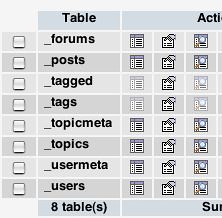
i tried putting db (my database) as a prefix in my wp-config file just to see if that would work, but i still got the same errors (so changed it back to what it was, since it also took my WordPress site down, though it was fine again once i removed the prefix from wp-config).
so i still have no idea of what to do.
i remember when i was setting up integration for bbPress that i specified a table prefix – i’m wondering whether it would be simpler to uninstall bbPress and reinstall it again, trying to avoid the prefix problem? i’d lose a bit of stuff i entered, but there’s not much and i could easily recreate it.
You didn’t mention what version you installed. It matters for finding problems like this. It looks like it’s probably an Alpha release and the indication of an error on that line means there’s likely a problem on a previous line. My guess is that there is a syntax error in the BB_LOGGED_IN_KEY.
It helps to use an editor with syntax highlighting to see if this is the problem. Posting an edited version of the bb-config.php will not help because you will destroy the evidence in editing.
I have seen keys that work fine for WordPress, but not bbPress. Maybe that’s happening here. You might want to simplify your WordPress key then match the bbPress key to that. The WordPress API allows all sorts of weird characters in there (non A..Z a..z 0..9) and they’re properly escaped for WordPress but sometimes they don’t work with bbPress.
But I think that’s probably your problem, one of the bbPress keys. PHP reports the error on the next line it tries to parse I think.
_ck_, I think in general people would be very happy if bbPress could live in a WordPress page, so you have WordPress header, footer, sidebar, look and feel. The menu item is the least of the problems usually. Everyone wants the look and feel of WordPress and right now that’s not the easiest thing to accomplish.
If bbPress were a plugin, which it’s not, it would accomplish what most people want.
Hi all,
I am getting this error when I go to the url for my bbpress install, apparently everything worked during install and integration to my wordpress blog.
However this is the error I get –
Parse error: syntax error, unexpected T_STRING in /home/content/d/o/c/docst4r/html/iglesiacdr/bbpress/bb-config.php on line 24
this is what is on line 24 in my bb_config.php –
$bb_table_prefix = ‘bb_’; // Only letters, numbers and underscores please!
This is all foreign to me please help.
Thanks
ATTENTION
PHP 4 users with WP 2.5.0 + bbPress 0.9.x
There is a HUGE BUG in the way the WP 2.5.0 (not 2.5.1) handles the login cookie. You won’t have a problem with PHP 5, only PHP 4.
So with PHP 4, you MUST use WP 2.5.1 and not WP 2.5.0 (aka 2.5) with bbPress 0.9 for cookie integration. Otherwise you’ll never get it to work.
There are only THREE files you need to replace in 2.5.0 to make it into 2.5.1:
wp-includes/pluggable.php
wp-admin/includes/media.php
wp-admin/media.php
Technical reason:
function wp_hash() in WP 2.5.0 never calls hash_hmac if it doesn’t exist and just returns a plain md5 instead. This method is incompatible with bbPress 0.9 – The compatibility function in compat.php is not loaded in time.
I like that few vs. many authors split… that’s a good way to put it.
One implication of that difference in focus is spam filtering. It’s easy to use Akismet to filter both boards topics and comments in bbPress… it’s harder to use Akismet to filter blog posts in WordPress (Akismet tends to focus on filtering blog comments, not blog posts).
That’s not to say you couldn’t get Akismet working on blog posts! I just haven’t seen any existing plugins that pull that off…
Since bbPress-Live also does a list of forums, here’s how to do that too:
<h2>Forum List</h2>

<ul>

<?php

global $wpdb;

$query="SELECT * FROM bb_forums WHERE topics!=0 ORDER BY forum_order ASC LIMIT 10";

$results=$wpdb->get_results($query);

foreach ($results as $result) {

echo "<li><a href='/forums/forum.php?id=".$result->forum_id."'>".$result->forum_name."</a></li>";

}

?>

</ul>
of course this example doesn’t take into account nested forums and will just display them flat.
And you can just keep making it fancier and fancier.
Let’s say you want to also show how many posts each topic has.
echo "<li><a href='/forums/topic.php?id=".$result->topic_id."'>".$result->topic_title."</a> (".$result->topic_posts." posts)</li>";
or how old the last reply is
echo "<li><a href='/forums/topic.php?id=".$result->topic_id."'>".$result->topic_title."</a> (".human_time_diff(strtotime($result->topic_time." GMT"))." ago)</li>";
Let’s put that all together – this should work right inside any wordpress template:
<h2>Latest Forum Discussions</h2>

<ul>

<?php

global $wpdb;

$query="SELECT * FROM bb_topics WHERE topic_status=0 ORDER BY topic_time DESC LIMIT 10";

$results=$wpdb->get_results($query);

foreach ($results as $result) {

echo "<li><a href='/forums/topic.php?id=".$result->topic_id."'>".$result->topic_title."</a></li>";

}

?>

</ul>
So we have the $results, how do we make a pretty list of them, say inside of our sidebar?
We have to loop through them and print them out. This is where that list of fields inside of bb_topics comes in handy.
Here’s just a list of titles to start with:
foreach ($results as $result) {

echo "<li>".$result->topic_title."</li>";

}
Of course that’s not very useful, because they aren’t clickable. To make them clickable will take a little bit more work:
foreach ($results as $result) {

echo "<li><a href='/forums/topic.php?id=".$result->topic_id."'>".$result->topic_title."</a></li>";

}
That example uses quite a few shortcuts to get the job done, it hardcoded the path to your forums (change /forums/ if needed) and even if your bbPress uses pretty permalinks, it simply uses the topic id number to get there – bbPress will redirect back to permalinks. If you absolutely know you have permalinks and want to use them, you could have done something like this instead:
<a href='/forums/topic/".$result->topic_slug."'>"
Now we need to put together a correct mysql query.
Let’s try something simple.
SELECT * FROM bb_topics WHERE topic_status=0 ORDER BY topic_time DESC LIMIT 10
SELECT means “grab the following”
the asterisk means “all the fields in the table”
FROM bb_topics is kinda obvious, it’s the table we want
topic_status=0 means it’s topics not deleted
ORDER BY topic_time DESC means put the newest topics on top
LIMIT 10 means we want only the first 10
Let’s say we also wanted to exclude topics that were closed, since people can’t reply, we don’t want to tease them. In that case you would change the
WHERE topic_status=0
to
WHERE topic_status=0 AND topic_open=1
or let’s say you only wanted “stickies”
WHERE topic_status=0 AND topic_sticky!=0
Okay now to use that in WordPress we do the following:
global $wpdb;

$query="SELECT * FROM bb_topics WHERE topic_status=0 ORDER BY topic_time DESC LIMIT 10";

$results=$wpdb->get_results($query);
If all goes well, WordPress will then execute the query and then fill $results with the answers.
Now comes the output part.
Both bbPress and WordPress have a very simple way of fetching data.
WordPress uses $wpdb
bbPress uses $bbdb
(the db part means database, very simple)
Then there’s the good old “get_results”. They both use that.
bbpress:
$results=$bbdb->get_results("mysql query goes here");
wordpress:
$results=$wpdb->get_results("mysql query goes here");
Many times you can use the same query in either bbpress or wordpress by just changing $bbdb to $wpdb or visa-versa.
Then you have to figure out what you are asking for.
Let’s use the really simple bbPress Topics table as an example. Unless you’ve customized your install, the Topics table is probably called bb_topics
Here are all the fields available inside of bb_topics.
topic_id

topic_title

topic_slug

topic_poster

topic_poster_name

topic_last_poster

topic_last_poster_name

topic_start_time

topic_time

forum_id

topic_status

topic_open

topic_last_post_id

topic_sticky

topic_posts

tag_count
I’m not sure if this has been addressed elsewhere already or a plugin already exists but for novices that have even just a beginner’s knowledge of how php+mysql works I want to show you how easy it is to show bbPress info inside of WordPress and vise-versa.
You should NOT be using overly complex plugins like bbPress-Live or parsing RSS feeds if you have WordPress and bbPress sharing the same database but different tables. Instead, it’s a piece-of-cake to grab info from each other directly and display it. You don’t even need a plugin, you can code it right into your templates (as long as you know they will remain working together).
So I’ll give some examples here and then if anyone has questions feel free to ask.
Did you already figure this out?
They look very well matched.
Are they simply trying to make a link to their forum from their blog and just mask the url so it looks like it’s a page of WordPress?
Just install the forums in /forums/ and make a link from WordPress’s link administration.
WordPress is good for a few authors <-> many commenters, with high quality authors.
bbPress is good for many authors <-> many commenters.
If you want *everyone* to have their own blogs then you want wpmu.
If you want your own social network then you probably want to wait a tiny bit longer for buddypress.
To get bbPress you work you might be able to go into bb_config.php and edit this line
$bb_table_prefix = 'bb_';
and make it say
$bb_table_prefix = '';
(that’s just two single quotes together with no space)
Not sure if it would work and it’s bad idea to keep running like that.
Using phpMyAdmin, you could try to rename all the tables to bb_users, bb_usermeta, etc.
But do you see your WordPress tables? You have a bigger problem is there’s wp_users and wp_usermeta and then you don’t see topics forums posts tables.
You may have installed bbpress into a new database instead of the old wp database?
Copy all the names of the tables in the left hand site of phpmyadmin here so we can see better what’s wrong.
I have an idea for a simple site, but I’m driving myself nuts deciding between bbPress and WordPress. On the front page of the site, I want to be able to add my own content, but also allow readers to post their own experiences and stories. I then want other users to be able to comment on those stories, and rate them. Simple idea, been done before.
Is this better done with WordPress, following this example:
http://creativebriefing.com/how-to-use-wordpress-to-build-a-website-with-user-generated-content/
or WordPress and TDO Mini Forms
or bbPress with a customized front page?
thanks for any insight.
Michael
2.6.5 just replaced a couple files, none related to cookies, so I would guess that 2.6.5 is still compatible with Alpha. The issue with integration was related to the cookie change WordPress made with 2.5 and again in 2.6.
What breaks it is the inclusion of the wordpress functions in the bb-config.php file. If you delete that code and visit the admin, it will work just fine.
Hi there! I am looking for a theme that I could easily edit to make it look like WordPress Revolution Church Theme (http://www.revolutiontwo.com/themes/church). Does anyone know of a theme?
Yes, using those functions will bring the header and footer over. Whether or not they look like you want is up to you to decide. The functions will work, but your bbPress template needs to be setup to display the WordPress header/footer/sidebar properly.


