Hello to everyone. I made a timeline for Bbpress. My homepage became like twitter. What do you think about my site? mimarlik forumu
timeline for Bbpress
Published on October 2nd, 2020 by Mrt RclbTopics and replies awaiting moderation
Published on October 2nd, 2020 by Angelo RochaI have a problem on my forum. Users are sending topics and replies and I have to approve the content. I did not make any settings for the forum to be moderated, how do I resolve this? Before it worked normally.
Trouble with shortcodes in topics
Published on October 2nd, 2020 by JasonI’m having trouble getting shortcodes for a picture gallery to work in topics. Did some looking around here and it seems I may need a shortcode plug in and also possibly a shortcode whitelist plugin to go with it. I looked at this one bbPress2 shortcode whitelist, but it is a bit old and hasn’t been tested with 5.5.1. I’m running 7.4.10 PHP, LiteSpeed webserver, 2.6.5 bbpress.
The shortcode for a photo gallery shows up in the post as text but that is all. https://transmissiontuner.com/blog/forums/topic/allison-bellhousing-types/
I asked for support on this from the photogallery plugin and they said it was a bbpress problem.
thanks!
Shortcode For Topics
Published on October 2nd, 2020 by nikputhuHi There,
I have created a template for the forum and add the shortcode for the forum into it which works. However when you click on the topics within that forum, it takes you to a separate page where it is displayed. How do I put the topics onto a template and redirect it to that template when a user clicks on the topic.
Thank you
login issues
Published on October 2nd, 2020 by quasihobbiesAlright, so everything works in the forum registration, however when its time to log in, it sends the user to the wordpress login screen, I’m extremely new to this so any help is appreciated thanks.
Problem Editing Posts
Published on October 1st, 2020 by LeadGuitarMxHello,
I’m having a problem when I try to edit a post the textarea called by
bbp_the_content( array( 'context' => 'topic' ) );
The textarea is not respecting the line breaks.
On my DB the content looks like:
text text text text

text text text
text text text

text text text
But on the textarea it looks like:
text text text
text text text
text text text
text text text
Somebody have a clue of how to solve this? 🤔
Thanks for any help : )
Log In page
Published on September 30th, 2020 by joergfischerHi there,
I hope anybody can help me (I already searched but didn´t find what I´m looking for). I set up a small forum with bbpress and would like a separately log-in page at the beginning. No register, just login (the forum should not be visible before logging in). I tried to put the Form on the first page. But when you logged-in you should direct to the forum-page, which I don´t know how to do.
Can anybody can give me a hint or a link to an already existing topic (which I didn´t found)?
Thanks a lot and best
Jörg
“Last Post” (not “Freshness”) displaying incorrectly — can I remove?
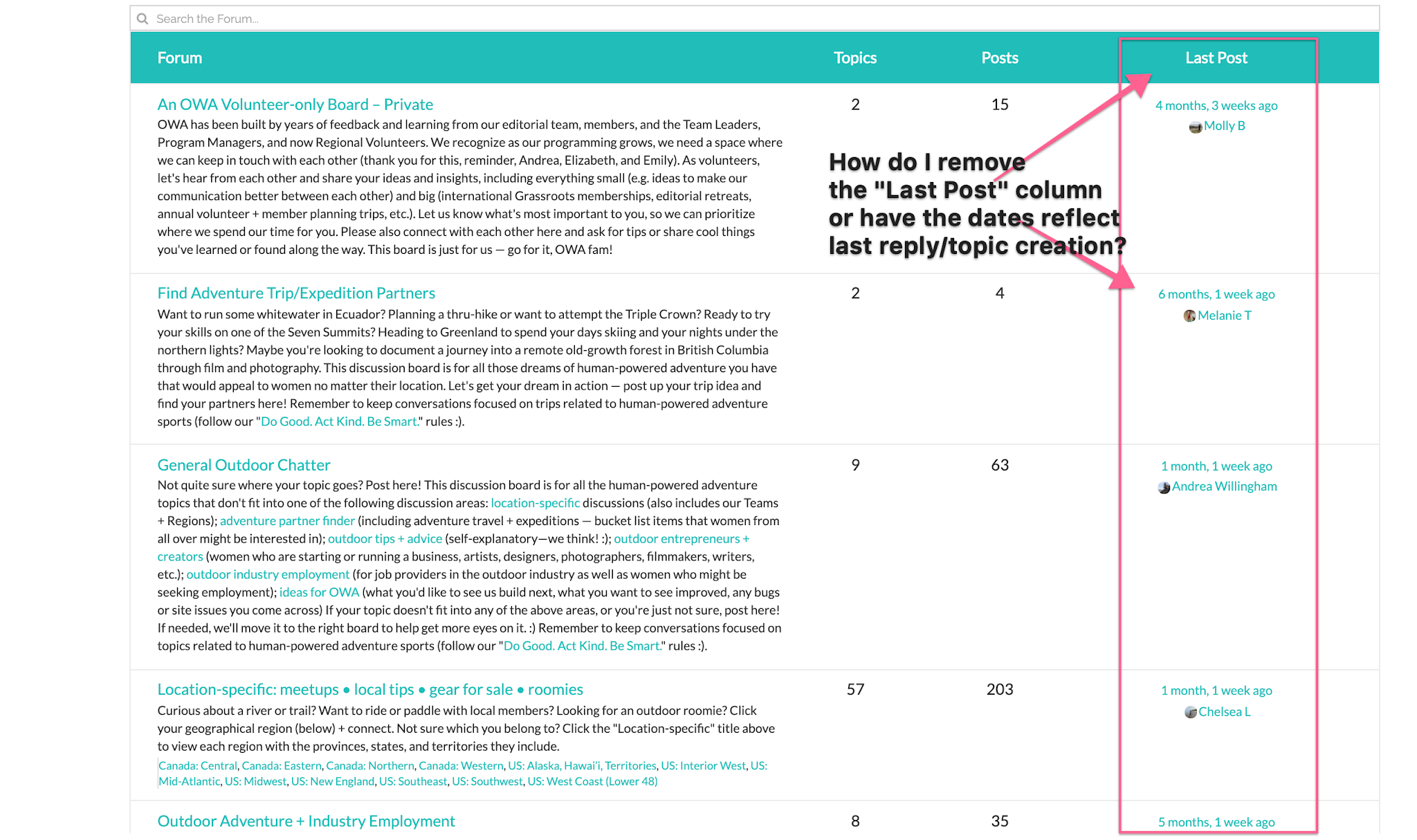
Published on September 30th, 2020 by ginaginaginaI tried to find something about removing “Last Post” which displays on the home page of my forum, but could only find posts related to “Freshness” — Freshness only shows up on my topics under each category, and I’ve already found a way to successfully remove these. The problem is, when people show up to the forum’s home page, they see “Last Post” which shows something that’s months old instead of the last time someone posted which might just be a few hours. I may be reading the “Last Post” thing incorrectly, but either way, it discourages people from interacting because they think no new activity is happening due to the date on the “Last Post” column.
How do I either get it to display the “Freshness” (e.g. the last time someone posted a reply or topic in that category) OR — preferably, if possible — remove “Last Post” from the forum home page altogether?
My forum is unfortunately private (members-only), so a URL won’t help, but attaching a screenshot of our forum’s home page to show the “Last Post” column we’d ideally like to get rid of.
How to hide the author of posts for unlogged users.
Published on September 30th, 2020 by krzysztofzpomHello, How to hide the author of posts for unlogged users.
unlogged user – sees only the content, does not see who added it.
I am asking for help.
WordPress 5.5.1
Wersja 2.6.5
http://tarnowskiegory.com.pl/forums/
Breadcrumbs are buggy
Published on September 29th, 2020 by VidyutThe breadcrumbs don’t appear to respect the actual homepage settings for the blog. If there is a homepage selected, but the setting is actually to show latest posts, the breadcrumbs most frustratingly and seemingly inexplicably show the title of the page selected as homepage instead of latest posts – even if the actual homepage is set to latest posts.
To reproduce, select some page to be homepage. Save. Switch to latest posts (default) for homepage without clearing the selector. The breadcrumbs continue to show the title of the selected inactive setting for page instead of the actual site title, or home or something sane even though the url points to the homepage.

