Hello!
I’m trying to display a dropdown menu with all the forums on all templates of bbPress. I was able to easily to it on the “content-archive-forum.php” template with this code :
<?php if ( bbp_has_forums() ) : ?>
	<?php while ( bbp_forums() ) : bbp_the_forum(); ?>
		<li><a id="textdropdown" class="bbp-forum-title" href="<?php bbp_forum_permalink(); ?>"><?php bbp_forum_title(); ?></a></li>
	<?php endwhile; ?>
<?php else : ?>
	<?php bbp_get_template_part( 'feedback', 'no-forums' ); ?>
<?php endif; ?>
The problem i’m having is on all other pages. I know that it’s passing the wrong forum_id to the bbp_has_forums function but i’m unable to modify the parameters or make a custom function to display a list (with links) of the MAIN forums (the one displayed on the “content-archive-forum.php”).
Basically, it displays the message “Oh bother! No forums were found here!” on all other pages.
Can anyone help me or tell me how to do this ?
Thanks in advance!
I install worpdress and bbpress , and set Permalink to /%post_id% .
But not work ,Help ! I want use post_id in post.
Hi Everyone,
I am using woocommerce and bbpress for my wordpress website.
I want to display all the topic and replies under product page of woocommerce.
I am getting trouble with topic and reply integration on the product page it’s not working fine may be due to not invoking bbpress hooks or what I am not sure anyone please guide me the steps how I can go for this one? this will be very helpful for me.
Thanks
[mode edit – moved to a new topic as it was entirely unrelated to the one you posted in]
I am using bbPress with Forum Restrict plugin. I am getting the following error when I access a single private forum out of a number of private forums that are set up. Here is the message:
Check TypeError: Unable to get property ‘getElementsByTagName’ of undefined or null reference
I am not able to access the approval page nor see the approved members. I am running WordPress 4.0 with bbPress and Forum Restrict.
Any assistance?
Hi,
I noticed two bugs occur on my bbPress forum (using last version of bbPress and WordPress), so I just wanted to report them and ask for any support to fix them.
Those are :
– “Subcribe to this forum” link not displayed in a float-right position
– “Private :” language string repeated twice
Here’s a very short video to explain that (sorry for the strange voice, I’m a bit ill) : https://www.youtube.com/watch?v=2s1Krn6cLAo
Many thanks in advance for your support, or any tip that would help me to fix that ! 🙂
Hi All,
I’m having a very frustrating time here.
I’m building a new site, and I need to transfer a BBPress powered forum from the old site.
Both sites are running BBPress 2.5.4.
The new site is running WordPress 4.0, the old site 3.9.2
My first surprise was when I realised that BBPress does not list BBPress in the list of platforms in the Tools -> Forums -> Import Forums dialog.
So I spent a couple of hours reading up and then set out to move the forums across to the new site.
I started out by using WP Migrate Pro to migrate wp_users and wp_usermeta from the old forum.
Then I used the WordPress Exporter to export Forums, Topics and Replies.
Then I used the WordPress Importer to import each of these three files.
As each file imported I manually specified which user should be given authorship of the forum, topic or reply. There are a lot of forums topics and users, this takes more than hour.
This seemed to go well, and at the end of the process I could see all of the forums, topics and replies in the BBPress admin screens of the site.
I went to the forums on the front-end, and I could see all the forums listed, together with the number of topics and replies in each one, and the last poster.
When I clicked through to view a forum, I saw the following message:
“This forum contains 1 topic and 7 replies, and was last updated by xxxx (name removed) 2 months, 2 weeks ago.”
Underneath that, another message:
“Oh bother! No topics were found here!”
So I Googled and Googled. I tried using the Tools -> Forums -> Repair Forums dialog, but this simply deleted all of my replies.
So I ran through the whole process again. Same result. I can see everything in the admin, but only the forums with no topics and no replies in the front end.
I’ve tried downgrading WordPress to 3.9.2, and also switching to the 2014 theme. Still no joy.
I’ve also tried disabling all of my other plugins. No dice.
I’ve also tried this:
bbpress wp4 fix
I would be really grateful if somebody out there might be able to help me with this.
I thought BBPress is a well supported WordPress based forum. Surely the ability to easily move forums between different WordPress installs is a core requirement?
Help!
Hi all
I have a WP site with bbPress installed and bbPress Like Button (a like button plugin).
I was trying to import a phpBB forum to bbPress.
I’m having problems doing this and in the process must have decactivted bbPress.
Now when I try to log in at wp-admin or view the site I get a page saying.
‘bbPress Like Button needs bbPress installed and activated in order to work.’
This is on QA server and so I can’t get access to the files.
Is there any way to fix this – Is there any way to access the dashboard to re-activate the plugin
Hi! Embedded Youtube videos are not show correctly on iPad. Please see this image: 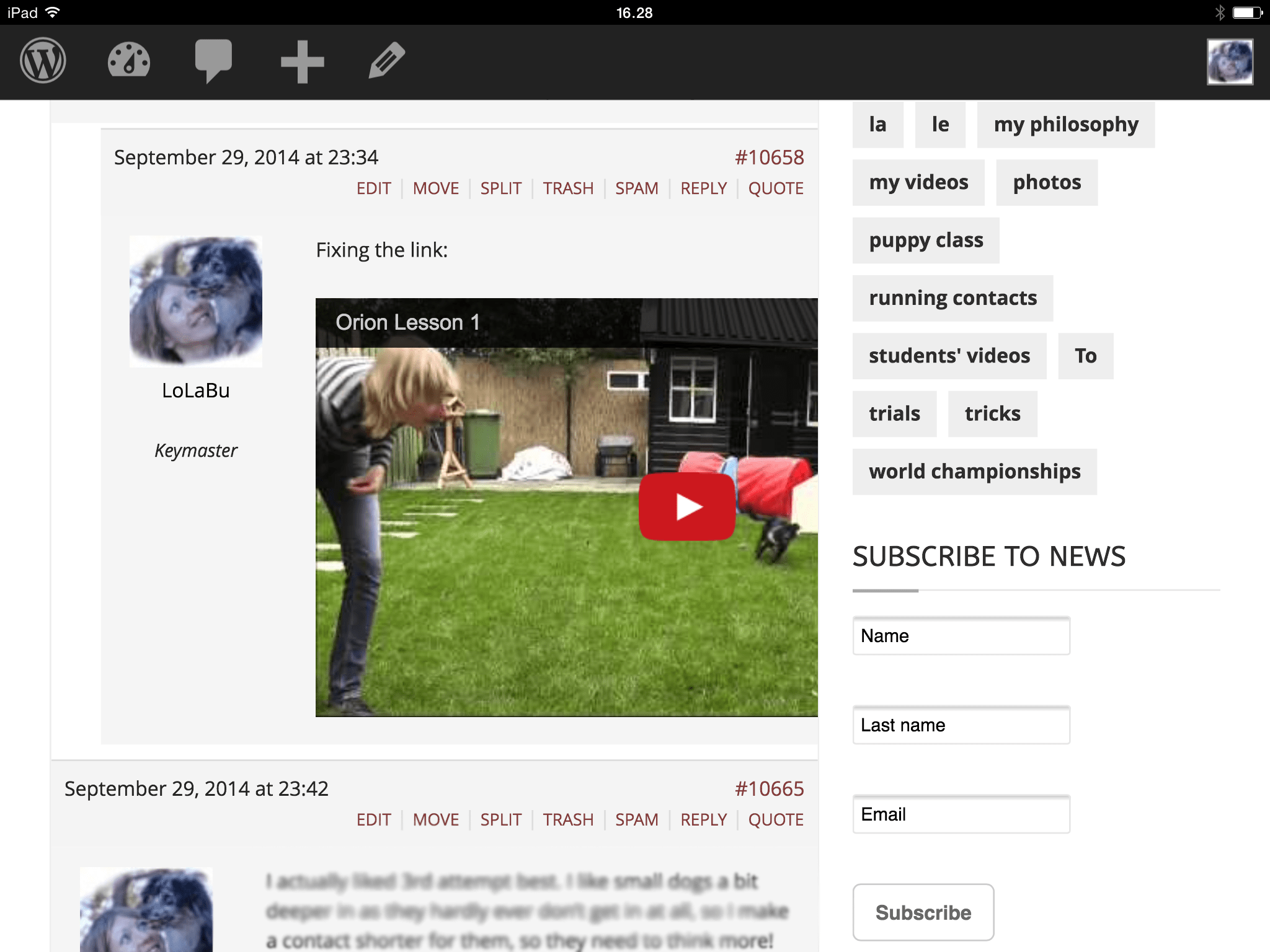
The video is cut on the right side.
I use two plugins on my website for Youtube embed, that is Smart Youtube Pro and WP Youtube Lyte. I use two plugins, because otherwise there were problem with embedding in comments on the blog section of the page, or in the backend or in posts/pages. So I would like to keep both plugins if it is possible.
I have Wp 4, Maxima theme.
Anybody know what might be the problem? Should I edit the bbpress.css in the Standard Mobile Landscape section?
Thanks!
Just a bump for core devs:
https://bbpress.trac.wordpress.org/ticket/2690
So, I had a theme which I tuned to work with bbpress and I really like it. I changed some css and some files to make it work. Now, I switch to a new WordPress theme and as a result, bbpress revert back to its original looks and feel which is not that eye catching. So what I would like to know is is it possible to still keep the old looks with the new theme or in another way, apply the old theme to bbpress ?

