
Forum Replies Created
-
In reply to: Why are the image uploads so small?
The image uploader used to ask for size, but after installing the bbPress image loader upgrade, it no longer gives the size field. thanks for the trouble shooting thing. This twenty fourteen theme has been modified and is now using a child theme. I’m not exactly sure what that means but I see no additional settings for the child portion. Neither the wordpress page editor nor the forum page editor have any format choices either. In addition I tried to make one page full width with this code .page-id-17507 .site-inner, .page-id-17507 .site-footer {
max-width: none !important;
width: 95% !important;
}
but it had no affect either, it works on my wordpress.com webpages at https://steveruddyphotography.com/
but not on this website.In reply to: Why are the image uploads so small?Thanks Robin, Looks like you are the only person here doing any support. You have to understand this is very frustrating for me! 🙂
Here are all the settings I can find
Theme is Customized child theme of twenty fourteen
settings / media settings/
-
thumbnail 150 x 150
Medium size 300×300
Large size 1920 x 1080settings / forum images there are no image size setting I have checked enable lightbox and the images are 400 some pixels there as well.
In reply to: Why are the image uploads so small?I just posted the setting size above. 1920 x 1080.
In reply to: Why are the image uploads so small?So the images are small on this forum too, I can’t even read the settings on my 29″ monitor. They are max 1920 x 1080
In reply to: Why are the image uploads so small?Here are my settings
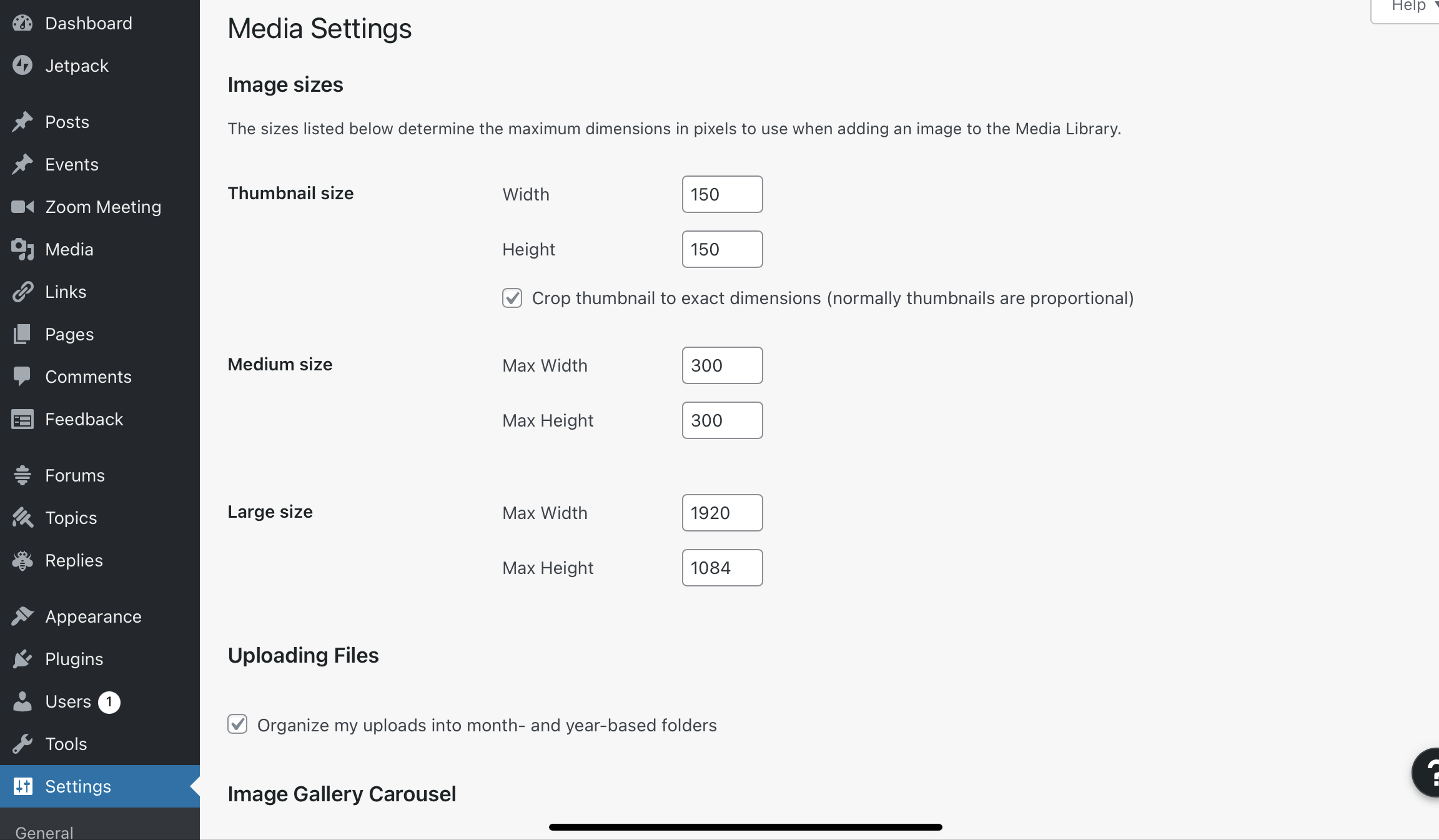 In reply to: Why are the image uploads so small?
The image icon in the bbPress editor that is part of the plugin.
In reply to: Why are the image uploads so small?Once users are logged in the sidebar disappears and the forum is much wider but images are still only 473px wide.
In reply to: How do I make a login link?I am just using the wp registration and login. I did one test and after the registration the login took them to the site not the admin section so this is good!
In reply to: How do I make a login link?Hi Robin,
I’m making a little headway. I tried #1 and I didn’t like how it automatically added the user. I what to approve all new registrations as they come in. I saw no setting on how to get new users approved manually. Also maybe this is a wordpress question but I can’t find were to change the color of the register here link on the login page. I put an image over it and can’t see it. I see no place in the login customizer to fix it. Here is the link https://santarosaphotographicsociety.org/wp-login.phplast I put a forum link in the home page main menu, this is it. https://santarosaphotographicsociety.org/forums/ Will this link would prompt a login first then open the forums. If not how do I make that happen.
In reply to: How do I make a login link?Thanks! So If I put a new menu item called login that links to this, https://santarosaphotographicsociety.org/wp-login.php?redirect_to=https%3A%2F%2Fsantarosaphotographicsociety.org%2Fwp-admin%2F&reauth=1
is that all I need for forum users to register and login? During registration will I and them be notified via email or it that another setting?In reply to: How do I make a login link?So I guess I’m not understanding how this all works. The website is a photography club and is wordpress.org. I just added this bbPress forum plugin and have all the forums set up. I’m ready to test with two other people. I now need to have a place were the two others can register, I then want an email so I can review and approve them. How do i accomplish this? After that I think the login page with the shortcode provided by Robin W should work.
In reply to: How do I make a login link?I tried the shortcode on a new page named login. Looks the same as the login page I use to administer the site. So I guess I need a forum registration page first, then during registration I think I can make it so forum members can only see the website and forums??
In reply to: How do i delete a post?Thanks, can’t believe i missed that!


