Integration Tips? (ie. I don’t think its working for me!)
-
my forum: http://www.mpm.org.au
my wordpress: http://300.mpm.org.au
I don’t think the integrated logins are working properly – can someone kindly check and report back here?
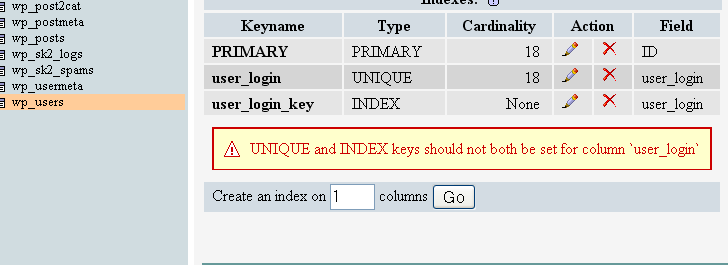
I have this alert in my mysql database regarding wp_users
http://i93.photobucket.com/albums/l69/mikedelighttoo/users.png

-
You will have to make changes to some core files to make this work properly, as they are in different subdomains.
Find your bbPress
config.phpfile and add these lines://try to sync cookies
$bb->cookiedomain = '.mpm.org.au';
$bb->cookiepath = '/';Now go to your wordpress folder, open
wp-settings.php.#line 190
FROM
define('COOKIE_DOMAIN', false);TO
define('COOKIE_DOMAIN', '.mpm.org.au');Make sure that you make note of this change to
wp-settings.php. Every time you upgrade wordpress this change will be overriden and you will have to make this change again.Actually, if you put the define(‘COOKIE_DOMAIN’, ‘.mpm.org.au’); in your wp-config.php it should work as well. I think that is the proper syntax, but you can define cookiepath in your WP config as well without having to make core changes. Maybe search for define cookie domain over at the forums at https://wordpress.org/support/
Trent
It does, cheers Trent.
thanks guys – I don’t have to reinstall either bbpress or wordpress?
I added
//try to sync cookies
$bb->cookiedomain = ‘.mpm.org.au’;
$bb->cookiepath = ‘/’;
to bbPress config.php (in root)
I added
define(‘COOKIE_DOMAIN’, ‘.mpm.org.au’);
to wp-config.php (in /300/)
but now I can’t log out of bbpress?
As long as you integrated from the start, no? Are you using the same database for WP and bb? In your config.php, did you add details for these settings:
bb->wp_table_prefix

bb->wp_home

bb->wp_siteurl
Another way to tell is, did it use your WordPress name for your admin account when you installed?
but now I can’t log out of bbpress?
This is because when you click “log out”, it clears the NEW version of the cookies, but when checking if you’re logged in it checks both the new and the old version. The old version is never cleared.
To do that, you have to clear your cookies. In FF, pressing Ctrl + Shift + Del gives you access to clear them, in IE you have to go to Tools > Options or something.
But this probably means it’s working!
Clearing the cookies worked wonders all round.
Thanks!
However, if I log out of the WP should I also be getting logged out of BB? (and vice versa) – I am not currently.
Yes, you should be. If you’ve cleared the old cookies for bb and WP, then logging out should work just as well as logging in? Hmm.
I registered over at your forums to test this out. I registered and then logged into bbPress. I then went over to your blog and tried the /wp-admin/ link to find out if I was registered. It gave me the login page where I added my information and then was redirected to:
That URL doesn’t exist. Is there something in your WP install that has the URL of the site as the first URL? That might be causing the problems.
As well, do you have the integration plugin that pulls the registrations from bbPress across to WordPress? That way all users are in the wp_users and not the bb_users table.
Trent
I see you fixed this! I was logged in both places now! Could you confirm that it is working for everyone else on your site Michael?
Trent
Still not working for me.
In one of my many reinstallations I forgot to put the wordpress integration file back in my-plugins.
Still no go however.
I do have the bbpress plugin activated in my wordpress already.
Also, yes, integrated from start.
so when you are logged in on BBPress you are automatically logged in on the WP – and vice versa?
Yeah, that is really strange, but yes! Do you have the WordPress integration plugin and the bbPress integration plugin installed? Does clearing your cookies and trying on a different browser work for you?
Trent
yep, I have both plugins installed and activated.
on a different computer with a different login, I log into WP but when I got to BB I am not logged in.


- You must be logged in to reply to this topic.