- You are now logged out.

Forum Replies Created
-
In reply to: Moving from vBulletin 4.1 to bbPress
This can be quite complex and is really not a “bbPress”, it is more a Apache/Nginx “thing”, take a look at the following on Stack Overflow, it describes the changes needed to redirect via
.htaccessan old vBulletin to bbPress site:
http://stackoverflow.com/q/13920322/1911294In reply to: Split: Import from snitz access databaseHI @maddogmcewan, as per my note above, I split this to a new topic as there are sure to be a couple of things that will get confusing if we continued in that same topic.
To start with you should take a look in your
wp_poststable, you should be able to find bbPress three custom post typesforum,topic, andreplyin thepost_typecolumn.1. Check if you indeed have some post types
forumin yourwp_poststable.
2. Now find atopicin thewp_poststable, look at thepost_parent, the ID of that field should relate to one of theIDvalues of the actual forums you found in step 1.
3. Replies are the same, find a reply, look up thepost_parentand check if a topic with that same ID exists.I’m expecting you have some mismatched data from your import and it is a matter of digging in to find what is broken in the data relationships.
In reply to: Meta query in ViewsHere is the resultant SQL query for your code above:
SELECT SQL_CALC_FOUND_ROWS wp_posts.ID
FROM wp_posts
INNER JOIN wp_postmeta ON wp_posts.ID = wp_postmeta.post_id
INNER JOIN wp_postmeta AS mt1 ON (wp_posts.ID = mt1.post_id)
INNER JOIN wp_postmeta AS mt2 ON (wp_posts.ID = mt2.post_id)
WHERE 1=1

AND ( ( YEAR( post_date ) = 2014 ) )

AND wp_posts.post_type = 'topic'

AND (wp_posts.post_status = 'publish'
	OR wp_posts.post_status = 'closed'
	OR wp_posts.post_status = 'private'
	OR wp_posts.post_status = 'hidden')

AND (wp_postmeta.meta_key = '_bbp_last_active_time'
	OR (mt1.meta_key = '_bbps_topic_status'
		AND CAST(mt1.meta_value AS CHAR) LIKE '%1%')
	OR (mt2.meta_key = '_bbps_topic_status'
		AND CAST(mt2.meta_value AS CHAR) LIKE '%2%')
	)

GROUP BY wp_posts.ID
ORDER BY wp_posts.post_date DESC
LIMIT 0, 15
I think you are hitting a known limitation of WordPress at the moment nesting queries, take a look at Boone’s posts on the improvements coming to WordPress 4.1:
…classes currently accept a ‘relation’ parameter, which allows multiple query clauses to be joined with AND or OR. So, for instance, you can query for: posts that are in the ‘Boone’ category AND have the tag ‘Awesome’ AND do not have the term ‘Raphael’ in the favorite_turtle taxonomy. But this syntax only allows for so much expressiveness: you can’t mix AND and OR, and you can’t group clauses. These limitations make it difficult to use these queries in support of complex content filtering…
Then take a read of the follow up post explaining what has happened since that first post, I haven’t had the time to look at how this changes affect bbPress, they should not break bbPress, but these will be something we will take a look at to a) Ensure bbPress is not affected by these WordPress 4.1 updates and b) How we can leverage these improvements in future versions of bbPress.
In reply to: Allow HTML from users@richkraetsch I expect this to be more of an issue with the GD BBPress Tools plugin rather than bbPress, they should have support in that plugin for the custom HTML tags it is using.
You can also try this plugin (and remove that custom code you added), I just added
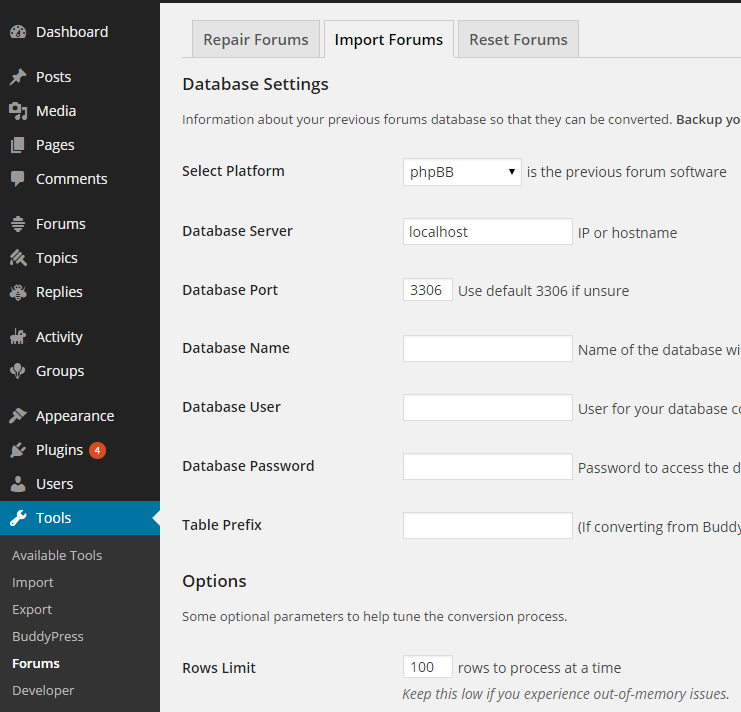
divand sub elementclassto this and it should work for you, you will need to double check and modify it to remove any HTML tags you do not need, also the next release of bbPress includes some more changes to the allowed KSES HTML tags so you’ll need to update and possibly make some more changes once bbPress 2.6 is released.In reply to: Trying to import and having issues.Does this help? You should be seeing the “Tools” section in WordPress 4.0 most definately.
 In reply to: Participants cannot edit posts *Please help Robin*
You will find it is a conflict between your server time and the WordPress time zone setting, contact your web host to find out what time zone the servers clock is set to, then update your WordPress time zone to match.
In reply to: Metabox Right Now in ForumsThe “Right now in Forums” meta box has been removed for the next release of bbPress.
In reply to: SMF Import to bbPress@bestru, to your four questions, no, no, oh, and no 🙁
Attachments are on the drawing board for a future release, it is a complex request because as attachments can be various file types and in particular size is the killer here, during import waiting for a file from what could be a remote source is what breaks this for us, I have a solution planned and have started testing this but at this stage it is a no go for now, avatars are also in this same boat.
For private message you will need a plugin as bbPress does not suppoort private messages out of the box, maybe BuddyPress would do the trick for you here, I’d like to be able to import private messages as BuddyPress private messages in a furture version though.
The post date should be accurate, you should have your WordPress install using the same timezone offset as your existing forum used and then times should match.
In reply to: Import from SMF and strange tags in text.As noted in your other topic, your replies here were marked as spam, I’ve unmarked them all as spam and deleted the duplicates.
Testing that same BBCode you have in your reply above (the one I left published) it does look like there is an error/conflict, I’ll take a look at this during the week and get back to you.
Again, apologies for your replies being caught by our spam filter. 🙂
In reply to: Can't post reply to my topicFixed, sorry about this, all your replies in the other topic were marked as spam for some reason, I have unspammed them and deleted the duplicates.
In reply to: Tough migrationI just tested the topic tag import and everything appears fine for me.
* I created a WordPress post tag
topic
* I created a WordPress post categorytopic
* I created a WordPress post and added the tagtopicand categorytopicto the post
* Imported from bbPress 1.2 with topics including the topic tagtopicAll results appear fine for me, I have posts/topics correctly associated with each taxonomy:
* http://example.com/tag/topic/
* http://example.com/category/topic/
* http://example.com/forums/topic-tag/topic/In reply to: Tough migrationStephen my rant was no way a slight against you and your work, assuming you’re the lead programmer? I know it’s been a hard road, I’ve been using bbpress since version .9, and seen a few leads over the years.
I didn’t take it that way at all 🙂
@JohnJamesJacoby is the lead developer, I’ve just hitched along for the ride since trying to migrate from phpBB to bbPress didn’t work, I do far more than just the import side of things now, I’m still learning PHP and constantly finding more and more ways to improve bbPress.Much to my delight, the posts in the wp category were not deleted, just the category itself. So I just recreated the category and put those posts in it again.
Excellent
But the tags in the wordpress site were definitely overwritten in the migration, including any custom taxonomies using the same slugs.
Ok, that’s a problem, it is also a scenario I haven’t tried and or thought of even though bbPress does register its own custom taxonomy. I’ll take a look at doing some imports with existing taxonomies in WordPress (tags/categories) and see what happens.
I also hope for a bright bbPress future and I have a pretty big wish list for it also, some documented around the place, some not 🙂
In reply to: SMF Import to bbPress@bestru Thanks, there is a minor bug in the SMF, it has been fixed for the next release.
If you take a look at this https://bbpress.trac.wordpress.org/changeset/5332 and change that mistaken
<tt>for<br>in the SMF.php file things should work just fine.Let me know how that goes for you 🙂
In reply to: Tough migrationA sleepless week later, it is done.
Been there, done that 😉
First, it imported all posts, even years-old spam, so I deleted that migration and figured out how to really delete spam in the standalone, and then imported again.
Tough gig, but once it is done it is done…
Then I found out that tags were not integrated, rather if tags were in the forum, they simply deleted any tags or custom taxonomies with the same name in the wordpress install. The site relies heavily on these tags, so we we spent a few days re-tagging everything and re-checking.
Tags should indeed work and import as expected, for example, here on bbpress.org this was imported using the same importer you used.
The “profile” tag ~7 year old topics -> https://bbpress.org/forums/topic-tag/profile/page/7/
Now this morning I see that one entire category of the wp install was deleted. Luckily it was not a heavily trafficked section of the site. At this point we’ve put days of work into this data, so rather than roll back, we’ll recreate that category.
WordPress deleted a category or forum? or was the category/forum not imported?
bbpress has given our site community many things over the years, I can’t complain at all. But the new version is much slower than the standalone version, and much harder for us to edit and modify. My viewers actually have a diminished experience now.
We are improving performance for the next release and yes, things are different now that it is a WordPress plugin, I can’t even begin to count the improvements I’d like added to bbPress, there are many, but not so much time to make it all happen quickly. 🙂
The tide has turned over the years. While WordPress fumbled with bbpress and buddypress, Facebook came to the fore and basically sucked all the community out of the wp platform. It’s a shame, and not likely to turn around for any of us here. I applaud the hard work of the devs who worked on this platform over the years, but it has been an exhausting experience this last week, and I am not done yet. It will be another sleepless night.
Thanks for applause and migrating data from one platform to another is not the easiest thing in the world, I’ve tried to help make it easier and more reliable but again more can be done and not enough time to do it.
In reply to: SMF Import to bbPress@tehred Go to SMF’s website to find details on how to install SMF, you probably want to install the same version that the database backup is from (if you know it).
You should have a MySQL database backup, typically these are named
filename.sql,filename.sql.ziporfilename.gz, this is an actual export of the database data rather than the actual files used as part of the website.You should be able to import (once you find it) that file into MySQL as a new database, then you point bbPress’ import to that database name in the import settings along with username and password and table prefix (most likely
smf_).Once you start running the import it copies the data from your old SMF database into the WordPress database you are using with bbPress, your original SMF database is not altered in anyway, it is still best practice to make sure you have backups of your SMF and WordPress database all the same.
In reply to: SMF Import to bbPress@bestru Your database table name is
bestru_smfand that looks correct, your table prefix does not look correct, in the screenshot you are using_smf, I think you will find it should besmf_, see this screenshot showing the table names inside myimport_smfdatabase https://cloudup.com/cTo5XoXDEBnIn reply to: SMF Import to bbPress@ tehredThe database needs to be exported from any existing MySQL install and imported into the same MySQL server you are using for WordPress, you should be able to find details on importing and exporting MySQL databases from your webhost support or knowledgebase help sections of their website.
I haven’t taken a close look for a while at attachment importing has some limitations that we really can’t do at this stage until some improvments upstream in WordPress Core are added.
For now the best solution I have seen would be to adapt the following for Vanilla 2.1
https://github.com/CybMeta/kunena-attachments-to-bbpress
Out of curiousity which attachment/file upload plugin are you using with Vanilla as I believe it doesn’t include one in the standard install.
The top two importers included with bbPress are phpBB and SMF, primarily because these are the two most popular importers and where most feature requests come from.
I’d love to know some detailed information on what/why/where you think the phpBB import is broken and/or why you don’t think it works so well.
I haven’t seen any reports for quite a while on issues with the phpBB importer.
In reply to: Why do some of my titles show weird charactersIt could also be an from the HTML entities not being correctly imported from a previous forum.
In reply to: Import from SMF and strange tags in text.The code /includes/admin/converters/SMF.php#L717 is replacing
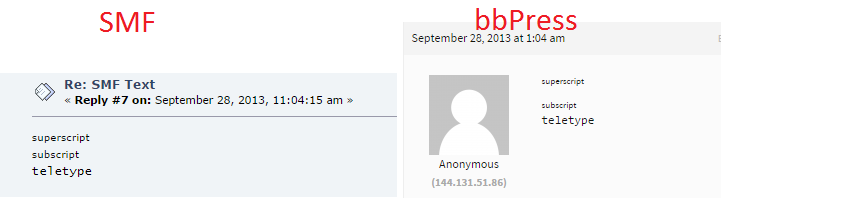
[tt]and[/tt]respectively with<tt>and</tt>and a quick lookup of the “teletype” HTML tag shows we should not really be using it all 😉http://www.w3.org/wiki/HTML/Elements/tt
Can you post the HTML raw source of the post from SMF for me, this will allow me to see if it is currently doing it correctly, which I think it is per the details and screenshot below.
SMF Source:
[sup]superscript[/sup]<br />[sub]subscript[/sub]<br />[tt]teletype[/tt]
bbPress Converted Source:<sup>superscript</sup><br><sub>subscript</sub><br><tt>teletype</tt>https://i.cloudup.com/jnMQwRKTXA.png
We probably should rather than converting them
<tt>/</tt>convert them to aspanand/orpHTML elements:e.g.
<span style="font-family: monospace;">
This is a sample.
</span>
In reply to: Importing DeluxeBB Into bbPress?I had a quick look around to see if I could find if it was a port or fork of another forum project but very little info was around.
I’d suggest taking a look at either the phpBB or SMF importers, they are pretty much the top two importers that are included with bbPress and have the best “import” feature support for bbPress.
The ‘Example.php” importer also tries (I know it can/could/should be better) to explain some of the field mappings.
I made a start on guessing the field mappings for the forum section based on the phpBB importer:
Using a table prefix
deluxebb_should work fine with the field map'from_tablename' => 'forums',, as the converter joins these staements together giving youdeluxebb_forums🙂https://gist.github.com/ntwb/da6466dc2b057942f0fa
I’ll let you have a crack at the topics, replies and users and then I’m more than happy to tweak it with some of the newest updates that will be included in the next release of bbPress.
In reply to: Topic ID instead of slugs?Ticket created on Trac: https://bbpress.trac.wordpress.org/ticket/2698
In reply to: OMG,This BUG two years. Fix that ,PLZ !!!!!Thanks for the ticket in Trac, we will work on adding either of the plugins mentiooned in the Trac ticket to bbPress.
In reply to: bbPress 2.6 zipped?Where are you downloading BuddyPress 2.2 Alpha from? bbPress and BuddyPress share (mostly) the same setup for development.
If it is from https://wordpress.org/plugins/buddypress/developers/ via the Development Version .zip link https://downloads.wordpress.org/plugin/buddypress.zip then bbPress is the same structure via https://wordpress.org/plugins/bbpress/developers/ and the Development Version .zip link https://downloads.wordpress.org/plugin/bbpress.zip
To get the “full” bleeding edge alpha’s requires quite a bit more setup at your end as bbPress and BuddyPress have recently switched to using a new build process and these are not designed to be run on a live website, only for local development on your local computer, I can point you to the docs for this if that is what you are after though 🙂
Awesome topic tags btw 😉