- You are now logged out.

Forum Replies Created
-
Ha… Using
bb_as your table prefix really did throw me 😉If you look at lines 59-60 for your topics your selecting the
forum_idfrom thephpbb_topicstable and inserting it intopost_parenthttps://gist.github.com/anonymous/8d1cb71e69d52ac69f5d#file-gistfile1-sql-L59-L60
The same needs to happen for replies, so you should be able to get the
topic_idthat the reply is for and then insert that into the replypost_parenthttps://gist.github.com/anonymous/8d1cb71e69d52ac69f5d#file-gistfile1-sql-L59-L60
The following should do it, assuming that
topic_idis actually in thephpbb_posts_texttable.INSERT INTO bb_posts(post_title,post_excerpt,post_name,post_content,post_type,post_parent) SELECT post_subject, post_id, post_subject, REPLACE (post_text, CONCAT (":", bbcode_uid), ""), 'reply', topic_id FROM phpbb_posts_text;So I edited the post and copied the SQL code to a gist on GitHub:
https://gist.github.com/anonymous/8d1cb71e69d52ac69f5d
First, it looks like you are importing the phpBB into bbPress 1.x, bbPress 1.x is not supported anymore.
Per @robkk post immediately above you should checkout that link to our docs on the codex on importing to bbPress 2.x, and in general look toward using the bbPress 2.x plugin for WordPress https://wordpress.org/plugins/bbpress/
I’d suggest taking a look at our phPBB v3.x importer and making any change to match the phpBB v1.x database schema changes you would need:
https://bbpress.trac.wordpress.org/browser/branches/2.5/includes/admin/converters/phpBB.phpSo your importing from phpBB v1?
Indeed our importers only support phpBB 3.x for bbPress 2.5.x and phpBB v3.1 for bbPress 2.6
Did you write your own phpBB v1 importer or copy and modify the one that is included with bbPress?
There are also some fixes and improvements in our repair tools coming for bbPress 2.6 that hopefully will be released in the next couple of weeks.
I’m happy to take a look at the importer if you made one and/or some data examples, you can post code examples on GitHub here https://gist.github.com/ntwb
(If you added the raw MySQL data from a single forum, a topic of that forum, and a reply of that topic I could give you some tips on what the main issues are that your most likely having)
Well, – forums are showing, so do topics, – when i click on “Replies” in admin – i get no response from server. Yep, there’re about 7,5M replies there, but i guess it has to work despite of that fact?
Those replies are shown in frontend and forums seem to work well.
This is because there is a slight data mismatch I expect, most likely around either
post_parentinwp_postsor some of the post meta relationships inwp_postmeta.And yes, even though they show on the front end correctly.
Another issue is: as i imported forums and topics to db – i could see them both listed at backend and frontend. But if i tried to come into the forum or topic on frontend i’ve got “not found”.
This is going to similar I think to the above, one or two of the meta relationships is not quite correct.
Open forum in backend, then just “save” helped that.
Bulk select topics, edit, changing nothing, just “save” helped that.The affect of doing this is that when saving/updating forums, topics, replies we have some error checking that will validate that the ID is indeed the correct type that is be saved, so be it a replies parent topic, or a topics parent forum etc these get validated upon saving.
Thus this is kind of working as a pseudo repair tool repairing that meta I mentioned above.
I’ll add another reply in a moment…
The ticket is https://bbpress.trac.wordpress.org/ticket/1989, there are some specific things we want to do with revisions, we want to actually keep all revisions but only display one revision, we want to be able to “scroll through” the list of revisions, you can see an example of this in the following comment https://bbpress.trac.wordpress.org/ticket/1989#comment:19, in that comment you’ll see
previousanddiff, once you clickpreviousyou’ll then seenext.If you want to join our development chat we can chat about what and where further.
To join follow the instructions here and join the #bbpress channel 🙂
http://chat.wordpress.orgIn reply to: Are there any responsive Bbpress-templates to buy?I’ve been thinking much about what is mentioned here of late…
For now, check out some of the plugins on this page https://codex.bbpress.org/feature-plugins-tracking/
p.s. Post counts will ship with bbPress 2.6, so that is one removed from that list.
In reply to: bbPress Android\iOs appDid you know bbPress has had a JSON API available for ~2 years?
Well, not quite, if you use Jetpack and enable the WordPress.com JSON API:
Custom post type and metadata support in the REST APIBecause we love bbPress, we’ve bundled in support for bbPress and the REST API directly into Jetpack, so that you can read, write and edit bbPress forums, topics and replies right out of the box. You can also use this file as an example on how to bundle support in your own plugins or themes.
Anyways, as you state in your post you’ve seen the work Brent has done, once I get some time and a few other interested parties we’d like to look at incorporating this into bbPress core 🙂
I can’t reproduce this issue at all 🙁
Did you try switching back to a default theme? Twenty Fourteen or Fifteen before rolling back bbPress to 2.5.6?
Any change you have a detailed error message? Anything in your web server logs that may help us track it down?
I can’t reproduce this issue at all 🙁
Doesn’t matter what i try I can’t seem to reproduce it.
Theoretically, your saying if a logged out users views the site it breaks, is this also the case for any visitor visiting your site for the first time?
Did you try switching back to a default theme? Twenty Fourteen or Fifteen before rolling back bbPress to 2.5.6?
Any change you have a detailed error message? Anything in your web server logs that may help us track it down?
In reply to: bbPress 2.5.5@loen010 I can’t see any issues with your site, http://www.onlinegokforum.nl/topics/, browsing through various topics works as expected.
@richkraetsch and @al_bullit Can you both please create a new separete topic each with a few more details as to your specific site setup, what theme your using, what plugins your using, also what happens when you switch back to the Twenty Fourteen or Twenty Fifteen theme with all other plugins disabled. Also in the new topic let me know what happens after you create a new user, standard participant role, log out, log back in etc, is this user affected by the issue still? (I’d suggest testing that in a “private” browser instance e.g. Google Chrome Incognito)In reply to: Problem passing remote username when importingIs this a bug or does the import script not support remote servers?
This, we do not support importing from remote servers
Indeed we use the user ID, an integer, the only work around for this would be to make a custom user table in one of two ways:
1) A a table with a unique ID linked to each email and join this table in the the user section of the import script2) Similar to the above, but add a column to each of your four databases with a unique ID for each email address that will be common across all four DB’s.
Thinking out loud both above and now, option 1 is kind of out, to keep performance reasonably quickly each forum, topic, and reply uses an integer ID for the post and bbPress uses this same method for all 25 importers except one, only one includes the email address of the poster in the topic and reply tables and each topic/reply is imported based on the original topic/reply author ID.
In the end (or the beginning) you need to “normalise” your data from 4 databases to match 1, thinking the other way round, do your import into 4 separate WordPress installs and then merge the 4 WP install DB tables into a single DB. The benefit of this is that all your data will be now “normalised” in the WordPress format and then it’s a matter of updating the duplicate user ID’s to the primary user ID and remove the now redundant user ids.
In reply to: Custom Import – how to skip fields that don't apply?Either comment out the code section using standard PHP syntax or simply remove that chunk of code 🙂
In reply to: SMF Import to bbPress@kweh, I’ll update the SMF importer once the full v2.1 is released, we won’t be supporting the 2.1 beta, if you’ve upgraded from 2.0.x to 2.1 beta I’d look at seeing if you can downgrade back to 2.0.x and import from there.
In reply to: Import/mapping of custom MySQL forum tablesThanks Lisa, it all makes sense, I doubt I made my explanation any better 😉
I’ll take a closer look a little later but I think I’ve a reasonable solution in mind 🙂
In reply to: Import/mapping of custom MySQL forum tablesHmmm…. I’m assuming in that case then you have no other parts (or major parts at least) missing from the DB schema you posted in the original post? e.g. No
topic_titletable listing the topics separately.If that is the case you’d now want to ignore those mappings I posted, rather remap them to the the topic and reply sections instead of the forums section.
This is now where we add some limiting SQL expressions to separate your topics from replies.
In the
Example.phpfile at the end of the topics section you’ll see:// Setup any table joins needed for the topic section $this->field_map[] = array( 'from_tablename' => 'replies_table', 'from_fieldname' => 'the_topic_id', 'join_tablename' => 'topics_table', 'join_type' => 'INNER', 'join_expression' => 'USING replies_table.the_topic_id = topics_table.the_topic_id', 'from_expression' => 'WHERE forums_table.the_topic_id = 0', 'to_type' => 'topic' );We’ll modify that to the following:
// Setup any table joins needed for the topic section
$this->field_map[] = array(
	'from_tablename'  => 'forum_table',
	'from_expression' => 'WHERE forums_table.Forum_Parent = 0',
	'to_type'         => 'topic'
);
Similarly at the end of the replies section, we change that join expression to:
// Setup any table joins needed for the topic section
$this->field_map[] = array(
	'from_tablename'  => 'forum_table',
	'from_expression' => 'WHERE forums_table.Forum_Parent != 0',
	'to_type'         => 'reply'
);
Now assuming I’ve got the logic correct in understanding your
Forum_Parent/Forum_Ancestorwhat equals0and what does not equal0then we should be good to go 🙂So the topics join expression is limiting the queries for your ‘thread starter’ topics, then in the reply section expression we ignore those previously ignored topics already imported and are assuming the remaining entries in the table are replies to those topics. The
Forum_Ancestorof each reply should then point to the “parent topic ID’ mapping.I think that’s it, one thing you’ll notice is that we also are not actually creating any forums to import the topics into, all the topics will import without being allocated to a forum, this can be bulk updated later, actually we can set a default forum for topics and relies, I’ll get back to you on that bit of code that I can’t remember of the top of my head right this second 😉
In reply to: Import/mapping of custom MySQL forum tablesYou may need to extract the users out to a separate table, or you may be able to treat these users as “anonymous users”, I’d suggest first though I’d look at mapping some of the fields for the content only as that should not take much time to get up and running.
First you want to do this with bbPress 2.6 ‘alpha’ rather than the current 2.5.6 release as there are significant improvements to the importers in the upcoming version.
You can get your hands on 2.6 alpha via https://wordpress.org/plugins/bbpress/developers/ and it is listed under “Other Versions” as “Development Version”
Or the direct download link https://downloads.wordpress.org/plugin/bbpress.zipNext you want to make a copy of
Example.phpfrom theincludes/admin/convertersfolder of the plugin toMyConverter.phpand in that file replace any instance ofExamplewithMyConverter(this is case sensitive to be mindful of that)Next up start mapping the fields from your schema to the fields in
MyConverter.phpIn the following screenshot I’ve
mappeddrawn lines to the easily concluded fields, any field mappings that you do not use you can simply delete, ideally using as many as you can will ensure the best bbPress experience for your data though.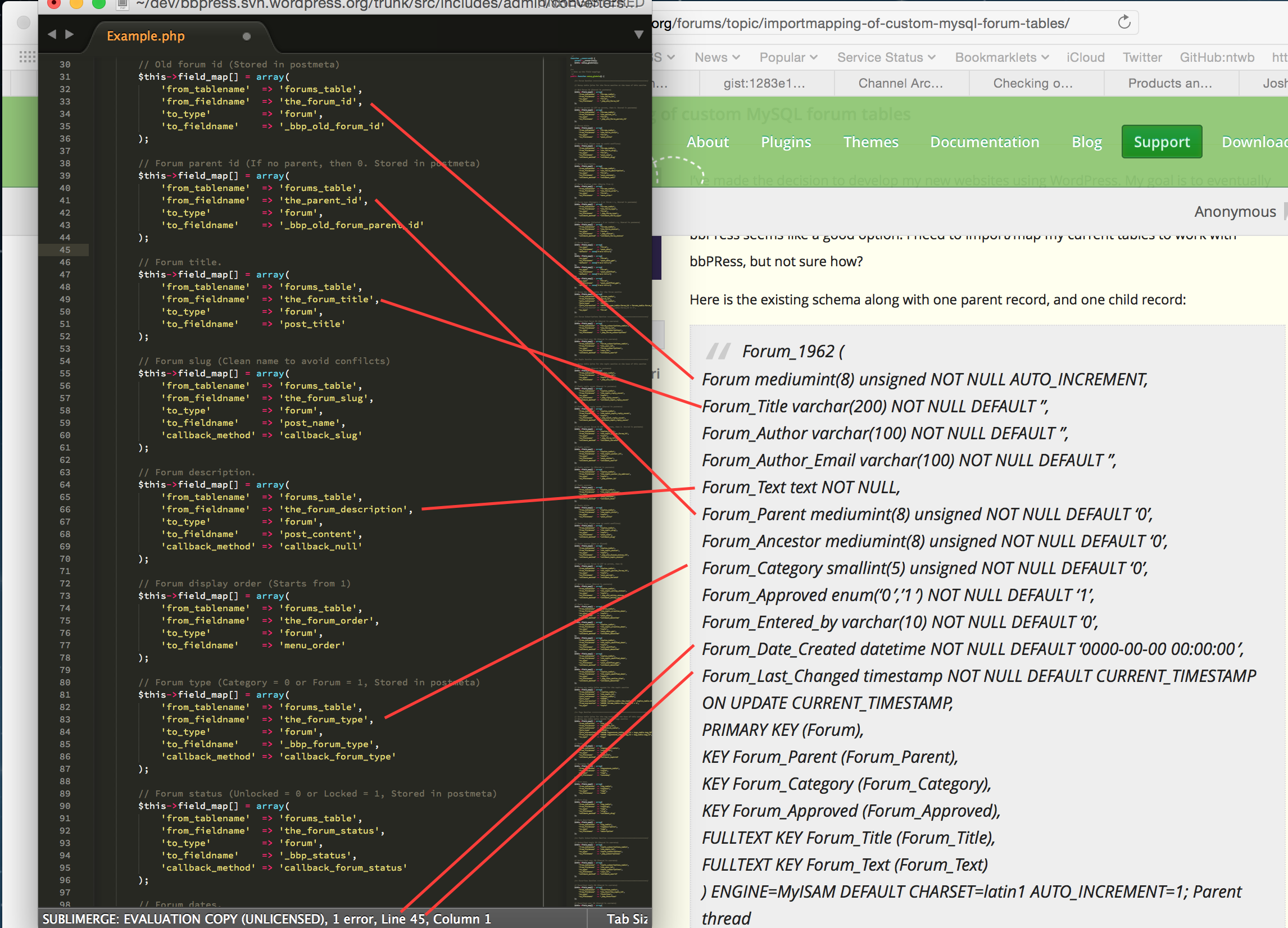
Take a stab at doing the above for the rest of your database, topics, replies etc and get back to us.
If you need a place to host code snippets, use GitHub Gists: http://gist.github.com
In reply to: automatically insert RSS linksThis is included as an optional option in the next release bbPress 2.6 🙂
In reply to: SMF Import to bbPressMike, thanks, much appreciated.
I’ve copied and pasted it into a GitHub Gist here:
https://gist.github.com/ntwb/9ff3f1ed93ae9671a93bIt makes it much clearer to read and update, if anyone wants to make improvements or suggestions drop a comment on the Gist 🙂
This is a great start and I hope to one of these days get attachment importing into bbPress importer 😉
In reply to: bbPress on GithubIt’s a work in progress 😉
In reply to: New Translation (Greek), where?@dyrer φοβερός 🙂
In reply to: Missing ThreadI’ve just fixed this.
In reply to: bbPress Import DocumentationFor example, here, there is NO documentation at all for import options:
This has been added for the next release.
a) It would be useful if there was an explanation as to what difference ‘Rows Limit’ and ‘Delay Time’ actually make to the importer. For example, after a search on this forum, I read that one user upped the Rows limit to 10000 and this helped him with a successful import that had previously hung. Why should this be? @netweb suggests 0.1 as a good Delay Time – why? Also, is there a minimum or range of values that are acceptable? For example, would 0.01 an acceptable value and would it make any difference?
The default values are what we think will work for “most users” without causing any issues, if your MySQL instance can handle more frequent and larger queries than the defaults then these values can be changed to reflect that. Many of the of shared hosting packages have limits on how many and how large these database queries can take place per hour, this is why it is relatively low by default.
If you have an incredibly fast MySQL instance you could set the time between queries (delay) to
0.01ms, I’d suggest not though, this allows MySQL to have some “time up it’s sleeve” for any other tasks it may also be needing, you’d hardly notice the difference between0.1and.0.01, you do (or at least I do) notice this on large imports when it is set to1.0.b) If ‘Start Over’ is not selected, will the importer always try and re-start where it left off if it was previously stopped? How does it know? Does it trawl through all matches and not replicate them until it gets to data that it hasn’t imported?
Yes, the importer will continue from where it left off, we store this is the
wp_optionsdatabase table.i) Once what is finished? If it hung again then it didn’t finish? Bit confused by this.
I’ll try to get to update these troubleshooting steps to make this a bit clearer.
ii) If one stops and starts the import, why should it continue where it left off? Why should it not hang immediately? Does it continue with the next batch of rows or does it continue with the table row in which it was stopped?
As per above, at each step during import we update this data in the options table so if the import stops when started again it can resume from where it left off.
And yes, it continues with the next batch of rows from where it left off.
iii) If one stops import, logs out, refreshes the page, etc. will import start where it left off?
Yes
iv) Please define ‘hangs’. If the wheel is spinning during, for example, ‘Converting Replies (480000 – 480999) does this mean it is still working albeit slowly?
The ‘wheel’ is always spinning as each step of the importer progresses, if for example it took ~3 seconds to convert the “Converting Replies (470000 – 470999)” replies, you’d find each batch would typically be taking a similar 3 seconds, once you see per your example “Converting Replies (480000 – 480999)” if that has been stuck on that batch for 30 seconds, a minute, 20 minutes that is pretty much a case of the import has stalled.
The next release of bbPress will allow you to customise the CSS based on the user role in each topic or reply so you should be able to do what your asking here 🙂
See https://bbpress.trac.wordpress.org/ticket/2692 for further details 🙂
Additionally also see this post on how to achieve the same results now 😉
In reply to: Show Me An Awesome Site Using bbPressThere’s also this page https://bbpress.org/about/examples/


